
Hello,
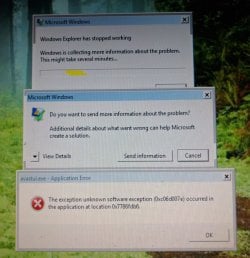
Recently my mothers windows 7 desktop has been throwing up the error message "Windows Explorer has stopped working" when it has just finished logging in, it then restarts windows explorer and seems to work up until I try to access files through file explorer or go into the home view of the control panel. I've also been getting the error saying "qt Platform plugin not found/missing".
I don't know if it's connected at all but Microsoft Word(2007) is also giving error messages whenever it's opened.
I've tried using CCleaner, and running the cmd with "sfc /scannow" and neither have fixed the issues. I've attached photos of the problem report and error messages.
What are some options for how I can go about fixing this? and is it possible it could be an issue with Malware?
Any and all help/suggestions are very much appreciated.
Recently my mothers windows 7 desktop has been throwing up the error message "Windows Explorer has stopped working" when it has just finished logging in, it then restarts windows explorer and seems to work up until I try to access files through file explorer or go into the home view of the control panel. I've also been getting the error saying "qt Platform plugin not found/missing".
I don't know if it's connected at all but Microsoft Word(2007) is also giving error messages whenever it's opened.
I've tried using CCleaner, and running the cmd with "sfc /scannow" and neither have fixed the issues. I've attached photos of the problem report and error messages.
What are some options for how I can go about fixing this? and is it possible it could be an issue with Malware?
Any and all help/suggestions are very much appreciated.
Attachments

My Computer
At a glance
Windows 7 Vista Home Premium 32-bit(RAM) 3GB
- Computer type
- PC/Desktop
- Computer Manufacturer/Model Number
- Compaq
- OS
- Windows 7 Vista Home Premium 32-bit
- Memory
- (RAM) 3GB
- Antivirus
- Avast
- Browser
- Chrome


