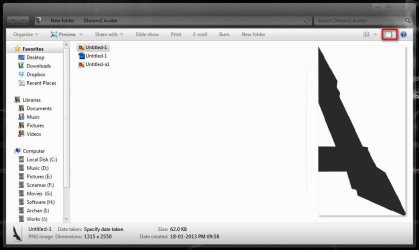
Solved windows 7 windows explorer view pane

Just married

New member
Member
VIP
Local time
7:59 PM
Messages
96
Good Morning Seven forums,

I recently noticed that at one time I could view a jpg file in windows explorer when I had a foler opened that contained sever jpg images uin the folder set to details view. There was no open preview pane to the right of the details list, I found a place to the right of the button to view details or large icons so I set to larger then clicked the button to the right to open the preview pane, still only find a larger square box with a camera picture in side that was to represent the image selected on the lift, still no image. What have i done wrong?
 

My Computer

Computer Manufacturer/Model Number
assemble my own
OS
Windows 7 Pro 64 bit
CPU
AMD
Motherboard
ASUS
Memory
6GB
Graphics Card(s)
ON BOARD
Sound Card
ON BOARD
Monitor(s) Displays
HP FALT SCREEN 21"
Hard Drives
ONE 1.5TB, ONE .5TB
PSU
500w
Case
NEW TO FIT
Cooling
WGAT CANE WUTG CASE
Hello Just Married,

Could you post a screenshot showing this to see if it may help betted ID the issue?

In the mean time, double check to make sure that you have thumbnail previews enabled, and that Windows Photo Viewer is set as the default program.

Hope this helps for now, :)
Shawn
 

My Computer

Computer type
PC/Desktop
Computer Manufacturer/Model Number
Self built custom
OS
64-bit Windows 11 Pro for Workstations
CPU
Intel i7-8700K OC'd to 5 GHz
Motherboard
ASUS ROG Maximus XI Formula Z390
Memory
64 GB (4x16GB) G.SKILL TridentZ RGB DDR4 3600 MHz
Graphics Card(s)
ASUS ROG-STRIX-GTX1080TI-O11G-GAMING
Sound Card
Integrated
Monitor(s) Displays
2 x Samsung Odyssey G7 27"
Screen Resolution
2560x1440
Hard Drives
1TB Samsung 990 PRO M.2,
4TB Samsung 990 PRO PRO M.2,
TerraMaster F8 SSD Plus NAS
PSU
Seasonic Prime Titanium 850W
Case
Thermaltake Core P3
Cooling
Corsair Hydro H115i
Keyboard
Logitech wireless K800
Mouse
Logitech MX Master 4
Internet Speed
2 Gb/s Download and 100 Mb/s Upload
Antivirus
Malwarebyte Anti-Malware Premium
Browser
Google Chrome
Other Info
Logitech Z625 speaker system,
Logitech BRIO 4K Pro webcam,
HP Color LaserJet Pro MFP M477fdn,
APC SMART-UPS RT 1000 XL - SURT1000XLI,
Galaxy S23 Plus phone
Like your username. I guess you selected the name in Dec 2012, and still carrying the mood. Great :p

Post a screenshot please, showing the Preview button pressed and a particular picture item selected. Does not it generates a preview, as in the image?
2013-01-19_001209.jpg
Edit: Late :) Follow what Brink suggested :)
 

My Computer

Computer type
PC/Desktop
Computer Manufacturer/Model Number
Self Assembled
OS
Microsoft Windows 10 Pro Insider Preview 64-bit
CPU
Intel(R) Core(TM) i3-4130 CPU @ 3.40GHz
Motherboard
Gigabyte Technology Co., Ltd. B85M-D3H
Memory
Corsair Vengence 4GB x2 (8.00GB Dual-Channel DDR3 @ 798MHz)
Graphics Card(s)
2047MB GeForce GTS 450 (ZOTAC International)
Sound Card
Onboard (Realtek High Definition Audio)
Monitor(s) Displays
LG Flatron E2040T
Screen Resolution
1600x900
Hard Drives
Western Digital 1 TB
Seagate 500 GB
PSU
Corsair VS550
Case
Cooler Master K380
Cooling
Cooler Master Seidon 120V Plus
Keyboard
Logitech MK260r
Mouse
Logitech MK260r
Internet Speed
PMPL Broadband
Antivirus
Windows Defender + MBAM
Browser
Firefox
Other Info
Dell Studio 15" Laptop
viewing jpgs in the preview area

Good Morning Seven Forums,

You hit the nail on the head, I forgot to look in FOLDER OPTIONS, just about all the time I do that but missed the very first option that had a check, "Allways view icons instead of images" or something like that. Did that problem solved,

Thanks for the reminder.

Also was going to upload a snipit but tried that in the past, don't think it worked for me.
 

My Computer

Computer Manufacturer/Model Number
assemble my own
OS
Windows 7 Pro 64 bit
CPU
AMD
Motherboard
ASUS
Memory
6GB
Graphics Card(s)
ON BOARD
Sound Card
ON BOARD
Monitor(s) Displays
HP FALT SCREEN 21"
Hard Drives
ONE 1.5TB, ONE .5TB
PSU
500w
Case
NEW TO FIT
Cooling
WGAT CANE WUTG CASE

My Computer

Computer type
PC/Desktop
Computer Manufacturer/Model Number
Self built custom
OS
64-bit Windows 11 Pro for Workstations
CPU
Intel i7-8700K OC'd to 5 GHz
Motherboard
ASUS ROG Maximus XI Formula Z390
Memory
64 GB (4x16GB) G.SKILL TridentZ RGB DDR4 3600 MHz
Graphics Card(s)
ASUS ROG-STRIX-GTX1080TI-O11G-GAMING
Sound Card
Integrated
Monitor(s) Displays
2 x Samsung Odyssey G7 27"
Screen Resolution
2560x1440
Hard Drives
1TB Samsung 990 PRO M.2,
4TB Samsung 990 PRO PRO M.2,
TerraMaster F8 SSD Plus NAS
PSU
Seasonic Prime Titanium 850W
Case
Thermaltake Core P3
Cooling
Corsair Hydro H115i
Keyboard
Logitech wireless K800
Mouse
Logitech MX Master 4
Internet Speed
2 Gb/s Download and 100 Mb/s Upload
Antivirus
Malwarebyte Anti-Malware Premium
Browser
Google Chrome
Other Info
Logitech Z625 speaker system,
Logitech BRIO 4K Pro webcam,
HP Color LaserJet Pro MFP M477fdn,
APC SMART-UPS RT 1000 XL - SURT1000XLI,
Galaxy S23 Plus phone
Back
Top