Windows 7 wont allow a defined IP address

guyver1

New member
Local time
2:35 PM
Messages
11
ok so i have a Netgear DG834PN ADSL router

I have 2 machines connected to it, my server box (running XP) which is setup as follows:

IP 192.168.0.253
Subnet 255.255.255.0
Gateway (Netgear Router) - 192.168.0.1

DNS 156.154.70.1
156.154.71.1

My main rig which used to run XP was configured exactly the same but with an IP address of 192.168.0.1

Im on BE Unlimited which uses a static IP address connection that doesnt require a login on the router.


This setup has worked flawlessly for years with both machines running XP.

As soon as i switch my main rig over to Windows 7. the 7 machine refuses to connect through to the internet if i define my parameters as above. I run troubleshooter and it says that "this machine isnt running DHCP. Try fixing this as Administrator?"

When you say yes and it removes your defined settingsa and uses DHCP it works....

but it still sufferes the random disconnects and fails as its an nVidia connection (680i chipset)

anyone have any clue why i cant define specific ip address etc and can only use DHCP?
 

My Computer My Computer

OS
Windows7 RC
ok so i have a Netgear DG834PN ADSL router

I have 2 machines connected to it, my server box (running XP) which is setup as follows:

IP 192.168.0.253
Subnet 255.255.255.0
Gateway (Netgear Router) - 192.168.0.1

DNS 156.154.70.1
156.154.71.1

My main rig which used to run XP was configured exactly the same but with an IP address of 192.168.0.1

Im on BE Unlimited which uses a static IP address connection that doesnt require a login on the router.


This setup has worked flawlessly for years with both machines running XP.

As soon as i switch my main rig over to Windows 7. the 7 machine refuses to connect through to the internet if i define my parameters as above. I run troubleshooter and it says that "this machine isnt running DHCP. Try fixing this as Administrator?"

When you say yes and it removes your defined settingsa and uses DHCP it works....

but it still sufferes the random disconnects and fails as its an nVidia connection (680i chipset)

anyone have any clue why i cant define specific ip address etc and can only use DHCP?

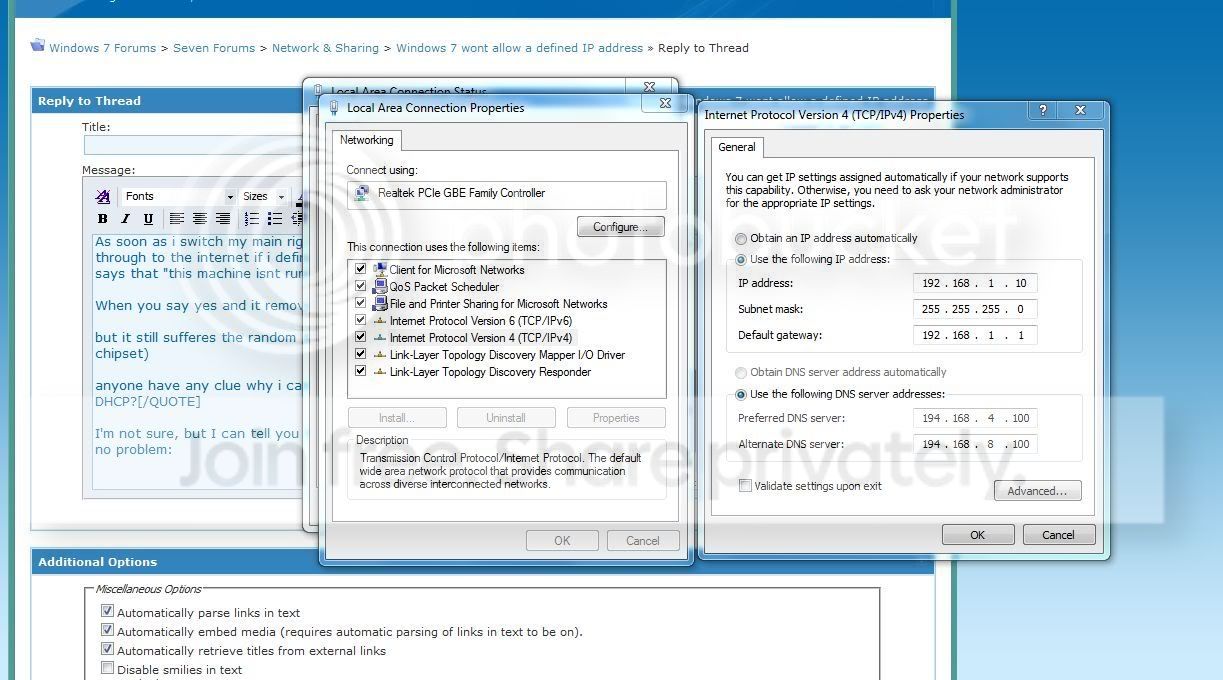
I'm not sure, but I can tell you that I'm running static on my netgear WNR2000 router no problem, using the guide on portforward.com:

Captur4e.jpg
 

My Computer My Computer

OS
Windows 7 HP x64
CPU
Intel i950 @ 4.4ghz
Motherboard
Gigabyte X58 Extreme
Memory
3x2gb Corsair xms3 1600mhz
Graphics Card(s)
Dual GTX295
Sound Card
Onboard Realtek
Monitor(s) Displays
50" Panasonic Plasma 1920x1080
Hard Drives
WD Velociraptor 300gb raid0
PSU
Corsair HX1000W
Case
Silverstone TJ07
Cooling
Water
The Router is using 192.168.0.1 for the IP address and the computer is trying to use 192.168.0.1?
That just will not work...
 

My Computer My Computer

Computer type
PC/Desktop
Computer Manufacturer/Model Number
Alienware Aurora ALX R4
OS
Windows 10 Pro (x64)
CPU
Intel Core i7-3930K (3.2GHz - 4.5GHz)
Motherboard
Alienware Aurora-R4 x79
Memory
4x Samsung 4GB PC3-12800 DDR3 (16GB 1600MHz)
Graphics Card(s)
Nvidia Geforce GTX 690
Sound Card
SteelSeries Siberia Elite
Monitor(s) Displays
Dell UltraSharp U3011
Screen Resolution
2560x1600
Hard Drives
Samsung 850 Pro 256 GB, Seagate 1TB Desktop Hybrid HDD, 2x Western Digital 4TB Green HDD
PSU
875W Some Dell PSU <.<
Case
Alienware Aurora ALX
Cooling
Custom Liquid Cooling (EK CPU & GPU blocks) dual EK 480RAD
Keyboard
Logitech G710+ Mechanical
Mouse
Logitech G700s
Internet Speed
Verizon Fios (50 mbps average)
Other Info
Server: Intel NUC D54250WYK: i5-4250U, 16GB, 256 GB mSATA, Windows Server 2012 R2
The Router is using 192.168.0.1 for the IP address and the computer is trying to use 192.168.0.1?
That just will not work...

Yes, he is exactly correct...you have 2 devices trying to use the same IP. Set your workstation to 192.168.0.2 and see if that doesn't fix the problem.
 

My Computer My Computer

Computer Manufacturer/Model Number
Self-Built in July 2009
OS
Windows 7 Ultimate x64
CPU
Intel Q9550 2.83Ghz OC'd to 3.40Ghz
Motherboard
Gigabyte GA-EP45-UD3R rev. 1.1, F12 BIOS
Memory
8GB G.Skill PI DDR2-800, 4-4-4-12 timings
Graphics Card(s)
EVGA 1280MB Nvidia GeForce GTX570
Sound Card
Realtek ALC899A 8 channel onboard audio
Monitor(s) Displays
23" Acer x233H
Screen Resolution
1920x1080
Hard Drives
Intel X25-M 80GB Gen 2 SSD
Western Digital 1TB Caviar Black, 32MB cache. WD1001FALS
PSU
Corsair 620HX modular
Case
Antec P182
Cooling
stock
Keyboard
ABS M1 Mechanical
Mouse
Logitech G9 Laser Mouse
Internet Speed
15/2 cable modem
Other Info
Windows and Linux enthusiast. Logitech G35 Headset.
sorry my main rig IS 192.168.0.2

typo
 

My Computer My Computer

OS
Windows7 RC
From your workstation, can you run
ping 192.168.0.1 and tell me if it comes back with 4 replies or 4 timeouts.
 

My Computer My Computer

Computer Manufacturer/Model Number
Self-Built in July 2009
OS
Windows 7 Ultimate x64
CPU
Intel Q9550 2.83Ghz OC'd to 3.40Ghz
Motherboard
Gigabyte GA-EP45-UD3R rev. 1.1, F12 BIOS
Memory
8GB G.Skill PI DDR2-800, 4-4-4-12 timings
Graphics Card(s)
EVGA 1280MB Nvidia GeForce GTX570
Sound Card
Realtek ALC899A 8 channel onboard audio
Monitor(s) Displays
23" Acer x233H
Screen Resolution
1920x1080
Hard Drives
Intel X25-M 80GB Gen 2 SSD
Western Digital 1TB Caviar Black, 32MB cache. WD1001FALS
PSU
Corsair 620HX modular
Case
Antec P182
Cooling
stock
Keyboard
ABS M1 Mechanical
Mouse
Logitech G9 Laser Mouse
Internet Speed
15/2 cable modem
Other Info
Windows and Linux enthusiast. Logitech G35 Headset.
Back
Top