Windows 7 won’t boot off external HDD

VelsDie

New member
Member
Local time
4:39 AM
Messages
15
Windows 7 won’t boot off external HDD

I have NO idea if I will even get any help, because this forum is old and probably not many people is left here, anyways, I’ve been trying to boot windows 7 off my USB HDD/External HDD for the past 2 WEEKS, but no matter what I do, I always get the same 0x7B BSOD, even with usb 3.0, even with booting from internal ssd via VHD using ventoy, I’ve tried wintousb or easy windows install and Rufus, but none have succeeded, my laptop is a ThinkPad T480, has both uefi and legacy support, please help I’m tired of failing, i just wanna life the beautiful windows 7 :(
 

My Computers

System One System Two

  • Computer type
    Laptop
    Computer Manufacturer/Model Number
    Lenovo ThinkPad T480
    OS
    Windows 10 Professional x64, MacOS 14.4.1 x86 (hackintosh), Linux Mint x64
    CPU
    Intel i5-8350u 1.70ghz
    Memory
    8GB 2400mgz DDR4
    Graphics Card(s)
    Intel UHD 620 graphics
    Sound Card
    Realtek(R) audio
    Monitor(s) Displays
    LCD
    Screen Resolution
    1366x768
    Hard Drives
    500GB Nvme SSD, 500GB 2,5 inch sata HDD, 160GB 2,5 inch sata HDD, 32GB microSD card
  • Computer type
    PC/Desktop
change the line

set installpath =

to whatever your usb letter is. for example if your usb stick is E:

set installpath=E:


set7_usb.cmd
Code:
[USER=353699]echo[/USER] off
setlocal EnableExtensions EnableDelayedExpansion
pushd %~dp0
rem thanks to cdob
echo Setting USB boot drivers &echo.
set installpath=
copy "%installpath%\system32\config\system" "%installpath%\system32\config\system_%random%.sav"
reg.exe load HKLM\loaded_SYSTEM "%installpath%\system32\config\system"

set ControlSetDefault=
call :setReg Default
call :setReg LastKnownGood

reg.exe unload HKLM\loaded_SYSTEM
popd

goto :eof

:setReg
 set ControlSet=001
 reg.exe query "HKLM\loaded_SYSTEM\Select" /v "%1" >nul 2>&1 && (
  for /f "skip=2 tokens=3" %%a in ('reg.exe query "HKLM\loaded_SYSTEM\Select" /v "%1"') do set /a ControlSet=%%a
  set ControlSet=000!ControlSet!
 )
 set ControlSetNNN=ControlSet%ControlSet:~-3%
 if %ControlSetDefault%.==%ControlSetNNN%. goto :eof
 echo. &echo ControlSet "%ControlSetNNN%" used.

 set Services=HKLM\loaded_SYSTEM\%ControlSetNNN%\Services
 set Control=HKLM\loaded_SYSTEM\%ControlSetNNN%\Control

 reg.exe add %Control%\PnP /f /v PollBootPartitionTimeout /t REG_DWORD /d 30000
 
 reg.exe add %Control% /f /v BootDriverFlags /t REG_DWORD /d 0x6

 set ControlSetDefault=%ControlSetNNN%
goto :eof
 

My Computers

System One System Two

  • Computer type
    PC/Desktop
    OS
    7 X64
    CPU
    i5 8400
    Motherboard
    gigabyte b365m ds3h
    Memory
    2x8gb 3200mhz
    Hard Drives
    various
    PSU
    pure power 11 400w cm
    Case
    Coolermaster
    Cooling
    cryorig m9i
  • Computer type
    PC/Desktop
    OS
    7x64
    CPU
    g5400
    Motherboard
    ga b365m ds3h
    Memory
    8gb ddr4 2400
    PSU
    xfx pro 450w
I’m kinda confused, do I paste that command into the cmd or something? Where do I change the set install path? I hope you don’t mind explaining a little further
 

My Computers

System One System Two

  • Computer type
    Laptop
    Computer Manufacturer/Model Number
    Lenovo ThinkPad T480
    OS
    Windows 10 Professional x64, MacOS 14.4.1 x86 (hackintosh), Linux Mint x64
    CPU
    Intel i5-8350u 1.70ghz
    Memory
    8GB 2400mgz DDR4
    Graphics Card(s)
    Intel UHD 620 graphics
    Sound Card
    Realtek(R) audio
    Monitor(s) Displays
    LCD
    Screen Resolution
    1366x768
    Hard Drives
    500GB Nvme SSD, 500GB 2,5 inch sata HDD, 160GB 2,5 inch sata HDD, 32GB microSD card
  • Computer type
    PC/Desktop
copy the code and paste it into a text file.
change the line in red below to whatever your usb letter is
for example if your usb stick is E: the line should be
set installpath=E:
save it as set7_7usb.cmd
then rt click on the set7_usb.cmd file and run as administrator

echo off
setlocal EnableExtensions EnableDelayedExpansion
pushd %~dp0
rem thanks to cdob
echo Setting USB boot drivers &echo.
set installpath=
copy "%installpath%\system32\config\system" "%installpath%\system32\config\system_%random%.sav"
reg.exe load HKLM\loaded_SYSTEM "%installpath%\system32\config\system"

set ControlSetDefault=
call :setReg Default
call :setReg LastKnownGood

reg.exe unload HKLM\loaded_SYSTEM
popd

goto :eof

:setReg
set ControlSet=001
reg.exe query "HKLM\loaded_SYSTEM\Select" /v "%1" >nul 2>&1 && (
for /f "skip=2 tokens=3" %%a in ('reg.exe query "HKLM\loaded_SYSTEM\Select" /v "%1"') do set /a ControlSet=%%a
set ControlSet=000!ControlSet!
)
set ControlSetNNN=ControlSet%ControlSet:~-3%
if %ControlSetDefault%.==%ControlSetNNN%. goto :eof
echo. &echo ControlSet "%ControlSetNNN%" used.

set Services=HKLM\loaded_SYSTEM\%ControlSetNNN%\Services
set Control=HKLM\loaded_SYSTEM\%ControlSetNNN%\Control

reg.exe add %Control%\PnP /f /v PollBootPartitionTimeout /t REG_DWORD /d 30000

reg.exe add %Control% /f /v BootDriverFlags /t REG_DWORD /d 0x6

set ControlSetDefault=%ControlSetNNN%
goto :eof
 

My Computers

System One System Two

  • Computer type
    PC/Desktop
    OS
    7 X64
    CPU
    i5 8400
    Motherboard
    gigabyte b365m ds3h
    Memory
    2x8gb 3200mhz
    Hard Drives
    various
    PSU
    pure power 11 400w cm
    Case
    Coolermaster
    Cooling
    cryorig m9i
  • Computer type
    PC/Desktop
    OS
    7x64
    CPU
    g5400
    Motherboard
    ga b365m ds3h
    Memory
    8gb ddr4 2400
    PSU
    xfx pro 450w
Sorry for the late reply, I was sleeping cuz I posted that on 12:40 AM my time, do I put the letter of my usb stick with WinPE/Windows setup, or the drive that i want to install it in? And don’t I need an iSO?? I’m very confused, sorry…
 
Last edited:

My Computers

System One System Two

  • Computer type
    Laptop
    Computer Manufacturer/Model Number
    Lenovo ThinkPad T480
    OS
    Windows 10 Professional x64, MacOS 14.4.1 x86 (hackintosh), Linux Mint x64
    CPU
    Intel i5-8350u 1.70ghz
    Memory
    8GB 2400mgz DDR4
    Graphics Card(s)
    Intel UHD 620 graphics
    Sound Card
    Realtek(R) audio
    Monitor(s) Displays
    LCD
    Screen Resolution
    1366x768
    Hard Drives
    500GB Nvme SSD, 500GB 2,5 inch sata HDD, 160GB 2,5 inch sata HDD, 32GB microSD card
  • Computer type
    PC/Desktop
Windows 7 wont boot off external hard drive (repost)

So last night i posted a thread about how i cannot boot windows 7 off my external hdd (sata to usb adapter), i feel like i didnt explain it well (i think because i was sleepy) so i decided to post a new thread which is more detailed

so i have been trying to install windows 7 and boot from my external hard disk for the past 14 days non-stop, but not a single success, i have tried WinToUSB, both in legacy and VHD mode, i tried via rufus which also didnt work, and i tried putting the hard disk (internally) and installing windows into it, then tried to boot externally and it didnt work, so i found a iSO with working display drivers and usb 3.0 drivers, and that didnt work either, i tried booting internally via vhd making the install with VM, and it didnt work,

no matter what i do, i keep geting the same annoying god damn 0x0000007B stop code, i posted many threads on reddit for this, i posted like 10 posts on diffrent subreddits searching for help, and no help, i do not want to give up hope on this, i really really want to use Windows 7 on my thinkpad t480, the closest i got was windows 7 pe (a uncompleted version of windows to save/fix your normal windows) which is not really windows...

please help if anyone can, i am really tired of keep failing on this :(

ThinkPad T480 specs:
intel i5-8350u cpu (i know its too new for windows 7, but there is people who got it working on this exact laptop)
intel uhd 620 gpu
8gb ram

Sorry if i wrote too much or explained bad, i tried my best to give backstory and the methods i used

i hope i can finally solve this and enjoy my beloved windows 7 again
 

My Computers

System One System Two

  • Computer type
    Laptop
    Computer Manufacturer/Model Number
    Lenovo ThinkPad T480
    OS
    Windows 10 Professional x64, MacOS 14.4.1 x86 (hackintosh), Linux Mint x64
    CPU
    Intel i5-8350u 1.70ghz
    Memory
    8GB 2400mgz DDR4
    Graphics Card(s)
    Intel UHD 620 graphics
    Sound Card
    Realtek(R) audio
    Monitor(s) Displays
    LCD
    Screen Resolution
    1366x768
    Hard Drives
    500GB Nvme SSD, 500GB 2,5 inch sata HDD, 160GB 2,5 inch sata HDD, 32GB microSD card
  • Computer type
    PC/Desktop
I already gave you a batch file to do it.

Two registry edits are needed in the system hive of the operating system on the usb stick.

You could do it manually.

Use regedit or similar to load the system hive from the usb stick.
 

My Computers

System One System Two

  • Computer type
    PC/Desktop
    OS
    7 X64
    CPU
    i5 8400
    Motherboard
    gigabyte b365m ds3h
    Memory
    2x8gb 3200mhz
    Hard Drives
    various
    PSU
    pure power 11 400w cm
    Case
    Coolermaster
    Cooling
    cryorig m9i
  • Computer type
    PC/Desktop
    OS
    7x64
    CPU
    g5400
    Motherboard
    ga b365m ds3h
    Memory
    8gb ddr4 2400
    PSU
    xfx pro 450w
SIW2 the code you gave me gives errors as "ERROR: The parameter is incorrect.", i dont know if i did something wrong, i did what you just added E: (the drive letter where my windows files are), and it didnt do anything and just instantly closed the cmd
 

My Computers

System One System Two

  • Computer type
    Laptop
    Computer Manufacturer/Model Number
    Lenovo ThinkPad T480
    OS
    Windows 10 Professional x64, MacOS 14.4.1 x86 (hackintosh), Linux Mint x64
    CPU
    Intel i5-8350u 1.70ghz
    Memory
    8GB 2400mgz DDR4
    Graphics Card(s)
    Intel UHD 620 graphics
    Sound Card
    Realtek(R) audio
    Monitor(s) Displays
    LCD
    Screen Resolution
    1366x768
    Hard Drives
    500GB Nvme SSD, 500GB 2,5 inch sata HDD, 160GB 2,5 inch sata HDD, 32GB microSD card
  • Computer type
    PC/Desktop
opps made a typo

set installpath=E:\windows

change the letter to the letter of your usb stick
 

My Computers

System One System Two

  • Computer type
    PC/Desktop
    OS
    7 X64
    CPU
    i5 8400
    Motherboard
    gigabyte b365m ds3h
    Memory
    2x8gb 3200mhz
    Hard Drives
    various
    PSU
    pure power 11 400w cm
    Case
    Coolermaster
    Cooling
    cryorig m9i
  • Computer type
    PC/Desktop
    OS
    7x64
    CPU
    g5400
    Motherboard
    ga b365m ds3h
    Memory
    8gb ddr4 2400
    PSU
    xfx pro 450w
SIW2 did what you said… cmd said successfull, 0x7B jumpscare, I don’t know what to do at this point, maybe I can try manually? How do I do that, if you don’t mind explaining
 

My Computers

System One System Two

  • Computer type
    Laptop
    Computer Manufacturer/Model Number
    Lenovo ThinkPad T480
    OS
    Windows 10 Professional x64, MacOS 14.4.1 x86 (hackintosh), Linux Mint x64
    CPU
    Intel i5-8350u 1.70ghz
    Memory
    8GB 2400mgz DDR4
    Graphics Card(s)
    Intel UHD 620 graphics
    Sound Card
    Realtek(R) audio
    Monitor(s) Displays
    LCD
    Screen Resolution
    1366x768
    Hard Drives
    500GB Nvme SSD, 500GB 2,5 inch sata HDD, 160GB 2,5 inch sata HDD, 32GB microSD card
  • Computer type
    PC/Desktop
What usb3 drivers are you using?

- - - Updated - - -

Start from the beginning.

1. format the usb stick

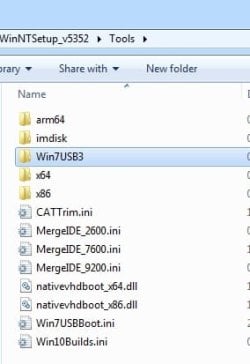
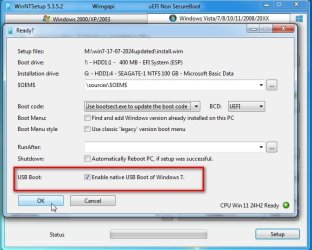
2. use winntsetup to install TO usb . put the drivers and update in the correct place first.

WinNTSetup v5.3.5.2 - Install Windows from USB - MSFN also install windows TO usb

Open this folder
winntsetup-usb.jpg

and put the usbstack and update inside it. It should look like this:

winntsetup-usb2.jpg


If you want to use the most recent usbstack,

:ar: :ar: :ar: View attachment XHCI_UASP_WIN7_MUI_SHA2_NEEDED.zip

you need to also install the sha2 update

:ar: :ar: :ar: https://catalog.s.download.windowsu..._b5614c6cea5cb4e198717789633dca16308ef79c.msu


winntsetup-usb3.jpg
 
Last edited:

My Computers

System One System Two

  • Computer type
    PC/Desktop
    OS
    7 X64
    CPU
    i5 8400
    Motherboard
    gigabyte b365m ds3h
    Memory
    2x8gb 3200mhz
    Hard Drives
    various
    PSU
    pure power 11 400w cm
    Case
    Coolermaster
    Cooling
    cryorig m9i
  • Computer type
    PC/Desktop
    OS
    7x64
    CPU
    g5400
    Motherboard
    ga b365m ds3h
    Memory
    8gb ddr4 2400
    PSU
    xfx pro 450w
SIW2 well the iso I use it’s from a friend so I have no idea which usb 3.” drivers it has, I have found an iso from archive.org that has usb 3.0 drivers which also didn’t work, so I’m lost, will you mind sending me the usb 3.0 drivers, if you have them, other drivers like wlan, Ethernet, display, sound are not a problem, I already have found them for windows 7
 

My Computers

System One System Two

  • Computer type
    Laptop
    Computer Manufacturer/Model Number
    Lenovo ThinkPad T480
    OS
    Windows 10 Professional x64, MacOS 14.4.1 x86 (hackintosh), Linux Mint x64
    CPU
    Intel i5-8350u 1.70ghz
    Memory
    8GB 2400mgz DDR4
    Graphics Card(s)
    Intel UHD 620 graphics
    Sound Card
    Realtek(R) audio
    Monitor(s) Displays
    LCD
    Screen Resolution
    1366x768
    Hard Drives
    500GB Nvme SSD, 500GB 2,5 inch sata HDD, 160GB 2,5 inch sata HDD, 32GB microSD card
  • Computer type
    PC/Desktop
They are in the link in my previous post.

I will put some arrows pointing to it.
 

My Computers

System One System Two

  • Computer type
    PC/Desktop
    OS
    7 X64
    CPU
    i5 8400
    Motherboard
    gigabyte b365m ds3h
    Memory
    2x8gb 3200mhz
    Hard Drives
    various
    PSU
    pure power 11 400w cm
    Case
    Coolermaster
    Cooling
    cryorig m9i
  • Computer type
    PC/Desktop
    OS
    7x64
    CPU
    g5400
    Motherboard
    ga b365m ds3h
    Memory
    8gb ddr4 2400
    PSU
    xfx pro 450w
SIW2 so i just started flashing the iso into the hdd, i did what you told me, but will i have to use the batch command again, ill just in case, i did put the drivers in WIN7USB3 but didnt add them on options, idk if i should have, i will make a update if it works or not

- - - Updated - - -
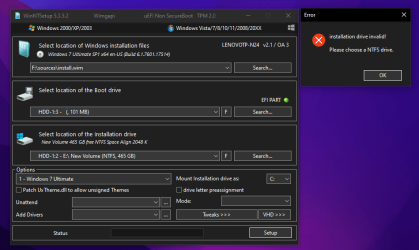
SIW2 update: gives me a stupid error, it says “installation drive invalid select a NTFS drive” it’s a ntfs drive, yet still gives me the same error
 

My Computers

System One System Two

  • Computer type
    Laptop
    Computer Manufacturer/Model Number
    Lenovo ThinkPad T480
    OS
    Windows 10 Professional x64, MacOS 14.4.1 x86 (hackintosh), Linux Mint x64
    CPU
    Intel i5-8350u 1.70ghz
    Memory
    8GB 2400mgz DDR4
    Graphics Card(s)
    Intel UHD 620 graphics
    Sound Card
    Realtek(R) audio
    Monitor(s) Displays
    LCD
    Screen Resolution
    1366x768
    Hard Drives
    500GB Nvme SSD, 500GB 2,5 inch sata HDD, 160GB 2,5 inch sata HDD, 32GB microSD card
  • Computer type
    PC/Desktop
post screenshots of what you are doing
 

My Computers

System One System Two

  • Computer type
    PC/Desktop
    OS
    7 X64
    CPU
    i5 8400
    Motherboard
    gigabyte b365m ds3h
    Memory
    2x8gb 3200mhz
    Hard Drives
    various
    PSU
    pure power 11 400w cm
    Case
    Coolermaster
    Cooling
    cryorig m9i
  • Computer type
    PC/Desktop
    OS
    7x64
    CPU
    g5400
    Motherboard
    ga b365m ds3h
    Memory
    8gb ddr4 2400
    PSU
    xfx pro 450w
@SIW2 here, i made a efi partition on the external hdd for the boot menager.Screenshot (138).png

- - - Updated - - -
@SIW2 update again, so i figured out how to install it, i made efi partition and a ntfs primary partition, it installed it, after that i used the script you gave me, it said successful, i tried to boot, BSOD, but this time, NOT 0x7B, instead 0x0000007E, here is a pictureIMG_9176.jpg
 

My Computers

System One System Two

  • Computer type
    Laptop
    Computer Manufacturer/Model Number
    Lenovo ThinkPad T480
    OS
    Windows 10 Professional x64, MacOS 14.4.1 x86 (hackintosh), Linux Mint x64
    CPU
    Intel i5-8350u 1.70ghz
    Memory
    8GB 2400mgz DDR4
    Graphics Card(s)
    Intel UHD 620 graphics
    Sound Card
    Realtek(R) audio
    Monitor(s) Displays
    LCD
    Screen Resolution
    1366x768
    Hard Drives
    500GB Nvme SSD, 500GB 2,5 inch sata HDD, 160GB 2,5 inch sata HDD, 32GB microSD card
  • Computer type
    PC/Desktop
Did you start with virgin official microsoft installation media ? Install the sha2 update, the driverframework update and the usb3 drivers.

Then make the adjustment either with the script or with winntsetup.

You also need to enable csm support in bios. Presumably you have already done that.
 

My Computers

System One System Two

  • Computer type
    PC/Desktop
    OS
    7 X64
    CPU
    i5 8400
    Motherboard
    gigabyte b365m ds3h
    Memory
    2x8gb 3200mhz
    Hard Drives
    various
    PSU
    pure power 11 400w cm
    Case
    Coolermaster
    Cooling
    cryorig m9i
  • Computer type
    PC/Desktop
    OS
    7x64
    CPU
    g5400
    Motherboard
    ga b365m ds3h
    Memory
    8gb ddr4 2400
    PSU
    xfx pro 450w

My Computers

System One System Two

  • Computer type
    Laptop
    Computer Manufacturer/Model Number
    Lenovo ThinkPad T480
    OS
    Windows 10 Professional x64, MacOS 14.4.1 x86 (hackintosh), Linux Mint x64
    CPU
    Intel i5-8350u 1.70ghz
    Memory
    8GB 2400mgz DDR4
    Graphics Card(s)
    Intel UHD 620 graphics
    Sound Card
    Realtek(R) audio
    Monitor(s) Displays
    LCD
    Screen Resolution
    1366x768
    Hard Drives
    500GB Nvme SSD, 500GB 2,5 inch sata HDD, 160GB 2,5 inch sata HDD, 32GB microSD card
  • Computer type
    PC/Desktop
the driverframework update is included in the zip file with the usb3 updates in post#11

the sha2 update I linked in post#11

:ar: post#11

get a fresh official ms iso file and do it properly.
 
Last edited:

My Computers

System One System Two

  • Computer type
    PC/Desktop
    OS
    7 X64
    CPU
    i5 8400
    Motherboard
    gigabyte b365m ds3h
    Memory
    2x8gb 3200mhz
    Hard Drives
    various
    PSU
    pure power 11 400w cm
    Case
    Coolermaster
    Cooling
    cryorig m9i
  • Computer type
    PC/Desktop
    OS
    7x64
    CPU
    g5400
    Motherboard
    ga b365m ds3h
    Memory
    8gb ddr4 2400
    PSU
    xfx pro 450w
SIW2 how do I install them into the iso? With NTLite? Or some other program?
 

My Computers

System One System Two

  • Computer type
    Laptop
    Computer Manufacturer/Model Number
    Lenovo ThinkPad T480
    OS
    Windows 10 Professional x64, MacOS 14.4.1 x86 (hackintosh), Linux Mint x64
    CPU
    Intel i5-8350u 1.70ghz
    Memory
    8GB 2400mgz DDR4
    Graphics Card(s)
    Intel UHD 620 graphics
    Sound Card
    Realtek(R) audio
    Monitor(s) Displays
    LCD
    Screen Resolution
    1366x768
    Hard Drives
    500GB Nvme SSD, 500GB 2,5 inch sata HDD, 160GB 2,5 inch sata HDD, 32GB microSD card
  • Computer type
    PC/Desktop
Back
Top