Solved Windows 7 wont shut down

Eneswar

New member
Member
Local time
2:17 AM
Messages
71
Location
Sweden
Hey everyone,

So this morning, for some stupid reason I desided to update my bios, even tho it has been working fine. What made me update was all the improve this and that on the changelogs :P

Anyway, the flashing went fine and all and when it was about to start it didnt get into windows. Now I know that most of the time when you flash your bios it changes your SATA controller to IDE, and you have to change it back to ACHI or ACPI which ever you use. Before I remembered this for some reason I desided to do a windows restore to last night. I clearly wasnt thinking. After this restore I remembered the STA controller and changed it back and I can get into windows fine and it all works as it should.

The problem I have now is that now windows wont shut down. It just hangs at "shutting down" screen and stays there for ever. I have to hold the button to shut it down. Any idea on why this happens and how I can fix this?

Many thanks in advance


Eneswar
 

My Computer

Computer Manufacturer/Model Number
Taurus
OS
MS Windows 7 Home Premium 64-bit SP1
CPU
Sandy Bridge Intel Core i5 2500K @ 3.30GHz
Motherboard
MSI P67A-C45
Memory
8,00 GB DDR3
Graphics Card(s)
NVIDIA GeForce GTX 560 Ti
Sound Card
7.1 Realtek ALC888
Monitor(s) Displays
Samsung SyncMaster T260
Screen Resolution
1920 x 1200 x 59 hertz
Hard Drives
1465GB Seagate ST31500341AS
977GB SAMSUNG SAMSUNG HD103SJ
PSU
600W
Case
Taurus R1 Miditower
Keyboard
Logitech Illuminated
Mouse
Logitech G5 Laser Mouse
The first thing I would try is another System Restore to a date before you had any problems.
 

My Computer

Computer type
PC/Desktop
Computer Manufacturer/Model Number
Custom Build
OS
Windows 7 Home Premium 32-Bit - Build 7600 SP1
CPU
Intel Core i3-2120 3.30Ghz
Motherboard
Asus P8Z68-V LX Intel Z68 Socket H2 ATX
Memory
Kingston 4 GB DDR3 1333 mhz
Graphics Card(s)
AMD Radeon HD6670
Sound Card
Sound Blaster Audigy SE 24-Bit
Monitor(s) Displays
Asus VE228
Screen Resolution
1440 X 900
Hard Drives
OCZ Vertex 3 120 GB Sata 3 SSD ==
Kingston SH103/S3 120 G Hyper X 120 GB SSD ==
Western Digital 500 GB Caviar Green 7200 RPM ==
PSU
Corsair CX600M == 600 Watt
Case
NZXT Apollo - Silver with Clear Side Panel
Cooling
Three 120 mm Fans
Keyboard
Microsoft Natural 4000
Mouse
Microsoft Custom Optical 3000
Internet Speed
AT&T Fiber Optic Wireless Network
Antivirus
Microsoft Security Essentials
Browser
Chrome
Other Info
120 mm Blue LED Fan -- Three Blue LED Lazer Light Sticks
If that doesn't work, restore your bios back to what it was. I don't update bios if I'm not having a problem. Bios updates are for some computers that have a certain problem not for all. If your not having a problem I recommend not updating bios.
 

My Computer

Computer type
PC/Desktop
Computer Manufacturer/Model Number
Home made Desktop
OS
Windows 10 Pro. 64/ version 1709 Windows 7 Pro/64
CPU
Intel i7-6800K @ 4.3
Motherboard
ASUS X-99 Deluxe II
Memory
Corsair Platinum 16 gig @2400
Graphics Card(s)
EVGA GTX 1070 OC
Monitor(s) Displays
Asus 27" LED LCD/VE278Q
Screen Resolution
1920-1080 or 1280-720 HDMI
Hard Drives
INTEL SSD 730-240 Gb Sata 3.0/
PSU
EVGA Platium 1200W
Case
Phanteks Luxe Tempered Glass 8 fans/ one radiator
Cooling
XSPC/ Water Cooled CPU
Keyboard
Das 4 Professional
Mouse
Logitech M705/MX Anywhere 2-S
Internet Speed
100 mbits
Antivirus
Microsoft Security Essentials/ Malwarebytes Premium 3.0/ SAS
Browser
I.E. 11 default/Firefox/ ISP Time Warner Cable/Spectrum
Other Info
LG BluRay Burner/
Sound system-KLipsch-THX/
Icy Dock ssd Hot Swap bays.
Is this on a laptop or desktop?.

I've had this before. It could be someting stuck in the Memory.

AS silly as this sounds. try:

Desktop: - Shut Down. ( if it hangs, then force a shutdown like you mentioned previously ) then take the power cable out the back of the PSU. Then press the power on button 5 times. This will clear any static electric energy stored on the motherboard, and clear the memory. Put power cable back in, - Turn it on, See if the problem persist.

If it still won't shut down, Try running windows update. Clear temporary folders.

If its a laptop, Take the battery and power cable out. Then press the power on button 5 times. Then re-connec battery and power cable. then test.
 

My Computer

Computer Manufacturer/Model Number
Cooler Master
OS
Windows 7 Home Premium 64 Bit
CPU
Core I7 1155 3.4GHZ
Memory
8GB DDR 1600
Hard Drives
64 GB SSD - OS
1TB - DATA
PSU
340 Watt Corsair
Case
Cooler Master
Cooling
Cooler Master
Thanks for the reply guys. Before I do any more system restore I will try the power memory stuck thing first. It is a desktop.

Thanks again


Edit: so when i was gonna try the memory stuck thing i shut down the computer expecting it to get stuck again and well it didnt. It just shut down normally and i have no idea why lol. I did do a discfragmentation but not sure if thats what fixed it.
 

My Computer

Computer Manufacturer/Model Number
Taurus
OS
MS Windows 7 Home Premium 64-bit SP1
CPU
Sandy Bridge Intel Core i5 2500K @ 3.30GHz
Motherboard
MSI P67A-C45
Memory
8,00 GB DDR3
Graphics Card(s)
NVIDIA GeForce GTX 560 Ti
Sound Card
7.1 Realtek ALC888
Monitor(s) Displays
Samsung SyncMaster T260
Screen Resolution
1920 x 1200 x 59 hertz
Hard Drives
1465GB Seagate ST31500341AS
977GB SAMSUNG SAMSUNG HD103SJ
PSU
600W
Case
Taurus R1 Miditower
Keyboard
Logitech Illuminated
Mouse
Logitech G5 Laser Mouse

My Computer

Computer type
PC/Desktop
Computer Manufacturer/Model Number
Home made Desktop
OS
Windows 10 Pro. 64/ version 1709 Windows 7 Pro/64
CPU
Intel i7-6800K @ 4.3
Motherboard
ASUS X-99 Deluxe II
Memory
Corsair Platinum 16 gig @2400
Graphics Card(s)
EVGA GTX 1070 OC
Monitor(s) Displays
Asus 27" LED LCD/VE278Q
Screen Resolution
1920-1080 or 1280-720 HDMI
Hard Drives
INTEL SSD 730-240 Gb Sata 3.0/
PSU
EVGA Platium 1200W
Case
Phanteks Luxe Tempered Glass 8 fans/ one radiator
Cooling
XSPC/ Water Cooled CPU
Keyboard
Das 4 Professional
Mouse
Logitech M705/MX Anywhere 2-S
Internet Speed
100 mbits
Antivirus
Microsoft Security Essentials/ Malwarebytes Premium 3.0/ SAS
Browser
I.E. 11 default/Firefox/ ISP Time Warner Cable/Spectrum
Other Info
LG BluRay Burner/
Sound system-KLipsch-THX/
Icy Dock ssd Hot Swap bays.

My Computer

Computer type
Laptop
Computer Manufacturer/Model Number
MSI GE72VR Apache Pro-416
OS
Windows 10x64 Build 1709
CPU
Intel i7 7700HQ Kaby Lake
Motherboard
Micro-Star Intl. MS-179B (U3C1)
Memory
16 GB DDR4 @2400
Graphics Card(s)
Nvidia Geforce GTX 1060
Screen Resolution
1920x1080 120Hz
Hard Drives
256 GB Nvme M.2 SSD

1TB HDD@7200
Cooling
Cooler Blast 4
Keyboard
Steel Series
Antivirus
Bit Defender Free
Browser
Edge
Hey again,
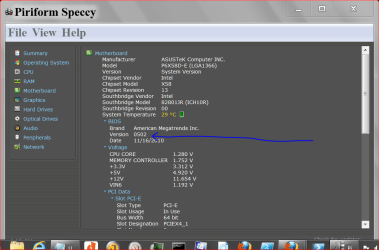
I went ahead and did the power memory thing and it still seems to be working fine. I also checked with Speccy, it has the update BIOS that I updated it with.

Im running the SFC scan as we speak, will report if anything bad happens :)

Edit: No integrity violations, all looks good! yay

Thank you all again
 

My Computer

Computer Manufacturer/Model Number
Taurus
OS
MS Windows 7 Home Premium 64-bit SP1
CPU
Sandy Bridge Intel Core i5 2500K @ 3.30GHz
Motherboard
MSI P67A-C45
Memory
8,00 GB DDR3
Graphics Card(s)
NVIDIA GeForce GTX 560 Ti
Sound Card
7.1 Realtek ALC888
Monitor(s) Displays
Samsung SyncMaster T260
Screen Resolution
1920 x 1200 x 59 hertz
Hard Drives
1465GB Seagate ST31500341AS
977GB SAMSUNG SAMSUNG HD103SJ
PSU
600W
Case
Taurus R1 Miditower
Keyboard
Logitech Illuminated
Mouse
Logitech G5 Laser Mouse
Good advice here! I always update my BIOS to the current version, regardless of whether I'm having problems or not and I've never had the BIOS update cause issues. You may have an application that is still resident in memory preventing a clean shut down...
 

My Computer

Computer type
PC/Desktop
Computer Manufacturer/Model Number
Intel DZ77GA-70K
OS
Microsoft Windows 8.1 Enterprise 64-bit
CPU
Intel(R) Core(TM) i7-3770K CPU @ 4.7GHz (Overclocked)
Motherboard
Intel Corporation DZ77GA-70K, 0066 BIOS version
Memory
32 GB 12800 DDR3 Crucial Ballistix Sport
Graphics Card(s)
NVIDIA GeForce GTX 660 SC x 2 (SLI) by EVGA
Sound Card
(1) Bluetooth Hands-free Audio (2) NVIDIA High Definition
Monitor(s) Displays
LG 27" HDMI
Screen Resolution
12920 x 1080 x 32 bits (4294967296 colors) @ 60Hz
Hard Drives
Intel 120GB SSD (ATA INTEL SSDSC2CT12 SCSI Disk Device)
Western Digital Caviar Black 64M cache 2TB 7200rpm (ATA WDC WD2002FAEX-0 SCSI Disk Device), 3 x WD 150Gb 10k Velociraptor hard drives in RAID 0 (testing)
PSU
Corsair 750w fully modular
Case
Corsair 650D with perforated side panel
Cooling
3 200mm case fans, Intel liquid cooling for CPU w 120mm fans
Keyboard
Logitech backlit
Mouse
Dell
Internet Speed
11Mbps DSL
Antivirus
Windows Defender, MalWareBytes Pro and CCleaner Pro
Browser
Chrome, IE and FireFox (latest versions)
Other Info
Windows Home Server 2011 with 10 clients at home
Excellent . Glad my advice helped out.
 

My Computer

Computer Manufacturer/Model Number
Cooler Master
OS
Windows 7 Home Premium 64 Bit
CPU
Core I7 1155 3.4GHZ
Memory
8GB DDR 1600
Hard Drives
64 GB SSD - OS
1TB - DATA
PSU
340 Watt Corsair
Case
Cooler Master
Cooling
Cooler Master
Back
Top