Hi ... I am a new member of SevenForums but have been a lurker for a good while
I recently upgraded my last XP machine to Windows 7 and am having a problem that I have seen discussed in several threads ... but am finding no answers
I have discovered ... on this latest machine (all are W7 Pro JFYI) that both Wordpad and MSPaint are only able to display about 1000 of my 5000 fonts ( I do a lot of graphic art ... so I have lots of fonts)
I have discovered that more 'robust' programs like Word 2007 ... Corel PhotoPaint Pro X4 ... and the latest version of Mozilla Thunderbird ... are able to access the full list of my fonts
In both Wordpad and MSPaint there is the option to SHOW MORE FONTS ... but this does not allow you to choose any outside of the context box
I have seen solutions that say you have to uninstall fonts to fix this ... this is both unacceptable ... as well as inaccurate as I do not have this problem on my other two W7 Machines
Can anyone tell me how to increase the number of fonts available in the font context box with these two programs?
My Computer
At a glance
Windows 7 Professional (x64)I7-3960x32gbNvidia Gforce GTX55o Ti
1*Samsung 840 EVO 120GB SSD;
1*OCZ Vertex 2 60GB SSD;
2*Samsung F3 SpinPoint 1TB in RAID0;
1*Samsung F1 SpinPoint 1TB;
2*Western Digital 1TB External USB 3.0
1*Western Digital 500GB External USB 3.0
1*Seagate 500GB External USB 2.0
PSU
Thermaltake ToughPower QFan 750W
Case
Thermaltake Element S VK60001W2Z
Cooling
Corsair H60 Water Cooling, 2*230mm and 2*80mm case fans
I am a big fan of Tweak ... so when I moved to W7 I finally broke down and paid for a copy ... I used Tweak's features to A) Look for damaged system files B) repair the fonts folder C) Clean the registry
IN addition ...I have gone to the fonts folder and made sure that all of the fonts are not hidden ... this moved the 'bottom' font from the mid H's ... to the mid G's ... so this means that a few of the fonts were hidden
My Computer
At a glance
Windows 7 Professional (x64)I7-3960x32gbNvidia Gforce GTX55o Ti
IMHO You do not need any third party software of this nature with Windows 7. Indeed I consider them more of a hindrance than a help. This is Windows 7 not Windows XP!
My Computer
At a glance
Microsoft Windows 7 Home Premium 64-bit 7601 ...Intel(R) Core(TM) i7-3770 CPU @ 3.40GHz8.00 GBIntel(R) HD Graphics 4000
Computer type
PC/Desktop
OS
Microsoft Windows 7 Home Premium 64-bit 7601 Multiprocessor Free Service Pack 1
CPU
Intel(R) Core(TM) i7-3770 CPU @ 3.40GHz
Motherboard
ASUSTeK COMPUTER INC. P8H77-M
Memory
8.00 GB
Graphics Card(s)
Intel(R) HD Graphics 4000
Sound Card
On Board
Monitor(s) Displays
Dell 24"
Screen Resolution
1920 x 1080
Hard Drives
(1) INTEL SSDSC2CT180A3 ATA Device (2) ST500DM002-1BD142 ATA Device (3) WDC WD3200AAKS-75L9A0 ATA Device (4) Generic- Compact Flash USB Device (5) Generic- MS/MS-Pro USB Device (6) Generic- SD/MMC USB Device (7) Generic- SM/xD-Picture USB
Most of us on here could not recommend using any kind of optimizers performance enhancer tools on Windows 7 it does not need it. What concerns me is you said you clean the registry that can do a lot of harm.
LOL ... true ... but I figured that I owed them something as I used Tweak XP for so many years ... and there are a couple of features (In tweak) that I have yet to find how to do easily in W7 alone
My Computer
At a glance
Windows 7 Professional (x64)I7-3960x32gbNvidia Gforce GTX55o Ti
Most of us on here could not recommend using any kind of optimizers performance enhancer tools on Windows 7 it does not need it. What concerns me is you said you clean the registry that can do a lot of harm.
Thanks Jerry ... as to harm .. this is why I have savepoints
Regarging the Install repair or clean install ... I dont see how this will help ... as there is no problem with most programs ... just MSPaint and Wordpad
My Computer
At a glance
Windows 7 Professional (x64)I7-3960x32gbNvidia Gforce GTX55o Ti
I downloaded SFC /SCANNOW Command - System File Checker ... and there was a setup.exe which I executed per instructions ... custom mode ... declined all of the other software ... during the installation of the SFC ... both McAfee and Spybot popped up and blocked the install
In regard to an earlier statement ... the performance enhancing features of Tweak ... I specifically blocked those from ever running as I have a Hex core 3.3 with SSD ... so my performance should be fine for years to come
I am going to try to find a mspaint alternative today ... it looks like paint.net may be the best ... I <can> do my lettering in Corel ... but it is such a clunky interface
My Computer
At a glance
Windows 7 Professional (x64)I7-3960x32gbNvidia Gforce GTX55o Ti
Forgive me from jumping in here but I have been following this thread with interest but now I am lost. There is nothing to download, SFC /scannow is a line of text to enter into a command prompt. What exactly did you "download" and where did you download it from?
My Computer
At a glance
Microsoft Windows 7 Home Premium 64-bit 7601 ...Intel(R) Core(TM) i7-3770 CPU @ 3.40GHz8.00 GBIntel(R) HD Graphics 4000
Computer type
PC/Desktop
OS
Microsoft Windows 7 Home Premium 64-bit 7601 Multiprocessor Free Service Pack 1
CPU
Intel(R) Core(TM) i7-3770 CPU @ 3.40GHz
Motherboard
ASUSTeK COMPUTER INC. P8H77-M
Memory
8.00 GB
Graphics Card(s)
Intel(R) HD Graphics 4000
Sound Card
On Board
Monitor(s) Displays
Dell 24"
Screen Resolution
1920 x 1080
Hard Drives
(1) INTEL SSDSC2CT180A3 ATA Device (2) ST500DM002-1BD142 ATA Device (3) WDC WD3200AAKS-75L9A0 ATA Device (4) Generic- Compact Flash USB Device (5) Generic- MS/MS-Pro USB Device (6) Generic- SD/MMC USB Device (7) Generic- SM/xD-Picture USB
To be honest .... I am not sure what I downloaded ... but it was billed as SFC - Scannow ... and as I have looked at at least 30 pages about this subject ... I dont recall exactly which site I used ... I am just glad it was caught as it likely was some sort of malware
Now that I understand that SFC is a Windows command ... I am in the process of executing it
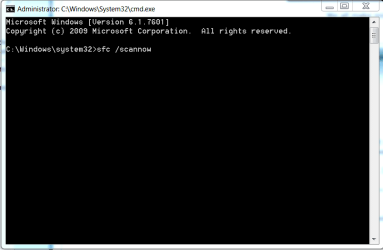
Well I don't undestand how you got there but your command prompt was wrong. You should have seen this:
My Computer
At a glance
Microsoft Windows 7 Home Premium 64-bit 7601 ...Intel(R) Core(TM) i7-3770 CPU @ 3.40GHz8.00 GBIntel(R) HD Graphics 4000
Computer type
PC/Desktop
OS
Microsoft Windows 7 Home Premium 64-bit 7601 Multiprocessor Free Service Pack 1
CPU
Intel(R) Core(TM) i7-3770 CPU @ 3.40GHz
Motherboard
ASUSTeK COMPUTER INC. P8H77-M
Memory
8.00 GB
Graphics Card(s)
Intel(R) HD Graphics 4000
Sound Card
On Board
Monitor(s) Displays
Dell 24"
Screen Resolution
1920 x 1080
Hard Drives
(1) INTEL SSDSC2CT180A3 ATA Device (2) ST500DM002-1BD142 ATA Device (3) WDC WD3200AAKS-75L9A0 ATA Device (4) Generic- Compact Flash USB Device (5) Generic- MS/MS-Pro USB Device (6) Generic- SD/MMC USB Device (7) Generic- SM/xD-Picture USB