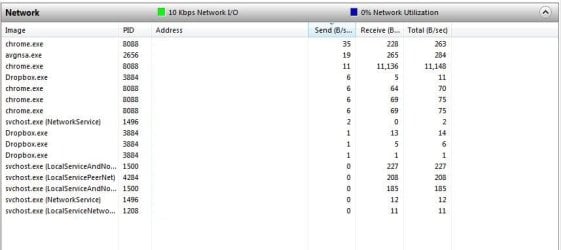
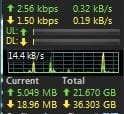
Can somone explain what **CRYPTSVC** cryptographic serivces/svchost is? I keep catching svchost uploading SOME kind of data via a network monitor.
I cannot find much info about cryptographic services. What EXACTLY is it and what kind of data would it be uploading or programs it would associate with and the data thats uploadin how can I find out to who/where its uploading TO?
This random contstant uploading is making me paranoid. When I kill the SVCHOST thet cryptsvc is in the uploading stops.
I have dropbox but it is nothing has been added so there shouldn't be any activity?? When I upload it is only in use while it is being used. Does dropbox use bandwidth when no files are being used from it?
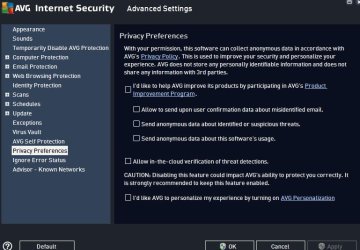
In AVG there was something checked that said:
"Allow in-the-cloud verification of threat detections. CAUTION: Disabling this feature could impact AVGs ability to protect you correctly. It is strongly recommenced to keep this feature enabled." EVerything else was unchecked.
I'll try to disable that and see if the uploads stop.
Whats confusing me though is its not just uploading when there is activity. It just randomly starts and upload for like 5-10 mins before it stops. Unless I get overly paranoid and end the process/service myself.
(EDIT--Since you mentioned AVG I shall also note that when I upgraded from AVG 2012 to the new 2015 version my computer is running slower than a turtle/snail now)
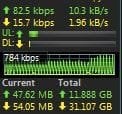
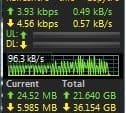
OK so I left this sit for a few days but it still seems to be doing it. The network meter shows upload , I go to resource meter, Its svchost that show the highest upload in resource meter. Then I open task managaer and gp to the correct PID in services and of course it still that bloody cryptsvc uploading something and I can't figure out what is being uploaded and where its being uploaded TO. I kill the process in task manager and the upload stops. Little bit later cryptsvc is back and uploading again.
I um unable to find results on google on how to determine/research what is being uploaded by cryptsvc and to who or where whatever is being uploaded is going.
EDIT: I JUST FOUN CRYPTOGRAPHIC SERVICES IN SERVICES.MSC. i STOPPED IT AND DISABLED IT AS PER THE PICTURE. Is this leaving me open to any sort of attacks?
I woke up this morning and as soon as I turned on the monitor, according to the network meter *something* was being uploaded to *somewhere* and I still cant figure out how to identify and solve this. I killed the cryptsvc service and sure enough the upload stopped. In Cloud verification is disabled in AVG. Its not Dropbox because Dropbox is only 1 Send (B/s). The cryptsvc often shows upload rate of 10,xxx Send (B/s).
I ask again...Is it safe to disable and leave disabled cryptsvc in services.msc without leaving myself open to any sort of attacks? I read the description of what cryptsvc is in services but still cannot figure out why it needs to upload so often and what it is that is being uploading and to where?
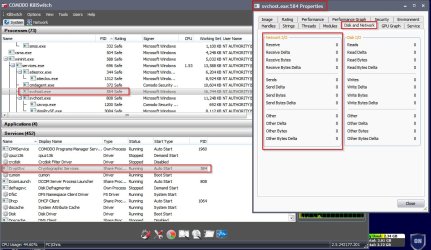
(The resource meter picture is after I killed the svchost that contained the cryptsvc service)
All I can say is as long as you have a cloud update service doing auto updates you will be see updates.
If I was going to use a Cloud service I would use encryption if the data being put into the cloud is sensitive.
I would also do it manually not any kind of Auto settings.
Because I don't use a Cloud service I have no idea what setting selection you may or may not have.
You will have to look into the instruction of what ever cloud service you are using. I can't do that for you.
My Computer
Computer type
PC/Desktop
Computer Manufacturer/Model Number
Home made Desktop
OS
Windows 10 Pro. 64/ version 1709 Windows 7 Pro/64
CPU
Intel i7-6800K @ 4.3
Motherboard
ASUS X-99 Deluxe II
Memory
Corsair Platinum 16 gig @2400
Graphics Card(s)
EVGA GTX 1070 OC
Monitor(s) Displays
Asus 27" LED LCD/VE278Q
Screen Resolution
1920-1080 or 1280-720 HDMI
Hard Drives
INTEL SSD 730-240 Gb Sata 3.0/
PSU
EVGA Platium 1200W
Case
Phanteks Luxe Tempered Glass 8 fans/ one radiator
Cooling
XSPC/ Water Cooled CPU
Keyboard
Das 4 Professional
Mouse
Logitech M705/MX Anywhere 2-S
Internet Speed
100 mbits
Antivirus
Microsoft Security Essentials/ Malwarebytes Premium 3.0/ SAS
Browser
I.E. 11 default/Firefox/ ISP Time Warner Cable/Spectrum
Other Info
LG BluRay Burner/
Sound system-KLipsch-THX/
Icy Dock ssd Hot Swap bays.
You are likely worried for nothing. This service handles the certificates on the machine, those used in SSL, and digital signatures. When it connects to the Internet its most likely validating the certificates to the Root Certificate Authority that is responsible for the certificate. All of the downloads from Windows Update for example are signed. Other vendors do the same.
My Computer
Computer type
PC/Desktop
Computer Manufacturer/Model Number
Alienware Aurora ALX R4
OS
Windows 10 Pro (x64)
CPU
Intel Core i7-3930K (3.2GHz - 4.5GHz)
Motherboard
Alienware Aurora-R4 x79
Memory
4x Samsung 4GB PC3-12800 DDR3 (16GB 1600MHz)
Graphics Card(s)
Nvidia Geforce GTX 690
Sound Card
SteelSeries Siberia Elite
Monitor(s) Displays
Dell UltraSharp U3011
Screen Resolution
2560x1600
Hard Drives
Samsung 850 Pro 256 GB, Seagate 1TB Desktop Hybrid HDD, 2x Western Digital 4TB Green HDD
PSU
875W Some Dell PSU <.<
Case
Alienware Aurora ALX
Cooling
Custom Liquid Cooling (EK CPU & GPU blocks) dual EK 480RAD
Keyboard
Logitech G710+ Mechanical
Mouse
Logitech G700s
Internet Speed
Verizon Fios (50 mbps average)
Other Info
Server: Intel NUC D54250WYK: i5-4250U, 16GB, 256 GB mSATA, Windows Server 2012 R2
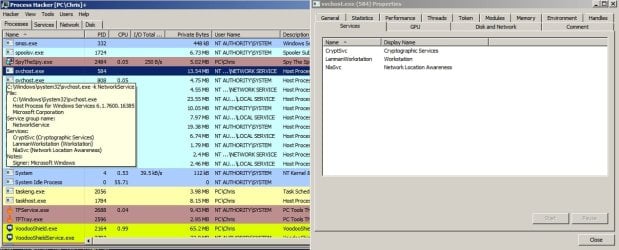
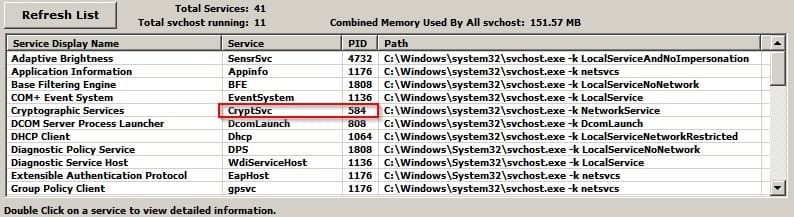
None of your screenshots show anything useful. Could you provide one showing the svchost PID and preferably something that shows that a connection has been established?
Example:
Svchost PID:
Connections:
My Computer
Computer type
Laptop
Computer Manufacturer/Model Number
ASUS
OS
Microsoft Windows 7 Home Premium 64-bit 7601 Multiprocessor Free Service Pack 1
CPU
AMD C-60 APU with Radeon(tm) HD Graphics
Motherboard
ASUSTeK COMPUTER INC. X501U
Memory
4.00 GB
Graphics Card(s)
AMD Radeon HD 6290 Graphics
Sound Card
(1) AMD High Definition Audio Device (2) Realtek High Defi
Yes. Here is the PID. Although its not doing anything strange right now. Its a very intermittent problem. The network meter is acting like it should.
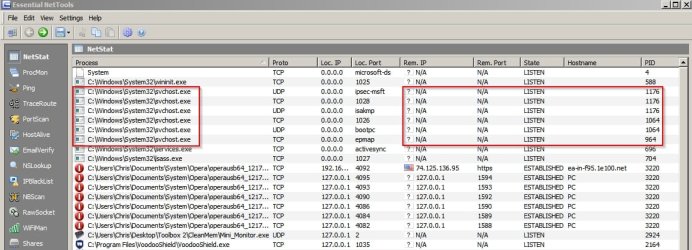
As for connection established Im gonna DL EssentialNetTools as you show if its free or if its not free I'll be a while as Ill have to find something else that is.
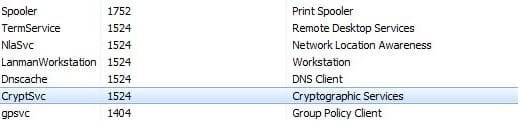
OK That PID is showing up as SVChost which is what it shows as in Windows TAsk Manager but when I right click that SVC host to services there is multiple listing for the one service # as shown in the previous picture and thats where the Cryptsvc is. But this is what EssentialNetTools Lists for PID 1524
Okay so using Comodo Killswitch (free) on my own machine shows cyrptsvc PID running under svchost. Checking network shows zero data being transferred. Perhaps you could keep any eye on it next time it goes crazy and use one or more of these tools to see where it's connecting to?
If you see "Established" connection for the PID try getting the ip address and domain name.
My Computer
Computer type
Laptop
Computer Manufacturer/Model Number
ASUS
OS
Microsoft Windows 7 Home Premium 64-bit 7601 Multiprocessor Free Service Pack 1
CPU
AMD C-60 APU with Radeon(tm) HD Graphics
Motherboard
ASUSTeK COMPUTER INC. X501U
Memory
4.00 GB
Graphics Card(s)
AMD Radeon HD 6290 Graphics
Sound Card
(1) AMD High Definition Audio Device (2) Realtek High Defi
OK next time my network meter goes nuts like the previous pictures I'll open up the Essential Tools again (Unless told to drop Essential Tools and get Comodo instead) and repost the PIDS. The issue only happens maybe every second day or so but its not until a few days ago that I seen it as bad as the 1st pic on this page and the last pic of page 1. Its just so random I cant even pinpoint the trigger for it.
CONNECTION ESTABLISHED.. However its not making the meter do anything crazy but there IS a connection there. I killed it as soon as I took the screenshot. IDK if this is of any use since the meter was OK though.
Would you try this to see if it makes any difference?
Control Panel> System> Remote Settings
Configure as above.
Also next time you get the problem lets get a better look at what port it's using.
For now - run an Elevated Command Prompt and click in the top left corner on C:\_ then choose "Properties" > "Options" then enable "Quick Edit Mode"
Next time the problem occurs run Elevated Command Prompt and in the window that opens up type:
netstat -ano
Press Enter. Wait for the list to populate then highlight all the text by left clicking and dragging your mouse over the text. Then when it's highlighted - right click, open your text editor and paste the results. (Ctrl+V)
Post them here thanks.
My Computer
Computer type
Laptop
Computer Manufacturer/Model Number
ASUS
OS
Microsoft Windows 7 Home Premium 64-bit 7601 Multiprocessor Free Service Pack 1
CPU
AMD C-60 APU with Radeon(tm) HD Graphics
Motherboard
ASUSTeK COMPUTER INC. X501U
Memory
4.00 GB
Graphics Card(s)
AMD Radeon HD 6290 Graphics
Sound Card
(1) AMD High Definition Audio Device (2) Realtek High Defi