Windows 7 x64 i5 Dell Inspiron N5010 lags when music played

sahildave1991

New member
Member
Local time
11:36 AM
Messages
36
Its been an issue with me and my friend having i5 CPU M 450 @2.40 GHz
Whenever i play music in, usually foobar2000/winamp/mediamonkey the computers lags a lot. it does not freeze completely, but it becomes unbearably slow.

Is this a common issue ? is there any solution ?

i usually "set affinity" of the music player from the task manager to "cpu 3" only, and the other program running to the remaining cpu, and the performance usually gets better, but i cant do this with chrome because there are many "chrome.exe" in the task manager.
 

My Computer My Computer

At a glance

Windows 7 Ultimate x64Intel(R) Core(TM) i5 CPU M 450 @ 2.40GHz4GBATI Mobility Radeon HD 5470
Computer Manufacturer/Model Number
Dell Inspiron N5010
OS
Windows 7 Ultimate x64
CPU
Intel(R) Core(TM) i5 CPU M 450 @ 2.40GHz
Motherboard
Dell
Memory
4GB
Graphics Card(s)
ATI Mobility Radeon HD 5470
Sound Card
ATI High Definition Audio Device
Monitor(s) Displays
Generic PnP Monitor 15"
Screen Resolution
1366x768 (32-bit) (60 Hz)
Hard Drives
320 Gb
Its been an issue with me and my friend having i5 CPU M 450 @2.40 GHz
Whenever i play music in, usually foobar2000/winamp/mediamonkey the computers lags a lot. it does not freeze completely, but it becomes unbearably slow.

Is this a common issue ? is there any solution ?

i usually "set affinity" of the music player from the task manager to "cpu 3" only, and the other program running to the remaining cpu, and the performance usually gets better, but i cant do this with chrome because there are many "chrome.exe" in the task manager.

Often caused by a driver. Please download this latency checker to test. DPC Latency Checker

Also check in event viewer for sound related things, app hang, or app crash.

There are several ways to find what the problem is. The best is to go into event viewer (type eventvwr in search). Event viewer (local) and look for errors listed in the last day, week, etc. Then go to the windows log>application tab. Finally the windows Logs>system tabs.

You want to look for all errors (they have red in the left column ).

When you find them you want to look for critical errors that say app hang, app crash, or anything that relates to the problem.

When you find them please note the event ID, and the source codes and tell us what they are.
 

My Computer My Computer

At a glance

Win 8 Release candidate 8400[email protected]4 gigsNvidia 9600M
Computer Manufacturer/Model Number
HP Pavillion dv-7 1005 Tx
OS
Win 8 Release candidate 8400
CPU
[email protected]
Memory
4 gigs
Graphics Card(s)
Nvidia 9600M
Sound Card
HD built-in
Monitor(s) Displays
17" Wxga
Screen Resolution
1440x900
Cooling
none
Internet Speed
45Mb down 5Mb up
Its been an issue with me and my friend having i5 CPU M 450 @2.40 GHz
Whenever i play music in, usually foobar2000/winamp/mediamonkey the computers lags a lot. it does not freeze completely, but it becomes unbearably slow.

Is this a common issue ? is there any solution ?

i usually "set affinity" of the music player from the task manager to "cpu 3" only, and the other program running to the remaining cpu, and the performance usually gets better, but i cant do this with chrome because there are many "chrome.exe" in the task manager.

Often caused by a driver. Please download this latency checker to test. DPC Latency Checker

Also check in event viewer for sound related things, app hang, or app crash.

There are several ways to find what the problem is. The best is to go into event viewer (type eventvwr in search). Event viewer (local) and look for errors listed in the last day, week, etc. Then go to the windows log>application tab. Finally the windows Logs>system tabs.

You want to look for all errors (they have red in the left column ).

When you find them you want to look for critical errors that say app hang, app crash, or anything that relates to the problem.

When you find them please note the event ID, and the source codes and tell us what they are.

Thanks for reply, i have download DPC, now how should i give you the data or anything else ?

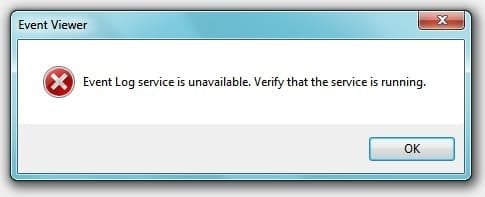
and i am getting error while openinig event viewer - PIC ATTACHED
 

Attachments

  • prob3.jpg
    prob3.jpg
    10.2 KB · Views: 9

My Computer My Computer

At a glance

Windows 7 Ultimate x64Intel(R) Core(TM) i5 CPU M 450 @ 2.40GHz4GBATI Mobility Radeon HD 5470
Computer Manufacturer/Model Number
Dell Inspiron N5010
OS
Windows 7 Ultimate x64
CPU
Intel(R) Core(TM) i5 CPU M 450 @ 2.40GHz
Motherboard
Dell
Memory
4GB
Graphics Card(s)
ATI Mobility Radeon HD 5470
Sound Card
ATI High Definition Audio Device
Monitor(s) Displays
Generic PnP Monitor 15"
Screen Resolution
1366x768 (32-bit) (60 Hz)
Hard Drives
320 Gb
CAn anyone help pls ??? :( :rolleyes:
 

My Computer My Computer

At a glance

Windows 7 Ultimate x64Intel(R) Core(TM) i5 CPU M 450 @ 2.40GHz4GBATI Mobility Radeon HD 5470
Computer Manufacturer/Model Number
Dell Inspiron N5010
OS
Windows 7 Ultimate x64
CPU
Intel(R) Core(TM) i5 CPU M 450 @ 2.40GHz
Motherboard
Dell
Memory
4GB
Graphics Card(s)
ATI Mobility Radeon HD 5470
Sound Card
ATI High Definition Audio Device
Monitor(s) Displays
Generic PnP Monitor 15"
Screen Resolution
1366x768 (32-bit) (60 Hz)
Hard Drives
320 Gb
CAn anyone help pls ??? :( :rolleyes:

When you ran the latency checker did and yellow or red bars appear?

If so there is a driver slowing them down.

Follow the directions on the Latency checkers site to find which one.
 

My Computer My Computer

At a glance

Win 8 Release candidate 8400[email protected]4 gigsNvidia 9600M
Computer Manufacturer/Model Number
HP Pavillion dv-7 1005 Tx
OS
Win 8 Release candidate 8400
CPU
[email protected]
Memory
4 gigs
Graphics Card(s)
Nvidia 9600M
Sound Card
HD built-in
Monitor(s) Displays
17" Wxga
Screen Resolution
1440x900
Cooling
none
Internet Speed
45Mb down 5Mb up
Back
Top