I may be in the wrong section. It was hard to assess just where to ask.
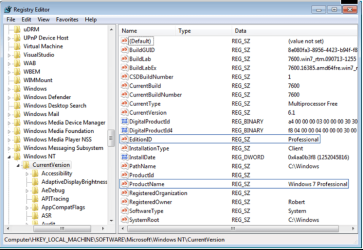
I bought a Windows 7 x64 Professional key, and installed from a windows 7 Pro x64 N iso thinking I would avoid media player. As a keen HWBot benchmarker this has come back to bite me because PCMark wont run fully without Media Player. I don't get a valid result.
So I tried downloading Windows6.1-KB968211-x64-RefreshPkg.msu, but it refuses to install. I get the "Not applicable to my installation" message. None of the fixes I've found by Googling have made any difference.
Now I'm wondering if I could "sidegrade" (as distinct from upgrade) , and retain file associations, by running a full version of Windows 7, or if I would need to do a full reinstall?
I bought a Windows 7 x64 Professional key, and installed from a windows 7 Pro x64 N iso thinking I would avoid media player. As a keen HWBot benchmarker this has come back to bite me because PCMark wont run fully without Media Player. I don't get a valid result.
So I tried downloading Windows6.1-KB968211-x64-RefreshPkg.msu, but it refuses to install. I get the "Not applicable to my installation" message. None of the fixes I've found by Googling have made any difference.
Now I'm wondering if I could "sidegrade" (as distinct from upgrade) , and retain file associations, by running a full version of Windows 7, or if I would need to do a full reinstall?
My Computer
At a glance
Windows 7 Pro 64i7 3970XG.Skill Ripjaws Z F3-17000CL9Q-16GBZH 16GB (4...Gainward GTX 580 1536MB Quad SLI
- OS
- Windows 7 Pro 64
- CPU
- i7 3970X
- Motherboard
- Asus Rampage IV Extreme
- Memory
- G.Skill Ripjaws Z F3-17000CL9Q-16GBZH 16GB (4x4GB) DDR3
- Graphics Card(s)
- Gainward GTX 580 1536MB Quad SLI
- Sound Card
- Onboard
- Monitor(s) Displays
- 3 x Dell U2412M
- Screen Resolution
- 5760 x 1200
- Hard Drives
- OCZ Vertex 4 256GB and Seagate SATA 1TB
- PSU
- Silverstone Strider 1500W
- Case
- Lian Li T160 Testbench
- Cooling
- Water