Windows 7 x64 not recognizing RAM

MrLooke

New member
Local time
12:58 AM
Messages
4
Okay, so I've got Windows 7 Ultimate x64 installed and I have 12gb of ram (3x4gb) but windows 7 only detects 4gb as shown below:

16jnh36.jpg


But CPU Z detects the whole 12gb, so does anyone know what the problem is? or what I need to do to diagnose the problem

2a5iubq.jpg


My spec's are on my profile under "system specs" if anyone needs to know them and if you need any more information, just ask.

Thanks in advance for any help, I appreciate it :D
 

My Computer My Computer

At a glance

Windows 7 Ultimate x64Intel i7 930 2.8GHz Socket 1366 8MB L3 CacheOCZ PC3-10666 DDR3 1333 3X4GB REAPER 1.65v x 3MSI GTX 580 1536MB GDDR5 Dual DVI Mini HDMI O...
OS
Windows 7 Ultimate x64
CPU
Intel i7 930 2.8GHz Socket 1366 8MB L3 Cache
Motherboard
Asus SABERTOOTH X58 TUF
Memory
OCZ PC3-10666 DDR3 1333 3X4GB REAPER 1.65v x 3
Graphics Card(s)
MSI GTX 580 1536MB GDDR5 Dual DVI Mini HDMI Out PCI-E
Sound Card
None
Monitor(s) Displays
Samsung SyncMaster P2450H 24" Monitor 1920x1080 2ms 70,000:
Hard Drives
Crucial 256GB Real SSD C300 2.5" SATA 6Gb/s Interface Read 355MB/s Write 215MB/s
Samsung HD103SJ Spinpoint F3 1TB Hard Drive SATAII 7200rpm 32MB Cache
Samsung HD103SJ Spinpoint
PSU
OCZ 750W Fatal1ty Series Semi-Modular PSU
Case
Coolermaster HAF X Case
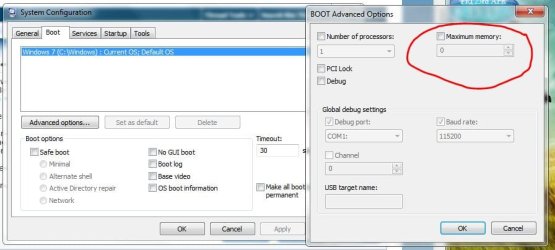
Check here to make sure Maximum memory is unchecked & set to Zero (0)

Start :ar: System Configuration :ar: Boot :ar: Advanced Options

Maximum_memory.JPG


:orb:

Also make sure there is nothing in the BIOS setup limiting memory or allocating memory to another area.
 

My Computer My Computer

At a glance

Win7 Enterprise, Win7 x86 (Ult 7600), Win7 x6...AMD fx8350 4ghz, AMD-32 2400mhz, AMD-64 3200m...2gb, 4gb on the Ult 7600, 4gb on Technet RTM,...Draw my own Graphics, several nVidia cards
Computer type
PC/Desktop
Computer Manufacturer/Model Number
Built them myself, Science Experiments !
OS
Win7 Enterprise, Win7 x86 (Ult 7600), Win7 x64 Ult 7600, TechNet RTM on AMD x64 (2.8Ghz)
CPU
AMD fx8350 4ghz, AMD-32 2400mhz, AMD-64 3200mhz, AMDx64 2.8G
Motherboard
SIS 755, ECS-K8M890M-M (Ult 7600), GigaByte & others
Memory
2gb, 4gb on the Ult 7600, 4gb on Technet RTM, 32gb on FX8350
Graphics Card(s)
Draw my own Graphics, several nVidia cards
Sound Card
on motherboard
Monitor(s) Displays
19" flat scr, 28" I-Inc widescr,22" Emprex Widescr, 23" Acer
Screen Resolution
1280 x 1024, 1440 x 900, 1920 x 1080
Hard Drives
6 pata Ide HD's & 2 Sata HD's
added 80gb external on Ult 7600 computer,
numerous extra 1tb, 2TB, 3Tb SATA HD's
A collection of ext HD Docks w/ HDs
PSU
430w, 550w, 600w, 700, 800, etc
Case
All Generic Full Towers
Cooling
Open Air & a few fans, some w/ colored LEDs
Keyboard
Compaq & Dell recycled from GoodWill
Mouse
Made in China Optical Wired Mouse
Internet Speed
Fast Cable InterNet
Antivirus
AVG Free on 24 different Desktops, NO Problems!
Browser
IE 8 is preferred, but use FireFox sometimes
Other Info
Linksys Routers, switches, & Hubs
Too Many USB Flash Drives to count, Biggest is 64GB !
Eight computers in my home network.
Sixteen computers at my business network.
Linked via TeamViewer !
Lots of old used spare computer parts everywhere!
It's unchecked and set to 0


In BIOS under System information it says only 4gb is usable... i'm not sure how to remedy this though
 

My Computer My Computer

At a glance

Windows 7 Ultimate x64Intel i7 930 2.8GHz Socket 1366 8MB L3 CacheOCZ PC3-10666 DDR3 1333 3X4GB REAPER 1.65v x 3MSI GTX 580 1536MB GDDR5 Dual DVI Mini HDMI O...
OS
Windows 7 Ultimate x64
CPU
Intel i7 930 2.8GHz Socket 1366 8MB L3 Cache
Motherboard
Asus SABERTOOTH X58 TUF
Memory
OCZ PC3-10666 DDR3 1333 3X4GB REAPER 1.65v x 3
Graphics Card(s)
MSI GTX 580 1536MB GDDR5 Dual DVI Mini HDMI Out PCI-E
Sound Card
None
Monitor(s) Displays
Samsung SyncMaster P2450H 24" Monitor 1920x1080 2ms 70,000:
Hard Drives
Crucial 256GB Real SSD C300 2.5" SATA 6Gb/s Interface Read 355MB/s Write 215MB/s
Samsung HD103SJ Spinpoint F3 1TB Hard Drive SATAII 7200rpm 32MB Cache
Samsung HD103SJ Spinpoint
PSU
OCZ 750W Fatal1ty Series Semi-Modular PSU
Case
Coolermaster HAF X Case
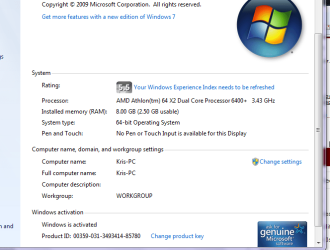
Hey guys Im also having a similar problem. I have just installed 2 4gb sticks or RAM. Bios reads it as 8gb. But In System Properties It says I have 8Gb installed but only 2.5Gb is uasable. I tried the Ms config thing as well.
Thanks.
 

Attachments

  • res mon.PNG
    res mon.PNG
    28.8 KB · Views: 289
  • Sys Properties.PNG
    Sys Properties.PNG
    26.5 KB · Views: 160
Last edited:

My Computer My Computer

At a glance

Windows 7 basic x64Amd 3.2Ghz dual core8Gb ddr2Xfx (512) Nvidia 9800
Computer Manufacturer/Model Number
Home Built
OS
Windows 7 basic x64
CPU
Amd 3.2Ghz dual core
Motherboard
Asus Crosshair Formula II
Memory
8Gb ddr2
Graphics Card(s)
Xfx (512) Nvidia 9800
Sound Card
rocket fish
Hard Drives
Seagate Baracuda 500gb 7200rpm
WD Veloci raptor 150Gb 10000rpm
PSU
Black Widow 1200 watt
Case
Antex case
Cooling
Big cpu cooler
Anyone got any ideas?
 

My Computer My Computer

At a glance

Windows 7 Ultimate x64Intel i7 930 2.8GHz Socket 1366 8MB L3 CacheOCZ PC3-10666 DDR3 1333 3X4GB REAPER 1.65v x 3MSI GTX 580 1536MB GDDR5 Dual DVI Mini HDMI O...
OS
Windows 7 Ultimate x64
CPU
Intel i7 930 2.8GHz Socket 1366 8MB L3 Cache
Motherboard
Asus SABERTOOTH X58 TUF
Memory
OCZ PC3-10666 DDR3 1333 3X4GB REAPER 1.65v x 3
Graphics Card(s)
MSI GTX 580 1536MB GDDR5 Dual DVI Mini HDMI Out PCI-E
Sound Card
None
Monitor(s) Displays
Samsung SyncMaster P2450H 24" Monitor 1920x1080 2ms 70,000:
Hard Drives
Crucial 256GB Real SSD C300 2.5" SATA 6Gb/s Interface Read 355MB/s Write 215MB/s
Samsung HD103SJ Spinpoint F3 1TB Hard Drive SATAII 7200rpm 32MB Cache
Samsung HD103SJ Spinpoint
PSU
OCZ 750W Fatal1ty Series Semi-Modular PSU
Case
Coolermaster HAF X Case
Anyone got any ideas?

Post a snip of your Resource Monitor - Memory tab.
Start button > type Resource Monitor in the box, hit enter.

Any new hardware lately?
New graphics card or RAM?

If you haven't refreshed your WEI, try that, strange at it seems it has helped for some people.

Hey guys Im also having a similar problem. I have just installed 2 4gb sticks or RAM. Bios reads it as 8gb. But In System Properties It says I have 8Gb installed but only 2.5Gb is uasable. I tried the Ms config thing as well.
Thanks.

That is a huge Hardware Reserved amount.
I have 8GB RAM with 9MB Hardware Reserved, something is trying to use your RAM.

Did you re-boot after clearing the Max memory in msconfig?
If not, then re-boot and see if it has made a difference.

When you add new hardware you need to refresh your WEI, your snip shows it's asking for the refresh. As mentioned above this has helped some solve this issue in some cases.


Both of you can:
Check your BIOS for any Memory re-mapping function, if you have it enable it.

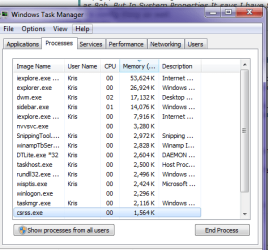
Open Task Manager, Processes Tab, click the Memory header and it will list by most memory used. This should show you what is using your memory.
Post back the details.

Check your motherboard website BIOS update log for memory fixes.
 
Last edited:

My Computer My Computer

At a glance

Windows 7 Ult x64 - SP1/ Windows 8 Pro x64Intel Core i5-3570K 4.6GHz8GB (2X4GB) DDR3 1600 Corsair Vengeance CL8 1.5vSapphire HD 7770 Vapor-X OC 1GB DDR5
Computer type
PC/Desktop
Computer Manufacturer/Model Number
76~2.0
OS
Windows 7 Ult x64 - SP1/ Windows 8 Pro x64
CPU
Intel Core i5-3570K 4.6GHz
Motherboard
Gigabyte GA-Z77X UD3H, f18
Memory
8GB (2X4GB) DDR3 1600 Corsair Vengeance CL8 1.5v
Graphics Card(s)
Sapphire HD 7770 Vapor-X OC 1GB DDR5
Sound Card
Onboard VIA VT2021
Monitor(s) Displays
22" LCD Dell
Screen Resolution
1680x1050
Hard Drives
Samsung 840Pro 128GB SSD,
Seagate Barracuda 500GB SATA2 7200rpm 32MB cache, Seagate Barracuda 1TB SATA2 7200rpm 32MB cache,
PSU
Corsair HX650W
Case
Cooler Master Storm Scout
Cooling
Corsair H80 2x12cm Noctua NF P12 , 2x14cm case fans
Keyboard
Logitech Wave
Mouse
CM Sentinel
Internet Speed
Dismal
Antivirus
Avast
Browser
Opera Next
Other Info
Haswell laptop: HP Envy 17t-j, i7-4700MQ, GeForce 740M 2GB DDR3, 17.3" Full HD 1920x1080, 16GB RAM, Samsung 840 Pro 128GB, 1TB Hitachi 7200 HDD,
Desktop: eSATA ports,
External eSATA Seagate 500GB SATA2 7200rpm,
External WD USB 500GB
In response to mr loocke

Make sure the ram you are adding is compatible with the mother board, if you system only takes 800 mhz ram and you are adding 1033 or 1333 and also what size ram stick your mobo will take, some will not recognize 4 gig sticks and these could be a major issues. Look at the specs for your board, mine maxes at 800 and I cant put anything larger than 2 gig sticks, other than another setting in the bios this must be what the issue is...
 
Last edited:

My Computer My Computer

At a glance

windows 7 ulitmate x64
OS
windows 7 ulitmate x64
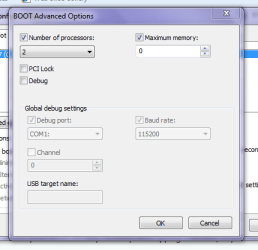
I rebooted after setting the memory in msconfig to 0, no change.
I found somthing in my bios called memorey hole mapping, it was enabled.
I also found somthing that says somthing like os/2 or no os/2. I tried both and nothing changed. also updated WEI.

Looked up BIO's updates and there are alot.
BIOS 0901
1. Add iGPU Overclock function.
2. Enhance compatibility for certain memory modules.
3. Add support to AMD C1E function.
Think this could be what im looking for?
I would realy like to avoid updating bios if posible haha.

Thanks again.
 

Attachments

  • task.PNG
    task.PNG
    16.9 KB · Views: 33
  • msconig.PNG
    msconig.PNG
    12.9 KB · Views: 41

My Computer My Computer

At a glance

Windows 7 basic x64Amd 3.2Ghz dual core8Gb ddr2Xfx (512) Nvidia 9800
Computer Manufacturer/Model Number
Home Built
OS
Windows 7 basic x64
CPU
Amd 3.2Ghz dual core
Motherboard
Asus Crosshair Formula II
Memory
8Gb ddr2
Graphics Card(s)
Xfx (512) Nvidia 9800
Sound Card
rocket fish
Hard Drives
Seagate Baracuda 500gb 7200rpm
WD Veloci raptor 150Gb 10000rpm
PSU
Black Widow 1200 watt
Case
Antex case
Cooling
Big cpu cooler

My Computer My Computer

At a glance

Win 7 Ultimate x64FX-8350 @ 4.6 GHz so farADATA XPG V1 Series Black 8GB DDR3 1600Sapphire R9 270x Dual-X
Computer type
PC/Desktop
Computer Manufacturer/Model Number
Me
OS
Win 7 Ultimate x64
CPU
FX-8350 @ 4.6 GHz so far
Motherboard
Asus M5A97 EVO
Memory
ADATA XPG V1 Series Black 8GB DDR3 1600
Graphics Card(s)
Sapphire R9 270x Dual-X
Sound Card
Xonar DGX w/ Corsair Vengence 1300
Monitor(s) Displays
Acer S232HL Abid
Screen Resolution
1920x1080
Hard Drives
120 GB OCZ Vertex 3
500 GB Seagate 7200.12
PSU
Antec Earthwatts 650W Green
Case
Antec Three Hundred
Cooling
Cooler Master 212 EVO
Keyboard
Logitech G510
Mouse
Logitech G500s
Internet Speed
35000/3000
Anyone got any ideas?

Post a snip of your Resource Monitor - Memory tab.
Start button > type Resource Monitor in the box, hit enter.

Any new hardware lately?
New graphics card or RAM?

If you haven't refreshed your WEI, try that, strange at it seems it has helped for some people.

Hey guys Im also having a similar problem. I have just installed 2 4gb sticks or RAM. Bios reads it as 8gb. But In System Properties It says I have 8Gb installed but only 2.5Gb is uasable. I tried the Ms config thing as well.
Thanks.

That is a huge Hardware Reserved amount.
I have 8GB RAM with 9MB Hardware Reserved, something is trying to use your RAM.

Did you re-boot after clearing the Max memory in msconfig?
If not, then re-boot and see if it has made a difference.

When you add new hardware you need to refresh your WEI, your snip shows it's asking for the refresh. As mentioned above this has helped some solve this issue in some cases.


Both of you can:
Check your BIOS for any Memory re-mapping function, if you have it enable it.

Open Task Manager, Processes Tab, click the Memory header and it will list by most memory used. This should show you what is using your memory.
Post back the details.

Check your motherboard website BIOS update log for memory fixes.
24q49r6.jpg


There's the resource monitor
and it's all brand new stuff, it's a new build, I've installed latest drivers and BIOS updates as far as I can see.
I tried refreshing my WEI, no luck :(
And there is no memory remapping in my BIOS

Thanks for replying though :)
I'll check this now, thanks
 

My Computer My Computer

At a glance

Windows 7 Ultimate x64Intel i7 930 2.8GHz Socket 1366 8MB L3 CacheOCZ PC3-10666 DDR3 1333 3X4GB REAPER 1.65v x 3MSI GTX 580 1536MB GDDR5 Dual DVI Mini HDMI O...
OS
Windows 7 Ultimate x64
CPU
Intel i7 930 2.8GHz Socket 1366 8MB L3 Cache
Motherboard
Asus SABERTOOTH X58 TUF
Memory
OCZ PC3-10666 DDR3 1333 3X4GB REAPER 1.65v x 3
Graphics Card(s)
MSI GTX 580 1536MB GDDR5 Dual DVI Mini HDMI Out PCI-E
Sound Card
None
Monitor(s) Displays
Samsung SyncMaster P2450H 24" Monitor 1920x1080 2ms 70,000:
Hard Drives
Crucial 256GB Real SSD C300 2.5" SATA 6Gb/s Interface Read 355MB/s Write 215MB/s
Samsung HD103SJ Spinpoint F3 1TB Hard Drive SATAII 7200rpm 32MB Cache
Samsung HD103SJ Spinpoint
PSU
OCZ 750W Fatal1ty Series Semi-Modular PSU
Case
Coolermaster HAF X Case
Good advice from stormy.

Also try re-seating the RAM cards.
If that doesn't help, check your manual for the recommended slots to use.
If that doesn't help, move all cards to the alternate slots.

Still not seeing the RAM, run memtest86+ with one card in one slot, then move to next slot with the next card, you are looking for bad RAM cards and bad motherboard slots.
 

My Computer My Computer

At a glance

Windows 7 Ult x64 - SP1/ Windows 8 Pro x64Intel Core i5-3570K 4.6GHz8GB (2X4GB) DDR3 1600 Corsair Vengeance CL8 1.5vSapphire HD 7770 Vapor-X OC 1GB DDR5
Computer type
PC/Desktop
Computer Manufacturer/Model Number
76~2.0
OS
Windows 7 Ult x64 - SP1/ Windows 8 Pro x64
CPU
Intel Core i5-3570K 4.6GHz
Motherboard
Gigabyte GA-Z77X UD3H, f18
Memory
8GB (2X4GB) DDR3 1600 Corsair Vengeance CL8 1.5v
Graphics Card(s)
Sapphire HD 7770 Vapor-X OC 1GB DDR5
Sound Card
Onboard VIA VT2021
Monitor(s) Displays
22" LCD Dell
Screen Resolution
1680x1050
Hard Drives
Samsung 840Pro 128GB SSD,
Seagate Barracuda 500GB SATA2 7200rpm 32MB cache, Seagate Barracuda 1TB SATA2 7200rpm 32MB cache,
PSU
Corsair HX650W
Case
Cooler Master Storm Scout
Cooling
Corsair H80 2x12cm Noctua NF P12 , 2x14cm case fans
Keyboard
Logitech Wave
Mouse
CM Sentinel
Internet Speed
Dismal
Antivirus
Avast
Browser
Opera Next
Other Info
Haswell laptop: HP Envy 17t-j, i7-4700MQ, GeForce 740M 2GB DDR3, 17.3" Full HD 1920x1080, 16GB RAM, Samsung 840 Pro 128GB, 1TB Hitachi 7200 HDD,
Desktop: eSATA ports,
External eSATA Seagate 500GB SATA2 7200rpm,
External WD USB 500GB
Back
Top