Windows 7 x86 - Communication Headphones Default Device

Tech123791

New member
Local time
6:26 PM
Messages
7
For some reason, I cannot set my headset ( SteelSeries Siberia V2 (non-USB) ) as a Default Device (playback). It is stuck as a Default Communication Device. Sometimes, applications like Skype and Google Chrome will play through my default device (internal speakers) and it is really annoying. In addition, I have an IDT Codec but for some reason, I do not have an IDT control panel, so I cannot change anything from there. I can also not instead the IDT Control Panel/ Driver because when I do I recieve a message saying, "The hardware detected is not supported by this IDT software package. The installer will abort."

Would someone help?
 

My Computer My Computer

At a glance

Windows 7 Home Premium 64-bit
OS
Windows 7 Home Premium 64-bit
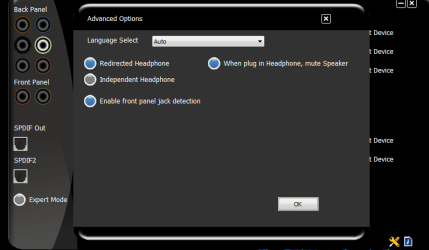
Is this an on board sound driver...built in to your mobo or is this and add on sound card? In either case you should have the sound driver installed from either your mobo or your sound card vendor. With that driver usually there is a sound control panel and in that panel you have your settings area to redirect sound when plugged into 3.5 mm jack. I have VIA HD audio driver and here is where I set mine up.

sound panel.PNG

Now I have a gaming keyboard with a built in sound driver that has 3.5 mm jacks and use my keyboard, which does everything for me automatically.

BTW...nice headset.
 

My Computer My Computer

At a glance

Windows 7 Ultimate 64 bitAMD Phenom II X4 965 Black EditionGSkill 4 X 2 GB PC 8500XFX Radeon HD 6790 D
Computer Manufacturer/Model Number
Custom built
OS
Windows 7 Ultimate 64 bit
CPU
AMD Phenom II X4 965 Black Edition
Motherboard
Gigabyte GA-MA790X-DS4
Memory
GSkill 4 X 2 GB PC 8500
Graphics Card(s)
XFX Radeon HD 6790 D
Sound Card
On board RealTek HD
Monitor(s) Displays
Dual monitors:Samsung SyncMaster S20B300
Screen Resolution
1600 X 900
Hard Drives
Seagate Barracuda 1TB (primary)
Seagate Barracuda 2 X 320 GB
PSU
Ultra X4 750 watt fully modular
Case
Thermaltake Overseer RX 1 full tower
Cooling
Core-Contact 92 mm CPU Cooler
Keyboard
Logitech G510
Mouse
Razor DeathAdder
Internet Speed
50/5 Mbps UL/DL
Other Info
Optical: Super Muliti DVD burner w/lightscribe, Hauppauge WinTV HVR-1800
It is an on-board sound driver. Anyways, I'm not quite sure how to open up IDT Audio Control Panel as Ican't seem to find it anywhere.
 
Last edited:

My Computer My Computer

At a glance

Windows 7 Home Premium 64-bit
OS
Windows 7 Home Premium 64-bit
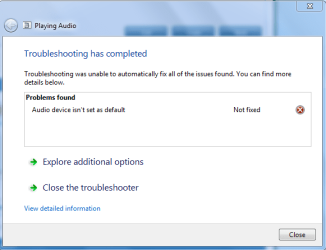
In addition, I have tried using the troubleshooter to change the default device to my headset, but when I try, this appears.
 

Attachments

  • Unfix.PNG
    Unfix.PNG
    15.6 KB · Views: 14

My Computer My Computer

At a glance

Windows 7 Home Premium 64-bit
OS
Windows 7 Home Premium 64-bit
Alright, this issue has plagued me for a while now. This is just how I managed to fix mine, hope this helps some of you.
  1. Unplug the "communication device"
  2. Enter Skype and go to Audio Settings
  3. change the speaker settings from communication device to Speakers and Headphones
  4. Save these changes
  5. Plug in the "communication device"
  6. enjoy!
What this did was it changed the sound settings in Skype to the default (speakers or headphones) which eliminated the need for a communication device, and when I plugged my "communication device" headset back in, it registered as headphones like it was supposed to reverting all sounds through them the way I wanted (so that i.e. Skype AND iTunes both went through the headphones). BTW I am on a HP dv6 running Windows 7 Home Premium 64bit and I am using a Turtle Beach earforce X12 headset.
 

My Computer My Computer

At a glance

Windows 7 Home Premium 64bit
OS
Windows 7 Home Premium 64bit
Back
Top