Windows 7 x86 + Sapphire HD 3850 = problem

fokogrilo

New member
Local time
6:35 PM
Messages
12
Hi!

I have a Sapphire Radeon HD3850 AGP card in my system but when i try to install the latest (or not latest) drivers (Catalyst 9.9 HOTFIX for HD2k/HD3k/HD4k AGP cards and Vista 32-bit for Windows Vista 32-bit Edition) i think it only install the defaults to standard VGA, and if I try to run the CCC in the explore it doesn't open. :confused:

If anyonne could help me i would be very appreciated!


Regards,
Fokogrilo
 

My Computer My Computer

OS
Windows 7

My Computer My Computer

Computer Manufacturer/Model Number
Self Built
OS
Windows 7 ultimate 64 bit / XP Home sp3
CPU
intel Core 2 Duo E8400 3.0ghz
Motherboard
Asus P5ND bios 1401
Memory
8 gigs 1066 OCZ Fata1ty
Graphics Card(s)
EVGA GTX 580 Call of Duty Black Ops Edition
Sound Card
Creative Soundblaster Audigy 2zs
Monitor(s) Displays
Asus 24in LCD's 2MS X2
Screen Resolution
1920x1080p @60Hz
Hard Drives
WD Caviar 500 Black/ WD Caviar 200 Blue
PSU
OCZ 700W GameXtreme
Case
NZXT Apollo
Cooling
Corsair H50 CPU/120mm x3 /60mm x2 /Corsair Dominator Ram
Keyboard
Logitech Bluetooth Wireless MX5000
Mouse
Logitech Bluetooth Wireless MX1000
Internet Speed
Download 19.83 Upload 0.97
Other Info
Logitech Z2300 Speakers/ Bose Noise Cancelling Headphones/Avermedia PCI-e Hybrid TV Bravo/Epson NX415 all in one/ 4 Port Powered USB Hub/ LG 10x Bluray Burner /TSST Corp DVDRW External

My Computer My Computer

Computer Manufacturer/Model Number
self built
OS
7600.20510 x86
CPU
P4 550 3.4 GHz HT running at 3.5 GHz
Motherboard
MSI PM8M3-V (MS-7211 v1.x) Micro-ATX mainboard
Memory
OCZ 2 GB(2x1GB) DDR400mHz running @ 414 mHz
Graphics Card(s)
HIS Radeon HD 3850 IceQ 3 Turbo HDMI Dual DL-DVI AGP
Sound Card
MOTU Traveler firewire studio interface 192 kHz 24 bit
Monitor(s) Displays
22" widescreen Acer X223W LCD, 17" Compaq P75 CRT
Screen Resolution
1680x1050 and 1280x1024
Hard Drives
SATA I x2 WD, 400 GB and 120 GB, SATA 2 WD Caviar Black 1 TB
PSU
350W generic
Case
Cybertronpc, it glows blue
Cooling
stock cpu fan, Ice-Q 3 gpu and system, many case fans
Keyboard
Logitch Classical Keyboard 200
Mouse
Logitech Mediaplay cordless
Internet Speed
1792/448 kbits/sec
Other Info
SATA II PCI fake RAID adapter, 1 GB Readyboost, original ATI Remote Wonder (even works with WMC perfectly), Logitech Rumblepad 2 game controller x2
Thanks for the replays. :D

I have done what you told me (torrentg) but after I restart the PC

("If it complains the driver is not signed, let it install anyway. Reboot and ....")

and when the win7 is loading the PC crashes and some times happens some kind o BSOD :eek:

Can you give me a hand?
 

My Computer My Computer

OS
Windows 7
Yeah, sure. Tell ya what. Since you're the 2nd person saying this, even though I'm quite certain the method works well as it has helped many people including myself, I'll setup the driver package myself and test it.

Then I'll upload it for ya. It'll take a little while though. I only have about 50 KB/sec up.
 

My Computer My Computer

Computer Manufacturer/Model Number
self built
OS
7600.20510 x86
CPU
P4 550 3.4 GHz HT running at 3.5 GHz
Motherboard
MSI PM8M3-V (MS-7211 v1.x) Micro-ATX mainboard
Memory
OCZ 2 GB(2x1GB) DDR400mHz running @ 414 mHz
Graphics Card(s)
HIS Radeon HD 3850 IceQ 3 Turbo HDMI Dual DL-DVI AGP
Sound Card
MOTU Traveler firewire studio interface 192 kHz 24 bit
Monitor(s) Displays
22" widescreen Acer X223W LCD, 17" Compaq P75 CRT
Screen Resolution
1680x1050 and 1280x1024
Hard Drives
SATA I x2 WD, 400 GB and 120 GB, SATA 2 WD Caviar Black 1 TB
PSU
350W generic
Case
Cybertronpc, it glows blue
Cooling
stock cpu fan, Ice-Q 3 gpu and system, many case fans
Keyboard
Logitch Classical Keyboard 200
Mouse
Logitech Mediaplay cordless
Internet Speed
1792/448 kbits/sec
Other Info
SATA II PCI fake RAID adapter, 1 GB Readyboost, original ATI Remote Wonder (even works with WMC perfectly), Logitech Rumblepad 2 game controller x2
OMG! Thank you so much!!! :D:D

It's quite weird not working for everybody...:(
 

My Computer My Computer

OS
Windows 7
No, no. Heh dozens of people have installed well and thanked me for it. Only two have had such a problem and another is on x64, although I got it working for someone else on x64 too. In these cases, it could be due to the CPU-AGP bridge driver or chipset itself. aka code 43.

Upload says 10 minutes left. I have the post with instructions waiting for it.
 

My Computer My Computer

Computer Manufacturer/Model Number
self built
OS
7600.20510 x86
CPU
P4 550 3.4 GHz HT running at 3.5 GHz
Motherboard
MSI PM8M3-V (MS-7211 v1.x) Micro-ATX mainboard
Memory
OCZ 2 GB(2x1GB) DDR400mHz running @ 414 mHz
Graphics Card(s)
HIS Radeon HD 3850 IceQ 3 Turbo HDMI Dual DL-DVI AGP
Sound Card
MOTU Traveler firewire studio interface 192 kHz 24 bit
Monitor(s) Displays
22" widescreen Acer X223W LCD, 17" Compaq P75 CRT
Screen Resolution
1680x1050 and 1280x1024
Hard Drives
SATA I x2 WD, 400 GB and 120 GB, SATA 2 WD Caviar Black 1 TB
PSU
350W generic
Case
Cybertronpc, it glows blue
Cooling
stock cpu fan, Ice-Q 3 gpu and system, many case fans
Keyboard
Logitch Classical Keyboard 200
Mouse
Logitech Mediaplay cordless
Internet Speed
1792/448 kbits/sec
Other Info
SATA II PCI fake RAID adapter, 1 GB Readyboost, original ATI Remote Wonder (even works with WMC perfectly), Logitech Rumblepad 2 game controller x2
Ok.

I hope it was something I did wrong.
 

My Computer My Computer

OS
Windows 7
Here is the tested (I'm running it now on my HD 3850 AGP and have been for 2 days) Full Catalyst Suite 9.10 for Windows 7/Vista x86, 32-bit, for all cards normally supported, including HD 3850 AGP also.

Extract the contents to C:\ATI using Winrar.

Right click your card in device manager ("standard vga" under display adapters), choose update driver software. Browse. Let me pick. Have disk. Browse. Go to
C:\ATI\Support\9-10_vista32_win7_32_dd_ccc_wdm_enu\Driver\Packages\Drivers\Display\W7_INF
and choose CL_83742.inf.

If it complains the driver is not signed, let it install anyway. Reboot and then choose an Aero theme by rt clicking desktop, choose personalize.

Run setup.exe in C:\ATI\Support\9-10_vista32_win7_32_dd_ccc_wdm_enu\Driver
if you want CCC too.

Link to driver package in .rar format - RapidShare: 1-CLICK Web hosting - Easy Filehosting
 

Attachments

  • Capture.JPG
    Capture.JPG
    58.3 KB · Views: 145

My Computer My Computer

Computer Manufacturer/Model Number
self built
OS
7600.20510 x86
CPU
P4 550 3.4 GHz HT running at 3.5 GHz
Motherboard
MSI PM8M3-V (MS-7211 v1.x) Micro-ATX mainboard
Memory
OCZ 2 GB(2x1GB) DDR400mHz running @ 414 mHz
Graphics Card(s)
HIS Radeon HD 3850 IceQ 3 Turbo HDMI Dual DL-DVI AGP
Sound Card
MOTU Traveler firewire studio interface 192 kHz 24 bit
Monitor(s) Displays
22" widescreen Acer X223W LCD, 17" Compaq P75 CRT
Screen Resolution
1680x1050 and 1280x1024
Hard Drives
SATA I x2 WD, 400 GB and 120 GB, SATA 2 WD Caviar Black 1 TB
PSU
350W generic
Case
Cybertronpc, it glows blue
Cooling
stock cpu fan, Ice-Q 3 gpu and system, many case fans
Keyboard
Logitch Classical Keyboard 200
Mouse
Logitech Mediaplay cordless
Internet Speed
1792/448 kbits/sec
Other Info
SATA II PCI fake RAID adapter, 1 GB Readyboost, original ATI Remote Wonder (even works with WMC perfectly), Logitech Rumblepad 2 game controller x2
Thanks :D

I'm going to try it right now! :)
 

My Computer My Computer

OS
Windows 7
How's it goin' Fokogrilo? Any success over there? Any problems?
 

My Computer My Computer

Computer Manufacturer/Model Number
self built
OS
7600.20510 x86
CPU
P4 550 3.4 GHz HT running at 3.5 GHz
Motherboard
MSI PM8M3-V (MS-7211 v1.x) Micro-ATX mainboard
Memory
OCZ 2 GB(2x1GB) DDR400mHz running @ 414 mHz
Graphics Card(s)
HIS Radeon HD 3850 IceQ 3 Turbo HDMI Dual DL-DVI AGP
Sound Card
MOTU Traveler firewire studio interface 192 kHz 24 bit
Monitor(s) Displays
22" widescreen Acer X223W LCD, 17" Compaq P75 CRT
Screen Resolution
1680x1050 and 1280x1024
Hard Drives
SATA I x2 WD, 400 GB and 120 GB, SATA 2 WD Caviar Black 1 TB
PSU
350W generic
Case
Cybertronpc, it glows blue
Cooling
stock cpu fan, Ice-Q 3 gpu and system, many case fans
Keyboard
Logitch Classical Keyboard 200
Mouse
Logitech Mediaplay cordless
Internet Speed
1792/448 kbits/sec
Other Info
SATA II PCI fake RAID adapter, 1 GB Readyboost, original ATI Remote Wonder (even works with WMC perfectly), Logitech Rumblepad 2 game controller x2
Well, when i turned on the PC the it was always crashing like i told so i needed to format the hard drive. Its now formatting but i don't know why its taking more time then usually (only 57% :() guess i just have to wait...:rolleyes:

When its complete i let you know
 

My Computer My Computer

OS
Windows 7
Cool. Good idea. Starting fresh is the way to go since you're having problems. You can have full confidence that the driver package I uploaded for you is good. It will not mess anything up. Good luck to you!
 

My Computer My Computer

Computer Manufacturer/Model Number
self built
OS
7600.20510 x86
CPU
P4 550 3.4 GHz HT running at 3.5 GHz
Motherboard
MSI PM8M3-V (MS-7211 v1.x) Micro-ATX mainboard
Memory
OCZ 2 GB(2x1GB) DDR400mHz running @ 414 mHz
Graphics Card(s)
HIS Radeon HD 3850 IceQ 3 Turbo HDMI Dual DL-DVI AGP
Sound Card
MOTU Traveler firewire studio interface 192 kHz 24 bit
Monitor(s) Displays
22" widescreen Acer X223W LCD, 17" Compaq P75 CRT
Screen Resolution
1680x1050 and 1280x1024
Hard Drives
SATA I x2 WD, 400 GB and 120 GB, SATA 2 WD Caviar Black 1 TB
PSU
350W generic
Case
Cybertronpc, it glows blue
Cooling
stock cpu fan, Ice-Q 3 gpu and system, many case fans
Keyboard
Logitch Classical Keyboard 200
Mouse
Logitech Mediaplay cordless
Internet Speed
1792/448 kbits/sec
Other Info
SATA II PCI fake RAID adapter, 1 GB Readyboost, original ATI Remote Wonder (even works with WMC perfectly), Logitech Rumblepad 2 game controller x2
I'm going to try it right now! :)


--------


No luck...same thing...after Win7 loading the PC crashes :cry:


My PC specs: (probably can help)

Motherboard Matsonic ms9388e
2Gb Kingston (1+1)
Sapphire HD 3850
Intel Pentium 4 3.0GHz
 
Last edited:

My Computer My Computer

OS
Windows 7
[FONT=Arial, Helvetica, sans-serif]"Supports AGP 3.0 Including 2X/4X/8x AGP Data Transfer"

Go into your bios and make sure your AGP slot is set to run at 8x. You may enable fast writes. Also make sure AGP is the default first video device.

Disable any onboard video in bios if there is an option to do so. Make the AGP Aperature size 128 MB.

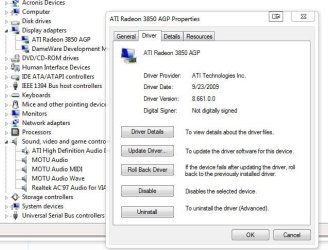
Failing all that, please post a screenshot of your device manager in Windows. Show me all of your system devices.
[/FONT]
 

My Computer My Computer

Computer Manufacturer/Model Number
self built
OS
7600.20510 x86
CPU
P4 550 3.4 GHz HT running at 3.5 GHz
Motherboard
MSI PM8M3-V (MS-7211 v1.x) Micro-ATX mainboard
Memory
OCZ 2 GB(2x1GB) DDR400mHz running @ 414 mHz
Graphics Card(s)
HIS Radeon HD 3850 IceQ 3 Turbo HDMI Dual DL-DVI AGP
Sound Card
MOTU Traveler firewire studio interface 192 kHz 24 bit
Monitor(s) Displays
22" widescreen Acer X223W LCD, 17" Compaq P75 CRT
Screen Resolution
1680x1050 and 1280x1024
Hard Drives
SATA I x2 WD, 400 GB and 120 GB, SATA 2 WD Caviar Black 1 TB
PSU
350W generic
Case
Cybertronpc, it glows blue
Cooling
stock cpu fan, Ice-Q 3 gpu and system, many case fans
Keyboard
Logitch Classical Keyboard 200
Mouse
Logitech Mediaplay cordless
Internet Speed
1792/448 kbits/sec
Other Info
SATA II PCI fake RAID adapter, 1 GB Readyboost, original ATI Remote Wonder (even works with WMC perfectly), Logitech Rumblepad 2 game controller x2
Hi,
Sorry hijacking... if I can get your thoughts on this
I had my 3850 Saphire running on my old P4 EE System, with the AGP hot fix drivers downloaded from the Sapphire tech site. That was until the PSU went after replacing the PSU with a better one I start to get the Code 43 error. I ended up re installing Win7 on a new partition and windows would see the 3850 but still gave the Code 43. I took the Video Card back to the store and was refunded. There is new one there they shipped in for me to buy. Should I give the new card a try? I am really worried about getting the code 43 again. But I really do not want to scrap the old system

Specs
Asus P4P800-E Deluxe
P4EE SL7AA 3.2GHZ
2560MB Ram 3200 Adata
500 GB Seagate SATA HDD
Phillips Semiconductor TV PCI Card (Cant Remember the model)
On board Sound
3850 AGP SAPPHIRE 512 DDR3 (currently not installed ATM)
Windows 7 x86 Build 7600
 

My Computer My Computer

Computer Manufacturer/Model Number
Mr Awesome
OS
Windows 7
CPU
q6600 @ 3.0GHZ
Motherboard
Asus PQ5 Pro
Memory
4096 Kingston Hyper X 1066Mhz DDR 2
Graphics Card(s)
VisionTek 4850 512 DDR 3
Sound Card
AC97
Monitor(s) Displays
Dual Acer 19" AL19W
Hard Drives
500 Gig Seagate Sata HDD (Primary)
1.5 TB Seagate Sata (Storage)
PSU
Cosair 750w
Case
OLD P4 HEAVY A$$ Case
Cooling
Some big heatsink and fan
Hello all!
Please help me!
My problem that I bought Sapphire HD 3850 last year and now, I don't play a lot of games on windows 7, but when xp was on the computer, I play every games!
For example: Mirror's edge: I played on XP, but I don't play it on win 7!
Why?
Please anybody answer it!
Thanks!
Senkijj
 

My Computer My Computer

OS
Windows 7 32-bit
Back
Top