Solved Windows 7 x86 USB installer not detected by Lenovo Ideapad 100S

looijuy

New member
Local time
3:58 PM
Messages
3
Hey, I'm having a lot of trouble with installing Windows 7 on a Lenovo Ideapad 100S. I installed Windows 7 Ultimate x86 on a USB using the USB DVD Tool, but it isn't detected on the system's boot menu no matter what I do. GPartEd works fine, which is confusing me even more. I haven't tested anything else yet but I'm downloading Linux Mint to be sure. I have absolutely no idea what the problem could be, and searching for a solution has turned up nothing. Any help is greatly needed, and feel free to ask for more information.

EDIT: I'll also mention that I already turned Secure Boot off.

EDIT2: Linux Mint x86 isn't detected either...

EDIT3: Alright, tried installing an x64 Win7 (apparently the Intel Atom Z3735F CPU is 64-bit) using Rufus. I tried all of the partition scheme options and none of them worked. This is insane...
 
Last edited:

My Computer My Computer

At a glance

Win 10 x64
Computer type
PC/Desktop
OS
Win 10 x64

My Computer My Computer

At a glance

Win-7-Pro64bit 7-H-Prem-64biti7-5930K 2nd i9-9940x both water blocked VRM'...Trident-z 3200C14 2nd Trident-z 3600C16EVGA 1080ti ftw3 2nd Titan Xp both water blocked
Computer type
PC/Desktop
Computer Manufacturer/Model Number
Custom assembled by me :}
OS
Win-7-Pro64bit 7-H-Prem-64bit
CPU
i7-5930K 2nd i9-9940x both water blocked VRM's too
Motherboard
ASUS SABERTOOTH X99 2nd ASUS x299 Apex
Memory
Trident-z 3200C14 2nd Trident-z 3600C16
Graphics Card(s)
EVGA 1080ti ftw3 2nd Titan Xp both water blocked
Sound Card
Built-in Realtek
Monitor(s) Displays
1-AOC G2460PG 24"G-Sync 144Hz/ 2nd 1-ASUS VG248QE 24" 144Hz
Screen Resolution
1920 x 1080 144Hz
Hard Drives
2-Samsung M.2 Evo & Evo Plus
2-Samsung 850 EVO 500GB SSD's/ 3-2.5 W.D. Black 1tb-&3-1tb/3-3.5 WD Black 1tb hdd's
PSU
EVGA SuperNOVA 1000-P2 2nd 1200-P2
Case
2-Corsair Obsidian Series 450D Black ATX Mid Tower
Cooling
Custom water loops
Keyboard
Logitech G710+/ 2nd Logitech G910
Mouse
2-RedDragon M901 Perdition 16400 dpi Gaming mouse = wired
Internet Speed
Comcast Ping 19ms 89.31mbps download speed 6.12mbps upload
Antivirus
Malwarebytes Pro/ Superantispyware Pro
Browser
FireFox & Pale moon
Other Info
2nd ASUS X299 Apex/Intel i9-9940x with Custom water loop/7H-Prem-x64/Corsair 450D case/Ram Trident-z 3600C16 4x8gb / Samsung970Evo plus 500gb SSD/Dual ssd EZ swap evo/PSU EVGA SuperNova 1200w-P2 80+Platinum/GPU Titan Xp /8-ML-140 on push-pull on 2-280GTX rads
Are they all usb 3.0 ports ? That`s the problem.
 

My Computer My Computer

At a glance

Windows 10 Pro x64Intel Core i7 6700KGSkill TridentZ RGB 16GB 3600 16-16-16-36EVGA GTX 980 Ti SC x2
Computer type
PC/Desktop
Computer Manufacturer/Model Number
Skylake Special #666
OS
Windows 10 Pro x64
CPU
Intel Core i7 6700K
Motherboard
Asus Sabertooth Z170 Mark 1
Memory
GSkill TridentZ RGB 16GB 3600 16-16-16-36
Graphics Card(s)
EVGA GTX 980 Ti SC x2
Sound Card
Realtek High Definition
Monitor(s) Displays
AOC G2460PG
Screen Resolution
1920 x 1080 144Hz
Hard Drives
Samsung 860 Pro 256GB, Seagate Barracuda 4TB x2
PSU
EVGA 1000 P2, EVGA White Custom Braided Cables
Case
Corsair Vengeance C70 Gunmetal Black
Cooling
Corsair H100i v2, Corsair ML120 x2, Thermal Grizzly Kryonaut
Keyboard
Logitech G910 Orion Spectrum
Mouse
Logitech G700s
Internet Speed
Verizon Fios Quantum Gateway 75/75
Antivirus
Windows Defender, Malwarebytes Free 3.8.3
Browser
Chrome
Other Info
Corsair SP120 x4, LG Blu-ray Drive, Durabrand HT-395 100 Watt Dolby Digital Amp, Corsair H2100 Wireless 7.1 Headset
Hi and welcome to SevenForums,
Did you use this tutorial and option 2
http://www.sevenforums.com/tutorials/2432-usb-windows-7-installation-key-drive-create.html
Yeah, I've done it like this multiple times, to no avail.

Are they all usb 3.0 ports ? That`s the problem.
No, all USB ports on this device are USB 2.0.

EDIT: More information. I read around and found out that "to save a few bucks, it is actually common for cheap systems to have a 32 bit UEFI firmware (and therefore force 32 bit Windows) even if the CPU is 64 bit capable." So I guess I'm going back to trying with a 32-bit Windows 7.
 
Last edited:

My Computer My Computer

At a glance

Win 10 x64
Computer type
PC/Desktop
OS
Win 10 x64
I doubt that`s the issue, the bios has no idea what you`re trying to install.

Does this thing have a bios ? Did you enable it to boot from an external usb device ?

Sometimes it`s disabled by default.

Did you test the installer on another PC ?
 

My Computer My Computer

At a glance

Windows 10 Pro x64Intel Core i7 6700KGSkill TridentZ RGB 16GB 3600 16-16-16-36EVGA GTX 980 Ti SC x2
Computer type
PC/Desktop
Computer Manufacturer/Model Number
Skylake Special #666
OS
Windows 10 Pro x64
CPU
Intel Core i7 6700K
Motherboard
Asus Sabertooth Z170 Mark 1
Memory
GSkill TridentZ RGB 16GB 3600 16-16-16-36
Graphics Card(s)
EVGA GTX 980 Ti SC x2
Sound Card
Realtek High Definition
Monitor(s) Displays
AOC G2460PG
Screen Resolution
1920 x 1080 144Hz
Hard Drives
Samsung 860 Pro 256GB, Seagate Barracuda 4TB x2
PSU
EVGA 1000 P2, EVGA White Custom Braided Cables
Case
Corsair Vengeance C70 Gunmetal Black
Cooling
Corsair H100i v2, Corsair ML120 x2, Thermal Grizzly Kryonaut
Keyboard
Logitech G910 Orion Spectrum
Mouse
Logitech G700s
Internet Speed
Verizon Fios Quantum Gateway 75/75
Antivirus
Windows Defender, Malwarebytes Free 3.8.3
Browser
Chrome
Other Info
Corsair SP120 x4, LG Blu-ray Drive, Durabrand HT-395 100 Watt Dolby Digital Amp, Corsair H2100 Wireless 7.1 Headset
I read around and found out that "to save a few bucks, it is actually common for cheap systems to have a 32 bit UEFI firmware (and therefore force 32 bit Windows) even if the CPU is 64 bit capable." So I guess I'm going back to trying with a 32-bit Windows 7.

Lenovo Ideapad 100S
Windows 10 Home (32-bit); 1.3GHz Intel Atom Z3735F; 2GB DDR3 SDRAM 1333MHz; 32MB (dedicated) Intel HD Graphics; 32GB SSD

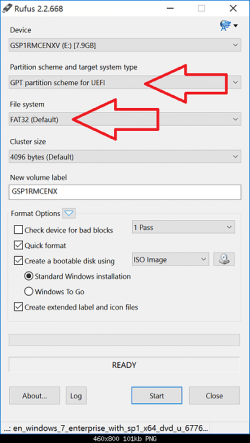
How to install Windows 7 32-bit/64-bit in UEFI mode from USB flash drive.

32-bit UEFI firmware

You need to have a Windows 7 32-bit USB flash drive that is compatible with UEFI mode. As long as it is FAT32 formatted and has efi\boot\bootia32.efi file, it should be UEFI bootable.

The easiest method to do this, would be to use Rufus: https://rufus.akeo.ie/

Rufus automatically creates the boot folder in the efi folder and puts the bootia32.efi in the folder.

In Rufus do this (select the Windows 7 32-bit ISO image by clicking the CD drive icon). See the image below.

64-bit UEFI firmware

You need to have a Windows 7 64-bit USB flash drive that is compatible with UEFI mode. As long as it is FAT32 formatted and has efi\boot\bootx64.efi file, it should be UEFI bootable.

The easiest method to do this, would be to use Rufus: https://rufus.akeo.ie/

Rufus automatically creates the boot folder in the efi folder and puts the bootx64.efi in the folder.

In Rufus do this (select the Windows 7 64-bit ISO image by clicking the CD drive icon). See the image below.

Rufus.png
 

My Computer My Computer

At a glance

Windows 7 Home Premium x64
Computer type
PC/Desktop
OS
Windows 7 Home Premium x64
This may or may not be related but I think worth a mention, Some Lenovo systems certain flash drives are a very loose fit in the USB ports whilst within Windows you can read and write from them ok but if you try to boot using one most of the time it will fail... I found the solution was if the flash drive is a loose fit to move it slightly towards you at a slight angle so it is not "square on" in the USB port ! (if it is a tight fit then please don't try this) also sometimes Lenovo does a warm start that will bypass booting from other sources, the solution for that is to power off the machine for 5mins before you try and boot from another source other than the HDD again.

Like I say this might not be the problem he is having, but an interesting little "quirk" I have found whilst working with these systems in the past.
 

My Computer My Computer

At a glance

Windows 7 x64 SP1Intel4gbNvidia
Computer type
Laptop
Computer Manufacturer/Model Number
Sony
OS
Windows 7 x64 SP1
CPU
Intel
Motherboard
Sony
Memory
4gb
Graphics Card(s)
Nvidia
Hard Drives
WD
Internet Speed
Dial up wasn't as bad as this !
Antivirus
Avast
Browser
Firefox
Does this thing have a bios ? Did you enable it to boot from an external usb device ?

Sometimes it`s disabled by default.

Did you test the installer on another PC ?
The bios on this machine is extremely simplified, with the only options being toggling Secure Boot and BIOS Back Flash.

On that note, I messaged Lenovo tech support for help on this topic and they told me that this laptop doesn't support "Legacy mode", and that because of this, installing Windows 7 on it is impossible. Awful. Guess I'm just going to throw in the towel and re-install Windows 10 on this machine, since the installer actually boots. Thanks for the help everyone, I really appreciate it.

I've tried this so many times, it just doesn't work. Maybe the ISO I've been using doesn't have a bootia32.efi file, or what the Lenovo representative said was correct and it wouldn't work either way. I've pretty much given up on trying. Thanks for trying to help anyway.


This may or may not be related but I think worth a mention, Some Lenovo systems certain flash drives are a very loose fit in the USB ports whilst within Windows you can read and write from them ok but if you try to boot using one most of the time it will fail... I found the solution was if the flash drive is a loose fit to move it slightly towards you at a slight angle so it is not "square on" in the USB port ! (if it is a tight fit then please don't try this) also sometimes Lenovo does a warm start that will bypass booting from other sources, the solution for that is to power off the machine for 5mins before you try and boot from another source other than the HDD again.

Like I say this might not be the problem he is having, but an interesting little "quirk" I have found whilst working with these systems in the past.
I'm sure that isn't a problem, I just tried it out a copy of Windows 10 with the same USB stick and it seems to be working fine. Thanks anyway!
 

My Computer My Computer

At a glance

Win 10 x64
Computer type
PC/Desktop
OS
Win 10 x64

My Computer My Computer

At a glance

Windows 10 Pro x64Intel Core i7 6700KGSkill TridentZ RGB 16GB 3600 16-16-16-36EVGA GTX 980 Ti SC x2
Computer type
PC/Desktop
Computer Manufacturer/Model Number
Skylake Special #666
OS
Windows 10 Pro x64
CPU
Intel Core i7 6700K
Motherboard
Asus Sabertooth Z170 Mark 1
Memory
GSkill TridentZ RGB 16GB 3600 16-16-16-36
Graphics Card(s)
EVGA GTX 980 Ti SC x2
Sound Card
Realtek High Definition
Monitor(s) Displays
AOC G2460PG
Screen Resolution
1920 x 1080 144Hz
Hard Drives
Samsung 860 Pro 256GB, Seagate Barracuda 4TB x2
PSU
EVGA 1000 P2, EVGA White Custom Braided Cables
Case
Corsair Vengeance C70 Gunmetal Black
Cooling
Corsair H100i v2, Corsair ML120 x2, Thermal Grizzly Kryonaut
Keyboard
Logitech G910 Orion Spectrum
Mouse
Logitech G700s
Internet Speed
Verizon Fios Quantum Gateway 75/75
Antivirus
Windows Defender, Malwarebytes Free 3.8.3
Browser
Chrome
Other Info
Corsair SP120 x4, LG Blu-ray Drive, Durabrand HT-395 100 Watt Dolby Digital Amp, Corsair H2100 Wireless 7.1 Headset

My Computer My Computer

At a glance

Win-7-Pro64bit 7-H-Prem-64biti7-5930K 2nd i9-9940x both water blocked VRM'...Trident-z 3200C14 2nd Trident-z 3600C16EVGA 1080ti ftw3 2nd Titan Xp both water blocked
Computer type
PC/Desktop
Computer Manufacturer/Model Number
Custom assembled by me :}
OS
Win-7-Pro64bit 7-H-Prem-64bit
CPU
i7-5930K 2nd i9-9940x both water blocked VRM's too
Motherboard
ASUS SABERTOOTH X99 2nd ASUS x299 Apex
Memory
Trident-z 3200C14 2nd Trident-z 3600C16
Graphics Card(s)
EVGA 1080ti ftw3 2nd Titan Xp both water blocked
Sound Card
Built-in Realtek
Monitor(s) Displays
1-AOC G2460PG 24"G-Sync 144Hz/ 2nd 1-ASUS VG248QE 24" 144Hz
Screen Resolution
1920 x 1080 144Hz
Hard Drives
2-Samsung M.2 Evo & Evo Plus
2-Samsung 850 EVO 500GB SSD's/ 3-2.5 W.D. Black 1tb-&3-1tb/3-3.5 WD Black 1tb hdd's
PSU
EVGA SuperNOVA 1000-P2 2nd 1200-P2
Case
2-Corsair Obsidian Series 450D Black ATX Mid Tower
Cooling
Custom water loops
Keyboard
Logitech G710+/ 2nd Logitech G910
Mouse
2-RedDragon M901 Perdition 16400 dpi Gaming mouse = wired
Internet Speed
Comcast Ping 19ms 89.31mbps download speed 6.12mbps upload
Antivirus
Malwarebytes Pro/ Superantispyware Pro
Browser
FireFox & Pale moon
Other Info
2nd ASUS X299 Apex/Intel i9-9940x with Custom water loop/7H-Prem-x64/Corsair 450D case/Ram Trident-z 3600C16 4x8gb / Samsung970Evo plus 500gb SSD/Dual ssd EZ swap evo/PSU EVGA SuperNova 1200w-P2 80+Platinum/GPU Titan Xp /8-ML-140 on push-pull on 2-280GTX rads
Back
Top