I recently purchased a new Toshiba Satellite with Windows 7 on it. It is primarily for use on board my sailboat for navigation and e-mail via my satellite phone. It is a NERA Fleet 33 Satellite phone that works perfectly (replacement cost $7500). It utilizes a computer interface software called NERA VT Lite Mobile (for e-mail and internet connection. Slow but fairly reliable). NERA has exited the sat phone business and is not updating the software to operate on Windows 7. Old XP program (works perfectly on old XP machine) will not function on Windows 7 (computer is not recognizing the USB input from the sat phone). I have tried running VT Lite in Windows 7 "compatibility mode". Nothing. Old XP driver has .INF extension. I Could I upgrade my Windows 7 Home Premium to Windows 7 Professional with XP emulation mode and get the sat phone interface to work? Will a serial type interface like a sat phone function in the XP emulation mode? Will the computer recognize a driver with a .inf suffix in the XP emulation mode?
It's quite impossible to tell if it's going to work. However, I know from my own experience that several old serial devices work well in XP Mode. In this thread you can for instance read that a user got a serial modem to work in XP Mode.
Kari
My Computer
Computer type
Laptop
Computer Manufacturer/Model Number
HP ENVY 17-1150eg
OS
Windows 10 Pro x64 EN-GB
CPU
1.6 GHz Intel Core i7-720QM Processor
Memory
6 GB
Graphics Card(s)
ATI Mobility Radeon HD 5850 Graphics
Sound Card
Beats sound system with integrated subwoofer
Monitor(s) Displays
17" laptop display, 22" LED and 32" Full HD TV through HDMI
Screen Resolution
1600*900 (1), 1920*1080 (2&3)
Hard Drives
Internal: 2 x 500 GB SATA Hard Disk Drive 7200 rpm
External: 2TB for backups, 3TB USB3 network drive for media
Cooling
As Envy runs a bit warm, I have it on a Cooler Master pad
Kari:
I am sorry to be slow...
I got through all these steps until I got here. How do I get to the XP Mode settings when XP mode is completely shut down? One more question since I am already showing my lack of computer literacy, How do I determine the modem's real physical port in 7? When I plug in the USB, it shows in devise manager but I don't see how to determine it's port assignment?
Go back to XP Mode settings when it's completely shut down, and select COM1 on the left pane. Select Physical serial port and choose the fax modem's real, physical port (which it has in Windows 7) from drop down list. Select Wait for modem command to open port. Click OK to save settings:
Run XP Mode and install Fax software, and modem from inside the fax program.
No need to be sorry. In fact, I should ask you to forgive me; I was so fixed in word "serial" in your post I completely forgot it is a USB device.
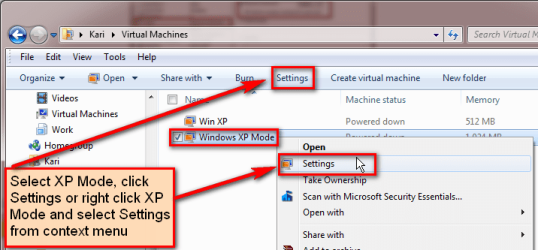
First, how to enter settings. Go to your user folder, open the subfolder Virtual Machines. Click Windows XP Mode to select it, click Settings or right click it and select Settings from context menu.
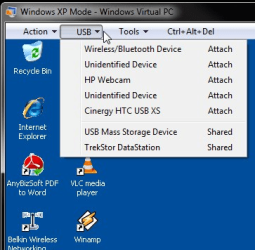
But, before trying COM-ports, let's try something else. Connect the phone to your laptop using USB cable. Launch XP Mode, then open the USB menu and attach the phone to XP mode and install the drivers.
Kari
My Computer
Computer type
Laptop
Computer Manufacturer/Model Number
HP ENVY 17-1150eg
OS
Windows 10 Pro x64 EN-GB
CPU
1.6 GHz Intel Core i7-720QM Processor
Memory
6 GB
Graphics Card(s)
ATI Mobility Radeon HD 5850 Graphics
Sound Card
Beats sound system with integrated subwoofer
Monitor(s) Displays
17" laptop display, 22" LED and 32" Full HD TV through HDMI
Screen Resolution
1600*900 (1), 1920*1080 (2&3)
Hard Drives
Internal: 2 x 500 GB SATA Hard Disk Drive 7200 rpm
External: 2TB for backups, 3TB USB3 network drive for media
Cooling
As Envy runs a bit warm, I have it on a Cooler Master pad