
Windows 7 & XP Question....

andel90

New member
Member
Local time
8:51 PM
Messages
27
Hi I have partitoned my hard drive and installed Windows 7 . on the other Partition i have XP. Is there any way i can use my XP programs on the 7 without installing them on the 7 Again? For some reason i also get a message saying you need permsion to peform this action when i try to copy a file from XP Partition to 7 Partition. ( this happens when im running Windows 7) Any help?:D

thanks
 

My Computer

Computer Manufacturer/Model Number
HP Pavilion
OS
Windows Xp And Windows 7 Ultimate (Partitioned)
Is there any way i can use my XP programs on the 7 without installing them on the 7 Again?
Yes and no. Yes, it can be done. It would require a massive amount of time on task and is subject to an enormous number of errors. Estimated time on task: Very Expert Programmer - 100 hours. Layperson - a career path.

You are better off re-installing the programs.

...you need permsion to peform this action when i try to copy a file from XP Partition to 7 Partition. ( this happens when im running Windows 7) ...
UAC prompts. There is a post elsewhere in the forum regarding this. I will try to find you a link, but someone will probably beat me to it.
 
Thanks for that mate dont think anyones posted a link lol any chance you can show me?

Thanks
 

My Computer

Computer Manufacturer/Model Number
HP Pavilion
OS
Windows Xp And Windows 7 Ultimate (Partitioned)
Slide UAC control to the bottom - turn it off. Copy files. Turn UAC back on.

That is a short term fix.

You could also take ownership of the XP folders, but that causes other problems (i think) in XP.

My baby girl wants to go outside and paly. Sorry about that. I think the UAC trick will work. Type UAC in the search box​
 
Hi I have partitoned my hard drive and installed Windows 7 . on the other Partition i have XP. Is there any way i can use my XP programs on the 7 without installing them on the 7 Again?

Antman is right, trying to do that would make a bitter and angry old man of you in a short time. Many of us speak from experience. Re-install the programs.

For some reason i also get a message saying you need permsion to peform this action when i try to copy a file from XP Partition to 7 Partition. ( this happens when im running Windows 7) Any help?:D

Coming straight from XP? Welcome to Windows 7 UAC. First introduced in Vista.

Go read this first

http://www.sevenforums.com/tutorial...-uac-change-notification-settings.html?filter

Then you may have some more questions..


Welcome to SevenForums! :D
 

My Computer

OS
XP Pro & Vista Home Premium (x86); Windows Ultimate 7600 x64 Retail
Thanks for that mate ive switched off the notifications but it still coming up witht the same message any other suggestions?

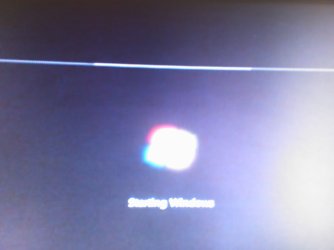
Also when i start Windows 7 on the startup i have a white line that is slightly fuzzy anyone know why this happens?

Thanks
 

My Computer

Computer Manufacturer/Model Number
HP Pavilion
OS
Windows Xp And Windows 7 Ultimate (Partitioned)
Slide UAC control to the bottom - turn it off. Copy files. Turn UAC back on.

That is a short term fix.

You could also take ownership of the XP folders, but that causes other problems (i think) in XP.

My baby girl wants to go outside and paly. Sorry about that. I think the UAC trick will work. Type UAC in the search box​


Thanks for that mate still no luck though:(
 

My Computer

Computer Manufacturer/Model Number
HP Pavilion
OS
Windows Xp And Windows 7 Ultimate (Partitioned)
One thing that may work - try running a copy of windows explorer as administrator to do the copies - type explorer into the start search and then Ctrl-Shift Enter to run as admin, accept the UAC prompt. This should allow you to copy without changing permissions or UAC
 

My Computers

System One System Two

  • Computer type
    PC/Desktop
    Computer Manufacturer/Model Number
    ChillBlast - Custom to my design
    OS
    Windows 11 Pro x64 [Latest Release and Release Preview]
    CPU
    Ryzen 9 5950X, 3.8 - 5.2 MHz
    Motherboard
    Asus Prime X570-Pro
    Memory
    64GB [2 x 32GB] DDR4 3200MHz
    Graphics Card(s)
    4GB NVIDIA GEFORCE GTX 1650 Ti
    Sound Card
    On-board SPDIF to 5.1 System + HDMI [5.1 system]
    Monitor(s) Displays
    32" UHD 32 Bit HDR Monitor + 43" UHD 4K 32Bit HDR TV
    Screen Resolution
    2 x 3840 x 2160 @60Hz
    Hard Drives
    1TB M2 SSD OS, 500GB Fast Access SSD, 2 x 8TB Data + Various Externals from 1TB to 4TB, 10TB NAS
    PSU
    NZXT C750 80 PLUS Gold 750W Modular PSU
    Case
    Workstation Case [Matt Black]
    Cooling
    NZXT Kraken X63 280mm CPU Cooler +2x Quiet Case fans
    Keyboard
    Logitech Wireless MX Keys & K400 + others
    Mouse
    Logitech Wireless MX Master 3S
    Internet Speed
    920 MB Down 50 MB Up
    Antivirus
    BitDefender Total Security Pro
    Browser
    Chrome (always run latest Non-Beta)
    Other Info
    Also run ...
    Laptop - Quad 8GB - Windows 10 Pro x64
    Nexus 7 Android tablet x2
    Samsung 10.2" tablet
    Blackview TAB 8 4G Android Tablet c/w Keyboard
    Wacom Intuos Pro Medium Pen Pad
    Wacom Intuos Pro Small Pen Pad
    Wacom Expresskeys Remote
    Loopdeck+ Graphics Controller
    Shuttle Pro v2 Control
  • Computer type
    Laptop
    System Manufacturer/Model Number
    Dell XPS 17 10750H
    OS
    Windows 11 Pro x64 Latest RP
    CPU
    Intel I7 10750H 5.0GHz
    Motherboard
    Dell XPS
    Memory
    32GB [2x16GB] DDR4 2933 MHz
    Graphics Card(s)
    nVidia GTX1650Ti 4 GB GDDR6
    Sound Card
    Stock [Realtek] 4 Speaker
    Monitor(s) Displays
    17" IPS UHD+ Infinity Edge Touchscreen
    Screen Resolution
    3840 x 2400
    Hard Drives
    2TB M2 NVMe, 4TB External + various 500GB & 1TB External NVMe (also have access to spinner HDD from
    PSU
    Stock
    Case
    Stock XPS Aluminium & Carbon Fibre
    Cooling
    Stock - Active Fan Control
    Keyboard
    Backlit + Various Logitech
    Mouse
    Stock Track Pad + Logitech MX Trackball
    Internet Speed
    72 MB Down 18MB Up
    Browser
    Chrome
    Other Info
    Also run ...
    Laptop - Quad 8GB - Windows 10 Pro x64
    Nexus 7 Android tablet x2
    10.2" tablet
    Sony Z3 Android Smartphone
    Wacom Intuos Pro Medium Pen Pad
    Wacom Intuos Pro Small Pen Pad
    Wacom Expresskeys Remote
    Loopdeck+ Graphics Controller
    Shuttle Pro v2 Control Pad
    10TB NAS
Thanks mate still no luck though!:(
 

My Computer

Computer Manufacturer/Model Number
HP Pavilion
OS
Windows Xp And Windows 7 Ultimate (Partitioned)
Ok,

You could try a boot into safe mode and see if that will allow you to perform the copy.

If not then I'm afraid it's the long way :(
Select the root folder of the files you wish to copy
Right click select security.
Add your user name to the list of permissions
give yourself "Full Access"
Go to the advanced section and make sure that you set it to apply the permissions of this folder to the files and folders beneath the current folder.

You may get errors applying some permissions - if this happens you will need to apply the permissions at the level causing the problem, and may even have to take ownership of the files and folders :(
 

My Computers

System One System Two

  • Computer type
    PC/Desktop
    Computer Manufacturer/Model Number
    ChillBlast - Custom to my design
    OS
    Windows 11 Pro x64 [Latest Release and Release Preview]
    CPU
    Ryzen 9 5950X, 3.8 - 5.2 MHz
    Motherboard
    Asus Prime X570-Pro
    Memory
    64GB [2 x 32GB] DDR4 3200MHz
    Graphics Card(s)
    4GB NVIDIA GEFORCE GTX 1650 Ti
    Sound Card
    On-board SPDIF to 5.1 System + HDMI [5.1 system]
    Monitor(s) Displays
    32" UHD 32 Bit HDR Monitor + 43" UHD 4K 32Bit HDR TV
    Screen Resolution
    2 x 3840 x 2160 @60Hz
    Hard Drives
    1TB M2 SSD OS, 500GB Fast Access SSD, 2 x 8TB Data + Various Externals from 1TB to 4TB, 10TB NAS
    PSU
    NZXT C750 80 PLUS Gold 750W Modular PSU
    Case
    Workstation Case [Matt Black]
    Cooling
    NZXT Kraken X63 280mm CPU Cooler +2x Quiet Case fans
    Keyboard
    Logitech Wireless MX Keys & K400 + others
    Mouse
    Logitech Wireless MX Master 3S
    Internet Speed
    920 MB Down 50 MB Up
    Antivirus
    BitDefender Total Security Pro
    Browser
    Chrome (always run latest Non-Beta)
    Other Info
    Also run ...
    Laptop - Quad 8GB - Windows 10 Pro x64
    Nexus 7 Android tablet x2
    Samsung 10.2" tablet
    Blackview TAB 8 4G Android Tablet c/w Keyboard
    Wacom Intuos Pro Medium Pen Pad
    Wacom Intuos Pro Small Pen Pad
    Wacom Expresskeys Remote
    Loopdeck+ Graphics Controller
    Shuttle Pro v2 Control
  • Computer type
    Laptop
    System Manufacturer/Model Number
    Dell XPS 17 10750H
    OS
    Windows 11 Pro x64 Latest RP
    CPU
    Intel I7 10750H 5.0GHz
    Motherboard
    Dell XPS
    Memory
    32GB [2x16GB] DDR4 2933 MHz
    Graphics Card(s)
    nVidia GTX1650Ti 4 GB GDDR6
    Sound Card
    Stock [Realtek] 4 Speaker
    Monitor(s) Displays
    17" IPS UHD+ Infinity Edge Touchscreen
    Screen Resolution
    3840 x 2400
    Hard Drives
    2TB M2 NVMe, 4TB External + various 500GB & 1TB External NVMe (also have access to spinner HDD from
    PSU
    Stock
    Case
    Stock XPS Aluminium & Carbon Fibre
    Cooling
    Stock - Active Fan Control
    Keyboard
    Backlit + Various Logitech
    Mouse
    Stock Track Pad + Logitech MX Trackball
    Internet Speed
    72 MB Down 18MB Up
    Browser
    Chrome
    Other Info
    Also run ...
    Laptop - Quad 8GB - Windows 10 Pro x64
    Nexus 7 Android tablet x2
    10.2" tablet
    Sony Z3 Android Smartphone
    Wacom Intuos Pro Medium Pen Pad
    Wacom Intuos Pro Small Pen Pad
    Wacom Expresskeys Remote
    Loopdeck+ Graphics Controller
    Shuttle Pro v2 Control Pad
    10TB NAS
Ok,

You could try a boot into safe mode and see if that will allow you to perform the copy.

If not then I'm afraid it's the long way :(
Select the root folder of the files you wish to copy
Right click select security.
Add your user name to the list of permissions
give yourself "Full Access"
Go to the advanced section and make sure that you set it to apply the permissions of this folder to the files and folders beneath the current folder.

You may get errors applying some permissions - if this happens you will need to apply the permissions at the level causing the problem, and may even have to take ownership of the files and folders :(


Thanks for your Help mate awfully long tried it still geting same message! i guess il wait untill someone else find the problem or something....do you know why i might be getting this white line when im at the Windows 7 Start up screen?

thanks again!
 

My Computer

Computer Manufacturer/Model Number
HP Pavilion
OS
Windows Xp And Windows 7 Ultimate (Partitioned)
Just thought of another possible solution - as this issue is caused by the use of NTFS file system - if you copied the files onto a usb stick formatted with FAT (normally the default for sticks) and then copied them back to the required location it should strip out the permissions.

As for the white line - check your graphics drivers as the start-up screens run at a basic resolution and glitches that appear there may not appear when the system has finished loading
 

My Computers

System One System Two

  • Computer type
    PC/Desktop
    Computer Manufacturer/Model Number
    ChillBlast - Custom to my design
    OS
    Windows 11 Pro x64 [Latest Release and Release Preview]
    CPU
    Ryzen 9 5950X, 3.8 - 5.2 MHz
    Motherboard
    Asus Prime X570-Pro
    Memory
    64GB [2 x 32GB] DDR4 3200MHz
    Graphics Card(s)
    4GB NVIDIA GEFORCE GTX 1650 Ti
    Sound Card
    On-board SPDIF to 5.1 System + HDMI [5.1 system]
    Monitor(s) Displays
    32" UHD 32 Bit HDR Monitor + 43" UHD 4K 32Bit HDR TV
    Screen Resolution
    2 x 3840 x 2160 @60Hz
    Hard Drives
    1TB M2 SSD OS, 500GB Fast Access SSD, 2 x 8TB Data + Various Externals from 1TB to 4TB, 10TB NAS
    PSU
    NZXT C750 80 PLUS Gold 750W Modular PSU
    Case
    Workstation Case [Matt Black]
    Cooling
    NZXT Kraken X63 280mm CPU Cooler +2x Quiet Case fans
    Keyboard
    Logitech Wireless MX Keys & K400 + others
    Mouse
    Logitech Wireless MX Master 3S
    Internet Speed
    920 MB Down 50 MB Up
    Antivirus
    BitDefender Total Security Pro
    Browser
    Chrome (always run latest Non-Beta)
    Other Info
    Also run ...
    Laptop - Quad 8GB - Windows 10 Pro x64
    Nexus 7 Android tablet x2
    Samsung 10.2" tablet
    Blackview TAB 8 4G Android Tablet c/w Keyboard
    Wacom Intuos Pro Medium Pen Pad
    Wacom Intuos Pro Small Pen Pad
    Wacom Expresskeys Remote
    Loopdeck+ Graphics Controller
    Shuttle Pro v2 Control
  • Computer type
    Laptop
    System Manufacturer/Model Number
    Dell XPS 17 10750H
    OS
    Windows 11 Pro x64 Latest RP
    CPU
    Intel I7 10750H 5.0GHz
    Motherboard
    Dell XPS
    Memory
    32GB [2x16GB] DDR4 2933 MHz
    Graphics Card(s)
    nVidia GTX1650Ti 4 GB GDDR6
    Sound Card
    Stock [Realtek] 4 Speaker
    Monitor(s) Displays
    17" IPS UHD+ Infinity Edge Touchscreen
    Screen Resolution
    3840 x 2400
    Hard Drives
    2TB M2 NVMe, 4TB External + various 500GB & 1TB External NVMe (also have access to spinner HDD from
    PSU
    Stock
    Case
    Stock XPS Aluminium & Carbon Fibre
    Cooling
    Stock - Active Fan Control
    Keyboard
    Backlit + Various Logitech
    Mouse
    Stock Track Pad + Logitech MX Trackball
    Internet Speed
    72 MB Down 18MB Up
    Browser
    Chrome
    Other Info
    Also run ...
    Laptop - Quad 8GB - Windows 10 Pro x64
    Nexus 7 Android tablet x2
    10.2" tablet
    Sony Z3 Android Smartphone
    Wacom Intuos Pro Medium Pen Pad
    Wacom Intuos Pro Small Pen Pad
    Wacom Expresskeys Remote
    Loopdeck+ Graphics Controller
    Shuttle Pro v2 Control Pad
    10TB NAS
Just thought of another possible solution - as this issue is caused by the use of NTFS file system - if you copied the files onto a usb stick formatted with FAT (normally the default for sticks) and then copied them back to the required location it should strip out the permissions.

As for the white line - check your graphics drivers as the start-up screens run at a basic resolution and glitches that appear there may not appear when the system has finished loading


Thanks a lot for all your suggestions mate i will give this a go tommorow morning! what OS are you running then?....After the startup screen everything else appears fine! should i mess with the reolution then mate?

Thanks aain for your helpful suggestions! REP added!
 

My Computer

Computer Manufacturer/Model Number
HP Pavilion
OS
Windows Xp And Windows 7 Ultimate (Partitioned)
Hi what it is is that when you are booting into windows the system sets a basic graphics mode irrelevant of what your actual resolution is set to once you are fully loaded into windows.

What I have seen is that a particular driver that works perfectly in the mode used for normal use has issues with the start-up mode that windows sets. updating your drivers to the latest can sometimes solve this issue.

If it's possible could you upload an image of the actual problem you are seeing (you may have to use a camera as print-screen doesn't work) - it may help to diagnose the fault.

I'm running the RC 7100 build but the actual build shouln't make a difference to this type of issue, although of course there are sometimes driver issues with specific builds
 

My Computers

System One System Two

  • Computer type
    PC/Desktop
    Computer Manufacturer/Model Number
    ChillBlast - Custom to my design
    OS
    Windows 11 Pro x64 [Latest Release and Release Preview]
    CPU
    Ryzen 9 5950X, 3.8 - 5.2 MHz
    Motherboard
    Asus Prime X570-Pro
    Memory
    64GB [2 x 32GB] DDR4 3200MHz
    Graphics Card(s)
    4GB NVIDIA GEFORCE GTX 1650 Ti
    Sound Card
    On-board SPDIF to 5.1 System + HDMI [5.1 system]
    Monitor(s) Displays
    32" UHD 32 Bit HDR Monitor + 43" UHD 4K 32Bit HDR TV
    Screen Resolution
    2 x 3840 x 2160 @60Hz
    Hard Drives
    1TB M2 SSD OS, 500GB Fast Access SSD, 2 x 8TB Data + Various Externals from 1TB to 4TB, 10TB NAS
    PSU
    NZXT C750 80 PLUS Gold 750W Modular PSU
    Case
    Workstation Case [Matt Black]
    Cooling
    NZXT Kraken X63 280mm CPU Cooler +2x Quiet Case fans
    Keyboard
    Logitech Wireless MX Keys & K400 + others
    Mouse
    Logitech Wireless MX Master 3S
    Internet Speed
    920 MB Down 50 MB Up
    Antivirus
    BitDefender Total Security Pro
    Browser
    Chrome (always run latest Non-Beta)
    Other Info
    Also run ...
    Laptop - Quad 8GB - Windows 10 Pro x64
    Nexus 7 Android tablet x2
    Samsung 10.2" tablet
    Blackview TAB 8 4G Android Tablet c/w Keyboard
    Wacom Intuos Pro Medium Pen Pad
    Wacom Intuos Pro Small Pen Pad
    Wacom Expresskeys Remote
    Loopdeck+ Graphics Controller
    Shuttle Pro v2 Control
  • Computer type
    Laptop
    System Manufacturer/Model Number
    Dell XPS 17 10750H
    OS
    Windows 11 Pro x64 Latest RP
    CPU
    Intel I7 10750H 5.0GHz
    Motherboard
    Dell XPS
    Memory
    32GB [2x16GB] DDR4 2933 MHz
    Graphics Card(s)
    nVidia GTX1650Ti 4 GB GDDR6
    Sound Card
    Stock [Realtek] 4 Speaker
    Monitor(s) Displays
    17" IPS UHD+ Infinity Edge Touchscreen
    Screen Resolution
    3840 x 2400
    Hard Drives
    2TB M2 NVMe, 4TB External + various 500GB & 1TB External NVMe (also have access to spinner HDD from
    PSU
    Stock
    Case
    Stock XPS Aluminium & Carbon Fibre
    Cooling
    Stock - Active Fan Control
    Keyboard
    Backlit + Various Logitech
    Mouse
    Stock Track Pad + Logitech MX Trackball
    Internet Speed
    72 MB Down 18MB Up
    Browser
    Chrome
    Other Info
    Also run ...
    Laptop - Quad 8GB - Windows 10 Pro x64
    Nexus 7 Android tablet x2
    10.2" tablet
    Sony Z3 Android Smartphone
    Wacom Intuos Pro Medium Pen Pad
    Wacom Intuos Pro Small Pen Pad
    Wacom Expresskeys Remote
    Loopdeck+ Graphics Controller
    Shuttle Pro v2 Control Pad
    10TB NAS
Take a look and tell me what you think :D

Thanks
 

Attachments

  • DSC_0004.jpg
    DSC_0004.jpg
    129.8 KB · Views: 8

My Computer

Computer Manufacturer/Model Number
HP Pavilion
OS
Windows Xp And Windows 7 Ultimate (Partitioned)
Definitely looks like some sort of driver glitch, all I can suggest is to have a look for updated drivers for your video - as it doesn't happen once the loading is completed It must be resolution dependent - you could try changing the resolution when you are fully loaded up to see if you can duplicate the issue but you may have to wait for a revision to the driver to become available
 

My Computers

System One System Two

  • Computer type
    PC/Desktop
    Computer Manufacturer/Model Number
    ChillBlast - Custom to my design
    OS
    Windows 11 Pro x64 [Latest Release and Release Preview]
    CPU
    Ryzen 9 5950X, 3.8 - 5.2 MHz
    Motherboard
    Asus Prime X570-Pro
    Memory
    64GB [2 x 32GB] DDR4 3200MHz
    Graphics Card(s)
    4GB NVIDIA GEFORCE GTX 1650 Ti
    Sound Card
    On-board SPDIF to 5.1 System + HDMI [5.1 system]
    Monitor(s) Displays
    32" UHD 32 Bit HDR Monitor + 43" UHD 4K 32Bit HDR TV
    Screen Resolution
    2 x 3840 x 2160 @60Hz
    Hard Drives
    1TB M2 SSD OS, 500GB Fast Access SSD, 2 x 8TB Data + Various Externals from 1TB to 4TB, 10TB NAS
    PSU
    NZXT C750 80 PLUS Gold 750W Modular PSU
    Case
    Workstation Case [Matt Black]
    Cooling
    NZXT Kraken X63 280mm CPU Cooler +2x Quiet Case fans
    Keyboard
    Logitech Wireless MX Keys & K400 + others
    Mouse
    Logitech Wireless MX Master 3S
    Internet Speed
    920 MB Down 50 MB Up
    Antivirus
    BitDefender Total Security Pro
    Browser
    Chrome (always run latest Non-Beta)
    Other Info
    Also run ...
    Laptop - Quad 8GB - Windows 10 Pro x64
    Nexus 7 Android tablet x2
    Samsung 10.2" tablet
    Blackview TAB 8 4G Android Tablet c/w Keyboard
    Wacom Intuos Pro Medium Pen Pad
    Wacom Intuos Pro Small Pen Pad
    Wacom Expresskeys Remote
    Loopdeck+ Graphics Controller
    Shuttle Pro v2 Control
  • Computer type
    Laptop
    System Manufacturer/Model Number
    Dell XPS 17 10750H
    OS
    Windows 11 Pro x64 Latest RP
    CPU
    Intel I7 10750H 5.0GHz
    Motherboard
    Dell XPS
    Memory
    32GB [2x16GB] DDR4 2933 MHz
    Graphics Card(s)
    nVidia GTX1650Ti 4 GB GDDR6
    Sound Card
    Stock [Realtek] 4 Speaker
    Monitor(s) Displays
    17" IPS UHD+ Infinity Edge Touchscreen
    Screen Resolution
    3840 x 2400
    Hard Drives
    2TB M2 NVMe, 4TB External + various 500GB & 1TB External NVMe (also have access to spinner HDD from
    PSU
    Stock
    Case
    Stock XPS Aluminium & Carbon Fibre
    Cooling
    Stock - Active Fan Control
    Keyboard
    Backlit + Various Logitech
    Mouse
    Stock Track Pad + Logitech MX Trackball
    Internet Speed
    72 MB Down 18MB Up
    Browser
    Chrome
    Other Info
    Also run ...
    Laptop - Quad 8GB - Windows 10 Pro x64
    Nexus 7 Android tablet x2
    10.2" tablet
    Sony Z3 Android Smartphone
    Wacom Intuos Pro Medium Pen Pad
    Wacom Intuos Pro Small Pen Pad
    Wacom Expresskeys Remote
    Loopdeck+ Graphics Controller
    Shuttle Pro v2 Control Pad
    10TB NAS
I was going to suggest using the old DOS method (CMD) run as admin.
works for me.
 
I was going to suggest using the old DOS method (CMD) run as admin.
works for me.

Hi how would i peform that then mate?

Thanks[/QUOTE]

Definitely looks like some sort of driver glitch, all I can suggest is to have a look for updated drivers for your video - as it doesn't happen once the loading is completed It must be resolution dependent - you could try changing the resolution when you are fully loaded up to see if you can duplicate the issue but you may have to wait for a revision to the driver to become available


Thanks mate for the advice guess il have to wait then!
 

My Computer

Computer Manufacturer/Model Number
HP Pavilion
OS
Windows Xp And Windows 7 Ultimate (Partitioned)
Definitely looks like some sort of driver glitch, all I can suggest is to have a look for updated drivers for your video - as it doesn't happen once the loading is completed It must be resolution dependent - you could try changing the resolution when you are fully loaded up to see if you can duplicate the issue but you may have to wait for a revision to the driver to become available

Do you know anything about WinTv by haupage mate? everytime i scan for channels computer restarts and gives a blue screen for some reason?

Thanks
 

My Computer

Computer Manufacturer/Model Number
HP Pavilion
OS
Windows Xp And Windows 7 Ultimate (Partitioned)
Hi how would i peform that then mate?

Thanks


Thanks mate for the advice guess il have to wait then![/QUOTE]

start --> cmd (right click-run as admin) wait for the popup.
this makes sure you have all the control possible.
type copy /? all the commands are there or like
del /? del is same as delete
move /?
ren /a? ren is same as rename

this is actually what the mouse& click allows you to do, but maybe not exactly the way you want....

Format D: /fs:ntfs /v:Volume-2

to find the commands type Format /? or Copy /?
sample:
FORMAT volume [/FS:file-system] [/V:label] [/Q] [/A:size] [/C] [/X] [/P:passes]
[/S:state]
FORMAT volume [/V:label] [/Q] [/F:size] [/P:passes]
FORMAT volume [/V:label] [/Q] [/T:tracks /N:sectors] [/P:passes]
FORMAT volume [/V:label] [/Q] [/P:passes]
FORMAT volume [/Q]
volume Specifies the drive letter (followed by a colon),
mount point, or volume name.
/FS:filesystem Specifies the type of the file system (FAT, FAT32, exFAT, NTFS
,
or UDF).
/V:label Specifies the volume label.
/Q Performs a quick format. Note that this switch overrides /P.
/C NTFS only: Files created on the new volume will be compressed
by default.
/X Forces the volume to dismount first if necessary. All opened
handles to the volume would no longer be valid.
/R:revision UDF only: Forces the format to a specific UDF version
(1.02, 1.50, 2.00, 2.01, 2.50). The default
revision is 2.01.

C:\Windows\system32>copy /?
Copies one or more files to another location.
COPY [/D] [/V] [/N] [/Y | /-Y] [/Z] [/L] [/A | /B ] source [/A | /B]
[+ source [/A | /B] [+ ...]] [destination [/A | /B]]
source Specifies the file or files to be copied.
/A Indicates an ASCII text file.
/B Indicates a binary file.
/D Allow the destination file to be created decrypted
destination Specifies the directory and/or filename for the new fil
/V Verifies that new files are written correctly.
/N Uses short filename, if available, when copying a file
non-8dot3 name.
/Y Suppresses prompting to confirm you want to overwrite a
existing destination file.
/-Y Causes prompting to confirm you want to overwrite an
existing destination file.
/Z Copies networked files in restartable mode.
/L If the source is a symbolic link, copy the link to the
instead of the actual file the source link points to.
 
Back
Top