
You are using an out of date browser. It may not display this or other websites correctly.
You should upgrade or use an alternative browser.
You should upgrade or use an alternative browser.
Windows 7
- Thread starter Amar65
- Start date

Do you mean that you don't have a system image or an installation disc.
My Computer
- Computer type
- PC/Desktop
- Computer Manufacturer/Model Number
- Self built using existing case
- OS
- Windows 7 Home Premium 64 bit sp1
- CPU
- Intel i5 3570 3.4Ghz Ivy Bridge SKT 1155 quad core
- Motherboard
- Gigabyte Z77-HD3 SKT 1155 2xSata 3, 4x USB 3.0
- Memory
- G-Skill Rip Jaws 16Gb (8x2) DDR3 -1600 PC3 12800 CL 10 red
- Graphics Card(s)
- Gigabyte NVIDIA GT610 1Gb DDR3 810/1200 PCI-E 2.0 Silent
- Sound Card
- NVIDIA High Definition & Realtech High Definition Audio
- Monitor(s) Displays
- 2 x Philips 226V4L 16:9 aspect ratio
- Screen Resolution
- 1920 x 1080 HD
- Hard Drives
- Samsung 840 Pro 256gb SSD, SATA 3.
Hitachi Touro Portable 1tb, USB 3.0 HDD used for image b/ups.
- PSU
- Corsair VS450
- Case
- Codeng
- Cooling
- PSU fan & CPU fan
- Keyboard
- Logitech
- Mouse
- Logitech Wireless trackball M570
- Internet Speed
- Wireless 3G. 3mg down & 550kb up.
- Antivirus
- Bitdefender Internet Security 2020
- Browser
- Opera (Current Version) & Firefox
- Other Info
- MS Office 2013 Pro. Davis weather station software. MGE Nova 600 avr UPS.

You do a restore to factory state via the hidden partition on the hard drive. How you do this varies with each manufacturer.
What is the full model number? The online Users Guide will tell how to do this for your computer.
May be like this:
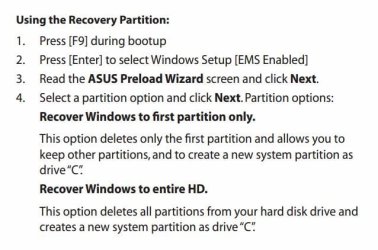
What is the full model number? The online Users Guide will tell how to do this for your computer.
May be like this:
My Computer
- Computer type
- PC/Desktop
- Computer Manufacturer/Model Number
- Lenovo IdeaCenter 450
- OS
- Windows 10 Pro X64
- CPU
- Intel Quad Core i7-4770 @ 3.4Ghz
- Memory
- 16.0GB PC3-12800 DDR3 SDRAM 1600 MHz
- Graphics Card(s)
- Intel Integrated HD Graphics
- Sound Card
- Realtek HD Audio
- Monitor(s) Displays
- HP 22" LCD
- Screen Resolution
- 1680 x 1050
- Hard Drives
- 250GB Samsung EVO SATA-3 SSD
2TB Seagate ST2000DM001 SATA-2
1.5TB Seagate ST3150041AS SATA
- Keyboard
- Dell USB
- Mouse
- Lenovo USB
- Internet Speed
- Cable via Road Runner 3MB Upload, 30MB Download
- Antivirus
- Windows Defender, MBAM Pro, MBAE
- Browser
- Seamonkey
- Other Info
- UEFI/GPT
PLDS DVD-RW DH16AERSH

- Local time
- 9:53 AM
- Messages
- 50,634
Or Clean Reinstall Windows 7
which discusses how to find safe installation media in Step 1.
which discusses how to find safe installation media in Step 1.