Windows 7127: Full transparent window frame again possi

Status
Not open for further replies.

unawave

Banned
Local time
4:00 PM
Messages
50
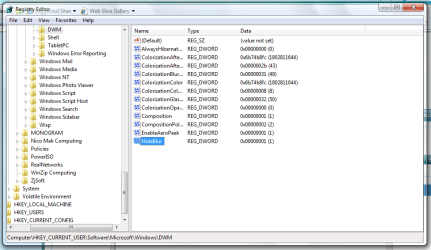
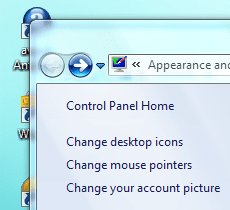
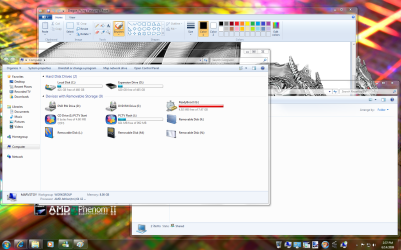
In Windows 7 (build 7127) again it is possible to switch the window frame from "frosted glass" effect ("blur") into fully transparent
 

Attachments

  • Windows-7127-HideBlur.png
    Windows-7127-HideBlur.png
    101.5 KB · Views: 2,187
Last edited by a moderator:

My Computer

OS
Windows XP and 7
That sounds intriguing....

Thanks for the info.
 

My Computers

System One System Two

  • Computer type
    PC/Desktop
    Computer Manufacturer/Model Number
    The Beast Model A (homebrew)
    OS
    Windows 11 21H2 Current build
    CPU
    AMD Ryzen 9 3950X
    Motherboard
    MSI MEG X570 GODLIKE
    Memory
    4 * 32 GB - Corsair Vengeance 3600 MHz
    Graphics Card(s)
    EVGA GeForce RTX 3080 Ti XC3 ULTRA GAMING (12G-P5-3955-KR)
    Sound Card
    Realtek® ALC1220 Codec
    Monitor(s) Displays
    2x Eve Spectrum ES07D03 4K Gaming Monitor (Matte) | Eve Spec
    Screen Resolution
    3x 3840 x 2160
    Hard Drives
    3x Samsung 980 Pro NVMe PCIe 4 M.2 2 TB SSD (MZ-V8P2T0B/AM) } 3x Sabrent Rocket NVMe 4.0 1 TB SSD
    PSU
    PC Power & Cooling’s Silencer Series 1050 Watt, 80 Plus Plat
    Case
    Fractal Design Define 7 XL Dark ATX Full Tower Case
    Cooling
    SteelSeries Apex Pro Wired Gaming Keyboard
    Keyboard
    SteelSeries Apex Pro
    Mouse
    Logitech MX Master 3S | MX Master 3 for business
    Internet Speed
    AT&T LightSpeed Gigabit Duplex Ftth
    Antivirus
    Windows Defender + MB 3
    Browser
    Nightly (default) + Firefox (stable),Chrome, Edge
  • Computer type
    PC/Desktop
    System Manufacturer/Model Number
    Dell Latitude E5470
    OS
    ChromeOS Flex Dev Channel (current)
    CPU
    Intel(R) Core(TM) i5-6300U CPU @ 2.40GHz, 2501 Mhz, 2 Core(s), 4 Logical Processor(s)
    Motherboard
    Dell
    Memory
    16 GB
    Graphics Card(s)
    Intel(R) HD Graphics 520
    Sound Card
    Intel(R) HD Graphics 520 + RealTek Audio
    Monitor(s) Displays
    Dell laptop display 15"
    Screen Resolution
    1920 * 1080
    Hard Drives
    Toshiba 128GB M.2 22300 drive
    INTEL Cherryville 520 Series SSDSC2CW180A 180 GB SATA III SSD
    PSU
    Dell
    Case
    Dell
    Cooling
    Dell
    Keyboard
    Dell
    Mouse
    Logitech MX Master 3S (shared w. Sys 1) | Dell TouchPad
    Internet Speed
    AT&T LightSpeed Gigabit Duplex Ftth
Cool, now how about the task bar ?
 

My Computer

OS
Windows7 Pro x64
CPU
Intel Q6600
Motherboard
Asus X38
Memory
GSkill DD2 1066 6-6-6-18
Graphics Card(s)
CF XFX 4870's
Sound Card
Creative X-fi XtreamGamer Fata1ity Pro
Monitor(s) Displays
ViewSonic 22" 2ms
Screen Resolution
1680 x 1050
Hard Drives
Samsung F1 750 GB
W/D 160
PSU
CM1000W
Case
CMstacker
Cooling
Air 7 120mm fans
Keyboard
Saitek red backlit
Mouse
Logitech G9
Internet Speed
3mbs
This effect was also in the builds 6956, 7022, 7048 and 7068 possible.
In the builds 7000, 7077 and 7100 it doesn't work.

You also can use this function in the build 7100 (RC), when you copy the two files "DWM.exe" and "uDWM.dll" from folder c:\windows\system32\ of Build 7127 into the Build 7100.

Whereby the file "DWM.exe" is responsible for the evaluation of the registry key ("HideBlur=1") and the file "uDWM.dll" for full transparency.

In order to overwrite these files at all, you first must acquire the full access rights at these files. Then "stop the service": "Desktop Windows Manager Session Manager" for a short time and copy the files from build 7127 into 7100. After that "restart the service": "Desktop Windows Manager Session Manager" again.

 

My Computer

OS
Windows XP and 7
Sorry to dig this up, but if there is someone with 7127 64 bit can you please upload dwm.exe and uDWM.dll files for me (and possibly others?).

Or does same files work for 64 bit?
 

My Computer

OS
Windows 7 Professional x64
CPU
E6420 (temporary)
Motherboard
G43 Twins-FullHD (temporary)
Memory
DDR2 2x1gb (temporary)
Graphics Card(s)
Evga GTX 480 Superclocked+
Sound Card
Creative X-FI Extreme Audio Pci-E
Monitor(s) Displays
2x24" Samsung SyncMaster 2494HS
Screen Resolution
1920x1080
Hard Drives
2xSamsung 500GB
Samsung F3 1 TB
PSU
OCZ GameXstream 850w
Case
Cooler Master HAF X
Keyboard
Logitech Illuminated
Mouse
Logitech MX518
Internet Speed
40/2
Cool, cheers man. Works great on 7127 x86. You need to add a DWORD (XXbit) value (where XX is 32 or 64, based on your system) in HKEY_CURRENT_USER\Software\Microsoft\Windows\DWM
Capture.PNG
Before
before hack.PNG
After
after hack.PNG
 

My Computer

Computer Manufacturer/Model Number
Compaq Desktop
OS
Windows 7 Ultimate x64
CPU
AMD Sempron Dual Core
Memory
3GB
Graphics Card(s)
NVIDIA GeForce 6150SE nForce 430
Screen Resolution
1024x768
Hard Drives
150GB Sata
when you say 64-bit dword, do you mean q-word key?
 

My Computer

Computer Manufacturer/Model Number
self built
OS
Windows 7 Professional 64-bit
CPU
Intel E8400 3GHz
Motherboard
Intel DX48BT2
Memory
Kingston PC3-10700H 4Gb
Graphics Card(s)
XFX Radeon HD 5850 BlackEd.
Sound Card
Asus Xonar DG
Monitor(s) Displays
2x Samsung SM-T220HD 22"
Screen Resolution
1680x1050 on two monitors
Hard Drives
OCZ Vertex 2 120gb 3.5" (OS)
Seagate Momentus XT 500gb
Samsung F3 1Tb (games)
2x Samsung F1 1Tb
PSU
Thermaltake ToughPower 850w
Case
Thermaltake Armor
Cooling
Scythe Mugen II
Keyboard
Microsoft Comfort Curve USB
Mouse
Razer Diamondback 3G
Internet Speed
8128/443
when you say 64-bit dword, do you mean q-word key?


Hi swarfeggy,

you could just make a 32 bit dword value like the rest of the entries there, but it appears that it doesn't work anymore in 7201, at least for me now. I had it in 7137. :(
 

My Computer

Computer type
PC/Desktop
Computer Manufacturer/Model Number
Airbot 2.0
OS
Windows 7 Ultimate x64 SP1
CPU
Core i7 920 (D0) @ 4Ghz, *26c idle *65c full load on air
Motherboard
Asus P6X58D Premium - Sata 6Gb/s - USB 3.0
Memory
12GB DDR3 Corsair Dominator -CMD12GX3M6A1600C8 at 1600MHz
Graphics Card(s)
Zotac Geforce GTX 770
Sound Card
ASUS Xonar D2X
Monitor(s) Displays
1 LG 24" Flatron W2453V-PF 1 Samsung 24" P2450H both 2ms RT
Screen Resolution
1920x1080@60hz
Hard Drives
1 Samsung 250GB 840 Evo SSD
1 OCZ Vertex2 180GB SSD
1 TB Samsung Spinpoint F1 7200RPM 32MB cache
2 500GB WD Caviar Blacks 7200RPM 32MB cache (WD5001AALS)

Pioneer DVD Burner DVR-S18M
PSU
Corsair HX1000W
Case
Cooler Master HAF 932
Cooling
Case Fans *3 230mm, *1 140mm/CPU - *Tuniq Tower 120 Extreme
Keyboard
Logitech Wireless MK700
Mouse
Logitech Wireless MK700
Internet Speed
DL 15 Mbps UL 0.98 Mbps
Antivirus
None
Browser
Firefox Nightly
Other Info
Processor-7.7 *RAM- 7.9 *Graphics-7.9 *Gaming Graphics- 7.9 *SSD- 7.8 W.E.I final score= 7.7
*Phone- LG Nexus 5
but it appears that it doesn't work anymore in 7201

I second. The DWM folder isn't even there in x86
 

My Computer

Computer Manufacturer/Model Number
Dell Vostro 1000
OS
Windows 7 Ultimate x86
CPU
AMD Sempron 3600+
Graphics Card(s)
ATI Radeon Xpress 1150
Monitor(s) Displays
Generic PnP Monitor
Screen Resolution
1200 x 800
Hard Drives
WD Scorpio Blue 500 GB (WD5000BEVT)
Mouse
Logitech V320 Cordless Optical Mouse
Hmm, strange. The folder's there with x64, but the entry has no effect like it did in 7137. :(
 

My Computer

Computer type
PC/Desktop
Computer Manufacturer/Model Number
Airbot 2.0
OS
Windows 7 Ultimate x64 SP1
CPU
Core i7 920 (D0) @ 4Ghz, *26c idle *65c full load on air
Motherboard
Asus P6X58D Premium - Sata 6Gb/s - USB 3.0
Memory
12GB DDR3 Corsair Dominator -CMD12GX3M6A1600C8 at 1600MHz
Graphics Card(s)
Zotac Geforce GTX 770
Sound Card
ASUS Xonar D2X
Monitor(s) Displays
1 LG 24" Flatron W2453V-PF 1 Samsung 24" P2450H both 2ms RT
Screen Resolution
1920x1080@60hz
Hard Drives
1 Samsung 250GB 840 Evo SSD
1 OCZ Vertex2 180GB SSD
1 TB Samsung Spinpoint F1 7200RPM 32MB cache
2 500GB WD Caviar Blacks 7200RPM 32MB cache (WD5001AALS)

Pioneer DVD Burner DVR-S18M
PSU
Corsair HX1000W
Case
Cooler Master HAF 932
Cooling
Case Fans *3 230mm, *1 140mm/CPU - *Tuniq Tower 120 Extreme
Keyboard
Logitech Wireless MK700
Mouse
Logitech Wireless MK700
Internet Speed
DL 15 Mbps UL 0.98 Mbps
Antivirus
None
Browser
Firefox Nightly
Other Info
Processor-7.7 *RAM- 7.9 *Graphics-7.9 *Gaming Graphics- 7.9 *SSD- 7.8 W.E.I final score= 7.7
*Phone- LG Nexus 5
Actually my bad, I looked under local machine and the folder wasn't there. It's there under current user, i'm rebooting to see if it worked

Edit: Does not work in x86 7201
 

My Computer

Computer Manufacturer/Model Number
Dell Vostro 1000
OS
Windows 7 Ultimate x86
CPU
AMD Sempron 3600+
Graphics Card(s)
ATI Radeon Xpress 1150
Monitor(s) Displays
Generic PnP Monitor
Screen Resolution
1200 x 800
Hard Drives
WD Scorpio Blue 500 GB (WD5000BEVT)
Mouse
Logitech V320 Cordless Optical Mouse
No, no worky anymore.
 

My Computer

Computer type
PC/Desktop
Computer Manufacturer/Model Number
Airbot 2.0
OS
Windows 7 Ultimate x64 SP1
CPU
Core i7 920 (D0) @ 4Ghz, *26c idle *65c full load on air
Motherboard
Asus P6X58D Premium - Sata 6Gb/s - USB 3.0
Memory
12GB DDR3 Corsair Dominator -CMD12GX3M6A1600C8 at 1600MHz
Graphics Card(s)
Zotac Geforce GTX 770
Sound Card
ASUS Xonar D2X
Monitor(s) Displays
1 LG 24" Flatron W2453V-PF 1 Samsung 24" P2450H both 2ms RT
Screen Resolution
1920x1080@60hz
Hard Drives
1 Samsung 250GB 840 Evo SSD
1 OCZ Vertex2 180GB SSD
1 TB Samsung Spinpoint F1 7200RPM 32MB cache
2 500GB WD Caviar Blacks 7200RPM 32MB cache (WD5001AALS)

Pioneer DVD Burner DVR-S18M
PSU
Corsair HX1000W
Case
Cooler Master HAF 932
Cooling
Case Fans *3 230mm, *1 140mm/CPU - *Tuniq Tower 120 Extreme
Keyboard
Logitech Wireless MK700
Mouse
Logitech Wireless MK700
Internet Speed
DL 15 Mbps UL 0.98 Mbps
Antivirus
None
Browser
Firefox Nightly
Other Info
Processor-7.7 *RAM- 7.9 *Graphics-7.9 *Gaming Graphics- 7.9 *SSD- 7.8 W.E.I final score= 7.7
*Phone- LG Nexus 5
Fully Transparent Window Frames again!

Using the registry changes mentioned before in UNAWAVE - Full transparent window frame window frames can be fully transparent again in build 7229. (At least in x64)

Fully Transparent.PNG

Looking good...​

Marvin​
 
Last edited by a moderator:

My Computer

Computer type
PC/Desktop
Computer Manufacturer/Model Number
Custom by Charbroil57
OS
Windows 7 Home Premium x64 (clean install 8/05/2015)
CPU
AMD Phenom II X2 550 Black Edition 3.1GHz
Motherboard
Gigabyte GA-MA790X-UD4P AM3/AM2+/AM2 AMD 790X ATX AMD
Memory
8 GB (4 x 2 GB) Corsair 6400C5 800 MHz
Graphics Card(s)
BFG 512MB GDDR3 9600GT OC
Sound Card
Realtec HD Audio 5.1
Monitor(s) Displays
DVI Viewsonic VA2231
Screen Resolution
1920 x 1080 (1080p)
Hard Drives
1 TB SATA 6G Seagate Barracuda (Boot drive, limited to 3G due to Mobo)
500 GB SATA 3G Seagate Barracuda
500 GB USB Seagate Desktop Drive
PSU
Ultra X4 750w Modular(upgraded)
Case
Antec Sonata
Cooling
Stock (80w CPU)
Keyboard
Microsoft Wireless Desktop Elite
Mouse
Wirless Intellimouse Explorer 2.0
Internet Speed
Xfinity Broadband (Home 75 MB Download)
Antivirus
Norton Internet Security
Browser
Firefox 39 (default) and IE 11
Other Info
SATA HP Lightscribe DVD RW
SATA Samsung Lightscribe DVD RW
Yes, it works for me again in 7229, didn't in 7201.
 

My Computer

Computer type
PC/Desktop
Computer Manufacturer/Model Number
Airbot 2.0
OS
Windows 7 Ultimate x64 SP1
CPU
Core i7 920 (D0) @ 4Ghz, *26c idle *65c full load on air
Motherboard
Asus P6X58D Premium - Sata 6Gb/s - USB 3.0
Memory
12GB DDR3 Corsair Dominator -CMD12GX3M6A1600C8 at 1600MHz
Graphics Card(s)
Zotac Geforce GTX 770
Sound Card
ASUS Xonar D2X
Monitor(s) Displays
1 LG 24" Flatron W2453V-PF 1 Samsung 24" P2450H both 2ms RT
Screen Resolution
1920x1080@60hz
Hard Drives
1 Samsung 250GB 840 Evo SSD
1 OCZ Vertex2 180GB SSD
1 TB Samsung Spinpoint F1 7200RPM 32MB cache
2 500GB WD Caviar Blacks 7200RPM 32MB cache (WD5001AALS)

Pioneer DVD Burner DVR-S18M
PSU
Corsair HX1000W
Case
Cooler Master HAF 932
Cooling
Case Fans *3 230mm, *1 140mm/CPU - *Tuniq Tower 120 Extreme
Keyboard
Logitech Wireless MK700
Mouse
Logitech Wireless MK700
Internet Speed
DL 15 Mbps UL 0.98 Mbps
Antivirus
None
Browser
Firefox Nightly
Other Info
Processor-7.7 *RAM- 7.9 *Graphics-7.9 *Gaming Graphics- 7.9 *SSD- 7.8 W.E.I final score= 7.7
*Phone- LG Nexus 5
Tried it out on my dad's notebook. Seems cool, but sometimes confusing. For me.. it's not so useful, but I'm pretty sure other users will like it. :D
 

My Computer

Computer type
PC/Desktop
Computer Manufacturer/Model Number
Multirama PC Expert [Bulgaria]
OS
Windows 7 Home Premium [64-Bit]
CPU
Intel Core 2 Quad CPU Q8200 @ 2.33 GHz
Motherboard
GIGABYTE GA-G31M-S2C
Memory
4094 MB DDR2
Graphics Card(s)
SAPPHIRE Radeon HD 6970 (2 GB VRAM)
Sound Card
Realtek ALC883 @ Intel 82801GB ICH7 - High Definition Audio
Monitor(s) Displays
Samsung SyncMaster BX2235 [21.5" LCD with LED Backlight]
Screen Resolution
1920x1080
Hard Drives
Hitachi HDT721075SLA360 - 750 GB
PSU
Cooler Master GX750 - 750W
Case
Multirama (Black / 2010 Revision)
Cooling
Stock + Cooler Master
Keyboard
Logitech G510 (Gaming Keyboard)
Mouse
Razer Lachesis (4000 DPI, Blue Version)
Internet Speed
Vivacom Optical [100 Mbps]
Browser
Chrome [Windows]
Status
Not open for further replies.
Back
Top