Windows 8 banned by world’s top benchmarking and overclocking site

Dude

Breaking Bad
Guru
Gold Member
VIP
Local time
8:13 AM
Messages
5,752
Location
Texas
Windows 8 banned by world’s top benchmarking and overclocking site

In an odd turn of events, Windows 8 has been banned from HWBot, one of the world’s top benchmarking and overclocking communities. All existing benchmarks recorded by Windows 8 have been disqualified. This is due to a fault in Windows 8′s real-time clock (RTC), which all benchmarking tools use as a baseline.

Source
 

My Computer My Computer

At a glance

Windows 10 Pro X64Intel(R) Core(TM) i5-3570K CPU OC@ 4.5GHZ Turbo8.00 GB DDR3 1600MhzMSI Gaming X GTX 1070
Computer type
PC/Desktop
Computer Manufacturer/Model Number
Dude Build
OS
Windows 10 Pro X64
CPU
Intel(R) Core(TM) i5-3570K CPU OC@ 4.5GHZ Turbo
Motherboard
MSI Z77A-G45 Gaming
Memory
8.00 GB DDR3 1600Mhz
Graphics Card(s)
MSI Gaming X GTX 1070
Sound Card
Realtek High Definition
Monitor(s) Displays
Dell S23O9W, HP L1710
Screen Resolution
DELL-1920 x 1080 HP-1280 x1024
Hard Drives
Crucial m4 256 SSD, WD 7200RPM 500GB WD 1TB
PSU
Seasonic X650 GOLD
Case
Zalman Z12
Cooling
Antec Kuhler 920
Keyboard
Logitech
Mouse
MSI DS100 Interceptor
Internet Speed
50 down and 5 up
Antivirus
MSE
Browser
Chrome, IE 11
Other Info
Logitech X-620 Speakers
No big deal here, have never really gone by any benchmark on any OS or Browser. . .Not really sure how important it really is for the everyday user (notice I said every day user and not the Average Joe/Jane user). . .:)
 
Last edited:

My Computer My Computer

At a glance

Win 7 Pro x64, VM Win XP, Win7 Pro Sandbox, K...AMD Athlon(tm) II X4 640 @ 3.0 Gbz12GB 1066MHz DDR3 SDRAM - 2x4GB, 2x2GBATI Radeon HD 4350 HD Graphics/Audio with 512MB
Computer Manufacturer/Model Number
HP Pavilion a4302f
OS
Win 7 Pro x64, VM Win XP, Win7 Pro Sandbox, Kubuntu 11
CPU
AMD Athlon(tm) II X4 640 @ 3.0 Gbz
Memory
12GB 1066MHz DDR3 SDRAM - 2x4GB, 2x2GB
Graphics Card(s)
ATI Radeon HD 4350 HD Graphics/Audio with 512MB
Sound Card
Realtek High Definition Audio
Monitor(s) Displays
1. Dell 23" SP2307, 2. Mitsublishi 40" HDTV, Hannspree 25"
Screen Resolution
1. 2048x1152, 2. 1920-1080, 3. 1920x1200
Hard Drives
Int: 1 120 Gig SSD i
1 - 2.5" 500 USB External HDD
1 -1 Tb USB External HDD
Case
Mid Tower
Cooling
Standard Fans - 5 fans (very quiet)
Keyboard
Microsoft Wireless 2000
Mouse
Microsoft Wireless Mouse 5000
Internet Speed
10 Mbit (realistically 500 Kbit - 1.2 Mbit)
Other Info
Speakers - Bose Desktop (Excellent Sound)
1 external CD|DVD\Blue-ray Recorders/Players (Sony)
this is going to discourage its use in gaming/overclocking rigs. And will piss off a lot of people.

As if it wasn't already.
 

My Computer My Computer

At a glance

Win 7 Pro 64-bit 7601AMD Phenom 9650 QuadCore, revision DR-B35 GB yes I run 2x 2GB and 1x 1GB, different b...NVIDIA GeForce 9800 GT 512 Mb, unknown manufa...
Computer type
PC/Desktop
Computer Manufacturer/Model Number
custom built
OS
Win 7 Pro 64-bit 7601
CPU
AMD Phenom 9650 QuadCore, revision DR-B3
Motherboard
ASUS M4A78
Memory
5 GB yes I run 2x 2GB and 1x 1GB, different brand, spank me.
Graphics Card(s)
NVIDIA GeForce 9800 GT 512 Mb, unknown manufacturer.
Sound Card
Crappy Realtek Integrated Audio
Monitor(s) Displays
Fujitsu Siemens P19-3P
Screen Resolution
1280 x 1024 x 32 bits @ 60 Hz Oh yeah, 4:3 rocks!
Hard Drives
(1) MAXTOR S TM3320613AS SATA Disk Device (2) STM35004 18AS SATA Disk Device (3) TOSHIBA USB 2.5"-HDD
PSU
whatever, around 450w
Case
Scavenged from old company PC, 10+ years old
Cooling
CPU fan, GPU fan, case fan, nothing fancy
Keyboard
Microsoft, PS/2, white.
Mouse
Optical, logitec.
Internet Speed
effective max speeds: 70-ish kB/s down 30-ish kB/s up
Antivirus
Avira, free edition.
Browser
Firefox with FXChrome to make it look like Google Chrome :P
Other Info
Was discarded by previous owner due to "horrible performance".
Was running Win Xp from a IDE drive. Yeah. Was a pain.
SATA II drive and Win7 and it zips away! Yay!
Pouring more hot lava on a OS that already makes people feel like this ---> :mad::devil:
 

My Computer My Computer

At a glance

Windows 10 ProAMD Ryzen 5 2400G Processor with Radeon RX Ve...G.SKILL Ripjaws V Series 16GB (2 x 8GB) 288-P...2047MB NVIDIA GeForce GTX 1060 6GB (EVGA)
Computer type
PC/Desktop
Computer Manufacturer/Model Number
Custom Built
OS
Windows 10 Pro
CPU
AMD Ryzen 5 2400G Processor with Radeon RX Vega 11 Graphics
Motherboard
ASRock X470 Master SLI/AC AM4 AMD Promontory X470 SATA 6Gb/s
Memory
G.SKILL Ripjaws V Series 16GB (2 x 8GB) 288-Pin DDR4 SDRAM D
Graphics Card(s)
2047MB NVIDIA GeForce GTX 1060 6GB (EVGA)
Sound Card
Motherboard Built in
Monitor(s) Displays
Acer R240HY bidx 23.8-Inch IPS HDMI DVI VGA (1920 x 1080) Wi
Screen Resolution
1920 x 1080
Hard Drives
1TB Sandisk SSD PLUS (Main drive)
500 GB Seagate 7200 RPM (Games)
500 GB Western Digital 7200 RPM (Virtual Machines)
PSU
CORSAIR TX Series TX650M 650W 80+ Gold Modular Power Supply
Case
CORSAIR CARBIDE SPEC-02 Mid-Tower Gaming Case, Red LED Fan
Cooling
220mm, two 120mm, and four 60mm fans
Keyboard
Wired Dell keyboard
Mouse
Wireless Logitech mouse
Internet Speed
250mb down, 30mb up
Antivirus
Panda Cloud Antivirus
Browser
Chrome-ish x64
Other Info
Your awesome for reading this.
For most people this isn't really an issue.

I just wouldn't want to be some benchmarking, rig building enthusiast that got Windows 8 for the sole reason that it supposedly runs things slightly faster in general.

Most people will like or dislike Windows 8 for other reasons.
 

My Computer My Computer

At a glance

Windows 7 Professional SP1 64bit, Manjaro Xfc...Intel i7-3930K @ 4.2GHzCorsair Dominator 64GB Quad Channel DDR3 @ 16...EVGA GeForce GTX Titan Black Superclocked (×2...
Computer type
PC/Desktop
OS
Windows 7 Professional SP1 64bit, Manjaro Xfce, Debian 10 64bit Xfce
CPU
Intel i7-3930K @ 4.2GHz
Motherboard
ASUS P9X79 WS
Memory
Corsair Dominator 64GB Quad Channel DDR3 @ 1600MHz
Graphics Card(s)
EVGA GeForce GTX Titan Black Superclocked (×2, SLI)
Monitor(s) Displays
Sony Bravia 46"
Screen Resolution
1920×1080 (Full Screen), 1366×768 (Windows)
Hard Drives
Samsung 860 PRO 4TB SSD, Samsung 850 EVO 1TB SSD, Western Digital WD Gold 16TB 7200 RPM 512MB Cache HDD
PSU
Corsair AX1200 (1200W, 100.4A @ 12V)
Case
Corsair Obsidian 750D
Cooling
Corsair H110, 5 NOCTUA NF-A14 industrialPPC-3000 PWM Fans
Keyboard
Logitech K360
Mouse
Logitech M220
Browser
Firefox Developer Edition, Pale Moon, Tor
I found this article on it.
 

My Computer My Computer

At a glance

Windows 7 Professional 64 bit
OS
Windows 7 Professional 64 bit
Well, Paul. I think overclocking is a lot more prevalent than he lets on. There are a lot more overclockers and benchmarkers than he wants everyone to believe.
 

My Computers My Computers

  • At a glance

    Windows 11 ProRyzen 9 5900X32GB G Skill DDR4-3600EVGA RTX 3080 FTW 3 Ultra
    Computer type
    PC/Desktop
    Computer Manufacturer/Model Number
    ALWAYS UNDER CONSTRUCTION
    OS
    Windows 11 Pro
    CPU
    Ryzen 9 5900X
    Motherboard
    Asus X570 Crosshair Viii Hero
    Memory
    32GB G Skill DDR4-3600
    Graphics Card(s)
    EVGA RTX 3080 FTW 3 Ultra
    Sound Card
    On Board/Sennheiser PC37X Headset
    Monitor(s) Displays
    3 X Asus 27"
    Screen Resolution
    2560x1440
    Hard Drives
    2 X 1 TB NVME drives
    PSU
    EVGA 850
    Case
    Phanteks Eclipse P400A
    Cooling
    EVGA 280 AIO
    Keyboard
    Logitech G510s/ Logitech G13
    Mouse
    Logitech G502
    Internet Speed
    24/1
    Antivirus
    ESET/MBAM Pro/SAS Pro
    Browser
    Chrome/ Firefox/ Edge
  • At a glance

    Windows 11 ProIntel Ultra 9 288V32 GB LPDDR5X 8533
    Computer type
    Laptop
    System Manufacturer/Model Number
    Dell 16 Plus
    OS
    Windows 11 Pro
    CPU
    Intel Ultra 9 288V
    Memory
    32 GB LPDDR5X 8533
    Monitor(s) Displays
    16" Mini-LED HDR600 Touch 90 Hz
    Screen Resolution
    2560X1600
    Hard Drives
    1 TB NVME
Heh. There are several reasons why I won't be purchasing a Win8 machine. Overclocking issues was never one. In fact, it's my habit to buy a machine with a faster processor and UNDERclock it, expressly because I can control heat and not worry about stability without spending more $$ on a cooling sys. My Seven machine has never crashed, never had a blue screen event, and rarely gets even warm. Do I run without snags? No. But, system stability is never a problem.

Would I buy a Win8 sys? Not on your life. Why mess with a good thing? I'll skip 8, just like I skipped Vista.
 

My Computer My Computer

At a glance

Microsoft Windows 10 Home Build 15036Intel(R) Core(TM) i7-860 @ 2.80GHz4.00 GBNVIDIA GeForce GTX 750
Computer type
PC/Desktop
Computer Manufacturer/Model Number
iBuyPower NZXT
OS
Microsoft Windows 10 Home Build 15036
CPU
Intel(R) Core(TM) i7-860 @ 2.80GHz
Motherboard
Gigabyte Technology Co., Ltd. P55-UD3L
Memory
4.00 GB
Graphics Card(s)
NVIDIA GeForce GTX 750
Sound Card
(1) Line 6 UX2 (2) Realtek High Definition Audio
Monitor(s) Displays
23" acer
Screen Resolution
1920 x 1080 x 32 bits (4294967296 colors) @ 60 Hz
Hard Drives
(1) WDC WD5000AAKS-00D2B0 ATA Device (2) Seagate FreeAgent Go 250G USB Device
Cooling
Corsair H75 liquid cooler (Very easy to install, actually)
Internet Speed
60M cable modem-->Linksys E1200-->1Gbps net card
Browser
Chrome
Other Info
This is probably the longest I've ever had a Windows machine run without having to restore it to scratch. I'm used to restoring to "factory" about every 2 yrs. I've run with Win7 since new in 2009 and only recently (Nov, '14) restored to clean up the machine from all my 'xperimenting. LOL!! I may never need another machine.

Upgraded to 10 when it was still free, then installed 2017 update.
Windows 8 has been banned from HWBot, one of the world’s top benchmarking and overclocking communities. All existing benchmarks recorded by Windows 8 have been disqualified. This is due to a fault in Windows 8′s real-time clock (RTC), which all benchmarking tools use as a baseline.

They're just blaming Windows 8 for a bug in their code, nothing on Windows uses RTC for benchmarks. Windows developers know that you do not use the RTC clock due to issues with power states, this has been the case since Windows 2000. :confused:

There were two major discrepancies that were encountered using the rdtsc instruction on Intel-compatible processors, namely:
(1) lack of synchronization of the TSC across processors, and
(2) dynamic changes to the TSC clock update interval as a result of the processor entering a lower power state, slowing both the clock rate and the TSC update interval in tandem.

To deal with the drift in TSC values across multiple processors, in Windows 6 (Vista and Windows Server 2008), the Windows QueryPerformanceCounter function was changed to use one of several external, high resolution timer facilities that are usually available on the machine. These include the High Precision Event Timer (HPET), often also referred to as the Multimedia Timer in Windows, and the external ACPI Power Management Timer, another high resolution timer facility that is independent of the main processor hardware. Because these timer facilities are external to the processors, they are capable of supplying uniform values that are consistent across CPUs. (At the same time, QueryPerformanceFrequency was also re-written to return the frequency of the external timer source.) This change effectively fixed the problems associated with accurate measurements of disk IO response time that were evident in Windows 2000 and Windows XP.

Performance By Design: High Resolution Clocks and Timers for Performance Measurement in Windows.
 
It appears that the only affected would be software overclocking.

And that they used "RTC clock" because they tried to look experts in a field they don't fully understand.

But there is something going on in Windows 8. It's not their programs.

From here.
Yesterday, popular overclocking site HWBot announced that due to problems with Windows 8′s performance when overclocking, they would no longer accept or validate results that used that platform. This was sufficient to kick off a tidal wave of speculation and vitriol towards Microsoft’s supposedly poor real-time clock (RTC). This has been picked up and magnified across the internet with all the inevitable effects of a game of telephone. It’s time to inject some sanity and examine what we really know — and what we don’t.
This problem impacts a tiny group of people

The issue HWBot has identified has no impact on stock hardware. It has no impact on BIOS-level overclocking. It has no impact on software multiplier adjustments. This problem is limited to software programs that adjust the base clock rate (BCLK) on-the-fly, without a reboot. I’ve talked to several boutique owners in the past and they’ve confirmed that even among computer enthusiasts, overclocking is fairly rare. Overclocking by BCLK is even rarer for multiple reasons — but mostly because Intel discourages it these days and doesn’t allow it to occur save within a very narrow range.
I’m not saying HWBot was wrong to do what they did, because when your reputation is built on validating OC results, you have to make certain the results are, well, valid. But the first thing to understand is that this problem is only going to tag a specific group of people using software to overclock within the OS.
The actual clock mechanism involved isn’t clear – but this isn’t a cheat

One thing I’ve seen mentioned at several sites is the idea that Microsoft is somehow cheating to try and make Windows 8 look better. (See: Windows 8: The disastrous result of Microsoft’s gutless equivocation.) This betrays a fundamental lack of understanding for the problem. The fact that the system clock is losing time rapidly is proof that this isn’t intentional. Keeping system clocks updated and synchronized can be extremely important across a network. A system losing 18 seconds out of every 5 minutes will be nearly 6 hours out of sync within four days. That means backup jobs and system maintenance normally scheduled for 04:00 is happening at 10:00 instead. This is a real problem.
But the repeated references to Windows RTC (real-time clock) probably aren’t accurate. Previous versions of 3DMark (a program affected by this errata) have all relied on HPET, not RTC. HPET was introduced in Windows Vista; it polls at 14MHz rather than 3.2MHz and was required for running 3DMark 11. It’s highly unlikely that Futuremark returned to using the old RTC rather than the newer HPET standard.
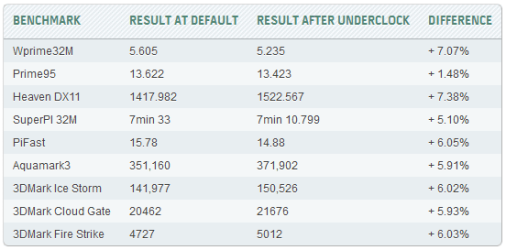
I’m going to use a metronome analogy to explain the problem here. At boot, the system “calibrates” its internal metronome at a given speed — let’s call it 133 beats per second. Right now, changing the BCLK value in software is simultaneously recalibrating the metronome. Set the system to a BCLK of 122, and then run a benchmark, and the system reports a lower time in seconds. The system clock is falling behind the objective wall time because each second is fractionally longer than it ought to be.
hwbot-underclocking-results.png
I think this problem would have been clearer if HWBot had added a column to the chart above. The wall time required to run these tests should be identical in both cases. What’s happening here is that the system’s counters are shifting the number of beats per second, rather than keeping that figure constant. I suspect this problem might be fixed by flipping a deep setting in Windows 8 to adjust how it handles this kind of on-the-fly adjustment — which leads us to the next point.
OS-level overclocking software has always been hit-and-miss

I first cut my teeth on overclocking with an IBM PC, a K6-233, and a Golden Orb. The K6-233 was swapped out for a K6-2 400 thanks a 2x/6x multiplier remap that could be swapped via hardware jumper on the motherboard. Then the first K6-2+ came along: 500MHz on .18 micron with an on-board L2 cache. I picked up an MSI-5169 motherboard, overclocked the chip to ~580MHz, and was off to the races. For all the changes between then and now, one thing has remained constant: Overclocking tuning software run within the operating system has almost always sucked.
I’m not saying this to excuse whatever is going on with Windows 8, because clearly that problem is OS-wide. Back then, we fought for BIOS-level tools precisely because software was so hit and miss. It was not unusual for a motherboard manufacturer’s tool to insist a system was running at one speed while third-party tools implied another and benchmarks indicated a third. The experience has improved modestly since, thanks to various motherboard tools and support from Intel and AMD, but Intel’s own Extreme Tuning Utility requires you to reboot if you want to change the base clock — and it alters the value passed to the BIOS for boot initialization. I suspect that’s to avoid this kind of problem.
The point here is not to give Windows 8 a free pass, but to acknowledge that problems with software OCing have plagued operating systems for as long as there have been operating systems. Some components have never liked on-the-fly adjustments of their frequencies. Some programs don’t respond well to this kind of shift.
The ball, so to speak, is definitely in Microsoft’s court on this one. The timer behavior is unusual and likely unintentional. But this is a problem that will impact a fraction of overclockers, which are a fraction of hardcore computer enthusiasts, who are a fraction of computer users. It’s not unusual for programs that change timings post-boot to create erratic behavior as a side effect. The real problem is the way the internal clock gets knocked off kilter — and that’s something MS can almost certainly fix.

 

My Computer My Computer

At a glance

Win 7 Pro 64-bit 7601AMD Phenom 9650 QuadCore, revision DR-B35 GB yes I run 2x 2GB and 1x 1GB, different b...NVIDIA GeForce 9800 GT 512 Mb, unknown manufa...
Computer type
PC/Desktop
Computer Manufacturer/Model Number
custom built
OS
Win 7 Pro 64-bit 7601
CPU
AMD Phenom 9650 QuadCore, revision DR-B3
Motherboard
ASUS M4A78
Memory
5 GB yes I run 2x 2GB and 1x 1GB, different brand, spank me.
Graphics Card(s)
NVIDIA GeForce 9800 GT 512 Mb, unknown manufacturer.
Sound Card
Crappy Realtek Integrated Audio
Monitor(s) Displays
Fujitsu Siemens P19-3P
Screen Resolution
1280 x 1024 x 32 bits @ 60 Hz Oh yeah, 4:3 rocks!
Hard Drives
(1) MAXTOR S TM3320613AS SATA Disk Device (2) STM35004 18AS SATA Disk Device (3) TOSHIBA USB 2.5"-HDD
PSU
whatever, around 450w
Case
Scavenged from old company PC, 10+ years old
Cooling
CPU fan, GPU fan, case fan, nothing fancy
Keyboard
Microsoft, PS/2, white.
Mouse
Optical, logitec.
Internet Speed
effective max speeds: 70-ish kB/s down 30-ish kB/s up
Antivirus
Avira, free edition.
Browser
Firefox with FXChrome to make it look like Google Chrome :P
Other Info
Was discarded by previous owner due to "horrible performance".
Was running Win Xp from a IDE drive. Yeah. Was a pain.
SATA II drive and Win7 and it zips away! Yay!

My Computer My Computer

At a glance

Win7 Home Premium x64 SP1i7 4770k8Gb Kingston HyperX Beast 2400MHz @2133MHz 11...MSI GTX 780ti Gaming Oc x2
Computer type
PC/Desktop
Computer Manufacturer/Model Number
Custom build
OS
Win7 Home Premium x64 SP1
CPU
i7 4770k
Motherboard
Asus maximus VI Hero
Memory
8Gb Kingston HyperX Beast 2400MHz @2133MHz 11-12-11-30
Graphics Card(s)
MSI GTX 780ti Gaming Oc x2
Sound Card
Onboard ROG SupremeFX
Monitor(s) Displays
Asus VG248QE
Screen Resolution
3840X1080 144Hz
Hard Drives
Samung Evo 256Gb, OCZ Agility4 128Gb
1x1TB hitachi storage
PSU
EVGA Supernova 1000w Platinum
Case
Corsair Air 540
Cooling
Corsair H100i
Keyboard
Coolermaster Quickfire Pro
Mouse
Corsair M65 RGB
Internet Speed
74mb dwn/16up
Antivirus
MSE,Malwarebytes
Browser
Chrome
Reason number 92 to stay with Windows 7.
 

My Computer My Computer

At a glance

Win 10 Pro 64Intel Core i7 960 @3.20 GHz24.0 GB DDR3EVGA GTX 750Ti
Computer type
PC/Desktop
Computer Manufacturer/Model Number
Custom Build
OS
Win 10 Pro 64
CPU
Intel Core i7 960 @3.20 GHz
Motherboard
MSI MS7522
Memory
24.0 GB DDR3
Graphics Card(s)
EVGA GTX 750Ti
Monitor(s) Displays
LG E2341 23 Inch
Screen Resolution
1920x1080
Hard Drives
1TB Western Dgital 1002FAEX-00Y9A0
1TB Hitachi HDS721010CLA322
PSU
700 Watt
Case
Haf 912
Cooling
Fans
Keyboard
Logitech MK710
Mouse
Logitech M705
Internet Speed
Cable
Antivirus
AIS 2015 .10.0.2225
Browser
Firefox 49
Other Info
MalwareBytes Anti-Rootkit utility

My Computer My Computer

At a glance

Microsoft Windows 10 Home Build 15036Intel(R) Core(TM) i7-860 @ 2.80GHz4.00 GBNVIDIA GeForce GTX 750
Computer type
PC/Desktop
Computer Manufacturer/Model Number
iBuyPower NZXT
OS
Microsoft Windows 10 Home Build 15036
CPU
Intel(R) Core(TM) i7-860 @ 2.80GHz
Motherboard
Gigabyte Technology Co., Ltd. P55-UD3L
Memory
4.00 GB
Graphics Card(s)
NVIDIA GeForce GTX 750
Sound Card
(1) Line 6 UX2 (2) Realtek High Definition Audio
Monitor(s) Displays
23" acer
Screen Resolution
1920 x 1080 x 32 bits (4294967296 colors) @ 60 Hz
Hard Drives
(1) WDC WD5000AAKS-00D2B0 ATA Device (2) Seagate FreeAgent Go 250G USB Device
Cooling
Corsair H75 liquid cooler (Very easy to install, actually)
Internet Speed
60M cable modem-->Linksys E1200-->1Gbps net card
Browser
Chrome
Other Info
This is probably the longest I've ever had a Windows machine run without having to restore it to scratch. I'm used to restoring to "factory" about every 2 yrs. I've run with Win7 since new in 2009 and only recently (Nov, '14) restored to clean up the machine from all my 'xperimenting. LOL!! I may never need another machine.

Upgraded to 10 when it was still free, then installed 2017 update.
Do laptops count?
 

My Computer My Computer

At a glance

Microsoft Windows 7 Home Premium 64-bit Servi...AMD A10-6800K APU with Radeon(tm)™ HD Graphic...(2) G.Skill F3-12800CL10-8GBXLASUS R7 250 Series (0x6610)
Computer type
PC/Desktop
Computer Manufacturer/Model Number
Custom
OS
Microsoft Windows 7 Home Premium 64-bit Service Pack 1
CPU
AMD A10-6800K APU with Radeon(tm)™ HD Graphics 4100
Motherboard
ASRock FM2A85X Extreme4-M
Memory
(2) G.Skill F3-12800CL10-8GBXL
Graphics Card(s)
ASUS R7 250 Series (0x6610)
Sound Card
Realtek High Definition Audio
Monitor(s) Displays
Acer X213H LCD monitor, 21"
Screen Resolution
1920 x 1080 x 32 bits @ 60 Hz
Hard Drives
WD Black, 1.0TB, WDC WD1002FAEX-00Z3A0
PSU
Rosewill Quark-650
Case
Raidmax Comet SECC Steel ATX Mid Tower Computer Case
Cooling
1 x 80mm + 2 x 120mm + Stock cooler
Mouse
Gear Head Wireless Optical 5-button mouse
Internet Speed
FTTx 6000 / 1000
Antivirus
Avast! Free Antivirus 2015.10.0.2208
Browser
Google Chrome Version 40.0.2214.115
Other Info
*AMD Dual-Graphics
*Uses OpenDNS
*Uses Folding@Home
*HP 16x Super-Multi DVD Writer
*Superspeed 74-in-1 Card Reader
*Maximum overclock has not been determined.

My Computer My Computer

At a glance

Windows 10 Professional 64-bitRyzen 9 5900XG.Skill 3600Mhz CL16 16GB × 4EVGA GeForce RTX 3070 Ti FTW3 Ultra Gaming
Computer type
PC/Desktop
Computer Manufacturer/Model Number
Custom build
OS
Windows 10 Professional 64-bit
CPU
Ryzen 9 5900X
Motherboard
Gigabyte X570 Aorus Master
Memory
G.Skill 3600Mhz CL16 16GB × 4
Graphics Card(s)
EVGA GeForce RTX 3070 Ti FTW3 Ultra Gaming
Sound Card
On-board
Monitor(s) Displays
Dell Alienware AW3418DW
Screen Resolution
3440x1440
Hard Drives
1×Sabrent Rocket 4 Plus 2TB nvme SSD (System, internal)
2x4TB Western Digital Blue (Internal)
1x4TB HDST 7200RPM (Internal)
PSU
Seasonic Focus Plus 850W Platinum
Case
Corsair 680X
Cooling
Stock fans + 3× Corsair QL120, Corsair H100i Platinum
Keyboard
Logitech K350
Mouse
Logitech M510
Internet Speed
120Mbits dl - 20Mbits up
Antivirus
ESET NOD32 Antivirus
Browser
Firefox (latest version)
Other Info
Headphones : Audio-Technica ATH-M50x
Scanner : Canon Canoscan LiDE 220 + Plustek OptiBook 4800
I don't overclock, have no need to and I certainly don't have any problems with heat on my Windows 8 machine, which is a Notebook and sits quite happily on my knee with never any problems regarding heat.

It never feels warm on my knee and it can be there for quite a long time.
 

My Computer My Computer

At a glance

Windows 10 64bit/Windows 10 64bit/Windows 10 ...Intel Pentium J3710 @ 60GHz/Intel B820,1.7GHz...8.00GB DDR3 @ 1599MHz/8GB 2 x 4GB DDR3/8.00GB...Intel HD Graphics/Intel/512MB ATI AMD Radeon ...
Computer type
PC/Desktop
Computer Manufacturer/Model Number
Acer Aspire XC-704 x64 bit/ Asus K55A Notebook PC/HP Envy x360 Convertible 15-bq0xx
OS
Windows 10 64bit/Windows 10 64bit/Windows 10 64bit
CPU
Intel Pentium J3710 @ 60GHz/Intel B820,1.7GHz/AMD A9 Radeon
Motherboard
Acer Aspire XC-704 (SOCKET 0)/Asus/HP 8312 (Socket FP4)
Memory
8.00GB DDR3 @ 1599MHz/8GB 2 x 4GB DDR3/8.00GB Dual-Channel
Graphics Card(s)
Intel HD Graphics/Intel/512MB ATI AMD Radeon R5 Graphics (HP
Sound Card
Realtek High Definition Audio/Onboard/AMD High Definition Au
Monitor(s) Displays
Acer LCD K222HQL /Asus 15.6/Generic PnP Monitor (1920x1080@6
Screen Resolution
1920x1080@59Hz/1366 x 768/1920x1080@60Hz
Hard Drives
1863GBWesternn Digital WDC/Asus/119GB SanDisk SD8SN8U-128G-1006 (SSD)
931GB Hitachi HGST HTS721010A9E630 (SATA)
Keyboard
Microsoft Natural Ergonomic Keyboard 4000 (UK)/Inbuilt/Inbui
Mouse
Microsoft Optical Wheel Mouse/Same plus Touchpad/Same + Pad
Internet Speed
Infinity 2 up to 76 Mbps
Antivirus
MSE/MSE/MSE and all 3 have MalwareBytes Premium
Browser
Edge, Firefox/Edge, Firefox/Edge, Firefox, Chrome
Other Info
Seagate Expansion 500GB External Desktop Drive
Seagate Expansion Portable Drives 500GB and 1TB
Epson XP-332 Wireless Printer
I'm with you Joan on this 1, Can't wait to get the official 8.1 update in October :D
 

My Computer My Computer

At a glance

win 7 ultimate32bit, Win8.1pro wmc 32bitamd phenom x4 9600corsair twinxs 2x2gb2x nvidia 1gb 8500gt
Computer type
PC/Desktop
Computer Manufacturer/Model Number
self build
OS
win 7 ultimate32bit, Win8.1pro wmc 32bit
CPU
amd phenom x4 9600
Motherboard
asus m2n32-sli deluxe
Memory
corsair twinxs 2x2gb
Graphics Card(s)
2x nvidia 1gb 8500gt
Sound Card
onboard
Monitor(s) Displays
23" PB Viseo 233d
Screen Resolution
1920x1080
Hard Drives
maxtor sata 500gb
maxtor sata 320gb
fujitsu sata200gb
PSU
oryxx tornado 750w
Case
thermaltake xaser lll
Cooling
artic freezer64 pro + 7 case fans
I agree Kathryn, I didn't bother with the review thought I'd just wait for it to come via the normal channels. I use it a lot more than my Windows 7 machine now, I don't have to change my glasses to see the screen. :p
 

My Computer My Computer

At a glance

Windows 10 64bit/Windows 10 64bit/Windows 10 ...Intel Pentium J3710 @ 60GHz/Intel B820,1.7GHz...8.00GB DDR3 @ 1599MHz/8GB 2 x 4GB DDR3/8.00GB...Intel HD Graphics/Intel/512MB ATI AMD Radeon ...
Computer type
PC/Desktop
Computer Manufacturer/Model Number
Acer Aspire XC-704 x64 bit/ Asus K55A Notebook PC/HP Envy x360 Convertible 15-bq0xx
OS
Windows 10 64bit/Windows 10 64bit/Windows 10 64bit
CPU
Intel Pentium J3710 @ 60GHz/Intel B820,1.7GHz/AMD A9 Radeon
Motherboard
Acer Aspire XC-704 (SOCKET 0)/Asus/HP 8312 (Socket FP4)
Memory
8.00GB DDR3 @ 1599MHz/8GB 2 x 4GB DDR3/8.00GB Dual-Channel
Graphics Card(s)
Intel HD Graphics/Intel/512MB ATI AMD Radeon R5 Graphics (HP
Sound Card
Realtek High Definition Audio/Onboard/AMD High Definition Au
Monitor(s) Displays
Acer LCD K222HQL /Asus 15.6/Generic PnP Monitor (1920x1080@6
Screen Resolution
1920x1080@59Hz/1366 x 768/1920x1080@60Hz
Hard Drives
1863GBWesternn Digital WDC/Asus/119GB SanDisk SD8SN8U-128G-1006 (SSD)
931GB Hitachi HGST HTS721010A9E630 (SATA)
Keyboard
Microsoft Natural Ergonomic Keyboard 4000 (UK)/Inbuilt/Inbui
Mouse
Microsoft Optical Wheel Mouse/Same plus Touchpad/Same + Pad
Internet Speed
Infinity 2 up to 76 Mbps
Antivirus
MSE/MSE/MSE and all 3 have MalwareBytes Premium
Browser
Edge, Firefox/Edge, Firefox/Edge, Firefox, Chrome
Other Info
Seagate Expansion 500GB External Desktop Drive
Seagate Expansion Portable Drives 500GB and 1TB
Epson XP-332 Wireless Printer
I agree with the Ladies. Only time I use my Windows 7 on my main dual boot system is to keep it updated. When 8.1 is released I will kill this dual boot system and install 8.1 only on a SSD and never look back. Will also update the wife's 7 system to 8.1 at that time. That will only leave my very old HP laptop on 7 as it was a XP machine and 7 has most drivers but 8 has even less. The problem is it just wont die so I can replace it. Just use it when we travel.

Jim :cool:
 

My Computer My Computer

At a glance

Windows 8.1 Pro w/Media Center 64bit, Windows...Phenom II X6 1100TCrucial Balistic 8gb DDR3-1866 CL9MSI R6850 Cyclone IGD5 PE
Computer type
PC/Desktop
Computer Manufacturer/Model Number
Home Built
OS
Windows 8.1 Pro w/Media Center 64bit, Windows 7 HP 64bit
CPU
Phenom II X6 1100T
Motherboard
ASUS M5A99X EVO
Memory
Crucial Balistic 8gb DDR3-1866 CL9
Graphics Card(s)
MSI R6850 Cyclone IGD5 PE
Sound Card
On Board
Monitor(s) Displays
ASUS VE258Q 25" LED with DVI-HDMI-DisplayPort
Screen Resolution
1920 x 1080
Hard Drives
Two WD Cavier Black 2TB Sata III, WD My Book Essential 2TB USB 3.0
PSU
Seasonic X650 80 Plus GOLD Modular
Case
Corsair 400R
Cooling
Antec Kuhler H2O 620, Two 120mm and four 140mm
Keyboard
Logitech K120
Mouse
Logitech Marble Mouse USB, Logitech Precision Game Pad
Internet Speed
15MB
Antivirus
Norton IS 2013, Malwarebytes Pro Beta 2
Browser
IE-11, FF-27
Other Info
APC UPS ES 750, Netgear WNR3500L Gigabit & Wireless N Router with SamKnows Test Program, Motorola SB6120 Gigabit Cable Modem. Brother HL-2170W Laser Printer, Epson V300 Scanner
Well if you guys are getting rid of 7, can I have the disk and the license keys? Hehe I kid I kid.......


maybe ;)
 

My Computer My Computer

At a glance

Windows 10 ProAMD Ryzen 5 2400G Processor with Radeon RX Ve...G.SKILL Ripjaws V Series 16GB (2 x 8GB) 288-P...2047MB NVIDIA GeForce GTX 1060 6GB (EVGA)
Computer type
PC/Desktop
Computer Manufacturer/Model Number
Custom Built
OS
Windows 10 Pro
CPU
AMD Ryzen 5 2400G Processor with Radeon RX Vega 11 Graphics
Motherboard
ASRock X470 Master SLI/AC AM4 AMD Promontory X470 SATA 6Gb/s
Memory
G.SKILL Ripjaws V Series 16GB (2 x 8GB) 288-Pin DDR4 SDRAM D
Graphics Card(s)
2047MB NVIDIA GeForce GTX 1060 6GB (EVGA)
Sound Card
Motherboard Built in
Monitor(s) Displays
Acer R240HY bidx 23.8-Inch IPS HDMI DVI VGA (1920 x 1080) Wi
Screen Resolution
1920 x 1080
Hard Drives
1TB Sandisk SSD PLUS (Main drive)
500 GB Seagate 7200 RPM (Games)
500 GB Western Digital 7200 RPM (Virtual Machines)
PSU
CORSAIR TX Series TX650M 650W 80+ Gold Modular Power Supply
Case
CORSAIR CARBIDE SPEC-02 Mid-Tower Gaming Case, Red LED Fan
Cooling
220mm, two 120mm, and four 60mm fans
Keyboard
Wired Dell keyboard
Mouse
Wireless Logitech mouse
Internet Speed
250mb down, 30mb up
Antivirus
Panda Cloud Antivirus
Browser
Chrome-ish x64
Other Info
Your awesome for reading this.
Back
Top