Solved windows 8 cannot install on a dynamic disk?

When I'd just given you the steps to Convert C then Resize to add as many adjacent Logical partitions as you want, why did you not do that but instead delete your OEM tools partition?

Yes you can still rightclick C to convert it to Logical but there's no reason to do that now since you already destroyed bootable diagnostics by not following the steps given.

If you have not made your Recovery disks yet then I'd do that now. You can normally run them to reinstall all of the factory partitions to default. Or you can run Minimized Recovery from it's partition at boot to get close to the superior Clean Reinstall - Factory OEM Windows 7 and lose the worst load of factory bloatware in the industry.
http://www.sevenforums.com/tutorials/219487-clean-reinstall-factory-oem-windows-7-a.html#post1839164
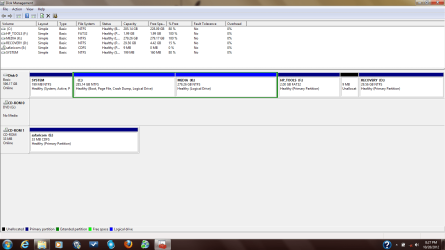
 
yea..was able to convert 'c' to logical but still can't recreate the HP_tools partition
well i guess i will have to live without it..i'll be doing diagnostics the old fashion way..F2 at start-up.
i had already messed up even before you and shawn suggested i i convert the hard disk to basic.
thanks for your help..i salute you(greg) and shawn.
 

My Computer

Computer Manufacturer/Model Number
hp
OS
windows 7 ultimate sp1 x64
CPU
core i5 460m
I was able to recreate the HP_TOOLS partition.
I just had to reduce the number of partitions to 3. I made sure all the 3 are primary(had to convert 'c' to primary and extended the 103mb unallocated space to the RECOVERY partition)
Then i reinstalled the HP system diagnostics UEFI which recreated the HP_TOOLS from partition 'c'. HP_TOOLS partition is primary so i guess you have to recreate it from a primary partition(when 'c' was logical it would just free up the space (2GB) then show an error message).
Then i converted 'c' to a logical partition and made a volume out of it.
Thats it!
 

Attachments

  • DM.png
    DM.png
    41.9 KB · Views: 14

My Computer

Computer Manufacturer/Model Number
hp
OS
windows 7 ultimate sp1 x64
CPU
core i5 460m
How did you reinstall Bootable Diagnostics without running Recovery disks? Does it boot and run?
 
Am able to boot and run the system without any hitch.
I just reinstalled the HP system diagnostics UEFI. I got that tip from the HP forums.
Or is there a way i can test whether the diagnostics are functioning properly? F2 at start-up works.
From what i read the HP tools(and HP system diagnostics UEFI) contain some 'tools' which enables users to boot into the BIOS from within windows.
I didn't have it initially but when i updated the BIOS thats when it was created.

To reinstall i just overwrote the existing HP system diagnostics UEFI files(i downloaded the install files from HP for my computer).I only wanted to recreate the HP_TOOLS partition which it did during the overwriting(reinstallation).
Have i answered your question Greg?
 

My Computer

Computer Manufacturer/Model Number
hp
OS
windows 7 ultimate sp1 x64
CPU
core i5 460m
Am able to perform all those tests now and even when i had deleted the HP_TOOLS partition i was still able to run those tests at start-up.
The HP support assistant was not affected. It was functioning normally.There was no need of a reinstallation.It was already there.
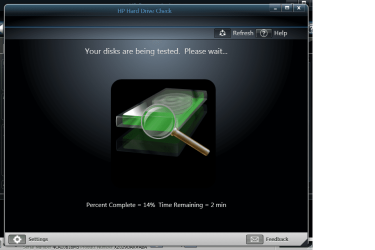
As you can see from screenshot am able to perform hard drive test using the support assistant.
In fact the only thing that was missing was the 'HP_TOOLS' partition.I wanted it back so as to avoid any trouble in case i wanted to update the BIOS.
 

Attachments

  • hdt.png
    hdt.png
    50.1 KB · Views: 3

My Computer

Computer Manufacturer/Model Number
hp
OS
windows 7 ultimate sp1 x64
CPU
core i5 460m
I would not rely on it now to update the BIOS, if it is even used for that.
 
I don't see anything wrong with it. It was only created by HP system diagnostics UEFI during the BIOS update processs. And when i checked the contents it had something to do with new and old BIOS. Right now there is nothing in there about BIOS update.Plus the partition is bigger at 2gb. The one i deleted was 103mb.

HP told me that the reason its created during the first BIOS update is to enable a rollback to the previous BIOS version if the new one is not flashed properly.

i just hope there is no BIOS update required in the future just to be safe.

check out this thread
How to use the HP BIOS update (uefi) utility - HP Support Forum
 

My Computer

Computer Manufacturer/Model Number
hp
OS
windows 7 ultimate sp1 x64
CPU
core i5 460m
Back
Top