Windows 8 Dev release

I feel many users will remain with Windows 7 unless they are using Tablets or the MS phone.
Many don't like using win 7 with tablets and the like due to a GUI not really configured for touch screen use (small icons). Windows 8 hopes to address this issue.

Is it an improvement over 7? I guess it depends on the hardware you use plus we really need to see the final product before making a final decision.
 

My Computer

Computer Manufacturer/Model Number
Custom Build
OS
Windows 7 Ultimate 64Bit SP1
CPU
AMD Phenom II [email protected] (19*200)
Motherboard
GA-MA790X-DS4
Memory
3GB XMS2 PC6400
Graphics Card(s)
ATI/Powercolor HD5870 PCS+ OC
Sound Card
Realtek HD
Monitor(s) Displays
EMC 19'' LCD
Screen Resolution
1280x1024
Hard Drives
500GB RAID 0 (2x250GB Seagate Barracuda) 1x75GB SATA2
PSU
OCZ 600W Modular
Case
Thermaltake Armour Jr
Cooling
Air
Keyboard
Logitech Media 600
Mouse
RAT 3
Internet Speed
Broadband 8MB
Other Info
Case has been resprayed internally to a black finish. Custom cooling added to VRMs as well as chipset.
3x120mm Fans on case
Wow... I guess it's too earky for doing this MS... but maybe it's just me.

This windows is supposed to retain the Aero interface for non tablets, doesn't it?

See ya!! :D
 

My Computer

Computer type
PC/Desktop
Computer Manufacturer/Model Number
Assembled Desktop PC
OS
Microsoft Windows 7 Home Premium SP1 64-bit Build 7600
CPU
AMD Athlon 64 X2 5200+ Dual Core CPU @ 2.7 Ghz (Brisbane)
Motherboard
PCChips A13G+ v3.0
Memory
2x2 GB DDR2 PC-5300 (667 Mhz) Kingston ValueRAM
Graphics Card(s)
XFX ATI Radeon HD 4350 GPU (512 MB + 512 MB HM)
Sound Card
Realtek High Definition Audio Driver ALC660 @ MCP61S
Monitor(s) Displays
HP S2031 20" LED HD Widescreen Display Monitor
Screen Resolution
1600 x 900 px
Hard Drives
Maxtor Diamond Max 10 (160 GB, 7200 RPM, SATA-II Hard Disk)
Western Digital Scorpion Blue (250 GB, 5400 RPM, SATA-II External Hard Disk - Personal Data)
Toshiba MQ01ABD050 (500 GB, 5400 RPM, SATA-II External Hard Disk - Software & ISOs)
PSU
Pixxo Transformer 850W 80+ Certification PSU
Case
Compaq 5BW353 Case
Cooling
Many solutions, see other info...
Keyboard
Green Leaf (Mitzu) Standard Keyboard
Mouse
Microsoft USB Lasser Pointing Device
Internet Speed
10 MB
Antivirus
Avast Antivirus Free
Browser
Firefox, Chrome, Internet Explorer
Other Info
Windows Experience Index Result: 3.8 of 7.9.

Cooling solutions:
- AVC @ 2000/5000 RPM Copper Heatpipes (For Athlon 64 X2 6000+ CPU used in an Athlon 64 X2 5200+)
- Rear Fan 80 mm @ 2700 RPM for heat extraction
- Manhatan Chipset Cooler @ 4700/7200 RPM (For nVidia Chipset in MoBo)
- Foxconn @ 2500 RPM (Old Pentium III heatsink fan) in XFX ATI Radeon HD 4350
I keep getting errors when I load it up in Virtual Box. :(
 

My Computer

Computer Manufacturer/Model Number
Desktop
OS
Windows 7 Professional x64
CPU
Intel i5-2500k @ 3.3Ghz
Motherboard
Gigabyte GA-Z77X-UD5H
Memory
4GB DDR3
Graphics Card(s)
Nvidia GTS250 1GB
Monitor(s) Displays
Sony SDM S95A
Screen Resolution
1280x1024
Hard Drives
1x 1TB, 2x 250GB HDDs
PSU
Corsair HX850W
Case
Cooler Master 690 II
Cooling
Thermalright True Spirit 140mm & 3x 120mm & 3x 140mm Fans
Keyboard
Logitech Media Keyboard
Mouse
Microsoft Intellimouse
Internet Speed
8MB
Restoring Boot Loader (W8 vhd Install Method)

I used a similar method. This is the simplest I've seen to not use a virtual machine app or installing directly to your machine (as primary OS).

Mister Goodcat | Installing Windows 8 Developer Preview as bootable VHD

I think it should be able to be outside of your smaller partition. Besides, among the last steps is to set the boot data. At first, I thought this was too simple to work as easy as it does.

Additional
Regarding the vhd install method (post 98 & 100), is there an easy way to restore the original boot entries, or will I have to re-image my PC?

I found this in the comments section of the Mister Goodcat article:
Mister Goodcat | Installing Windows 8 Developer Preview as bootable VHD

Please Note:
I haven't confirmed that this command works.
Use at your own discretion.


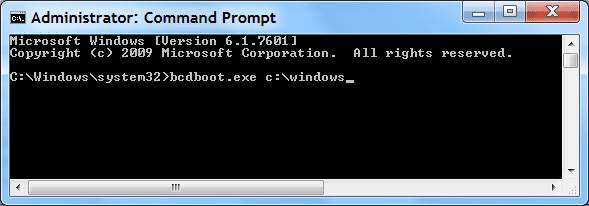
To restore the original Windows 7 boot loader (from W7 OS):

  • Open a the Command Prompt with Admin privileges.
  • Type bcdboot.exe c:\windows
Command Prompt (bcdboot).png
 

My Computer

Computer type
PC/Desktop
Computer Manufacturer/Model Number
n/a
OS
W7 Ultimate SP1, LM19.2 MATE, W10 Home 1703, W10 Pro 1703 VM, #All 64 bit
CPU
AMD Phenom II x6 1100T, 3.3 GHz
Motherboard
ASUS M4A88T-M/USB3 (AM3)
Memory
12GB DDR3 1333 G-Skill (4GB x 2), G-Skill (2GB x 2)
Graphics Card(s)
NVIDIA GeForce GTX 660
Sound Card
Realtek?
Monitor(s) Displays
Samsung S23B350
Screen Resolution
1920x1080
Hard Drives
WD Green 2TB (SATA), WD Green 3TB (SATA), WD Blue 4TB (SATA), WD Blue 6TB (SATA)
PSU
Cooler Master
Case
Antec GX300 Tower
Cooling
3x Antec TRICOOL 120mm Fans
Mouse
Wired Optical
Internet Speed
DSL
Antivirus
Avast
Browser
Pale Moon (64 bit)
Other Info
2018-12-27 Upgraded HDDs
2015-12-10 Upgraded case, graphics card, storage
2015-08-15 Upgraded motherboard & RAM
2015-07-15 Upgraded LM17.1 to LM17.2
It does work in VB - instead of using any Windows option - use Win7 64 bit during setup

anyways you're really missing nothing - it's Win7 with a stupid start menu.

oddly my IE doesn't launch from Metro - have to pin to taskbar to launch

If Metro is going to become something - make it secondary, an option - or just throw it away

so what's the extent of the dev in VM/B?

Has anyone tried installed classic shell or an application launcher like Rocket Dock/Nexus?

Does the desktop environment still respond the same way with making personal changes?

I don't know if I want to test the waters...
 

My Computer

OS
Windows 7
The VHD is a better boot option than using Virtual Box. The metro apps don't work in VB. Also, the experience is a lot better than in a third party VM.

Win8 relies a lot on hardware acceleration, so installing it as close to the hardware is preferable and gives the best experience. That is why the VHD works better. Not quite as good as directly on the hardware, but better than VB.

Also, VB uses generic drivers for just about everything, so your experience is very limited.
 

My Computer

Computer Manufacturer/Model Number
Dell Inspiron 1520 (Laptop)/ Home (Desktop)
OS
Windows 7 x64 / Same
CPU
Intel Core 2 Duo T7250 / Intel Core i7 930
Motherboard
Intel 945 / Asus P6X58D-E
Memory
4GB / 6GB
Graphics Card(s)
NVIDIA GeForce 8400M GS / ASUS 1GB
Sound Card
Whatever Dell gave me :-( / Onboard
Monitor(s) Displays
15.4" LCD / Crappy CRT
Hard Drives
Seagate 500GB SATA; 7200 RPM / Seagate 1TB SATA; 7200 RPM
PSU
N/A / OCZ Fatal1ty 550W Modular
Case
N/A / Antec 900
Cooling
Air
Mouse
Microsoft Presenter (Bluetooth)
Brrr..I'm quite annoy with myself now.I just told someone that i haven't heard windows 8 through this forum and now I just found it through you.:o
 

My Computer

Computer Manufacturer/Model Number
Acer
OS
Windows 7 Ultimate x32
Antivirus
ESET NOD32

My Computers

System One System Two

  • Computer type
    PC/Desktop
    Computer Manufacturer/Model Number
    ChillBlast - Custom to my design
    OS
    Windows 11 Pro x64 [Latest Release and Release Preview]
    CPU
    Ryzen 9 5950X, 3.8 - 5.2 MHz
    Motherboard
    Asus Prime X570-Pro
    Memory
    64GB [2 x 32GB] DDR4 3200MHz
    Graphics Card(s)
    4GB NVIDIA GEFORCE GTX 1650 Ti
    Sound Card
    On-board SPDIF to 5.1 System + HDMI [5.1 system]
    Monitor(s) Displays
    32" UHD 32 Bit HDR Monitor + 43" UHD 4K 32Bit HDR TV
    Screen Resolution
    2 x 3840 x 2160 @60Hz
    Hard Drives
    1TB M2 SSD OS, 500GB Fast Access SSD, 2 x 8TB Data + Various Externals from 1TB to 4TB, 10TB NAS
    PSU
    NZXT C750 80 PLUS Gold 750W Modular PSU
    Case
    Workstation Case [Matt Black]
    Cooling
    NZXT Kraken X63 280mm CPU Cooler +2x Quiet Case fans
    Keyboard
    Logitech Wireless MX Keys & K400 + others
    Mouse
    Logitech Wireless MX Master 3S
    Internet Speed
    920 MB Down 50 MB Up
    Antivirus
    BitDefender Total Security Pro
    Browser
    Chrome (always run latest Non-Beta)
    Other Info
    Also run ...
    Laptop - Quad 8GB - Windows 10 Pro x64
    Nexus 7 Android tablet x2
    Samsung 10.2" tablet
    Blackview TAB 8 4G Android Tablet c/w Keyboard
    Wacom Intuos Pro Medium Pen Pad
    Wacom Intuos Pro Small Pen Pad
    Wacom Expresskeys Remote
    Loopdeck+ Graphics Controller
    Shuttle Pro v2 Control
  • Computer type
    Laptop
    System Manufacturer/Model Number
    Dell XPS 17 10750H
    OS
    Windows 11 Pro x64 Latest RP
    CPU
    Intel I7 10750H 5.0GHz
    Motherboard
    Dell XPS
    Memory
    32GB [2x16GB] DDR4 2933 MHz
    Graphics Card(s)
    nVidia GTX1650Ti 4 GB GDDR6
    Sound Card
    Stock [Realtek] 4 Speaker
    Monitor(s) Displays
    17" IPS UHD+ Infinity Edge Touchscreen
    Screen Resolution
    3840 x 2400
    Hard Drives
    2TB M2 NVMe, 4TB External + various 500GB & 1TB External NVMe (also have access to spinner HDD from
    PSU
    Stock
    Case
    Stock XPS Aluminium & Carbon Fibre
    Cooling
    Stock - Active Fan Control
    Keyboard
    Backlit + Various Logitech
    Mouse
    Stock Track Pad + Logitech MX Trackball
    Internet Speed
    72 MB Down 18MB Up
    Browser
    Chrome
    Other Info
    Also run ...
    Laptop - Quad 8GB - Windows 10 Pro x64
    Nexus 7 Android tablet x2
    10.2" tablet
    Sony Z3 Android Smartphone
    Wacom Intuos Pro Medium Pen Pad
    Wacom Intuos Pro Small Pen Pad
    Wacom Expresskeys Remote
    Loopdeck+ Graphics Controller
    Shuttle Pro v2 Control Pad
    10TB NAS
Thanks.Is Windows 8 released at Asia?Because I haven't see anyone using it at my place.So far I think users will remain on Windows 7.I read news and I haven't read any post mention on Windows 8.Poor me isn't it?Like me,I myself isn't good enough in using Windows 7.Thank you anyway:)
 

My Computer

Computer Manufacturer/Model Number
Acer
OS
Windows 7 Ultimate x32
Antivirus
ESET NOD32
The only "release" officially at the present is the Development Preview as linked in the first post of this thread, this is a pre-BETA build of the OS for developers.

I am not sure if there are any geographic restrictions on downloads, but I have not heard of any, so it should be downloadable worldwide
 

My Computers

System One System Two

  • Computer type
    PC/Desktop
    Computer Manufacturer/Model Number
    ChillBlast - Custom to my design
    OS
    Windows 11 Pro x64 [Latest Release and Release Preview]
    CPU
    Ryzen 9 5950X, 3.8 - 5.2 MHz
    Motherboard
    Asus Prime X570-Pro
    Memory
    64GB [2 x 32GB] DDR4 3200MHz
    Graphics Card(s)
    4GB NVIDIA GEFORCE GTX 1650 Ti
    Sound Card
    On-board SPDIF to 5.1 System + HDMI [5.1 system]
    Monitor(s) Displays
    32" UHD 32 Bit HDR Monitor + 43" UHD 4K 32Bit HDR TV
    Screen Resolution
    2 x 3840 x 2160 @60Hz
    Hard Drives
    1TB M2 SSD OS, 500GB Fast Access SSD, 2 x 8TB Data + Various Externals from 1TB to 4TB, 10TB NAS
    PSU
    NZXT C750 80 PLUS Gold 750W Modular PSU
    Case
    Workstation Case [Matt Black]
    Cooling
    NZXT Kraken X63 280mm CPU Cooler +2x Quiet Case fans
    Keyboard
    Logitech Wireless MX Keys & K400 + others
    Mouse
    Logitech Wireless MX Master 3S
    Internet Speed
    920 MB Down 50 MB Up
    Antivirus
    BitDefender Total Security Pro
    Browser
    Chrome (always run latest Non-Beta)
    Other Info
    Also run ...
    Laptop - Quad 8GB - Windows 10 Pro x64
    Nexus 7 Android tablet x2
    Samsung 10.2" tablet
    Blackview TAB 8 4G Android Tablet c/w Keyboard
    Wacom Intuos Pro Medium Pen Pad
    Wacom Intuos Pro Small Pen Pad
    Wacom Expresskeys Remote
    Loopdeck+ Graphics Controller
    Shuttle Pro v2 Control
  • Computer type
    Laptop
    System Manufacturer/Model Number
    Dell XPS 17 10750H
    OS
    Windows 11 Pro x64 Latest RP
    CPU
    Intel I7 10750H 5.0GHz
    Motherboard
    Dell XPS
    Memory
    32GB [2x16GB] DDR4 2933 MHz
    Graphics Card(s)
    nVidia GTX1650Ti 4 GB GDDR6
    Sound Card
    Stock [Realtek] 4 Speaker
    Monitor(s) Displays
    17" IPS UHD+ Infinity Edge Touchscreen
    Screen Resolution
    3840 x 2400
    Hard Drives
    2TB M2 NVMe, 4TB External + various 500GB & 1TB External NVMe (also have access to spinner HDD from
    PSU
    Stock
    Case
    Stock XPS Aluminium & Carbon Fibre
    Cooling
    Stock - Active Fan Control
    Keyboard
    Backlit + Various Logitech
    Mouse
    Stock Track Pad + Logitech MX Trackball
    Internet Speed
    72 MB Down 18MB Up
    Browser
    Chrome
    Other Info
    Also run ...
    Laptop - Quad 8GB - Windows 10 Pro x64
    Nexus 7 Android tablet x2
    10.2" tablet
    Sony Z3 Android Smartphone
    Wacom Intuos Pro Medium Pen Pad
    Wacom Intuos Pro Small Pen Pad
    Wacom Expresskeys Remote
    Loopdeck+ Graphics Controller
    Shuttle Pro v2 Control Pad
    10TB NAS
I think it is only in English, though.
 

My Computers

System One System Two

  • Computer type
    PC/Desktop
    OS
    7 X64
    CPU
    i5 8400
    Motherboard
    gigabyte b365m ds3h
    Memory
    2x8gb 3200mhz
    Hard Drives
    various
    PSU
    pure power 11 400w cm
    Case
    Coolermaster
    Cooling
    cryorig m9i
  • Computer type
    PC/Desktop
    OS
    7x64
    CPU
    g5400
    Motherboard
    ga b365m ds3h
    Memory
    8gb ddr4 2400
    PSU
    xfx pro 450w
Metro need alot more work! But it does run alot faster on my pc than windows 7 64bit and less ram used (down by 10% 1.5gb)

CANT WAIT FOR RC
 

My Computer

Computer Manufacturer/Model Number
build it myself
OS
Windows 8 X64 M3 8102 / Windows 7 Ultimate X64
CPU
Core i7 2600K @3.7ghz
Motherboard
GA-Z68XP-UD3R
Memory
32GB DDR-3 1866mhz
Graphics Card(s)
AMD Radeon 6990 + Geforce GTX560
Sound Card
SB Xfi Fatality
Monitor(s) Displays
4x 23" + 30" Dell
Screen Resolution
4x 1920x1080 + Main 2560x1600 Dell
Hard Drives
2x OCZ Agility 3 120gb SATA3
1x Kingston 120gb SATA3
1x Corsair 120gb SATA3
1x Intel 512gb SATA3 (STEAM)
5x 3TB SATA 3 WD Black (Storage)
PSU
Antec 1300W HC
Case
HAF X (USB3)
Cooling
Swiftech H20-320 Edge Liquid Cooling Kit
Keyboard
Optimus Maximus replaced G19
Mouse
Saitek Cyborg R.A.T. 7 Replaced Sidewinder X5
Internet Speed
Internode 1TB Cap ADSL2+ (NBN Optic)
So far I don't like it. I will reserve my final opinion when the beta version is available. I really don't need a portable interface on a desktop that is not a touch screen. The conventional interface seems to be more of an add-on that really does not add any value to what is available in Windows 7. My son has a Mac Pro and the interface is a much more elegant. If Microsoft does not polish up the interface in Windows 8, I doubt I will buy it. Also if Microsoft does not develop a better interface by windows 9 I may have to consider a Mac.
 

My Computer

Computer type
PC/Desktop
Computer Manufacturer/Model Number
Custom Build
OS
Windows 10 (64 bit)
CPU
AMD FX8320
Motherboard
Asus M5A99X EVO
Memory
16 GB
Graphics Card(s)
AMD 7870
Avira and Avast AV report "compatibility issues". You can "install" and run Avira but the scan is not recorded in log and update is not reported, so I'll leave Windows Defender and Windows Firewall in place for the time being. Installed Open Office and it seems to play nice w/Win 8. I like the interface so far-bit of a learning curve to find things, but that is what we try things and give feedback. Improvements will come with beta/rc/rtm.
 

My Computer

OS
windows 7 ultimate
CPU
Pentium D, 2.8
Memory
2.5 gb
Hi Paulgo,

Yes. I think many will feel the same as you do.

The interface is very irritating.

However, I am sure that later you will be able to choose which you use - without intereference from the other.

There are signs of some very interesting developments in the o/s proper - some annoying bits too - particularly with regards to pe.

I am hoping they will be cleaned up - and I think we may ,in the end, be in for something very special.


If that is the case - and MS comes out with an excellent product - then the marketing is where they may fall down.

They don't seem to understand what marketing is.
 

My Computers

System One System Two

  • Computer type
    PC/Desktop
    OS
    7 X64
    CPU
    i5 8400
    Motherboard
    gigabyte b365m ds3h
    Memory
    2x8gb 3200mhz
    Hard Drives
    various
    PSU
    pure power 11 400w cm
    Case
    Coolermaster
    Cooling
    cryorig m9i
  • Computer type
    PC/Desktop
    OS
    7x64
    CPU
    g5400
    Motherboard
    ga b365m ds3h
    Memory
    8gb ddr4 2400
    PSU
    xfx pro 450w
Hello All,
The other day I decided to download and install the windows 8 dev. version, I partitioned my hard drive like it's recommended to do and installed it there. I must say..it's a LOT different than windows 7. As I'm still trying to learn about it, I haven't formed any kind of opinion on it yet. There is somewhat of a user guide on the download site, but it really doesn't go into very much detail.
David
 

My Computer

OS
Windows 7 Professional 32bit
Hello David, and welcome to Seven Forums.

You could also get some more detailed information at the link below from our sister site Eight Forums that may help. :)

Windows 8 Tutorials

Hope this helps,
Shawn
 

My Computer

Computer type
PC/Desktop
Computer Manufacturer/Model Number
Self built custom
OS
64-bit Windows 11 Pro for Workstations
CPU
Intel i7-8700K OC'd to 5 GHz
Motherboard
ASUS ROG Maximus XI Formula Z390
Memory
64 GB (4x16GB) G.SKILL TridentZ RGB DDR4 3600 MHz
Graphics Card(s)
ASUS ROG-STRIX-GTX1080TI-O11G-GAMING
Sound Card
Integrated
Monitor(s) Displays
2 x Samsung Odyssey G7 27"
Screen Resolution
2560x1440
Hard Drives
1TB Samsung 990 PRO M.2,
4TB Samsung 990 PRO PRO M.2,
TerraMaster F8 SSD Plus NAS
PSU
Seasonic Prime Titanium 850W
Case
Thermaltake Core P3
Cooling
Corsair Hydro H115i
Keyboard
Logitech wireless K800
Mouse
Logitech MX Master 4
Internet Speed
2 Gb/s Download and 100 Mb/s Upload
Antivirus
Malwarebyte Anti-Malware Premium
Browser
Google Chrome
Other Info
Logitech Z625 speaker system,
Logitech BRIO 4K Pro webcam,
HP Color LaserJet Pro MFP M477fdn,
APC SMART-UPS RT 1000 XL - SURT1000XLI,
Galaxy S23 Plus phone
Hi Shawn,
Thanks SO much for such a quick reply..I was a member in here before when it had a different name, now it seems even BETTER !! I'll take your advice and check out the other site, thanks. This morning my biggest issue is trying to get the windows xp service pack 3 installed on my older desktop that has windows xp professional sp 2 already installed on it. It starts to install the service pack correctly, but then I receive a 'internal error' notice, and informed the update couldn't be installed. Thank goodness for google !!
David :confused:

Shawn,
I guess I can't use my same login info. @ the windows 8 forum ?
David :cry:
 
Last edited by a moderator:

My Computer

OS
Windows 7 Professional 32bit
Shawn,
I guess I can't use my same login info. @ the windows 8 forum ?
David :cry:

Hello Davy49 you will need to click on the register link just below the Eight Forums logo and complete the registration form (same username and password can be used if desired). Then you will be able to log in normally.
 

My Computer

Computer type
PC/Desktop
Computer Manufacturer/Model Number
My own abomination, I call it the Money Pit
OS
Windows 10 Pro x 2/Windows 11 Home
CPU
Intel i7 2600K @ 3.40 GHz
Motherboard
ASUS Sabertooth P67
Memory
Corsair Vengeance 16GB DDR3 1600MHz CL8 Dual Channel Kit
Graphics Card(s)
EVGA GeForce RTX 3080 XC3 ULTRA GAMING 10GB GDDR6X
Sound Card
Onboard Realtek or Nvidia High Definition Audio (HDMI)
Monitor(s) Displays
Samsung JS7000 50" SUHD TV or Samsung 27" FHD 60Hz 8ms GTG V
Screen Resolution
1920 x 1080
Hard Drives
1 x Samsung 870 EVO 250 GB SSD (Windows 10 Pro), 1 x Samsung 850 EVO 250 GB SSD (Windows 10 Pro)
PSU
Corsair AX860 - 860W Modular Power Supply
Case
Phanteks Enthoo Luxe Full Tower Case - Black
Cooling
CORSAIR Hydro Series H150i PRO RGB 360mm Liquid CPU Cooler
Keyboard
Logitech K830 Illuminated Living-Room Keyboard
Mouse
Logitech MX Anywhere 2S Wireless Mouse
Internet Speed
100 Mbps
Antivirus
ESET Internet Security
Browser
Latest Version Of Firefox & Microsoft Edge Chromium Stable
Other Info
LG Super Multi Blue Internal Blu-ray Disk Rewriter - BH10LS30
6x2 HDMI Switcher (6 inputs, 2 outputs) so I can send the output of my Cable Box, Roku, or any my 4 computers to either my TV or Monitor separately or simultaneously.
Dear IownAmoneyPit ( What an interesting username )
Thanks..I already did, with windows 8 I'm going to need ALL the help I can get !
David :)
 

My Computer

OS
Windows 7 Professional 32bit
Back
Top