Windows 9 concept: Saving Windows from itself with a focus on ‘little

indianacarnie

Good News!
Guru
Gold Member
VIP
Local time
8:18 PM
Messages
3,036
Location
Kentucky/Florida U.S.A.

My Computer My Computer

At a glance

Windows 10x64 Build 1709Intel i7 7700HQ Kaby Lake16 GB DDR4 @2400Nvidia Geforce GTX 1060
Computer type
Laptop
Computer Manufacturer/Model Number
MSI GE72VR Apache Pro-416
OS
Windows 10x64 Build 1709
CPU
Intel i7 7700HQ Kaby Lake
Motherboard
Micro-Star Intl. MS-179B (U3C1)
Memory
16 GB DDR4 @2400
Graphics Card(s)
Nvidia Geforce GTX 1060
Screen Resolution
1920x1080 120Hz
Hard Drives
256 GB Nvme M.2 SSD

1TB HDD@7200
Cooling
Cooler Blast 4
Keyboard
Steel Series
Antivirus
Bit Defender Free
Browser
Edge
interesting; fwiw; I think they should keep the start "circle" like in win 7. But on the other hand; it might be easier for some if microsoft brings the start menu back. Easier as in easier to nagivate, etc. Just my thought here....
 

My Computer My Computer

At a glance

Windows 7 ultimate 64-bitIntel I7 2600K 3.4ghzCorsair 16gb ddr3 1600mhzNvidia Geforce gt 430
Computer type
PC/Desktop
Computer Manufacturer/Model Number
custom built
OS
Windows 7 ultimate 64-bit
CPU
Intel I7 2600K 3.4ghz
Motherboard
Asus Evo P8P67
Memory
Corsair 16gb ddr3 1600mhz
Graphics Card(s)
Nvidia Geforce gt 430
Sound Card
Sound Blaster Titanium x-fi pci express
Monitor(s) Displays
Dell E198WFP
Hard Drives
1 western digital 2TB drive.
PSU
Antec 1200 watt
Case
Inwin Dragon Rider
Cooling
6 case supplied cooling fans
Keyboard
logitech mk700
Mouse
logitech m705
Internet Speed
25-50mbps download; 10mbps upload(i think)
Antivirus
avg free 2014
Browser
mozilla firefox
Other Info
Also have a pretty bad speaker setup which is a klipsch promedia 5.1 surround speaker setup with huge subwoofer and lg blu ray player/writer. Also a hp officejet pro 8600 plus wireless all in one and a logitech s7500 webcam.
I agree, Metro apps running on desktop would be much better. I completely ignore Metro at the moment, because so much is Desktop based, it's jarring to come out of that just for skype or facebook.

"Play to" definitely needs an overhaul too, or at least fix the media streaming feature. It works, but if you add new content it's hit and miss whether Windows will actually report it any time this year...

I've started using Nero to stream my content, as it came free with my Blu-Ray player. It works just like WMP's streaming, except that it jumps to it when you add new content, and supports MKVs out of the box without having to install codecs.
 

My Computer My Computer

At a glance

Windows 10 Pro x64Intel Core i5 7400 @ 3.00GHz8GB 2133Mhz DDR4 (OEM supplied)Gygabyte Windforce GTX 1050Ti (Factory Overcl...
Computer type
PC/Desktop
Computer Manufacturer/Model Number
Medion Erazer (note to self: insert model number) - with custom additions
OS
Windows 10 Pro x64
CPU
Intel Core i5 7400 @ 3.00GHz
Motherboard
OEM supllied with PC
Memory
8GB 2133Mhz DDR4 (OEM supplied)
Graphics Card(s)
Gygabyte Windforce GTX 1050Ti (Factory Overclocked)
Sound Card
Realtek
Monitor(s) Displays
Acer Al1980 + HKC
Screen Resolution
1360*768(HKC) / 1280*1024(Acer)
Hard Drives
1TB Toshiba
1TB WD Caviar Green
120GB Samsung Evo 840
PSU
OEM supplied (no power rating on case)
Case
OEM Supplied
Cooling
Stock
Keyboard
Logitech Wireless
Mouse
Logitect Wireless
Internet Speed
40Mb/s Down 10Mb/s Up
Antivirus
Defender
Browser
Firefox
Hi there

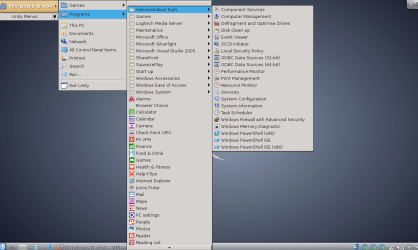
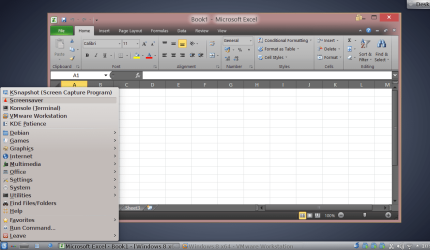
I've found that if you really want to keep the old classic menu for Windows 8 / 8.1 the BEST way IMO is to run Windows 8 in a Virtual Machine and use UNITY MODE

Here's a couple of screenshots of what I mean running W8. Enterprise on a DEBIAN WHEEZY HOST (Linux for those not aware of all these distributions).

The example shows the Windows applications directly from the Linux desktop and I'm running EXCEL in the Linux workspace -- and have bought up the standard Linux start menu for my distribution using the KDE GUI.

Now I prefer to run VM's usually in full screen mode but this is just an example of what the UNITY mode does -- far far better than the cludge Microsoft offered as XP MODE. You can set the menus so only the actual windows programs you want to run from your desktop are shown.

The FREE vmware player I believe has unity mode (I'm using vmware workstation). VBOX has similar called seamless.

Modern hardware is so good these days that running a vm even on a laptop gives response almost as good as native (so long as you've got enough RAM and a sensible graphics card).

I find myself only booting into a physical Windows machine really rarely these days and that only if I have to use specific hardware or need extra super dooper 3-D acceleration. I'm not a gamer so the whole graphics bit doesn't bother me unless I'm using a sophisticated CAD Engineering package. Office and Photoshop run just fine in Unity mode !!! -

I don't like the way a lot of vendors are going these days with SUBSCRIPTION MODELS - for example Office 365 and ADOBE Photoshop. Running on a VM allows me to explore a lot of other alternatives (there's a HUGE amount of really good open source out there now) while still using the programs I use daily at work.

So the point is that the whole start menu for Windows 8.2 is essentially a dead discussion -- people who want a start menu have found various ways of implementing schemes while others are just happy to use the new method.

(My 80+ year old Dad now like the new Windows method far better than the old version - although he didn't like it straight out of the box. Showing him what to do in both the old and new systems didn't take that long and he decided after the initial confusion he liked Windows 8.1).

Of course for people at work Windows 7 is just fine and presumably will remain the system of choice - but there's a lot to be said also in the workplace for Desktop Virtualisation with Unity mode. Easier for the IT staff to manage and also harder for users to hose up their systems.

You can see in Unity mode the Metro apps are also accessible from the desktop menu. The new Windows 8.2 if rumours are to be believed will allow these to run in floating re-sizeable windows (like classic windows).

(Another Linux advantage is that you can have as many COMPLETE desktops as you like so you can have a different set of menus etc etc for all of them and either a simple keyboard or mouse switch will take you to the relevant desktop -- Windows had this partially implemented in XP but later implementations are just HORRIBLE including the latest from the sysinternals suite).

cheers
jimbo
 

Attachments

  • snapshot1.png
    snapshot1.png
    71.7 KB · Views: 5
  • snapshot2.png
    snapshot2.png
    76.3 KB · Views: 3

My Computer My Computer

At a glance

Linux CENTOS 7 / various Windows OS'es and se...Intel i7 Intel i58GB, 16GBOn Motherboard
Computer type
PC/Desktop
Computer Manufacturer/Model Number
Custom built, several laptops HP/ASUS
OS
Linux CENTOS 7 / various Windows OS'es and servers
CPU
Intel i7 Intel i5
Memory
8GB, 16GB
Graphics Card(s)
On Motherboard
Sound Card
Realtek HD audio
Monitor(s) Displays
Apple Cinema display, Samsung LCD
Screen Resolution
1920 X 1080
Hard Drives
4 X 1TB SATA
Mouse
Toshiba wireless laser
Internet Speed
> 20MB up
That's great. I would look forward to it. It likes regresses to the style of classical windows
 

My Computer My Computer

At a glance

Windows 7
Computer type
PC/Desktop
OS
Windows 7
Back
Top