Windows Activation and Update errors

rmk9785e

New member
Local time
4:12 PM
Messages
39
Location
SF bay Area
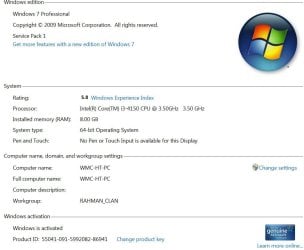
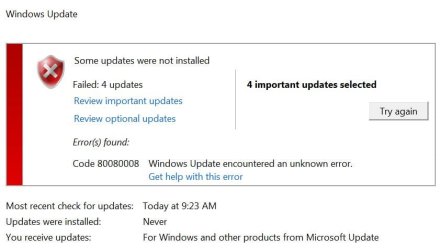
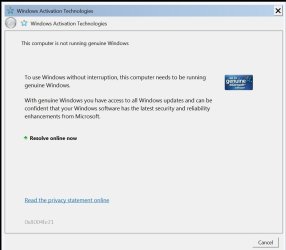
My system has been running fine for almost a year. Since last week, I've been having Windows Activation pop-ups and Update errors. I've read the guidelines for posting these issues and I hope it is OK to include both issues in one post because I think they may be related.
I have run MGADiag, Windows Update Diagnostics, MalwareBytes and ADWCleaner on this system after receiving these errors.
I've attached some files but am getting "404 - File or directory not found." error uploading cbs.zip file which shows progress upto 99% and then gives this error. The zipped file is 118MB in size.
Your help is highly appreciated.


Code:
Diagnostic Report 
(1.9.0027.0):
-----------------------------------------
Windows Validation 
Data-->

Validation Code: 0x8004FE21
Cached Online Validation Code: 0x0
Windows 
Product Key: *****-*****-*****-*****-YP2F3
Windows Product Key Hash: 
abjlzd46Yypjp9QCCXMvbfO/zuM=
Windows Product ID: 
55041-091-5992082-86941
Windows Product ID Type: 6
Windows License Type: 
Volume MAK
Windows OS version: 6.1.7601.2.00010100.1.0.048
ID: 
{5879C9AF-7B58-481D-8F6B-027E74BA3C5B}(3)
Is Admin: Yes
TestCab: 
0x0
LegitcheckControl ActiveX: N/A, hr = 0x80070002
Signed By: N/A, hr = 
0x80070002
Product Name: Windows 7 Professional
Architecture: 
0x00000009
Build lab: 7601.win7sp1_gdr.150715-0600
TTS Error: 

Validation Diagnostic: 
Resolution Status: N/A

Vista WgaER Data-->
ThreatID(s): N/A, hr = 0x80070002
Version: N/A, 
hr = 0x80070002

Windows XP Notifications Data-->
Cached Result: N/A, hr = 
0x80070002
File Exists: No
Version: N/A, hr = 0x80070002
WgaTray.exe 
Signed By: N/A, hr = 0x80070002
WgaLogon.dll Signed By: N/A, hr = 
0x80070002

OGA Notifications Data-->
Cached Result: N/A, hr = 
0x80070002
Version: N/A, hr = 0x80070002
OGAExec.exe Signed By: N/A, hr = 
0x80070002
OGAAddin.dll Signed By: N/A, hr = 0x80070002

OGA Data-->
Office Status: 109 N/A
OGA Version: N/A, 
0x80070002
Signed By: N/A, hr = 0x80070002
Office Diagnostics: 
025D1FF3-364-80041010_025D1FF3-229-80041010_025D1FF3-230-1_025D1FF3-517-80040154_025D1FF3-237-80040154_025D1FF3-238-2_025D1FF3-244-80070002_025D1FF3-258-3

Browser Data-->
Proxy settings: N/A
User Agent: Mozilla/4.0 
(compatible; MSIE 8.0; Win32)
Default Browser: C:\Program Files 
(x86)\Google\Chrome\Application\chrome.exe
Download signed ActiveX controls: 
Prompt
Download unsigned ActiveX controls: Disabled
Run ActiveX controls 
and plug-ins: Allowed
Initialize and script ActiveX controls not marked as 
safe: Disabled
Allow scripting of Internet Explorer Webbrowser control: 
Disabled
Active scripting: Allowed
Script ActiveX controls marked as safe 
for scripting: Allowed

File Scan Data-->
File Mismatch: 
C:\Windows\system32\wat\watadminsvc.exe[7.1.7600.16395], Hr = 0x80092003
File 
Mismatch: C:\Windows\system32\wat\watux.exe[7.1.7600.16395], Hr = 
0x80092003
File Mismatch: C:\Windows\system32\sppobjs.dll[6.1.7601.17514], Hr 
= 0x80092003
File Mismatch: C:\Windows\system32\sppc.dll[6.1.7601.17514], Hr 
= 0x800b0100
File Mismatch: C:\Windows\system32\sppcext.dll[6.1.7600.16385], 
Hr = 0x800b0100
File Mismatch: 
C:\Windows\system32\sppwinob.dll[6.1.7601.17514], Hr = 0x80092003
File 
Mismatch: C:\Windows\system32\slc.dll[6.1.7600.16385], Hr = 0x800b0100
File 
Mismatch: C:\Windows\system32\slcext.dll[6.1.7600.16385], Hr = 
0x800b0100
File Mismatch: 
C:\Windows\system32\sppuinotify.dll[6.1.7600.16385], Hr = 0x80092003
File 
Mismatch: C:\Windows\system32\slui.exe[6.1.7601.17514], Hr = 0x80092003
File 
Mismatch: C:\Windows\system32\sppcomapi.dll[6.1.7601.17514], Hr = 
0x800b0100
File Mismatch: C:\Windows\system32\sppcommdlg.dll[6.1.7600.16385], 
Hr = 0x800b0100
File Mismatch: 
C:\Windows\system32\sppsvc.exe[6.1.7601.17514], Hr = 0x80092003
File 
Mismatch: C:\Windows\system32\drivers\spsys.sys[6.1.7127.0], Hr = 
0x80092003
File Mismatch: C:\Windows\system32\drivers\spldr.sys[6.1.7127.0], 
Hr = 0x80092003
File Mismatch: 
C:\Windows\system32\systemcpl.dll[6.1.7601.17514], Hr = 0x800b0100
File 
Mismatch: C:\Windows\system32\user32.dll[6.1.7601.17514], Hr = 0x800b0100

Other data-->
Office Details: 
<GenuineResults><MachineData><UGUID>{5879C9AF-7B58-481D-8F6B-027E74BA3C5B}</UGUID><Version>1.9.0027.0</Version><OS>6.1.7601.2.00010100.1.0.048</OS><Architecture>x64</Architecture><PKey>*****-*****-*****-*****-BBBBB</PKey><PID>55041-091-5992082-86941</PID><PIDType>6</PIDType><SID>S-1-5-21-927872882-1455276849-2396522846</SID><SYSTEM><Manufacturer>Dell 
Inc.</Manufacturer><Model>Inspiron 
3847</Model></SYSTEM><BIOS><Manufacturer>Dell 
Inc.</Manufacturer><Version>A08</Version><SMBIOSVersion 
major="2" 
minor="7"/><Date>20150629000000.000000+000</Date></BIOS><HWID>E61E3C07018400F4</HWID><UserLCID>0409</UserLCID><SystemLCID>0409</SystemLCID><TimeZone>Pacific 
Standard 
Time(GMT-08:00)</TimeZone><iJoin>0</iJoin><SBID><stat>3</stat><msppid></msppid><name></name><model></model></SBID><OEM><OEMID>DELL  
</OEMID><OEMTableID>WN09   
</OEMTableID></OEM><GANotification/></MachineData><Software><Office><Result>109</Result><Products/><Applications/></Office></Software></GenuineResults>  

Spsys.log Content: 0x80070002

Licensing Data-->
Software licensing service version: 
6.1.7601.17514

Name: Windows(R) 7, Professional edition
Description: Windows Operating 
System - Windows(R) 7, VOLUME_MAK channel
Activation ID: 
9abf5984-9c16-46f2-ad1e-7fe15931a8dd
Application ID: 
55c92734-d682-4d71-983e-d6ec3f16059f
Extended PID: 
55041-00172-091-599208-03-1033-7601.0000-2432014
Installation ID: 
003532170045467371577005436516626644692534573093301960
Processor Certificate 
URL: http://go.microsoft.com/fwlink/?LinkID=88338
Machine 
Certificate URL: http://go.microsoft.com/fwlink/?LinkID=88339
Use 
License URL: http://go.microsoft.com/fwlink/?LinkID=88341
Product 
Key Certificate URL: http://go.microsoft.com/fwlink/?LinkID=88340
Partial 
Product Key: YP2F3
License Status: Licensed
Remaining Windows rearm count: 
3
Trusted time: 9/15/2015 11:30:21 AM

Windows Activation Technologies-->
HrOffline: 0x8004FE21
HrOnline: 
N/A
HealthStatus: 0x000000000001EFF0
Event Time Stamp: N/A
ActiveX: 
Registered, Version: 7.1.7600.16395
Admin Service: Registered, Version: 
7.1.7600.16395
HealthStatus Bitmask Output:
Tampered File: 
%systemroot%\system32\sppobjs.dll
Tampered File: 
%systemroot%\system32\sppc.dll|sppc.dll.mui
Tampered File: 
%systemroot%\system32\sppcext.dll|sppcext.dll.mui
Tampered File: 
%systemroot%\system32\sppwinob.dll
Tampered File: 
%systemroot%\system32\slc.dll|slc.dll.mui
Tampered File: 
%systemroot%\system32\slcext.dll|slcext.dll.mui
Tampered File: 
%systemroot%\system32\sppuinotify.dll|sppuinotify.dll.mui
Tampered File: 
%systemroot%\system32\slui.exe|slui.exe.mui|COM Registration
Tampered File: 
%systemroot%\system32\sppcomapi.dll|sppcomapi.dll.mui
Tampered File: 
%systemroot%\system32\sppcommdlg.dll|sppcommdlg.dll.mui
Tampered File: 
%systemroot%\system32\sppsvc.exe|sppsvc.exe.mui
Tampered File: 
%systemroot%\system32\drivers\spsys.sys

HWID Data-->
HWID Hash Current: 
MAAAAAEAAQABAAEAAAACAAAAAwABAAEAln0sez6Q/OWgipSHZoCs7rYzmE5pSMj2

OEM Activation 1.0 Data-->
N/A

OEM Activation 2.0 Data-->
BIOS valid for OA 2.0: yes
Windows marker 
version: 0x20001
OEMID and OEMTableID Consistent: yes
BIOS Information: 

  ACPI Table Name OEMID Value OEMTableID Value
  
APIC   DELL    WN09   
FACP   DELL    WN09   
HPET   DELL    WN09   
MCFG   DELL    WN09   
FPDT   DELL    WN09   
ASF!   INTEL    HCG
SLIC   DELL    WN09   
SSDT   PmRef  Cpu0Ist
MSDM   DELL    WN09   
BGRT   DELL    WN09
 

Attachments
  • Windows Activation Error.JPG
    Windows Activation Error.JPG
    55.7 KB · Views: 0
  • Windows Activated.JPG
    Windows Activated.JPG
    69.9 KB · Views: 0
  • Update error.JPG
    Update error.JPG
    40.7 KB · Views: 0
  • sfcdetails.txt
    sfcdetails.txt
    46.7 KB · Views: 1

My Computer

Computer type
PC/Desktop
Computer Manufacturer/Model Number
Dell Inspiron I3847-3850BK
OS
Microsoft Windows 7 Professional 64-bit 7601 Multiprocessor Free Service Pack 1
CPU
Intel(R) Core(TM) i3-4150 CPU @ 3.50GHz
Motherboard
Dell Inc. 088DT1
Memory
8.00 GB
Graphics Card(s)
Intel(R) HD Graphics 4400
Sound Card
(1) Realtek High Definition Audio (2) Intel(R) Display Aud
Monitor(s) Displays
Samsung LCD TV, 3 HDMI ports
Screen Resolution
1920 x 1080 x 32 bits (4294967296 colors) @ 60 Hz
Hard Drives
C300-CTF C300-CTFDDAC128M SCSI Disk Device
PSU
220W
Case
Dell
Keyboard
Basic
Mouse
Basic
Internet Speed
Ethernet, 802.11b/g/n wireless LAN (Dell Wireless 1705)
Antivirus
Microsoft Security Essentials
Browser
Chrome Version 38.0.2125.101 m, IE 10.0.92
Other Info
Intel H81 Express chipset, in 1 card reader, DVD/CD burner, 1 PCI Express x16 & 2 PCI Express x1, HDMI output for HDTV. VGA. 8 USB ports (2 USB3, 6 USB2), Audio in/out jacks. 3-stack audio jacks supporting 5.1 surround sound. Windows Media Center.
Most likely causes are
1) problems with hard drive-relates drivers
2) corrupted CATROOT2 folder.

See if you can download a more recent driver for your HD (or SATA) from Dell... Intel Rapid Storage Technology Driver Driver Details | Dell US
Install them, reboot TWICE, then post a new MGADiag report

Having said the above, the SFC scan you did shows some significant errors...
Code:
2015-09-15 07:47:52, Info                  CSI    0000034e [SR] Repairing 2 components
2015-09-15 07:47:52, Info                  CSI    0000034f [SR] Beginning Verify and Repair transaction
2015-09-15 07:47:52, Info                  CSI    00000351 [SR] Cannot repair member file [l:22{11}]"svchost.exe" of Microsoft-Windows-Services-Svchost, Version = 6.1.7600.16385, pA = PROCESSOR_ARCHITECTURE_AMD64 (9), Culture neutral, VersionScope = 1 nonSxS, PublicKeyToken = {l:8 b:31bf3856ad364e35}, Type neutral, TypeName neutral, PublicKey neutral in the store, hash mismatch
2015-09-15 07:47:52, Info                  CSI    00000353 [SR] Cannot repair member file [l:20{10}]"dialer.exe" of Microsoft-Windows-TAPICore, Version = 6.1.7600.16385, pA = PROCESSOR_ARCHITECTURE_AMD64 (9), Culture neutral, VersionScope = 1 nonSxS, PublicKeyToken = {l:8 b:31bf3856ad364e35}, Type neutral, TypeName neutral, PublicKey neutral in the store, hash mismatch

I'll post a fix protocol for those tomorrow (bedtime now!)
 

My Computer

Computer type
Laptop
Computer Manufacturer/Model Number
Asus K52F or Lenovo B51-80
OS
Win 7 x64 Home Premium (and x86 VirtualBox VM)/Win10
CPU
i3 370M/i7 6500U
Motherboard
Asus/Lenovo
Memory
8GB - finally :)/8GB
Graphics Card(s)
it's an i3, dude!/dual Intel&nVidia
Sound Card
onboard
Monitor(s) Displays
15.6" built-in
Screen Resolution
1366x768/1920x1080
Hard Drives
750GB Seagate internal
Sundry external drives attached to other computers on the local network
1TB SSD on the Lenovo
PSU
n/a
Internet Speed
as much as I can get - usually on a dongle/phone, so <1MB/s
Antivirus
MSE/Defender
Browser
IE11/12/Edge/Chrome/FF(if I must)
Noel, Thank you for your quick response. I have updated the storage drivers, rebooted twice and then run MGADiag. Here is the current report.

Code:
Diagnostic Report (1.9.0027.0):
-----------------------------------------
Windows Validation Data-->

Validation Code: 0x8004FE21
Cached Online Validation Code: 0x0
Windows Product Key: *****-*****-*****-*****-YP2F3
Windows Product Key Hash: abjlzd46Yypjp9QCCXMvbfO/zuM=
Windows Product ID: 55041-091-5992082-86941
Windows Product ID Type: 6
Windows License Type: Volume MAK
Windows OS version: 6.1.7601.2.00010100.1.0.048
ID: {5879C9AF-7B58-481D-8F6B-027E74BA3C5B}(3)
Is Admin: Yes
TestCab: 0x0
LegitcheckControl ActiveX: N/A, hr = 0x80070002
Signed By: N/A, hr = 0x80070002
Product Name: Windows 7 Professional
Architecture: 0x00000009
Build lab: 7601.win7sp1_gdr.150715-0600
TTS Error: 
Validation Diagnostic: 
Resolution Status: N/A

Vista WgaER Data-->
ThreatID(s): N/A, hr = 0x80070002
Version: N/A, hr = 0x80070002

Windows XP Notifications Data-->
Cached Result: N/A, hr = 0x80070002
File Exists: No
Version: N/A, hr = 0x80070002
WgaTray.exe Signed By: N/A, hr = 0x80070002
WgaLogon.dll Signed By: N/A, hr = 0x80070002

OGA Notifications Data-->
Cached Result: N/A, hr = 0x80070002
Version: N/A, hr = 0x80070002
OGAExec.exe Signed By: N/A, hr = 0x80070002
OGAAddin.dll Signed By: N/A, hr = 0x80070002

OGA Data-->
Office Status: 109 N/A
OGA Version: N/A, 0x80070002
Signed By: N/A, hr = 0x80070002
Office Diagnostics: 025D1FF3-364-80041010_025D1FF3-229-80041010_025D1FF3-230-1_025D1FF3-517-80040154_025D1FF3-237-80040154_025D1FF3-238-2_025D1FF3-244-80070002_025D1FF3-258-3

Browser Data-->
Proxy settings: N/A
User Agent: Mozilla/4.0 (compatible; MSIE 8.0; Win32)
Default Browser: C:\Program Files (x86)\Google\Chrome\Application\chrome.exe
Download signed ActiveX controls: Prompt
Download unsigned ActiveX controls: Disabled
Run ActiveX controls and plug-ins: Allowed
Initialize and script ActiveX controls not marked as safe: Disabled
Allow scripting of Internet Explorer Webbrowser control: Disabled
Active scripting: Allowed
Script ActiveX controls marked as safe for scripting: Allowed

File Scan Data-->
File Mismatch: C:\Windows\system32\wat\watadminsvc.exe[7.1.7600.16395], Hr = 0x80092003
File Mismatch: C:\Windows\system32\wat\watux.exe[7.1.7600.16395], Hr = 0x80092003
File Mismatch: C:\Windows\system32\sppobjs.dll[6.1.7601.17514], Hr = 0x80092003
File Mismatch: C:\Windows\system32\sppc.dll[6.1.7601.17514], Hr = 0x800b0100
File Mismatch: C:\Windows\system32\sppcext.dll[6.1.7600.16385], Hr = 0x800b0100
File Mismatch: C:\Windows\system32\sppwinob.dll[6.1.7601.17514], Hr = 0x80092003
File Mismatch: C:\Windows\system32\slc.dll[6.1.7600.16385], Hr = 0x800b0100
File Mismatch: C:\Windows\system32\slcext.dll[6.1.7600.16385], Hr = 0x800b0100
File Mismatch: C:\Windows\system32\sppuinotify.dll[6.1.7600.16385], Hr = 0x80092003
File Mismatch: C:\Windows\system32\slui.exe[6.1.7601.17514], Hr = 0x80092003
File Mismatch: C:\Windows\system32\sppcomapi.dll[6.1.7601.17514], Hr = 0x800b0100
File Mismatch: C:\Windows\system32\sppcommdlg.dll[6.1.7600.16385], Hr = 0x800b0100
File Mismatch: C:\Windows\system32\sppsvc.exe[6.1.7601.17514], Hr = 0x80092003
File Mismatch: C:\Windows\system32\drivers\spsys.sys[6.1.7127.0], Hr = 0x80092003
File Mismatch: C:\Windows\system32\drivers\spldr.sys[6.1.7127.0], Hr = 0x80092003
File Mismatch: C:\Windows\system32\systemcpl.dll[6.1.7601.17514], Hr = 0x800b0100
File Mismatch: C:\Windows\system32\user32.dll[6.1.7601.17514], Hr = 0x800b0100

Other data-->
Office Details: <GenuineResults><MachineData><UGUID>{5879C9AF-7B58-481D-8F6B-027E74BA3C5B}</UGUID><Version>1.9.0027.0</Version><OS>6.1.7601.2.00010100.1.0.048</OS><Architecture>x64</Architecture><PKey>*****-*****-*****-*****-BBBBB</PKey><PID>55041-091-5992082-86941</PID><PIDType>6</PIDType><SID>S-1-5-21-927872882-1455276849-2396522846</SID><SYSTEM><Manufacturer>Dell Inc.</Manufacturer><Model>Inspiron 3847</Model></SYSTEM><BIOS><Manufacturer>Dell Inc.</Manufacturer><Version>A08</Version><SMBIOSVersion major="2" minor="7"/><Date>20150629000000.000000+000</Date></BIOS><HWID>E61E3C07018400F4</HWID><UserLCID>0409</UserLCID><SystemLCID>0409</SystemLCID><TimeZone>Pacific Standard Time(GMT-08:00)</TimeZone><iJoin>0</iJoin><SBID><stat>3</stat><msppid></msppid><name></name><model></model></SBID><OEM><OEMID>DELL  </OEMID><OEMTableID>WN09   </OEMTableID></OEM><GANotification/></MachineData><Software><Office><Result>109</Result><Products/><Applications/></Office></Software></GenuineResults>  

Spsys.log Content: 0x80070002

Licensing Data-->
Software licensing service version: 6.1.7601.17514

Name: Windows(R) 7, Professional edition
Description: Windows Operating System - Windows(R) 7, VOLUME_MAK channel
Activation ID: 9abf5984-9c16-46f2-ad1e-7fe15931a8dd
Application ID: 55c92734-d682-4d71-983e-d6ec3f16059f
Extended PID: 55041-00172-091-599208-03-1033-7601.0000-2432014
Installation ID: 003532170045467371577005436516626644692534573093301960
Processor Certificate URL: http://go.microsoft.com/fwlink/?LinkID=88338
Machine Certificate URL: http://go.microsoft.com/fwlink/?LinkID=88339
Use License URL: http://go.microsoft.com/fwlink/?LinkID=88341
Product Key Certificate URL: http://go.microsoft.com/fwlink/?LinkID=88340
Partial Product Key: YP2F3
License Status: Licensed
Remaining Windows rearm count: 3
Trusted time: 9/15/2015 3:58:10 PM

Windows Activation Technologies-->
HrOffline: 0x8004FE21
HrOnline: N/A
HealthStatus: 0x000000000001EFF0
Event Time Stamp: N/A
ActiveX: Registered, Version: 7.1.7600.16395
Admin Service: Registered, Version: 7.1.7600.16395
HealthStatus Bitmask Output:
Tampered File: %systemroot%\system32\sppobjs.dll
Tampered File: %systemroot%\system32\sppc.dll|sppc.dll.mui
Tampered File: %systemroot%\system32\sppcext.dll|sppcext.dll.mui
Tampered File: %systemroot%\system32\sppwinob.dll
Tampered File: %systemroot%\system32\slc.dll|slc.dll.mui
Tampered File: %systemroot%\system32\slcext.dll|slcext.dll.mui
Tampered File: %systemroot%\system32\sppuinotify.dll|sppuinotify.dll.mui
Tampered File: %systemroot%\system32\slui.exe|slui.exe.mui|COM Registration
Tampered File: %systemroot%\system32\sppcomapi.dll|sppcomapi.dll.mui
Tampered File: %systemroot%\system32\sppcommdlg.dll|sppcommdlg.dll.mui
Tampered File: %systemroot%\system32\sppsvc.exe|sppsvc.exe.mui
Tampered File: %systemroot%\system32\drivers\spsys.sys

HWID Data-->
HWID Hash Current: MAAAAAEAAQABAAEAAAACAAAAAwABAAEAln0sez6Q/OWgipSHZoCs7rYzmE5pSMj2

OEM Activation 1.0 Data-->
N/A

OEM Activation 2.0 Data-->
BIOS valid for OA 2.0: yes
Windows marker version: 0x20001
OEMID and OEMTableID Consistent: yes
BIOS Information: 
  ACPI Table Name	OEMID Value	OEMTableID Value
  APIC			DELL  		WN09   
  FACP			DELL  		WN09   
  HPET			DELL  		WN09   
  MCFG			DELL  		WN09   
  FPDT			DELL  		WN09   
  ASF!			INTEL 		 HCG
  SLIC			DELL  		WN09   
  SSDT			PmRef		Cpu0Ist
  SSDT			PmRef		Cpu0Ist
  SSDT			PmRef		Cpu0Ist
  SSDT			PmRef		Cpu0Ist
  MSDM			DELL  		WN09   
  BGRT			DELL  		WN09
 

My Computer

Computer type
PC/Desktop
Computer Manufacturer/Model Number
Dell Inspiron I3847-3850BK
OS
Microsoft Windows 7 Professional 64-bit 7601 Multiprocessor Free Service Pack 1
CPU
Intel(R) Core(TM) i3-4150 CPU @ 3.50GHz
Motherboard
Dell Inc. 088DT1
Memory
8.00 GB
Graphics Card(s)
Intel(R) HD Graphics 4400
Sound Card
(1) Realtek High Definition Audio (2) Intel(R) Display Aud
Monitor(s) Displays
Samsung LCD TV, 3 HDMI ports
Screen Resolution
1920 x 1080 x 32 bits (4294967296 colors) @ 60 Hz
Hard Drives
C300-CTF C300-CTFDDAC128M SCSI Disk Device
PSU
220W
Case
Dell
Keyboard
Basic
Mouse
Basic
Internet Speed
Ethernet, 802.11b/g/n wireless LAN (Dell Wireless 1705)
Antivirus
Microsoft Security Essentials
Browser
Chrome Version 38.0.2125.101 m, IE 10.0.92
Other Info
Intel H81 Express chipset, in 1 card reader, DVD/CD burner, 1 PCI Express x16 & 2 PCI Express x1, HDMI output for HDTV. VGA. 8 USB ports (2 USB3, 6 USB2), Audio in/out jacks. 3-stack audio jacks supporting 5.1 surround sound. Windows Media Center.
No change - OK, then , on to Plan B ;)
Please run the following commands in an Elevated Command Prompt

NET STOP CRYPTSVC
REN C:\WINDOWS\SYSTEM32\CATROOT2 CATROOT2OLD
NET START CRYPTSVC

once complete, leave the system alone for at least an hour to rebuild the database, then reboot, and run another MGADiag report and post the results.

Note that this may delete your Update History - but all updates will remain installed, and can be viewed in the Installed Updates listing.
 

My Computer

Computer type
Laptop
Computer Manufacturer/Model Number
Asus K52F or Lenovo B51-80
OS
Win 7 x64 Home Premium (and x86 VirtualBox VM)/Win10
CPU
i3 370M/i7 6500U
Motherboard
Asus/Lenovo
Memory
8GB - finally :)/8GB
Graphics Card(s)
it's an i3, dude!/dual Intel&nVidia
Sound Card
onboard
Monitor(s) Displays
15.6" built-in
Screen Resolution
1366x768/1920x1080
Hard Drives
750GB Seagate internal
Sundry external drives attached to other computers on the local network
1TB SSD on the Lenovo
PSU
n/a
Internet Speed
as much as I can get - usually on a dongle/phone, so <1MB/s
Antivirus
MSE/Defender
Browser
IE11/12/Edge/Chrome/FF(if I must)
Thank you again. I think my computer has dual personalities - part of it believes it is validly licensed and activated (Computer->Properties); and some other part thinks it is not and keeps popping up Windows Genuine messages (copies of both enclosed earlier).
Followed the instructions and let it run for 5 hours. Following is the new MGADiag report.
Code:
Diagnostic Report (1.9.0027.0):
-----------------------------------------
Windows Validation Data-->

Validation Code: 0x8004FE21
Cached Online Validation Code: 0x0
Windows Product Key: *****-*****-*****-*****-YP2F3
Windows Product Key Hash: abjlzd46Yypjp9QCCXMvbfO/zuM=
Windows Product ID: 55041-091-5992082-86941
Windows Product ID Type: 6
Windows License Type: Volume MAK
Windows OS version: 6.1.7601.2.00010100.1.0.048
ID: {5879C9AF-7B58-481D-8F6B-027E74BA3C5B}(3)
Is Admin: Yes
TestCab: 0x0
LegitcheckControl ActiveX: N/A, hr = 0x80070002
Signed By: N/A, hr = 0x80070002
Product Name: Windows 7 Professional
Architecture: 0x00000009
Build lab: 7601.win7sp1_gdr.150715-0600
TTS Error: 
Validation Diagnostic: 
Resolution Status: N/A

Vista WgaER Data-->
ThreatID(s): N/A, hr = 0x80070002
Version: N/A, hr = 0x80070002

Windows XP Notifications Data-->
Cached Result: N/A, hr = 0x80070002
File Exists: No
Version: N/A, hr = 0x80070002
WgaTray.exe Signed By: N/A, hr = 0x80070002
WgaLogon.dll Signed By: N/A, hr = 0x80070002

OGA Notifications Data-->
Cached Result: N/A, hr = 0x80070002
Version: N/A, hr = 0x80070002
OGAExec.exe Signed By: N/A, hr = 0x80070002
OGAAddin.dll Signed By: N/A, hr = 0x80070002

OGA Data-->
Office Status: 109 N/A
OGA Version: N/A, 0x80070002
Signed By: N/A, hr = 0x80070002
Office Diagnostics: 025D1FF3-364-80041010_025D1FF3-229-80041010_025D1FF3-230-1_025D1FF3-517-80040154_025D1FF3-237-80040154_025D1FF3-238-2_025D1FF3-244-80070002_025D1FF3-258-3

Browser Data-->
Proxy settings: N/A
User Agent: Mozilla/4.0 (compatible; MSIE 8.0; Win32)
Default Browser: C:\Program Files (x86)\Google\Chrome\Application\chrome.exe
Download signed ActiveX controls: Prompt
Download unsigned ActiveX controls: Disabled
Run ActiveX controls and plug-ins: Allowed
Initialize and script ActiveX controls not marked as safe: Disabled
Allow scripting of Internet Explorer Webbrowser control: Disabled
Active scripting: Allowed
Script ActiveX controls marked as safe for scripting: Allowed

File Scan Data-->
File Mismatch: C:\Windows\system32\wat\watadminsvc.exe[7.1.7600.16395], Hr = 0x80092003
File Mismatch: C:\Windows\system32\wat\watux.exe[7.1.7600.16395], Hr = 0x80092003
File Mismatch: C:\Windows\system32\sppobjs.dll[6.1.7601.17514], Hr = 0x80092003
File Mismatch: C:\Windows\system32\sppc.dll[6.1.7601.17514], Hr = 0x800b0100
File Mismatch: C:\Windows\system32\sppcext.dll[6.1.7600.16385], Hr = 0x800b0100
File Mismatch: C:\Windows\system32\sppwinob.dll[6.1.7601.17514], Hr = 0x80092003
File Mismatch: C:\Windows\system32\slc.dll[6.1.7600.16385], Hr = 0x800b0100
File Mismatch: C:\Windows\system32\slcext.dll[6.1.7600.16385], Hr = 0x800b0100
File Mismatch: C:\Windows\system32\sppuinotify.dll[6.1.7600.16385], Hr = 0x80092003
File Mismatch: C:\Windows\system32\slui.exe[6.1.7601.17514], Hr = 0x80092003
File Mismatch: C:\Windows\system32\sppcomapi.dll[6.1.7601.17514], Hr = 0x800b0100
File Mismatch: C:\Windows\system32\sppcommdlg.dll[6.1.7600.16385], Hr = 0x800b0100
File Mismatch: C:\Windows\system32\sppsvc.exe[6.1.7601.17514], Hr = 0x80092003
File Mismatch: C:\Windows\system32\drivers\spsys.sys[6.1.7127.0], Hr = 0x80092003
File Mismatch: C:\Windows\system32\drivers\spldr.sys[6.1.7127.0], Hr = 0x80092003
File Mismatch: C:\Windows\system32\systemcpl.dll[6.1.7601.17514], Hr = 0x800b0100
File Mismatch: C:\Windows\system32\user32.dll[6.1.7601.17514], Hr = 0x800b0100

Other data-->
Office Details: <GenuineResults><MachineData><UGUID>{5879C9AF-7B58-481D-8F6B-027E74BA3C5B}</UGUID><Version>1.9.0027.0</Version><OS>6.1.7601.2.00010100.1.0.048</OS><Architecture>x64</Architecture><PKey>*****-*****-*****-*****-BBBBB</PKey><PID>55041-091-5992082-86941</PID><PIDType>6</PIDType><SID>S-1-5-21-927872882-1455276849-2396522846</SID><SYSTEM><Manufacturer>Dell Inc.</Manufacturer><Model>Inspiron 3847</Model></SYSTEM><BIOS><Manufacturer>Dell Inc.</Manufacturer><Version>A08</Version><SMBIOSVersion major="2" minor="7"/><Date>20150629000000.000000+000</Date></BIOS><HWID>E61E3C07018400F4</HWID><UserLCID>0409</UserLCID><SystemLCID>0409</SystemLCID><TimeZone>Pacific Standard Time(GMT-08:00)</TimeZone><iJoin>0</iJoin><SBID><stat>3</stat><msppid></msppid><name></name><model></model></SBID><OEM><OEMID>DELL  </OEMID><OEMTableID>WN09   </OEMTableID></OEM><GANotification/></MachineData><Software><Office><Result>109</Result><Products/><Applications/></Office></Software></GenuineResults>  

Spsys.log Content: 0x80070002

Licensing Data-->
Software licensing service version: 6.1.7601.17514

Name: Windows(R) 7, Professional edition
Description: Windows Operating System - Windows(R) 7, VOLUME_MAK channel
Activation ID: 9abf5984-9c16-46f2-ad1e-7fe15931a8dd
Application ID: 55c92734-d682-4d71-983e-d6ec3f16059f
Extended PID: 55041-00172-091-599208-03-1033-7601.0000-2432014
Installation ID: 003532170045467371577005436516626644692534573093301960
Processor Certificate URL: http://go.microsoft.com/fwlink/?LinkID=88338
Machine Certificate URL: http://go.microsoft.com/fwlink/?LinkID=88339
Use License URL: http://go.microsoft.com/fwlink/?LinkID=88341
Product Key Certificate URL: http://go.microsoft.com/fwlink/?LinkID=88340
Partial Product Key: YP2F3
License Status: Licensed
Remaining Windows rearm count: 3
Trusted time: 9/16/2015 3:01:43 PM

Windows Activation Technologies-->
HrOffline: 0x8004FE21
HrOnline: N/A
HealthStatus: 0x000000000001EFF0
Event Time Stamp: N/A
ActiveX: Registered, Version: 7.1.7600.16395
Admin Service: Registered, Version: 7.1.7600.16395
HealthStatus Bitmask Output:
Tampered File: %systemroot%\system32\sppobjs.dll
Tampered File: %systemroot%\system32\sppc.dll|sppc.dll.mui
Tampered File: %systemroot%\system32\sppcext.dll|sppcext.dll.mui
Tampered File: %systemroot%\system32\sppwinob.dll
Tampered File: %systemroot%\system32\slc.dll|slc.dll.mui
Tampered File: %systemroot%\system32\slcext.dll|slcext.dll.mui
Tampered File: %systemroot%\system32\sppuinotify.dll|sppuinotify.dll.mui
Tampered File: %systemroot%\system32\slui.exe|slui.exe.mui|COM Registration
Tampered File: %systemroot%\system32\sppcomapi.dll|sppcomapi.dll.mui
Tampered File: %systemroot%\system32\sppcommdlg.dll|sppcommdlg.dll.mui
Tampered File: %systemroot%\system32\sppsvc.exe|sppsvc.exe.mui
Tampered File: %systemroot%\system32\drivers\spsys.sys


HWID Data-->
HWID Hash Current: MAAAAAEAAQABAAEAAAACAAAAAwABAAEAln0sez6Q/OWgipSHZoCs7rYzmE5pSMj2

OEM Activation 1.0 Data-->
N/A

OEM Activation 2.0 Data-->
BIOS valid for OA 2.0: yes
Windows marker version: 0x20001
OEMID and OEMTableID Consistent: yes
BIOS Information: 
  ACPI Table Name	OEMID Value	OEMTableID Value
  APIC			DELL  		WN09   
  FACP			DELL  		WN09   
  HPET			DELL  		WN09   
  MCFG			DELL  		WN09   
  FPDT			DELL  		WN09   
  ASF!			INTEL 		 HCG
  SLIC			DELL  		WN09   
  SSDT			PmRef		Cpu0Ist
  SSDT			PmRef		Cpu0Ist
  SSDT			PmRef		Cpu0Ist
  SSDT			PmRef		Cpu0Ist
  MSDM			DELL  		WN09   
  BGRT			DELL  		WN09
 

My Computer

Computer type
PC/Desktop
Computer Manufacturer/Model Number
Dell Inspiron I3847-3850BK
OS
Microsoft Windows 7 Professional 64-bit 7601 Multiprocessor Free Service Pack 1
CPU
Intel(R) Core(TM) i3-4150 CPU @ 3.50GHz
Motherboard
Dell Inc. 088DT1
Memory
8.00 GB
Graphics Card(s)
Intel(R) HD Graphics 4400
Sound Card
(1) Realtek High Definition Audio (2) Intel(R) Display Aud
Monitor(s) Displays
Samsung LCD TV, 3 HDMI ports
Screen Resolution
1920 x 1080 x 32 bits (4294967296 colors) @ 60 Hz
Hard Drives
C300-CTF C300-CTFDDAC128M SCSI Disk Device
PSU
220W
Case
Dell
Keyboard
Basic
Mouse
Basic
Internet Speed
Ethernet, 802.11b/g/n wireless LAN (Dell Wireless 1705)
Antivirus
Microsoft Security Essentials
Browser
Chrome Version 38.0.2125.101 m, IE 10.0.92
Other Info
Intel H81 Express chipset, in 1 card reader, DVD/CD burner, 1 PCI Express x16 & 2 PCI Express x1, HDMI output for HDTV. VGA. 8 USB ports (2 USB3, 6 USB2), Audio in/out jacks. 3-stack audio jacks supporting 5.1 surround sound. Windows Media Center.
That sort of behaviour isn't unusual with this error :(
The problem is we don't have a good solution if what we've tried so far doesn't work - so we have to go back to basic troubleshooting...

Please follow the Windows Update Posting Instructions and post the requested data

If the file is too large (8MB compressed), remove the older CBSPersist cab files until the final file is below the limit - you can always post them separately after zipping them. (the forum doesn't allow the upload of bare CAB files, for a number of reasons)

Please also post the C:\Windows\windowsudpate.log file
 

My Computer

Computer type
Laptop
Computer Manufacturer/Model Number
Asus K52F or Lenovo B51-80
OS
Win 7 x64 Home Premium (and x86 VirtualBox VM)/Win10
CPU
i3 370M/i7 6500U
Motherboard
Asus/Lenovo
Memory
8GB - finally :)/8GB
Graphics Card(s)
it's an i3, dude!/dual Intel&nVidia
Sound Card
onboard
Monitor(s) Displays
15.6" built-in
Screen Resolution
1366x768/1920x1080
Hard Drives
750GB Seagate internal
Sundry external drives attached to other computers on the local network
1TB SSD on the Lenovo
PSU
n/a
Internet Speed
as much as I can get - usually on a dongle/phone, so <1MB/s
Antivirus
MSE/Defender
Browser
IE11/12/Edge/Chrome/FF(if I must)
Following instructions for Windows Update Posting, I ran System Update Readiness tool followed by SFC /ScanNow again. Then I tried installing updates and succeeded this time. Thanks to your guidance, the Update issues seems to have been resolved. I'll wait to see if the Windows Activation message pops up. Attached is the windowsupdate.log and the results of the latest MGADiag.
I have a few questions:
How do we resolve the File Mismatches and Tampered Files?
Are there any tools I need to run at this stage to ensure system is healthy?
The CAB files in CBS are too large. Should I upload these to my OneDrive?

Code:
Diagnostic Report (1.9.0027.0):
-----------------------------------------
Windows Validation Data-->

Validation Code: 0x8004FE21
Cached Online Validation Code: 0x0
Windows Product Key: *****-*****-*****-*****-YP2F3
Windows Product Key Hash: abjlzd46Yypjp9QCCXMvbfO/zuM=
Windows Product ID: 55041-091-5992082-86941
Windows Product ID Type: 6
Windows License Type: Volume MAK
Windows OS version: 6.1.7601.2.00010100.1.0.048
ID: {5879C9AF-7B58-481D-8F6B-027E74BA3C5B}(3)
Is Admin: Yes
TestCab: 0x0
LegitcheckControl ActiveX: N/A, hr = 0x80070002
Signed By: N/A, hr = 0x80070002
Product Name: Windows 7 Professional
Architecture: 0x00000009
Build lab: 7601.win7sp1_gdr.150722-0600
TTS Error: 
Validation Diagnostic: 
Resolution Status: N/A

Vista WgaER Data-->
ThreatID(s): N/A, hr = 0x80070002
Version: N/A, hr = 0x80070002

Windows XP Notifications Data-->
Cached Result: N/A, hr = 0x80070002
File Exists: No
Version: N/A, hr = 0x80070002
WgaTray.exe Signed By: N/A, hr = 0x80070002
WgaLogon.dll Signed By: N/A, hr = 0x80070002

OGA Notifications Data-->
Cached Result: N/A, hr = 0x80070002
Version: N/A, hr = 0x80070002
OGAExec.exe Signed By: N/A, hr = 0x80070002
OGAAddin.dll Signed By: N/A, hr = 0x80070002

OGA Data-->
Office Status: 109 N/A
OGA Version: N/A, 0x80070002
Signed By: N/A, hr = 0x80070002
Office Diagnostics: 025D1FF3-364-80041010_025D1FF3-229-80041010_025D1FF3-230-1_025D1FF3-517-80040154_025D1FF3-237-80040154_025D1FF3-238-2_025D1FF3-244-80070002_025D1FF3-258-3

Browser Data-->
Proxy settings: N/A
User Agent: Mozilla/4.0 (compatible; MSIE 8.0; Win32)
Default Browser: C:\Program Files (x86)\Google\Chrome\Application\chrome.exe
Download signed ActiveX controls: Prompt
Download unsigned ActiveX controls: Disabled
Run ActiveX controls and plug-ins: Allowed
Initialize and script ActiveX controls not marked as safe: Disabled
Allow scripting of Internet Explorer Webbrowser control: Disabled
Active scripting: Allowed
Script ActiveX controls marked as safe for scripting: Allowed

File Scan Data-->
File Mismatch: C:\Windows\system32\wat\watadminsvc.exe[7.1.7600.16395], Hr = 0x80092003
File Mismatch: C:\Windows\system32\wat\watux.exe[7.1.7600.16395], Hr = 0x80092003
File Mismatch: C:\Windows\system32\sppobjs.dll[6.1.7601.17514], Hr = 0x80092003
File Mismatch: C:\Windows\system32\sppc.dll[6.1.7601.17514], Hr = 0x800b0100
File Mismatch: C:\Windows\system32\sppcext.dll[6.1.7600.16385], Hr = 0x800b0100
File Mismatch: C:\Windows\system32\sppwinob.dll[6.1.7601.17514], Hr = 0x80092003
File Mismatch: C:\Windows\system32\slc.dll[6.1.7600.16385], Hr = 0x800b0100
File Mismatch: C:\Windows\system32\slcext.dll[6.1.7600.16385], Hr = 0x800b0100
File Mismatch: C:\Windows\system32\sppuinotify.dll[6.1.7600.16385], Hr = 0x80092003
File Mismatch: C:\Windows\system32\slui.exe[6.1.7601.17514], Hr = 0x80092003
File Mismatch: C:\Windows\system32\sppcomapi.dll[6.1.7601.17514], Hr = 0x800b0100
File Mismatch: C:\Windows\system32\sppcommdlg.dll[6.1.7600.16385], Hr = 0x800b0100
File Mismatch: C:\Windows\system32\sppsvc.exe[6.1.7601.17514], Hr = 0x80092003
File Mismatch: C:\Windows\system32\drivers\spsys.sys[6.1.7127.0], Hr = 0x80092003
File Mismatch: C:\Windows\system32\drivers\spldr.sys[6.1.7127.0], Hr = 0x80092003
File Mismatch: C:\Windows\system32\systemcpl.dll[6.1.7601.17514], Hr = 0x800b0100
File Mismatch: C:\Windows\system32\user32.dll[6.1.7601.17514], Hr = 0x800b0100

Other data-->
Office Details: <GenuineResults><MachineData><UGUID>{5879C9AF-7B58-481D-8F6B-027E74BA3C5B}</UGUID><Version>1.9.0027.0</Version><OS>6.1.7601.2.00010100.1.0.048</OS><Architecture>x64</Architecture><PKey>*****-*****-*****-*****-BBBBB</PKey><PID>55041-091-5992082-86941</PID><PIDType>6</PIDType><SID>S-1-5-21-927872882-1455276849-2396522846</SID><SYSTEM><Manufacturer>Dell Inc.</Manufacturer><Model>Inspiron 3847</Model></SYSTEM><BIOS><Manufacturer>Dell Inc.</Manufacturer><Version>A08</Version><SMBIOSVersion major="2" minor="7"/><Date>20150629000000.000000+000</Date></BIOS><HWID>E61E3C07018400F4</HWID><UserLCID>0409</UserLCID><SystemLCID>0409</SystemLCID><TimeZone>Pacific Standard Time(GMT-08:00)</TimeZone><iJoin>0</iJoin><SBID><stat>3</stat><msppid></msppid><name></name><model></model></SBID><OEM><OEMID>DELL  </OEMID><OEMTableID>WN09   </OEMTableID></OEM><GANotification/></MachineData><Software><Office><Result>109</Result><Products/><Applications/></Office></Software></GenuineResults>  

Spsys.log Content: 0x80070002

Licensing Data-->
Software licensing service version: 6.1.7601.17514

Name: Windows(R) 7, Professional edition
Description: Windows Operating System - Windows(R) 7, VOLUME_MAK channel
Activation ID: 9abf5984-9c16-46f2-ad1e-7fe15931a8dd
Application ID: 55c92734-d682-4d71-983e-d6ec3f16059f
Extended PID: 55041-00172-091-599208-03-1033-7601.0000-2432014
Installation ID: 003532170045467371577005436516626644692534573093301960
Processor Certificate URL: http://go.microsoft.com/fwlink/?LinkID=88338
Machine Certificate URL: http://go.microsoft.com/fwlink/?LinkID=88339
Use License URL: http://go.microsoft.com/fwlink/?LinkID=88341
Product Key Certificate URL: http://go.microsoft.com/fwlink/?LinkID=88340
Partial Product Key: YP2F3
License Status: Licensed
Remaining Windows rearm count: 3
Trusted time: 9/17/2015 10:19:57 AM

Windows Activation Technologies-->
HrOffline: 0x8004FE21
HrOnline: N/A
HealthStatus: 0x000000000001EFF0
Event Time Stamp: N/A
ActiveX: Registered, Version: 7.1.7600.16395
Admin Service: Registered, Version: 7.1.7600.16395
HealthStatus Bitmask Output:
Tampered File: %systemroot%\system32\sppobjs.dll
Tampered File: %systemroot%\system32\sppc.dll|sppc.dll.mui
Tampered File: %systemroot%\system32\sppcext.dll|sppcext.dll.mui
Tampered File: %systemroot%\system32\sppwinob.dll
Tampered File: %systemroot%\system32\slc.dll|slc.dll.mui
Tampered File: %systemroot%\system32\slcext.dll|slcext.dll.mui
Tampered File: %systemroot%\system32\sppuinotify.dll|sppuinotify.dll.mui
Tampered File: %systemroot%\system32\slui.exe|slui.exe.mui|COM Registration
Tampered File: %systemroot%\system32\sppcomapi.dll|sppcomapi.dll.mui
Tampered File: %systemroot%\system32\sppcommdlg.dll|sppcommdlg.dll.mui
Tampered File: %systemroot%\system32\sppsvc.exe|sppsvc.exe.mui
Tampered File: %systemroot%\system32\drivers\spsys.sys


HWID Data-->
HWID Hash Current: MAAAAAEAAQABAAEAAAACAAAAAwABAAEAln0sez6Q/OWgipSHZoCs7rYzmE5pSMj2

OEM Activation 1.0 Data-->
N/A

OEM Activation 2.0 Data-->
BIOS valid for OA 2.0: yes
Windows marker version: 0x20001
OEMID and OEMTableID Consistent: yes
BIOS Information: 
  ACPI Table Name	OEMID Value	OEMTableID Value
  APIC			DELL  		WN09   
  FACP			DELL  		WN09   
  HPET			DELL  		WN09   
  MCFG			DELL  		WN09   
  FPDT			DELL  		WN09   
  ASF!			INTEL 		 HCG
  SLIC			DELL  		WN09   
  SSDT			PmRef		Cpu0Ist
  SSDT			PmRef		Cpu0Ist
  SSDT			PmRef		Cpu0Ist
  SSDT			PmRef		Cpu0Ist
  MSDM			DELL  		WN09   
  BGRT			DELL  		WN09
 

My Computer

Computer type
PC/Desktop
Computer Manufacturer/Model Number
Dell Inspiron I3847-3850BK
OS
Microsoft Windows 7 Professional 64-bit 7601 Multiprocessor Free Service Pack 1
CPU
Intel(R) Core(TM) i3-4150 CPU @ 3.50GHz
Motherboard
Dell Inc. 088DT1
Memory
8.00 GB
Graphics Card(s)
Intel(R) HD Graphics 4400
Sound Card
(1) Realtek High Definition Audio (2) Intel(R) Display Aud
Monitor(s) Displays
Samsung LCD TV, 3 HDMI ports
Screen Resolution
1920 x 1080 x 32 bits (4294967296 colors) @ 60 Hz
Hard Drives
C300-CTF C300-CTFDDAC128M SCSI Disk Device
PSU
220W
Case
Dell
Keyboard
Basic
Mouse
Basic
Internet Speed
Ethernet, 802.11b/g/n wireless LAN (Dell Wireless 1705)
Antivirus
Microsoft Security Essentials
Browser
Chrome Version 38.0.2125.101 m, IE 10.0.92
Other Info
Intel H81 Express chipset, in 1 card reader, DVD/CD burner, 1 PCI Express x16 & 2 PCI Express x1, HDMI output for HDTV. VGA. 8 USB ports (2 USB3, 6 USB2), Audio in/out jacks. 3-stack audio jacks supporting 5.1 surround sound. Windows Media Center.
Perhaps I spoke too early. The Windows Activation messages didn't appear again but the system became unstable after these updates and even repair failed. I had to then restore it to its state of 2 days earlier (before successful updates). Would I have to fix the File Mismatch and Tampered File errors to bring stability back to the system? And if so, how do I go about doing that?
 

My Computer

Computer type
PC/Desktop
Computer Manufacturer/Model Number
Dell Inspiron I3847-3850BK
OS
Microsoft Windows 7 Professional 64-bit 7601 Multiprocessor Free Service Pack 1
CPU
Intel(R) Core(TM) i3-4150 CPU @ 3.50GHz
Motherboard
Dell Inc. 088DT1
Memory
8.00 GB
Graphics Card(s)
Intel(R) HD Graphics 4400
Sound Card
(1) Realtek High Definition Audio (2) Intel(R) Display Aud
Monitor(s) Displays
Samsung LCD TV, 3 HDMI ports
Screen Resolution
1920 x 1080 x 32 bits (4294967296 colors) @ 60 Hz
Hard Drives
C300-CTF C300-CTFDDAC128M SCSI Disk Device
PSU
220W
Case
Dell
Keyboard
Basic
Mouse
Basic
Internet Speed
Ethernet, 802.11b/g/n wireless LAN (Dell Wireless 1705)
Antivirus
Microsoft Security Essentials
Browser
Chrome Version 38.0.2125.101 m, IE 10.0.92
Other Info
Intel H81 Express chipset, in 1 card reader, DVD/CD burner, 1 PCI Express x16 & 2 PCI Express x1, HDMI output for HDTV. VGA. 8 USB ports (2 USB3, 6 USB2), Audio in/out jacks. 3-stack audio jacks supporting 5.1 surround sound. Windows Media Center.
I still need the CBS.log data?
 

My Computer

Computer type
Laptop
Computer Manufacturer/Model Number
Asus K52F or Lenovo B51-80
OS
Win 7 x64 Home Premium (and x86 VirtualBox VM)/Win10
CPU
i3 370M/i7 6500U
Motherboard
Asus/Lenovo
Memory
8GB - finally :)/8GB
Graphics Card(s)
it's an i3, dude!/dual Intel&nVidia
Sound Card
onboard
Monitor(s) Displays
15.6" built-in
Screen Resolution
1366x768/1920x1080
Hard Drives
750GB Seagate internal
Sundry external drives attached to other computers on the local network
1TB SSD on the Lenovo
PSU
n/a
Internet Speed
as much as I can get - usually on a dongle/phone, so <1MB/s
Antivirus
MSE/Defender
Browser
IE11/12/Edge/Chrome/FF(if I must)
I still need the CBS.log data?

My CBS log file is so large that I had to split into 5 parts and then zip them as attached. The other files are way too large. I have uploaded all of them to my One Drive if you'd like to examine them.

Thank you.
 

Attachments

My Computer

Computer type
PC/Desktop
Computer Manufacturer/Model Number
Dell Inspiron I3847-3850BK
OS
Microsoft Windows 7 Professional 64-bit 7601 Multiprocessor Free Service Pack 1
CPU
Intel(R) Core(TM) i3-4150 CPU @ 3.50GHz
Motherboard
Dell Inc. 088DT1
Memory
8.00 GB
Graphics Card(s)
Intel(R) HD Graphics 4400
Sound Card
(1) Realtek High Definition Audio (2) Intel(R) Display Aud
Monitor(s) Displays
Samsung LCD TV, 3 HDMI ports
Screen Resolution
1920 x 1080 x 32 bits (4294967296 colors) @ 60 Hz
Hard Drives
C300-CTF C300-CTFDDAC128M SCSI Disk Device
PSU
220W
Case
Dell
Keyboard
Basic
Mouse
Basic
Internet Speed
Ethernet, 802.11b/g/n wireless LAN (Dell Wireless 1705)
Antivirus
Microsoft Security Essentials
Browser
Chrome Version 38.0.2125.101 m, IE 10.0.92
Other Info
Intel H81 Express chipset, in 1 card reader, DVD/CD burner, 1 PCI Express x16 & 2 PCI Express x1, HDMI output for HDTV. VGA. 8 USB ports (2 USB3, 6 USB2), Audio in/out jacks. 3-stack audio jacks supporting 5.1 surround sound. Windows Media Center.
You have a couple of major errors in the CheckSUR...
Code:
(w)	Unable to open Event Log	0x000006B5	Application		OpenEventLog failed: 0x000006B5 - The interface is unknown.
.
(w)	Unable to open Event Log	0x000006B5	System		OpenEventLog failed: 0x000006B5 - The interface is unknown.
.
Please open an Elevated Command Prompt, and run the following commands....


NET START WECSVC
NET START WERSVC
NET START EVENTLOG
SC QUERYEX WERSVC
SC QC WERSVC
SC QUERYEX WECSVC
SC QC WECSVC
SC QUERYEX EVENTLOG
SC QC EVENTLOG


post the results...


Here are some instructions to make life easier :)
1) To open an Elevated Command Prompt Window (the ECP window), click on Start, All Programs, Accessories – then right-click on Command Prompt, and select Run as Administrator. Accept the UAC prompt.
2) To run the commands easier, highlight the block of commands, and right-click on the highlight – select Copy. In the CP Window, click on the black/white icon at top left – select Paste. The commands will run but may not complete the last command, so hit the Enter Key once.
3) To copy the results... click on the Black/White icon in the top left, and select Edit... 'Select All', and hit the Enter key - then use Ctrl+V or r-click+Paste to paste it into your response.
 

My Computer

Computer type
Laptop
Computer Manufacturer/Model Number
Asus K52F or Lenovo B51-80
OS
Win 7 x64 Home Premium (and x86 VirtualBox VM)/Win10
CPU
i3 370M/i7 6500U
Motherboard
Asus/Lenovo
Memory
8GB - finally :)/8GB
Graphics Card(s)
it's an i3, dude!/dual Intel&nVidia
Sound Card
onboard
Monitor(s) Displays
15.6" built-in
Screen Resolution
1366x768/1920x1080
Hard Drives
750GB Seagate internal
Sundry external drives attached to other computers on the local network
1TB SSD on the Lenovo
PSU
n/a
Internet Speed
as much as I can get - usually on a dongle/phone, so <1MB/s
Antivirus
MSE/Defender
Browser
IE11/12/Edge/Chrome/FF(if I must)
Thank you for detailed instructions. At first, this command gave an error.

C:\>NET START EVENTLOG
The Windows Event Log service is starting.
The Windows Event Log service could not be started.

A system error has occurred.
System error 5 has occurred.
Access is denied.

In order to correct this, I searched Microsoft sites and applied this fix. I then ran the commands again and received these results. What should I do next?

Code:
Microsoft Windows [Version 6.1.7601]
Copyright (c) 2009 Microsoft Corporation.  All rights reserved.

C:\>NET START WECSVC
The requested service has already been started.

More help is available by typing NET HELPMSG 2182.

C:\>NET START WERSVC
The Windows Error Reporting Service service is starting.
The Windows Error Reporting Service service was started successfully.

C:\>NET START EVENTLOG
The requested service has already been started.

More help is available by typing NET HELPMSG 2182.

C:\>SC QUERYEX WERSVC

SERVICE_NAME: WERSVC
        TYPE               : 20  WIN32_SHARE_PROCESS
        STATE              : 4  RUNNING
                                (STOPPABLE, PAUSABLE, IGNORES_SHUTDOWN)
        WIN32_EXIT_CODE    : 0  (0x0)
        SERVICE_EXIT_CODE  : 0  (0x0)
        CHECKPOINT         : 0x0
        WAIT_HINT          : 0x0
        PID                : 6324
        FLAGS              :

C:\>SC QC WERSVC
[SC] QueryServiceConfig SUCCESS

SERVICE_NAME: WERSVC
        TYPE               : 20  WIN32_SHARE_PROCESS
        START_TYPE         : 3   DEMAND_START
        ERROR_CONTROL      : 0   IGNORE
        BINARY_PATH_NAME   : C:\Windows\System32\svchost.exe -k WerSvcGroup
        LOAD_ORDER_GROUP   :
        TAG                : 0
        DISPLAY_NAME       : Windows Error Reporting Service
        DEPENDENCIES       :
        SERVICE_START_NAME : localSystem

C:\>SC QUERYEX WECSVC

SERVICE_NAME: WECSVC
        TYPE               : 20  WIN32_SHARE_PROCESS
        STATE              : 4  RUNNING
                                (STOPPABLE, NOT_PAUSABLE, ACCEPTS_SHUTDOWN)
        WIN32_EXIT_CODE    : 0  (0x0)
        SERVICE_EXIT_CODE  : 0  (0x0)
        CHECKPOINT         : 0x0
        WAIT_HINT          : 0x0
        PID                : 1332
        FLAGS              :

C:\>SC QC WECSVC
[SC] QueryServiceConfig SUCCESS

SERVICE_NAME: WECSVC
        TYPE               : 20  WIN32_SHARE_PROCESS
        START_TYPE         : 3   DEMAND_START
        ERROR_CONTROL      : 1   NORMAL
        BINARY_PATH_NAME   : C:\Windows\system32\svchost.exe -k NetworkService
        LOAD_ORDER_GROUP   :
        TAG                : 0
        DISPLAY_NAME       : Windows Event Collector
        DEPENDENCIES       : HTTP
                           : Eventlog
        SERVICE_START_NAME : NT AUTHORITY\NetworkService

C:\>SC QUERYEX EVENTLOG

SERVICE_NAME: EVENTLOG
        TYPE               : 20  WIN32_SHARE_PROCESS
        STATE              : 4  RUNNING
                                (STOPPABLE, NOT_PAUSABLE, ACCEPTS_SHUTDOWN)
        WIN32_EXIT_CODE    : 0  (0x0)
        SERVICE_EXIT_CODE  : 0  (0x0)
        CHECKPOINT         : 0x0
        WAIT_HINT          : 0x0
        PID                : 352
        FLAGS              :

C:\>SC QC EVENTLOG
[SC] QueryServiceConfig SUCCESS

SERVICE_NAME: EVENTLOG
        TYPE               : 20  WIN32_SHARE_PROCESS
        START_TYPE         : 2   AUTO_START
        ERROR_CONTROL      : 1   NORMAL
        BINARY_PATH_NAME   : C:\Windows\System32\svchost.exe -k LocalServiceNetw
orkRestricted
        LOAD_ORDER_GROUP   : Event Log
        TAG                : 0
        DISPLAY_NAME       : Windows Event Log
        DEPENDENCIES       :
        SERVICE_START_NAME : NT AUTHORITY\LocalService
 
Last edited:

My Computer

Computer type
PC/Desktop
Computer Manufacturer/Model Number
Dell Inspiron I3847-3850BK
OS
Microsoft Windows 7 Professional 64-bit 7601 Multiprocessor Free Service Pack 1
CPU
Intel(R) Core(TM) i3-4150 CPU @ 3.50GHz
Motherboard
Dell Inc. 088DT1
Memory
8.00 GB
Graphics Card(s)
Intel(R) HD Graphics 4400
Sound Card
(1) Realtek High Definition Audio (2) Intel(R) Display Aud
Monitor(s) Displays
Samsung LCD TV, 3 HDMI ports
Screen Resolution
1920 x 1080 x 32 bits (4294967296 colors) @ 60 Hz
Hard Drives
C300-CTF C300-CTFDDAC128M SCSI Disk Device
PSU
220W
Case
Dell
Keyboard
Basic
Mouse
Basic
Internet Speed
Ethernet, 802.11b/g/n wireless LAN (Dell Wireless 1705)
Antivirus
Microsoft Security Essentials
Browser
Chrome Version 38.0.2125.101 m, IE 10.0.92
Other Info
Intel H81 Express chipset, in 1 card reader, DVD/CD burner, 1 PCI Express x16 & 2 PCI Express x1, HDMI output for HDTV. VGA. 8 USB ports (2 USB3, 6 USB2), Audio in/out jacks. 3-stack audio jacks supporting 5.1 surround sound. Windows Media Center.
Ah - I'm not certain about the permissions here... even if it seems to have fixed the problem for now, they may still be wrong. Did you use a Windows 7 machine to create the permissions file?

Please upload the file and also run the following commands and post the results...

ICACLS C:\Windows\System32\winevt
ICACLS C:\Windows\System32\winevt\Logs\System.evtx
 

My Computer

Computer type
Laptop
Computer Manufacturer/Model Number
Asus K52F or Lenovo B51-80
OS
Win 7 x64 Home Premium (and x86 VirtualBox VM)/Win10
CPU
i3 370M/i7 6500U
Motherboard
Asus/Lenovo
Memory
8GB - finally :)/8GB
Graphics Card(s)
it's an i3, dude!/dual Intel&nVidia
Sound Card
onboard
Monitor(s) Displays
15.6" built-in
Screen Resolution
1366x768/1920x1080
Hard Drives
750GB Seagate internal
Sundry external drives attached to other computers on the local network
1TB SSD on the Lenovo
PSU
n/a
Internet Speed
as much as I can get - usually on a dongle/phone, so <1MB/s
Antivirus
MSE/Defender
Browser
IE11/12/Edge/Chrome/FF(if I must)
I didn't create a permissions file from another Windows 7 machine but rather manually changed permissions of the folder on this machine following directions in that KB. Which file should I upload?
The results of these two commands are here:

Code:
Microsoft Windows [Version 6.1.7601]
Copyright (c) 2009 Microsoft Corporation.  All rights reserved.

C:\ICACLS C:\Windows\System32\winevt
C:\Windows\System32\winevt NT SERVICE\TrustedInstaller:(I)(F)
                           NT SERVICE\TrustedInstaller:(I)(CI)(IO)(F)
                           NT AUTHORITY\SYSTEM:(I)(F)
                           NT AUTHORITY\SYSTEM:(I)(OI)(CI)(IO)(F)
                           BUILTIN\Administrators:(I)(F)
                           BUILTIN\Administrators:(I)(OI)(CI)(IO)(F)
                           BUILTIN\Users:(I)(RX)
                           BUILTIN\Users:(I)(OI)(CI)(IO)(GR,GE)
                           CREATOR OWNER:(I)(OI)(CI)(IO)(F)

Successfully processed 1 files; Failed processing 0 files

C:\ICACLS C:\Windows\System32\winevt\Logs\System.evtx
C:\Windows\System32\winevt\Logs\System.evtx BUILTIN\Administrators:(I)(F)
                                            NT SERVICE\eventlog:(I)(F)
                                            BUILTIN\Users:(I)(F)
                                            NT SERVICE\TrustedInstaller:(I)(F)
                                            NT AUTHORITY\SYSTEM:(I)(F)

Successfully processed 1 files; Failed processing 0 files
 

My Computer

Computer type
PC/Desktop
Computer Manufacturer/Model Number
Dell Inspiron I3847-3850BK
OS
Microsoft Windows 7 Professional 64-bit 7601 Multiprocessor Free Service Pack 1
CPU
Intel(R) Core(TM) i3-4150 CPU @ 3.50GHz
Motherboard
Dell Inc. 088DT1
Memory
8.00 GB
Graphics Card(s)
Intel(R) HD Graphics 4400
Sound Card
(1) Realtek High Definition Audio (2) Intel(R) Display Aud
Monitor(s) Displays
Samsung LCD TV, 3 HDMI ports
Screen Resolution
1920 x 1080 x 32 bits (4294967296 colors) @ 60 Hz
Hard Drives
C300-CTF C300-CTFDDAC128M SCSI Disk Device
PSU
220W
Case
Dell
Keyboard
Basic
Mouse
Basic
Internet Speed
Ethernet, 802.11b/g/n wireless LAN (Dell Wireless 1705)
Antivirus
Microsoft Security Essentials
Browser
Chrome Version 38.0.2125.101 m, IE 10.0.92
Other Info
Intel H81 Express chipset, in 1 card reader, DVD/CD burner, 1 PCI Express x16 & 2 PCI Express x1, HDMI output for HDTV. VGA. 8 USB ports (2 USB3, 6 USB2), Audio in/out jacks. 3-stack audio jacks supporting 5.1 surround sound. Windows Media Center.
The permissions are definitely strange - but should work.
The problem as I see it is that the permissions have been opened up way too far - Users aren't supposed to have access to the winevt folder at all unless they are member of the Administrators group at least.
From those results it looks to me like the System32 folder (if not the Windows folder) has the master permissions for the Users - and this is positively dangerous, as it opens the system to every malware on the internet.


Please open an Elevated Command Prompt, and run the following commands...

ICACLS C:\Windows\System32
ICACLS C:\Windows
ICACLS C:\

Post the results.
 
Last edited:

My Computer

Computer type
Laptop
Computer Manufacturer/Model Number
Asus K52F or Lenovo B51-80
OS
Win 7 x64 Home Premium (and x86 VirtualBox VM)/Win10
CPU
i3 370M/i7 6500U
Motherboard
Asus/Lenovo
Memory
8GB - finally :)/8GB
Graphics Card(s)
it's an i3, dude!/dual Intel&nVidia
Sound Card
onboard
Monitor(s) Displays
15.6" built-in
Screen Resolution
1366x768/1920x1080
Hard Drives
750GB Seagate internal
Sundry external drives attached to other computers on the local network
1TB SSD on the Lenovo
PSU
n/a
Internet Speed
as much as I can get - usually on a dongle/phone, so <1MB/s
Antivirus
MSE/Defender
Browser
IE11/12/Edge/Chrome/FF(if I must)
I'll be glad to change them as appropriate.

Code:
Microsoft Windows [Version 6.1.7601]
Copyright (c) 2009 Microsoft Corporation.  All rights reserved.

C:\Users\WMC_HT>cd\

C:\>ICACLS C:\Windows\System32
C:\Windows\System32 NT SERVICE\TrustedInstaller:(I)(F)
                    NT SERVICE\TrustedInstaller:(I)(CI)(IO)(F)
                    NT AUTHORITY\SYSTEM:(I)(F)
                    NT AUTHORITY\SYSTEM:(I)(OI)(CI)(IO)(F)
                    BUILTIN\Administrators:(I)(F)
                    BUILTIN\Administrators:(I)(OI)(CI)(IO)(F)
                    BUILTIN\Users:(I)(RX)
                    BUILTIN\Users:(I)(OI)(CI)(IO)(GR,GE)
                    CREATOR OWNER:(I)(OI)(CI)(IO)(F)

Successfully processed 1 files; Failed processing 0 files

C:\>ICACLS C:\Windows
C:\Windows NT SERVICE\TrustedInstaller:(F)
           NT SERVICE\TrustedInstaller:(CI)(IO)(F)
           NT AUTHORITY\SYSTEM:(M)
           NT AUTHORITY\SYSTEM:(OI)(CI)(IO)(F)
           BUILTIN\Administrators:(M)
           BUILTIN\Administrators:(OI)(CI)(IO)(F)
           BUILTIN\Users:(RX)
           BUILTIN\Users:(OI)(CI)(IO)(GR,GE)
           CREATOR OWNER:(OI)(CI)(IO)(F)

Successfully processed 1 files; Failed processing 0 files

C:\>ICACLS C:\
C:\ BUILTIN\Administrators:(F)
    BUILTIN\Administrators:(OI)(CI)(IO)(F)
    NT AUTHORITY\SYSTEM:(F)
    NT AUTHORITY\SYSTEM:(OI)(CI)(IO)(F)
    BUILTIN\Users:(OI)(CI)(RX)
    NT AUTHORITY\Authenticated Users:(OI)(CI)(IO)(M)
    NT AUTHORITY\Authenticated Users:(AD)
    Mandatory Label\High Mandatory Level:(OI)(NP)(IO)(NW)

Successfully processed 1 files; Failed processing 0 files

C:\>
 

My Computer

Computer type
PC/Desktop
Computer Manufacturer/Model Number
Dell Inspiron I3847-3850BK
OS
Microsoft Windows 7 Professional 64-bit 7601 Multiprocessor Free Service Pack 1
CPU
Intel(R) Core(TM) i3-4150 CPU @ 3.50GHz
Motherboard
Dell Inc. 088DT1
Memory
8.00 GB
Graphics Card(s)
Intel(R) HD Graphics 4400
Sound Card
(1) Realtek High Definition Audio (2) Intel(R) Display Aud
Monitor(s) Displays
Samsung LCD TV, 3 HDMI ports
Screen Resolution
1920 x 1080 x 32 bits (4294967296 colors) @ 60 Hz
Hard Drives
C300-CTF C300-CTFDDAC128M SCSI Disk Device
PSU
220W
Case
Dell
Keyboard
Basic
Mouse
Basic
Internet Speed
Ethernet, 802.11b/g/n wireless LAN (Dell Wireless 1705)
Antivirus
Microsoft Security Essentials
Browser
Chrome Version 38.0.2125.101 m, IE 10.0.92
Other Info
Intel H81 Express chipset, in 1 card reader, DVD/CD burner, 1 PCI Express x16 & 2 PCI Express x1, HDMI output for HDTV. VGA. 8 USB ports (2 USB3, 6 USB2), Audio in/out jacks. 3-stack audio jacks supporting 5.1 surround sound. Windows Media Center.
I tried installing pending updates a few at a time. One of them failed.

Update for Windows 7 for x64-based Systems (KB3080149)

Installation date: ‎9/‎19/‎2015 3:25 PM

Installation status: Failed

Error details: Code 80070490

Update type: Recommended

Install this update to resolve issues in Windows. For a complete listing of the issues that are included in this update, see the associated Microsoft Knowledge Base article for more information. After you install this item, you may have to restart your computer.

More information:
http://support.microsoft.com/kb/3080149
 

My Computer

Computer type
PC/Desktop
Computer Manufacturer/Model Number
Dell Inspiron I3847-3850BK
OS
Microsoft Windows 7 Professional 64-bit 7601 Multiprocessor Free Service Pack 1
CPU
Intel(R) Core(TM) i3-4150 CPU @ 3.50GHz
Motherboard
Dell Inc. 088DT1
Memory
8.00 GB
Graphics Card(s)
Intel(R) HD Graphics 4400
Sound Card
(1) Realtek High Definition Audio (2) Intel(R) Display Aud
Monitor(s) Displays
Samsung LCD TV, 3 HDMI ports
Screen Resolution
1920 x 1080 x 32 bits (4294967296 colors) @ 60 Hz
Hard Drives
C300-CTF C300-CTFDDAC128M SCSI Disk Device
PSU
220W
Case
Dell
Keyboard
Basic
Mouse
Basic
Internet Speed
Ethernet, 802.11b/g/n wireless LAN (Dell Wireless 1705)
Antivirus
Microsoft Security Essentials
Browser
Chrome Version 38.0.2125.101 m, IE 10.0.92
Other Info
Intel H81 Express chipset, in 1 card reader, DVD/CD burner, 1 PCI Express x16 & 2 PCI Express x1, HDMI output for HDTV. VGA. 8 USB ports (2 USB3, 6 USB2), Audio in/out jacks. 3-stack audio jacks supporting 5.1 surround sound. Windows Media Center.
That's an odd one to fail.
Please post the new CBS.log file and windowsupdate.log file.
 

My Computer

Computer type
Laptop
Computer Manufacturer/Model Number
Asus K52F or Lenovo B51-80
OS
Win 7 x64 Home Premium (and x86 VirtualBox VM)/Win10
CPU
i3 370M/i7 6500U
Motherboard
Asus/Lenovo
Memory
8GB - finally :)/8GB
Graphics Card(s)
it's an i3, dude!/dual Intel&nVidia
Sound Card
onboard
Monitor(s) Displays
15.6" built-in
Screen Resolution
1366x768/1920x1080
Hard Drives
750GB Seagate internal
Sundry external drives attached to other computers on the local network
1TB SSD on the Lenovo
PSU
n/a
Internet Speed
as much as I can get - usually on a dongle/phone, so <1MB/s
Antivirus
MSE/Defender
Browser
IE11/12/Edge/Chrome/FF(if I must)
Noel,
I wish to sincerely thank you for your patience and efforts in trying to revive my corrupted system. I am unable to boot it to upload the current BCD log files. Unfortunately, it is now beyond repair. After the last updates, it again became unstable and would not boot. I tried Windows repair using the original install media but it continued to fail to repair it or restore it to a restore point. Chkdsk shows no errors and memory tests complete without a problem. It's possible that some malware messed it up.
I was using the system primarily as an HTPC to run Windows Media Center. I'll just have to upgrade to Windows 10 and learn to work with MediaPortal as a replacement for WMC.
Thank you again, for your generosity in sharing your expertise. These forums are a great resource.
 

My Computer

Computer type
PC/Desktop
Computer Manufacturer/Model Number
Dell Inspiron I3847-3850BK
OS
Microsoft Windows 7 Professional 64-bit 7601 Multiprocessor Free Service Pack 1
CPU
Intel(R) Core(TM) i3-4150 CPU @ 3.50GHz
Motherboard
Dell Inc. 088DT1
Memory
8.00 GB
Graphics Card(s)
Intel(R) HD Graphics 4400
Sound Card
(1) Realtek High Definition Audio (2) Intel(R) Display Aud
Monitor(s) Displays
Samsung LCD TV, 3 HDMI ports
Screen Resolution
1920 x 1080 x 32 bits (4294967296 colors) @ 60 Hz
Hard Drives
C300-CTF C300-CTFDDAC128M SCSI Disk Device
PSU
220W
Case
Dell
Keyboard
Basic
Mouse
Basic
Internet Speed
Ethernet, 802.11b/g/n wireless LAN (Dell Wireless 1705)
Antivirus
Microsoft Security Essentials
Browser
Chrome Version 38.0.2125.101 m, IE 10.0.92
Other Info
Intel H81 Express chipset, in 1 card reader, DVD/CD burner, 1 PCI Express x16 & 2 PCI Express x1, HDMI output for HDTV. VGA. 8 USB ports (2 USB3, 6 USB2), Audio in/out jacks. 3-stack audio jacks supporting 5.1 surround sound. Windows Media Center.
Good luck with it!
 

My Computer

Computer type
Laptop
Computer Manufacturer/Model Number
Asus K52F or Lenovo B51-80
OS
Win 7 x64 Home Premium (and x86 VirtualBox VM)/Win10
CPU
i3 370M/i7 6500U
Motherboard
Asus/Lenovo
Memory
8GB - finally :)/8GB
Graphics Card(s)
it's an i3, dude!/dual Intel&nVidia
Sound Card
onboard
Monitor(s) Displays
15.6" built-in
Screen Resolution
1366x768/1920x1080
Hard Drives
750GB Seagate internal
Sundry external drives attached to other computers on the local network
1TB SSD on the Lenovo
PSU
n/a
Internet Speed
as much as I can get - usually on a dongle/phone, so <1MB/s
Antivirus
MSE/Defender
Browser
IE11/12/Edge/Chrome/FF(if I must)
Back
Top