
Solved Windows Activation Failed Code: 0xC0000022

oO Jawsh Oo

New member
Local time
2:06 AM
Messages
8
Location
Texas
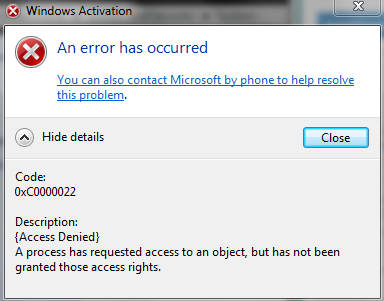
My windows activation has all of a sudden stopped working.
It states on my desktop, This copy of Windows is not genuine, when i know it's a working key.

I had been getting errors on my pc before, and had to fix them because my pc programs would freeze up and even, ctrl>alt>delete wouldn't work.
Got that all fixed.... but now

I can't activate windows 7 by my pc anywhere, or from phone.

Here is some screencaps of what it looks like:

windows activation by phone:
b7ae8b37c164689abac865212a27c664.png


View Basic information about your computer, page:

8cb8d4bde543a5a648de603fc31cfa13.png


As you can see, i have no where, now... to actually input the code to activate it.

Any help in resolving this issue, would be greatly appreciated.
 
Last edited:

My Computer

OS
Windows 64-bit

My Computer

Computer type
PC/Desktop
Computer Manufacturer/Model Number
Self built custom
OS
64-bit Windows 11 Pro for Workstations
CPU
Intel i7-8700K OC'd to 5 GHz
Motherboard
ASUS ROG Maximus XI Formula Z390
Memory
64 GB (4x16GB) G.SKILL TridentZ RGB DDR4 3600 MHz
Graphics Card(s)
ASUS ROG-STRIX-GTX1080TI-O11G-GAMING
Sound Card
Integrated
Monitor(s) Displays
2 x Samsung Odyssey G7 27"
Screen Resolution
2560x1440
Hard Drives
1TB Samsung 990 PRO M.2,
4TB Samsung 990 PRO PRO M.2,
TerraMaster F8 SSD Plus NAS
PSU
Seasonic Prime Titanium 850W
Case
Thermaltake Core P3
Cooling
Corsair Hydro H115i
Keyboard
Logitech wireless K800
Mouse
Logitech MX Master 4
Internet Speed
2 Gb/s Download and 100 Mb/s Upload
Antivirus
Malwarebyte Anti-Malware Premium
Browser
Google Chrome
Other Info
Logitech Z625 speaker system,
Logitech BRIO 4K Pro webcam,
HP Color LaserJet Pro MFP M477fdn,
APC SMART-UPS RT 1000 XL - SURT1000XLI,
Galaxy S23 Plus phone
Jawsh,

Where did you get your copy of Windows 7 from, what type is it, and how was it installed?

For now, also try doing the Validate Windows option.
 

My Computer

Computer type
PC/Desktop
Computer Manufacturer/Model Number
Self built custom
OS
64-bit Windows 11 Pro for Workstations
CPU
Intel i7-8700K OC'd to 5 GHz
Motherboard
ASUS ROG Maximus XI Formula Z390
Memory
64 GB (4x16GB) G.SKILL TridentZ RGB DDR4 3600 MHz
Graphics Card(s)
ASUS ROG-STRIX-GTX1080TI-O11G-GAMING
Sound Card
Integrated
Monitor(s) Displays
2 x Samsung Odyssey G7 27"
Screen Resolution
2560x1440
Hard Drives
1TB Samsung 990 PRO M.2,
4TB Samsung 990 PRO PRO M.2,
TerraMaster F8 SSD Plus NAS
PSU
Seasonic Prime Titanium 850W
Case
Thermaltake Core P3
Cooling
Corsair Hydro H115i
Keyboard
Logitech wireless K800
Mouse
Logitech MX Master 4
Internet Speed
2 Gb/s Download and 100 Mb/s Upload
Antivirus
Malwarebyte Anti-Malware Premium
Browser
Google Chrome
Other Info
Logitech Z625 speaker system,
Logitech BRIO 4K Pro webcam,
HP Color LaserJet Pro MFP M477fdn,
APC SMART-UPS RT 1000 XL - SURT1000XLI,
Galaxy S23 Plus phone
It's a good, perfectly working copy, that's not the issue.
Got it from when i got an alienware pc.

I'm thinking some kind of file is corrupted and now allowing to to input the activation code anymore.......

As i said, my windows 7 has been working great for around 2 years now, it did this when i fixed an issue with my pc freezing up and not allowing me to access anything.. not even the Ctrl alt delete command.

I'm using Windows 7 64-bit. Never had this issue before, until now.

Trying the option/link you posted above,now.
thanks.
 

My Computer

OS
Windows 64-bit
Okay so,
This is the procedure i did to get rid of the error of my computer always freezing up after being on for about an hour or so and not letting me open any programs or use my ctrl alt delete command... just simply letting me click on stuff yet they not open.
Windows Management Instrumentation (WMI) Registry Error

After i did that procedure, it fixed that issue but then....

it deactivated my windows 7 and took away the option for me to re-input my key again or able to activate it.

Don't know what file to change or replace to fix that?
I really don't want to backup files and such... i would then still have to re-install all the programs and such i currently have. I had to do this like 2-3 weeks ago, which was a pain.

Somene has to know a way to fix this :/?

here is a screencap of what it looks like... @ the bottom:
http://gyazo.com/b9c66526bddacf16f08ab2dfcca0b811.png

As you can see, it took away the option for me to input my license key again.

Thanks again
 

My Computer

OS
Windows 64-bit
This can happen if the log On account for Software Protection service is incorrect. Click Start button, type Services.msc, double click Software Protection Service, change the Log On account to Network Service and restart this service to check the result. Make sure you have admin privileges.
 

My Computer

Computer Manufacturer/Model Number
Too many to describe...
OS
Windows 7 x64 pro/ Windows 7 x86 Pro/ XP SP3 x86
This can happen if the log On account for Software Protection service is incorrect. Click Start button, type Services.msc, double click Software Protection Service, change the Log On account to Network Service and restart this service to check the result. Make sure you have admin privileges.

hmm, i checked it out.. it was already on Network Service, on the 'Log On' tab.
http://gyazo.com/2a89e990eb2da0062c68902460ad37d3.png
I tried right clicking, Software Protection...and clicking start... but i get an error as shown here: http://gyazo.com/21228089ceba2842f2addb1bf7204386.png

I am on a administrator account, it's the only account i have on my pc made.
 

My Computer

OS
Windows 64-bit
CBS logs...hmm. I'll ask niemiro to take a look. As far as I can make out, run a factory restore as Brink suggested earlier.
 

My Computer

Computer Manufacturer/Model Number
Too many to describe...
OS
Windows 7 x64 pro/ Windows 7 x86 Pro/ XP SP3 x86
Thanks guys... did everything in the link that bill gave me, and i got it working again!
 

My Computer

OS
Windows 64-bit

My Computer

Computer type
PC/Desktop
Computer Manufacturer/Model Number
Custom Build
OS
Windows 7 Home Premium x64
CPU
Intel i7 3770
Motherboard
ASRock H61M-DGS
Memory
8 GB
Hard Drives
1 TB
Antivirus
Avast
Browser
Mozilla

My Computer

Computer type
PC/Desktop
Computer Manufacturer/Model Number
Self built custom
OS
64-bit Windows 11 Pro for Workstations
CPU
Intel i7-8700K OC'd to 5 GHz
Motherboard
ASUS ROG Maximus XI Formula Z390
Memory
64 GB (4x16GB) G.SKILL TridentZ RGB DDR4 3600 MHz
Graphics Card(s)
ASUS ROG-STRIX-GTX1080TI-O11G-GAMING
Sound Card
Integrated
Monitor(s) Displays
2 x Samsung Odyssey G7 27"
Screen Resolution
2560x1440
Hard Drives
1TB Samsung 990 PRO M.2,
4TB Samsung 990 PRO PRO M.2,
TerraMaster F8 SSD Plus NAS
PSU
Seasonic Prime Titanium 850W
Case
Thermaltake Core P3
Cooling
Corsair Hydro H115i
Keyboard
Logitech wireless K800
Mouse
Logitech MX Master 4
Internet Speed
2 Gb/s Download and 100 Mb/s Upload
Antivirus
Malwarebyte Anti-Malware Premium
Browser
Google Chrome
Other Info
Logitech Z625 speaker system,
Logitech BRIO 4K Pro webcam,
HP Color LaserJet Pro MFP M477fdn,
APC SMART-UPS RT 1000 XL - SURT1000XLI,
Galaxy S23 Plus phone
Back
Top