Windows Activation Tool Issue

RocketFlamingo

New member
Local time
11:44 PM
Messages
27
Hello :) I've visited here countless times but until recently, didn't have any problems I couldn't solve. Now I have an abundance of them :(

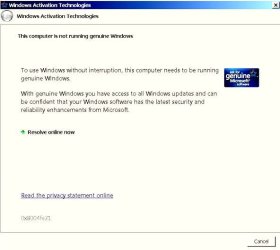
Windows Activation Technology - Starting there since it is most annoying. Several times a day, at random, I see that funky blue and orange star in the status bar and I know the page is waiting for me. I'm running Win7 Home Premium 64 bit and from what I've heard, have no plans to check out Win10 anytime soon. But I can't make that activation tool notice stop. If anyone here knows what can be done, I would very much appreciate the assistance. :)
 

Attachments

  • winactivationimage.jpg
    winactivationimage.jpg
    24 KB · Views: 66
Last edited:

My Computer

Computer type
Laptop
Computer Manufacturer/Model Number
ASUS G75VW
OS
Windows 7 Home Premium 64 bit
CPU
Intel Core i7-3610QM CPU @ 2.30GHz
Motherboard
IRQ 4294967294 Intel(R) 7 Series Chipset Family SATA AHCI Co
Memory
12.0 GB RAM
Graphics Card(s)
GeForce GTX 660M, NVIDIA compatible
Sound Card
NVIDIA High Definition Audio
Monitor(s) Displays
17.3" HD with EWV (1366 x 768) / FHD 3D LED Backlight
Screen Resolution
1600 x 900 x 32 bits (4294967296 colors) @ 60 Hz
Hard Drives
ATA Samsung SSD 840 SCSI Disk Device
ATA Toshiba MQ01ABD0 SCSI Disk Device
PSU
Output : 19 V DC, A, 180 W Input : 100 -240 V AC, 50/60 Hz u
Keyboard
PC/AT Enhanced PS/2 Keyboard (101/102-Key)
Mouse
Synaptics PS/2 Port TouchPad
Internet Speed
72.2 Mbps
Antivirus
Malwarebytes, Bitdefender, Advanced System Care
Browser
Firefox, Opera Stable
Please follow this tutorial and post an MGADiag report - then we can see what the problem is.

http://www.sevenforums.com/windows-...ne-activation-issue-posting-instructions.html

Ignore errors produced when clicking on the Copy button - they simply mean that the tool could not create the backup files for some reason. The data is still copied to the clipboard for pasting to your response.

Please also state the Version and Edition of Windows quoted on your COA sticker (if you have one) on the case of your machine (or inside the battery compartment), but do NOT quote the Key on the sticker!
https://www.microsoft.com/en-gb/howtotell/Hardware.aspx#PCPurchase
 

My Computer

Computer type
Laptop
Computer Manufacturer/Model Number
Asus K52F or Lenovo B51-80
OS
Win 7 x64 Home Premium (and x86 VirtualBox VM)/Win10
CPU
i3 370M/i7 6500U
Motherboard
Asus/Lenovo
Memory
8GB - finally :)/8GB
Graphics Card(s)
it's an i3, dude!/dual Intel&nVidia
Sound Card
onboard
Monitor(s) Displays
15.6" built-in
Screen Resolution
1366x768/1920x1080
Hard Drives
750GB Seagate internal
Sundry external drives attached to other computers on the local network
1TB SSD on the Lenovo
PSU
n/a
Internet Speed
as much as I can get - usually on a dongle/phone, so <1MB/s
Antivirus
MSE/Defender
Browser
IE11/12/Edge/Chrome/FF(if I must)
Thank you, Noel, for posting a reply :)

I ran tools yesterday, both the Diagnostic tool and a couple of upper level command prompt tests. These are the results of the Diagnostic:
Code:
Diagnostic Report (1.9.0027.0):
 -----------------------------------------
 Windows Validation Data-->
 
 Validation Code: 0x8004FE21
 Cached Online Validation Code: 0x0
 Windows Product Key: *****-*****-2QWT6-HCQXJ-9YQTR
 Windows Product Key Hash: PVjSC5x6njvqunmbCY3lOD7rYDo=
 Windows Product ID: 00359-OEM-8992687-00007
 Windows Product ID Type: 2
 Windows License Type: OEM SLP
 Windows OS version: 6.1.7601.2.00010300.1.0.003
 ID: {CC5306F1-28D3-4A78-BE22-7F94933D3906}(1)
 Is Admin: Yes
 TestCab: 0x0
 LegitcheckControl ActiveX: N/A, hr = 0x80070002
 Signed By: N/A, hr = 0x80070002
 Product Name: Windows 7 Home Premium
 Architecture: 0x00000009
 Build lab: 7601.win7sp1_gdr.150525-0603
 TTS Error: 
 Validation Diagnostic: 
 Resolution Status: N/A
 
 Vista WgaER Data-->
 ThreatID(s): N/A, hr = 0x80070002
 Version: N/A, hr = 0x80070002
 
 Windows XP Notifications Data-->
 Cached Result: N/A, hr = 0x80070002
 File Exists: No
 Version: N/A, hr = 0x80070002
 WgaTray.exe Signed By: N/A, hr = 0x80070002
 WgaLogon.dll Signed By: N/A, hr = 0x80070002
 
 OGA Notifications Data-->
 Cached Result: N/A, hr = 0x80070002
 Version: N/A, hr = 0x80070002
 OGAExec.exe Signed By: N/A, hr = 0x80070002
 OGAAddin.dll Signed By: N/A, hr = 0x80070002
 
 OGA Data-->
 Office Status: 109 N/A
 OGA Version: N/A, 0x80070002
 Signed By: N/A, hr = 0x80070002
 Office Diagnostics: B4D0AA8B-604-645_025D1FF3-364-80041010_025D1FF3-229-80041010_025D1FF3-230-1_025D1FF3-517-800
40154_025D1FF3-237-80040154_025D1FF3-238-2_025D1FF3-244-80070002_025D1FF3-258-3


 Browser Data-->
 Proxy settings: N/A
 User Agent: Mozilla/4.0 (compatible; MSIE 8.0; Win32)
 Default Browser: D:\Program Files (x86)\Mozilla Firefox\firefox.exe
 Download signed ActiveX controls: Prompt
 Download unsigned ActiveX controls: Disabled
 Run ActiveX controls and plug-ins: Allowed
 Initialize and script ActiveX controls not marked as safe: Disabled
 Allow scripting of Internet Explorer Webbrowser control: Allowed
 Active scripting: Allowed
 Script ActiveX controls marked as safe for scripting: Allowed
 
 File Scan Data-->
 File Mismatch: C:\Windows\system32\wat\watadminsvc.exe[7.1.7600.16395], Hr = 0x80092003
 File Mismatch: C:\Windows\system32\wat\watux.exe[7.1.7600.16395], Hr = 0x80092003
 File Mismatch: C:\Windows\system32\sppobjs.dll[6.1.7601.17514], Hr = 0x80092003
 File Mismatch: C:\Windows\system32\sppc.dll[6.1.7601.17514], Hr = 0x800b0100
 File Mismatch: C:\Windows\system32\sppcext.dll[6.1.7600.16385], Hr = 0x800b0100
 File Mismatch: C:\Windows\system32\sppwinob.dll[6.1.7601.17514], Hr = 0x80092003
 File Mismatch: C:\Windows\system32\slc.dll[6.1.7600.16385], Hr = 0x800b0100
 File Mismatch: C:\Windows\system32\slcext.dll[6.1.7600.16385], Hr = 0x800b0100
 File Mismatch: C:\Windows\system32\sppuinotify.dll[6.1.7600.16385], Hr = 0x80092003
 File Mismatch: C:\Windows\system32\slui.exe[6.1.7601.17514], Hr = 0x80092003
 File Mismatch: C:\Windows\system32\sppcomapi.dll[6.1.7601.17514], Hr = 0x800b0100
 File Mismatch: C:\Windows\system32\sppcommdlg.dll[6.1.7600.16385], Hr = 0x800b0100
 File Mismatch: C:\Windows\system32\sppsvc.exe[6.1.7601.17514], Hr = 0x80092003
 File Mismatch: C:\Windows\system32\drivers\spsys.sys[6.1.7127.0], Hr = 0x80092003
 File Mismatch: C:\Windows\system32\drivers\spldr.sys[6.1.7127.0], Hr = 0x80092003
 File Mismatch: C:\Windows\system32\systemcpl.dll[6.1.7601.17514], Hr = 0x800b0100
 File Mismatch: C:\Windows\system32\user32.dll[6.1.7601.17514], Hr = 0x800b0100
 
 Other data-->
 Office Details: <GenuineResults><MachineData><UGUID>{CC5306F1-28D3-4A78-BE22-7F94933D3906}</UGUID><Version>1.9.0027.0</Version><OS>6.1.7601.2.00010300.1.0.003</OS><Architecture>x64</Architecture><PKey>*****-*****-*****-*****-9YQTR</PKey><PID>00359-OEM-8992687-00007</PID><PIDType>2</PIDType><SID>S-1-5-21-4279100701-1020221552-2777786871</SID><SYSTEM><Manufacturer>ASUSTeK COMPUTER INC.</Manufacturer><Model>G75VW</Model></SYSTEM><BIOS><Manufacturer>American Megatrends Inc.</Manufacturer><Version>G75VW.223</Version><SMBIOSVersion major="2" minor="7"/><Date>20130107000000.000000+000</Date></BIOS><HWID>27293207018400FE</HWID><UserLCID>0409</UserLCID><SystemLCID>0409</SystemLCID><TimeZone>Central Standard Time(GMT-06:00)</TimeZone><iJoin>0</iJoin><SBID><stat>3</stat><msppid></msppid><name></name><model></model></SBID><OEM><OEMID>_ASUS_</OEMID><OEMTableID>Notebook</OEMTableID></OEM><GANotification/></MachineData><Software><Office><Result>109</Result><Products/><Applications/></Office></Software></GenuineResults>  
 
 Spsys.log Content: 0x80070002
 
 Licensing Data-->
 C:\Windows\system32\slmgr.vbs(22, 1) Microsoft VBScript runtime error: ActiveX component can't create object: 'Scripting.Dictionary'
 
 Windows Activation Technologies-->
 HrOffline: 0x8004FE21
 HrOnline: N/A
 HealthStatus: 0x000000000001EFF0
 Event Time Stamp: 9:28:2015 13:15
 ActiveX: Registered, Version: 7.1.7600.16395
 Admin Service: Registered, Version: 7.1.7600.16395
 HealthStatus Bitmask Output:
 Tampered File: %systemroot%\system32\sppobjs.dll
 Tampered File: %systemroot%\system32\sppc.dll|sppc.dll.mui
 Tampered File: %systemroot%\system32\sppcext.dll|sppcext.dll.mui
 Tampered File: %systemroot%\system32\sppwinob.dll
 Tampered File: %systemroot%\system32\slc.dll|slc.dll.mui
 Tampered File: %systemroot%\system32\slcext.dll|slcext.dll.mui
 Tampered File: %systemroot%\system32\sppuinotify.dll|sppuinotify.dll.mui
 Tampered File: %systemroot%\system32\slui.exe|slui.exe.mui|COM Registration
 Tampered File: %systemroot%\system32\sppcomapi.dll|sppcomapi.dll.mui
 Tampered File: %systemroot%\system32\sppcommdlg.dll|sppcommdlg.dll.mui
 Tampered File: %systemroot%\system32\sppsvc.exe|sppsvc.exe.mui
 Tampered File: %systemroot%\system32\drivers\spsys.sys
 
 
 HWID Data-->
 HWID Hash Current: MgAAAAEAAQABAAEAAQACAAAAAwABAAEACrbKhdAxtCSCCxSBxJYWZBaDANeu8OpwlmM=
 
 OEM Activation 1.0 Data-->
 N/A
 
 OEM Activation 2.0 Data-->
 BIOS valid for OA 2.0: yes
 Windows marker version: 0x20001
 OEMID and OEMTableID Consistent: yes
 BIOS Information: 
   ACPI Table Name    OEMID Value    OEMTableID Value
   APIC            _ASUS_        Notebook
   FACP            _ASUS_        Notebook
   HPET            _ASUS_        Notebook
   MCFG            _ASUS_        Notebook
   FPDT            _ASUS_        Notebook
   ECDT            _ASUS_        Notebook
   SLIC            _ASUS_        Notebook
   SSDT            AhciR1        AhciTab1
   SSDT            AhciR1        AhciTab1
   SSDT            AhciR1        AhciTab1

   SSDT            AhciR1        AhciTab1
Seeing I had a number of tampered files, I'm running a deep scan to locate and dispose of these issues. But I don't know if they have anything to do with the Windows Activation crud.

I ran tests in an upper level command prompt, both reg queries (trying to oust the GWX.exe) bug and have those results as well. GWX.exe is located both where it should be, and where it should not.

Hope to hear from you soon, thank you for taking the time to help :)

Lisa
 
Last edited by a moderator:

My Computer

Computer type
Laptop
Computer Manufacturer/Model Number
ASUS G75VW
OS
Windows 7 Home Premium 64 bit
CPU
Intel Core i7-3610QM CPU @ 2.30GHz
Motherboard
IRQ 4294967294 Intel(R) 7 Series Chipset Family SATA AHCI Co
Memory
12.0 GB RAM
Graphics Card(s)
GeForce GTX 660M, NVIDIA compatible
Sound Card
NVIDIA High Definition Audio
Monitor(s) Displays
17.3" HD with EWV (1366 x 768) / FHD 3D LED Backlight
Screen Resolution
1600 x 900 x 32 bits (4294967296 colors) @ 60 Hz
Hard Drives
ATA Samsung SSD 840 SCSI Disk Device
ATA Toshiba MQ01ABD0 SCSI Disk Device
PSU
Output : 19 V DC, A, 180 W Input : 100 -240 V AC, 50/60 Hz u
Keyboard
PC/AT Enhanced PS/2 Keyboard (101/102-Key)
Mouse
Synaptics PS/2 Port TouchPad
Internet Speed
72.2 Mbps
Antivirus
Malwarebytes, Bitdefender, Advanced System Care
Browser
Firefox, Opera Stable
Just a note for Noel.
From RocketFlamingo system specs.

Hard Drives ATA Samsung SSD 840 SCSI Disk Device ATA Toshiba MQ01ABD0 SCSI Disk Device
Internet Speed 72.2 Mbps
Antivirus Malwarebytes, Bitdefender, Advanced System Care
Browser Firefox, Opera Stable
 

My Computer

Computer type
PC/Desktop
Computer Manufacturer/Model Number
Home made Desktop
OS
Windows 10 Pro. 64/ version 1709 Windows 7 Pro/64
CPU
Intel i7-6800K @ 4.3
Motherboard
ASUS X-99 Deluxe II
Memory
Corsair Platinum 16 gig @2400
Graphics Card(s)
EVGA GTX 1070 OC
Monitor(s) Displays
Asus 27" LED LCD/VE278Q
Screen Resolution
1920-1080 or 1280-720 HDMI
Hard Drives
INTEL SSD 730-240 Gb Sata 3.0/
PSU
EVGA Platium 1200W
Case
Phanteks Luxe Tempered Glass 8 fans/ one radiator
Cooling
XSPC/ Water Cooled CPU
Keyboard
Das 4 Professional
Mouse
Logitech M705/MX Anywhere 2-S
Internet Speed
100 mbits
Antivirus
Microsoft Security Essentials/ Malwarebytes Premium 3.0/ SAS
Browser
I.E. 11 default/Firefox/ ISP Time Warner Cable/Spectrum
Other Info
LG BluRay Burner/
Sound system-KLipsch-THX/
Icy Dock ssd Hot Swap bays.
(Thanks, Jack!)
Please uninstall Advanced System Care - it may be the cause of your problems.

Then...
This may simply be caused by a bad set of Intel Rapid Storage Technology drivers -

Installing the Intel Rapid Storage Drivers
try downloading and installing them from here - https://downloadcenter.intel.com/Detail_Desc.aspx?agr=Y&ProdId=2101&DwnldID=22194

(you want the iata_enu.exe download)

Once complete, please reboot twice, then post another MGADiag report.
 

My Computer

Computer type
Laptop
Computer Manufacturer/Model Number
Asus K52F or Lenovo B51-80
OS
Win 7 x64 Home Premium (and x86 VirtualBox VM)/Win10
CPU
i3 370M/i7 6500U
Motherboard
Asus/Lenovo
Memory
8GB - finally :)/8GB
Graphics Card(s)
it's an i3, dude!/dual Intel&nVidia
Sound Card
onboard
Monitor(s) Displays
15.6" built-in
Screen Resolution
1366x768/1920x1080
Hard Drives
750GB Seagate internal
Sundry external drives attached to other computers on the local network
1TB SSD on the Lenovo
PSU
n/a
Internet Speed
as much as I can get - usually on a dongle/phone, so <1MB/s
Antivirus
MSE/Defender
Browser
IE11/12/Edge/Chrome/FF(if I must)
Hello Noel,

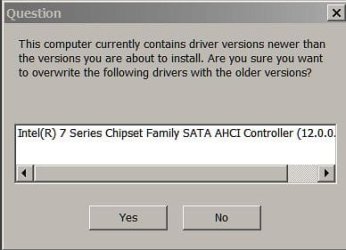
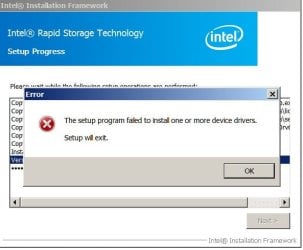
I have uninstalled AVC though previous versions over the years have never caused me problems. When I downloaded the Intel Rapid Storate Tech I get the message below. Do I disregard??

Lisa
 

Attachments

  • iata_enu.jpg
    iata_enu.jpg
    15.6 KB · Views: 49

My Computer

Computer type
Laptop
Computer Manufacturer/Model Number
ASUS G75VW
OS
Windows 7 Home Premium 64 bit
CPU
Intel Core i7-3610QM CPU @ 2.30GHz
Motherboard
IRQ 4294967294 Intel(R) 7 Series Chipset Family SATA AHCI Co
Memory
12.0 GB RAM
Graphics Card(s)
GeForce GTX 660M, NVIDIA compatible
Sound Card
NVIDIA High Definition Audio
Monitor(s) Displays
17.3" HD with EWV (1366 x 768) / FHD 3D LED Backlight
Screen Resolution
1600 x 900 x 32 bits (4294967296 colors) @ 60 Hz
Hard Drives
ATA Samsung SSD 840 SCSI Disk Device
ATA Toshiba MQ01ABD0 SCSI Disk Device
PSU
Output : 19 V DC, A, 180 W Input : 100 -240 V AC, 50/60 Hz u
Keyboard
PC/AT Enhanced PS/2 Keyboard (101/102-Key)
Mouse
Synaptics PS/2 Port TouchPad
Internet Speed
72.2 Mbps
Antivirus
Malwarebytes, Bitdefender, Advanced System Care
Browser
Firefox, Opera Stable
Posting the Info you requested

Hello Noel,

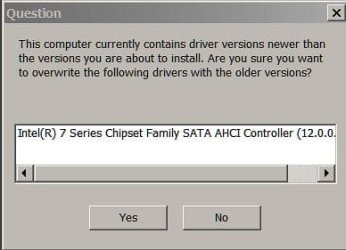
I don't guess the image showed up - it just said that the files downloaded were older than the files on the machine. Did I want to proceed.

The other info: Windows 7 Home Premium (DA) - I assume for "Deal Alert"

Version 6.1.7601 SP1 Build 7601

Posting that image again, just to be sure that's what you want me to do.

Thanks :)

Lisa
 

Attachments

  • iata_enu.jpg
    iata_enu.jpg
    15.6 KB · Views: 47

My Computer

Computer type
Laptop
Computer Manufacturer/Model Number
ASUS G75VW
OS
Windows 7 Home Premium 64 bit
CPU
Intel Core i7-3610QM CPU @ 2.30GHz
Motherboard
IRQ 4294967294 Intel(R) 7 Series Chipset Family SATA AHCI Co
Memory
12.0 GB RAM
Graphics Card(s)
GeForce GTX 660M, NVIDIA compatible
Sound Card
NVIDIA High Definition Audio
Monitor(s) Displays
17.3" HD with EWV (1366 x 768) / FHD 3D LED Backlight
Screen Resolution
1600 x 900 x 32 bits (4294967296 colors) @ 60 Hz
Hard Drives
ATA Samsung SSD 840 SCSI Disk Device
ATA Toshiba MQ01ABD0 SCSI Disk Device
PSU
Output : 19 V DC, A, 180 W Input : 100 -240 V AC, 50/60 Hz u
Keyboard
PC/AT Enhanced PS/2 Keyboard (101/102-Key)
Mouse
Synaptics PS/2 Port TouchPad
Internet Speed
72.2 Mbps
Antivirus
Malwarebytes, Bitdefender, Advanced System Care
Browser
Firefox, Opera Stable
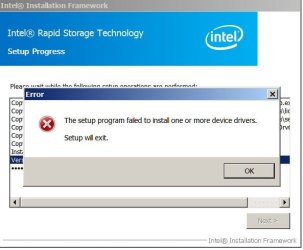
Intel Rapid Storage Technology Install Fail

Here's what I got at a point midway through the install of that program. I'd troubleshoot it, but I know it wouldn't work, none of my Troubleshooters do.

Also, in the big Windows Activation Tool page, there's a barely perceptable code number embedded in the image = 0x8004fe21.

Open to all ideas

Lisa
 

Attachments

  • IntelInstallationFail.jpg
    IntelInstallationFail.jpg
    28.9 KB · Views: 41
Last edited:

My Computer

Computer type
Laptop
Computer Manufacturer/Model Number
ASUS G75VW
OS
Windows 7 Home Premium 64 bit
CPU
Intel Core i7-3610QM CPU @ 2.30GHz
Motherboard
IRQ 4294967294 Intel(R) 7 Series Chipset Family SATA AHCI Co
Memory
12.0 GB RAM
Graphics Card(s)
GeForce GTX 660M, NVIDIA compatible
Sound Card
NVIDIA High Definition Audio
Monitor(s) Displays
17.3" HD with EWV (1366 x 768) / FHD 3D LED Backlight
Screen Resolution
1600 x 900 x 32 bits (4294967296 colors) @ 60 Hz
Hard Drives
ATA Samsung SSD 840 SCSI Disk Device
ATA Toshiba MQ01ABD0 SCSI Disk Device
PSU
Output : 19 V DC, A, 180 W Input : 100 -240 V AC, 50/60 Hz u
Keyboard
PC/AT Enhanced PS/2 Keyboard (101/102-Key)
Mouse
Synaptics PS/2 Port TouchPad
Internet Speed
72.2 Mbps
Antivirus
Malwarebytes, Bitdefender, Advanced System Care
Browser
Firefox, Opera Stable
Image accompanying Rapid Install Tech Fail

Goes with previous note to Noel.
 

Attachments

  • IntelInstallationFail.jpg
    IntelInstallationFail.jpg
    28.9 KB · Views: 39

My Computer

Computer type
Laptop
Computer Manufacturer/Model Number
ASUS G75VW
OS
Windows 7 Home Premium 64 bit
CPU
Intel Core i7-3610QM CPU @ 2.30GHz
Motherboard
IRQ 4294967294 Intel(R) 7 Series Chipset Family SATA AHCI Co
Memory
12.0 GB RAM
Graphics Card(s)
GeForce GTX 660M, NVIDIA compatible
Sound Card
NVIDIA High Definition Audio
Monitor(s) Displays
17.3" HD with EWV (1366 x 768) / FHD 3D LED Backlight
Screen Resolution
1600 x 900 x 32 bits (4294967296 colors) @ 60 Hz
Hard Drives
ATA Samsung SSD 840 SCSI Disk Device
ATA Toshiba MQ01ABD0 SCSI Disk Device
PSU
Output : 19 V DC, A, 180 W Input : 100 -240 V AC, 50/60 Hz u
Keyboard
PC/AT Enhanced PS/2 Keyboard (101/102-Key)
Mouse
Synaptics PS/2 Port TouchPad
Internet Speed
72.2 Mbps
Antivirus
Malwarebytes, Bitdefender, Advanced System Care
Browser
Firefox, Opera Stable

My Computer

Computer type
Laptop
Computer Manufacturer/Model Number
Asus K52F or Lenovo B51-80
OS
Win 7 x64 Home Premium (and x86 VirtualBox VM)/Win10
CPU
i3 370M/i7 6500U
Motherboard
Asus/Lenovo
Memory
8GB - finally :)/8GB
Graphics Card(s)
it's an i3, dude!/dual Intel&nVidia
Sound Card
onboard
Monitor(s) Displays
15.6" built-in
Screen Resolution
1366x768/1920x1080
Hard Drives
750GB Seagate internal
Sundry external drives attached to other computers on the local network
1TB SSD on the Lenovo
PSU
n/a
Internet Speed
as much as I can get - usually on a dongle/phone, so <1MB/s
Antivirus
MSE/Defender
Browser
IE11/12/Edge/Chrome/FF(if I must)
2nd Attempt at Solving GWX issue and results Including log

Noel,

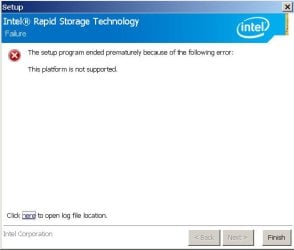
The second attempt did not work either. Attaching image and log file for your review.

Lisa

Begin Log File:

2015:10:07 15:28:58:214:
2015:10:07 15:28:58:214: >>> Log start
2015:10:07 15:28:58:215: Mutex with given name doesn't exist. Creating new one.

2015:10:07 15:28:58:215: Obtained mutex succesfully.
2015:10:07 15:28:58:216: Single-instance mutex has been obtained
2015:10:07 15:28:58:216: Core version: 2.5.49
2015:10:07 15:28:58:217: Setup version: 2.2.6.0
2015:10:07 15:28:58:217: Command line: "D:\LISA'S\New folder\SetupRST(1).exe"
2015:10:07 15:28:58:218: OS data: 6-1-1-1 64-bit
2015:10:07 15:28:58:218: System up time: 9614 sec
2015:10:07 15:28:58:219: Reboot pending: No
2015:10:07 15:28:58:219: Current UI language: 0409
2015:10:07 15:28:58:220: Language folder: C:\Users\owner\AppData\Local\Temp\IIFB33A.tmp
2015:10:07 15:28:58:227: Found C:\Users\owner\AppData\Local\Temp\IIFB33A.tmp\ar-SA\IntelCommon.dll. Lang 0401. Rank 0
2015:10:07 15:28:58:245: Found C:\Users\owner\AppData\Local\Temp\IIFB33A.tmp\cs-CZ\IntelCommon.dll. Lang 0405. Rank 0
2015:10:07 15:28:58:255: Found C:\Users\owner\AppData\Local\Temp\IIFB33A.tmp\da-DK\IntelCommon.dll. Lang 0406. Rank 0
2015:10:07 15:28:58:275: Found C:\Users\owner\AppData\Local\Temp\IIFB33A.tmp\de-DE\IntelCommon.dll. Lang 0407. Rank 0
2015:10:07 15:28:58:297: Found C:\Users\owner\AppData\Local\Temp\IIFB33A.tmp\el-GR\IntelCommon.dll. Lang 0408. Rank 0
2015:10:07 15:28:58:309: Found C:\Users\owner\AppData\Local\Temp\IIFB33A.tmp\en-US\IntelCommon.dll. Lang 0409. Rank 3
2015:10:07 15:28:58:327: Found C:\Users\owner\AppData\Local\Temp\IIFB33A.tmp\es-ES\IntelCommon.dll. Lang 0C0A. Rank 0
2015:10:07 15:28:58:352: Found C:\Users\owner\AppData\Local\Temp\IIFB33A.tmp\fi-FI\IntelCommon.dll. Lang 040B. Rank 0
2015:10:07 15:28:58:362: Found C:\Users\owner\AppData\Local\Temp\IIFB33A.tmp\fr-FR\IntelCommon.dll. Lang 040C. Rank 0
2015:10:07 15:28:58:373: Found C:\Users\owner\AppData\Local\Temp\IIFB33A.tmp\he-IL\IntelCommon.dll. Lang 040D. Rank 0
2015:10:07 15:28:58:382: Found C:\Users\owner\AppData\Local\Temp\IIFB33A.tmp\hu-HU\IntelCommon.dll. Lang 040E. Rank 0
2015:10:07 15:28:58:393: Found C:\Users\owner\AppData\Local\Temp\IIFB33A.tmp\it-IT\IntelCommon.dll. Lang 0410. Rank 0
2015:10:07 15:28:58:416: Found C:\Users\owner\AppData\Local\Temp\IIFB33A.tmp\ja-JP\IntelCommon.dll. Lang 0411. Rank 0
2015:10:07 15:28:58:427: Found C:\Users\owner\AppData\Local\Temp\IIFB33A.tmp\ko-KR\IntelCommon.dll. Lang 0412. Rank 0
2015:10:07 15:28:58:436: Found C:\Users\owner\AppData\Local\Temp\IIFB33A.tmp\nb-NO\IntelCommon.dll. Lang 0414. Rank 0
2015:10:07 15:28:58:451: Found C:\Users\owner\AppData\Local\Temp\IIFB33A.tmp\nl-NL\IntelCommon.dll. Lang 0413. Rank 0
2015:10:07 15:28:58:461: Found C:\Users\owner\AppData\Local\Temp\IIFB33A.tmp\pl-PL\IntelCommon.dll. Lang 0415. Rank 0
2015:10:07 15:28:58:473: Found C:\Users\owner\AppData\Local\Temp\IIFB33A.tmp\pt-BR\IntelCommon.dll. Lang 0416. Rank 0
2015:10:07 15:28:58:488: Found C:\Users\owner\AppData\Local\Temp\IIFB33A.tmp\pt-PT\IntelCommon.dll. Lang 0816. Rank 0
2015:10:07 15:28:58:503: Found C:\Users\owner\AppData\Local\Temp\IIFB33A.tmp\ru-RU\IntelCommon.dll. Lang 0419. Rank 0
2015:10:07 15:28:58:515: Found C:\Users\owner\AppData\Local\Temp\IIFB33A.tmp\sk-SK\IntelCommon.dll. Lang 041B. Rank 0
2015:10:07 15:28:58:526: Found C:\Users\owner\AppData\Local\Temp\IIFB33A.tmp\sv-SE\IntelCommon.dll. Lang 041D. Rank 0
2015:10:07 15:28:58:537: Found C:\Users\owner\AppData\Local\Temp\IIFB33A.tmp\th-TH\IntelCommon.dll. Lang 041E. Rank 0
2015:10:07 15:28:58:546: Found C:\Users\owner\AppData\Local\Temp\IIFB33A.tmp\tr-TR\IntelCommon.dll. Lang 041F. Rank 0
2015:10:07 15:28:58:557: Found C:\Users\owner\AppData\Local\Temp\IIFB33A.tmp\zh-CN\IntelCommon.dll. Lang 0804. Rank 0
2015:10:07 15:28:58:571: Found C:\Users\owner\AppData\Local\Temp\IIFB33A.tmp\zh-TW\IntelCommon.dll. Lang 0404. Rank 0
2015:10:07 15:28:58:577: Loading language 0409
2015:10:07 15:28:58:578: Setup mode: Installation
2015:10:07 15:28:58:579: Looking for OS: 6.1 6.2 6.3
2015:10:07 15:28:58:579: OS check passed
2015:10:07 15:28:58:580: Checking .NET version...
2015:10:07 15:28:58:581: Expected version: v4.5\Client
2015:10:07 15:28:58:581: Found registry key for the expected .NET version.
2015:10:07 15:28:58:582: Looking for .NET version 4.5 or above
2015:10:07 15:28:58:582: Found version: 4.5.51209
2015:10:07 15:28:58:583: .NET version check passed
2015:10:07 15:28:58:583: Resolving driver source
2015:10:07 15:28:58:585: Using embedded driver(s). Temp source is 'C:\Users\owner\AppData\Local\Temp\IIFB4A2.tmp'
2015:10:07 15:28:58:674: Using folder 'C:\Users\owner\AppData\Local\Temp\IIFB4A2.tmp' as the driver source
2015:10:07 15:28:58:675: Scanning all active devices
2015:10:07 15:28:58:721: Scanning x64\iaAHCIC.inf (Name: AHCI64, Version: 14.6.0.1029)
2015:10:07 15:28:58:722: Section with the best match: INTEL.NTamd64.6.2
2015:10:07 15:28:58:723: Device: PCI\VEN_8086&DEV_8C02&CC_0106 (Intel(R) 8 Series/C220 Chipset Family SATA AHCI Controller)
2015:10:07 15:28:58:723: Device: PCI\VEN_8086&DEV_8C03&CC_0106 (Intel(R) 8 Series Chipset Family SATA AHCI Controller)
2015:10:07 15:28:58:724: Device: PCI\VEN_8086&DEV_8C82&CC_0106 (Intel(R) 9 Series Chipset Family SATA AHCI Controller)
2015:10:07 15:28:58:724: Device: PCI\VEN_8086&DEV_8C83&CC_0106 (Intel(R) 9 Series Chipset Family SATA AHCI Controller)
2015:10:07 15:28:58:725: Device: PCI\VEN_8086&DEV_9C02&CC_0106 (Intel(R) 8 Series/C220 Chipset Family SATA AHCI Controller)
2015:10:07 15:28:58:726: Device: PCI\VEN_8086&DEV_9C03&CC_0106 (Intel(R) 8 Series Chipset Family SATA AHCI Controller)
2015:10:07 15:28:58:726: Device: PCI\VEN_8086&DEV_9C82&CC_0106 (Intel(R) 9 Series Chipset Family SATA AHCI Controller)
2015:10:07 15:28:58:727: Device: PCI\VEN_8086&DEV_9C83&CC_0106 (Intel(R) 9 Series Chipset Family SATA AHCI Controller)
2015:10:07 15:28:58:727: Device: PCI\VEN_8086&DEV_9D03&CC_0106 (Intel(R) 6th Generation Core Processor Family Platform I/O SATA AHCI Controller)
2015:10:07 15:28:58:728: Device: PCI\VEN_8086&DEV_A102&CC_0106 (Intel(R) 100 Series/C230 Chipset Family SATA AHCI Controller)
2015:10:07 15:28:58:729: Device: PCI\VEN_8086&DEV_A103&CC_0106 (Intel(R) 100 Series/C230 Chipset Family SATA AHCI Controller)
2015:10:07 15:28:58:729: Device: PCI\VEN_8086&DEV_8D02&CC_0106 (Intel(R) 9 Series Chipset Family SATA AHCI Controller)
2015:10:07 15:28:58:730: MUP OS bits: 0xB6C00
2015:10:07 15:28:58:731: Scanning x64\iaStorAC.inf (Name: RAID64, Version: 14.6.0.1029)
2015:10:07 15:28:58:731: Section with the best match: INTEL.NTamd64.6.2
2015:10:07 15:28:58:732: Device: PCI\VEN_8086&DEV_2822&CC_0104 (Intel Chipset SATA RAID Controller)
2015:10:07 15:28:58:733: Device: PCI\VEN_8086&DEV_282A&CC_0104 (Intel Chipset SATA RAID Controller)
2015:10:07 15:28:58:733: MUP OS bits: 0xB6C00
2015:10:07 15:28:58:735: Scanning x86\iaAHCIC.inf (Name: AHCI32, Version: 14.6.0.1029)
2015:10:07 15:28:58:736: No section match
2015:10:07 15:28:58:737: MUP OS bits: 0x49200
2015:10:07 15:28:58:738: Scanning x86\iaStorAC.inf (Name: RAID32, Version: 14.6.0.1029)
2015:10:07 15:28:58:738: No section match
2015:10:07 15:28:58:739: MUP OS bits: 0x49200
2015:10:07 15:28:58:740: E Win32 exception occurred!!
2015:10:07 15:28:58:740: Error code: 0x4E24 (20004)
2015:10:07 15:28:58:741: Error text: ''
2015:10:07 15:28:58:741: Extended error text: 'Error in device matching'
2015:10:07 15:28:58:742: Debug info: 'Setup.cpp (257)'
2015:10:07 15:28:58:743: Reading storyboard
2015:10:07 15:28:58:744: Page count: 10
2015:10:07 15:28:58:744: Added: Welcome
2015:10:07 15:28:58:745: Added: Modify
2015:10:07 15:28:58:745: Added: Warning
2015:10:07 15:28:58:746: Added: License
2015:10:07 15:28:58:747: Added: Readme
2015:10:07 15:28:58:747: Added: Destination
2015:10:07 15:28:58:748: Added: Confirm
2015:10:07 15:28:58:748: Added: Progress
2015:10:07 15:28:58:749: Added: Finish
2015:10:07 15:28:58:749: Added: Error
2015:10:07 15:28:58:750: Reading string map
2015:10:07 15:28:58:751: No string map present
2015:10:07 15:28:58:765: Showing page: Error
2015:10:07 15:29:19:817: Link: Launching 'C:\Users\owner\Intel\Logs'"

End log
 

Attachments

  • 2ndtry.jpg
    2ndtry.jpg
    31.2 KB · Views: 25

My Computer

Computer type
Laptop
Computer Manufacturer/Model Number
ASUS G75VW
OS
Windows 7 Home Premium 64 bit
CPU
Intel Core i7-3610QM CPU @ 2.30GHz
Motherboard
IRQ 4294967294 Intel(R) 7 Series Chipset Family SATA AHCI Co
Memory
12.0 GB RAM
Graphics Card(s)
GeForce GTX 660M, NVIDIA compatible
Sound Card
NVIDIA High Definition Audio
Monitor(s) Displays
17.3" HD with EWV (1366 x 768) / FHD 3D LED Backlight
Screen Resolution
1600 x 900 x 32 bits (4294967296 colors) @ 60 Hz
Hard Drives
ATA Samsung SSD 840 SCSI Disk Device
ATA Toshiba MQ01ABD0 SCSI Disk Device
PSU
Output : 19 V DC, A, 180 W Input : 100 -240 V AC, 50/60 Hz u
Keyboard
PC/AT Enhanced PS/2 Keyboard (101/102-Key)
Mouse
Synaptics PS/2 Port TouchPad
Internet Speed
72.2 Mbps
Antivirus
Malwarebytes, Bitdefender, Advanced System Care
Browser
Firefox, Opera Stable

My Computer

Computer type
Laptop
Computer Manufacturer/Model Number
Asus K52F or Lenovo B51-80
OS
Win 7 x64 Home Premium (and x86 VirtualBox VM)/Win10
CPU
i3 370M/i7 6500U
Motherboard
Asus/Lenovo
Memory
8GB - finally :)/8GB
Graphics Card(s)
it's an i3, dude!/dual Intel&nVidia
Sound Card
onboard
Monitor(s) Displays
15.6" built-in
Screen Resolution
1366x768/1920x1080
Hard Drives
750GB Seagate internal
Sundry external drives attached to other computers on the local network
1TB SSD on the Lenovo
PSU
n/a
Internet Speed
as much as I can get - usually on a dongle/phone, so <1MB/s
Antivirus
MSE/Defender
Browser
IE11/12/Edge/Chrome/FF(if I must)
We've already tried this set - Windows Activation Tool

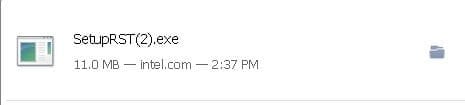
Download indicates this is the second time this set has been downloaded. This machine replaced the G72GX that I still have. I should compare chipsets.

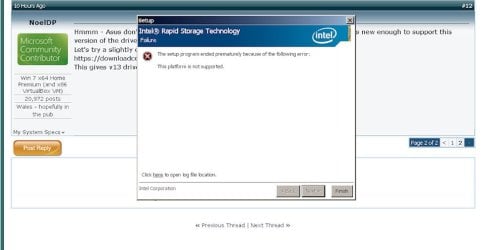
Just as on first try, a no-go :( But at some point, the file size changed. Didn't make much difference, I keep getting the message that 'this platform is not supported'. What platform is not supported? Isn't the "Platform" the OS?

I REALLY appreciate your persistence, Noel. I went into Processes or Services and found the Windows Activation Tool 'Tree' which if stopped, stopped all related processes. If it doesn't come up again, I'm going to try modifying the startup in msconfig and see if killing the Tree gets rid of this problem.

Lisa
 

Attachments

  • setupsetdownloadedbefore.jpg
    setupsetdownloadedbefore.jpg
    11.5 KB · Views: 23
  • WinActivationFail2.jpg
    WinActivationFail2.jpg
    40.5 KB · Views: 3
  • downloadsetupRSTdownloadhistory.jpg
    downloadsetupRSTdownloadhistory.jpg
    18.2 KB · Views: 2

My Computer

Computer type
Laptop
Computer Manufacturer/Model Number
ASUS G75VW
OS
Windows 7 Home Premium 64 bit
CPU
Intel Core i7-3610QM CPU @ 2.30GHz
Motherboard
IRQ 4294967294 Intel(R) 7 Series Chipset Family SATA AHCI Co
Memory
12.0 GB RAM
Graphics Card(s)
GeForce GTX 660M, NVIDIA compatible
Sound Card
NVIDIA High Definition Audio
Monitor(s) Displays
17.3" HD with EWV (1366 x 768) / FHD 3D LED Backlight
Screen Resolution
1600 x 900 x 32 bits (4294967296 colors) @ 60 Hz
Hard Drives
ATA Samsung SSD 840 SCSI Disk Device
ATA Toshiba MQ01ABD0 SCSI Disk Device
PSU
Output : 19 V DC, A, 180 W Input : 100 -240 V AC, 50/60 Hz u
Keyboard
PC/AT Enhanced PS/2 Keyboard (101/102-Key)
Mouse
Synaptics PS/2 Port TouchPad
Internet Speed
72.2 Mbps
Antivirus
Malwarebytes, Bitdefender, Advanced System Care
Browser
Firefox, Opera Stable
This effing iphone is killing me :( back wjen i can get to a machine that actually works!
 

My Computer

Computer type
Laptop
Computer Manufacturer/Model Number
Asus K52F or Lenovo B51-80
OS
Win 7 x64 Home Premium (and x86 VirtualBox VM)/Win10
CPU
i3 370M/i7 6500U
Motherboard
Asus/Lenovo
Memory
8GB - finally :)/8GB
Graphics Card(s)
it's an i3, dude!/dual Intel&nVidia
Sound Card
onboard
Monitor(s) Displays
15.6" built-in
Screen Resolution
1366x768/1920x1080
Hard Drives
750GB Seagate internal
Sundry external drives attached to other computers on the local network
1TB SSD on the Lenovo
PSU
n/a
Internet Speed
as much as I can get - usually on a dongle/phone, so <1MB/s
Antivirus
MSE/Defender
Browser
IE11/12/Edge/Chrome/FF(if I must)
Back
Top