Windows aero doesn't work

mak

New member
Member
Local time
3:11 PM
Messages
59
Hi

Recently i update my graphics card and install a new one Sapphire HD 4670 1gb ddr3 the problem is after installing the driver the aero disabled itself and when i troubleshoot the problem a error message comes windows desktop manager is disabled even i tried the latest driver but nothing help. I update my system drivers like bios,chipset,sound and others but nothing seems to work. I am using Windows 7 ultimate x32bit I really wanted to use this card under win7 but because of this problem i couldn't.
 

My Computer

OS
Windows 7 Ultimate x32
CPU
Intel core 2 duo E7400 2.8
Motherboard
Intel DG31PR
Memory
3GB
Graphics Card(s)
Sapphire Radeon HD 4670 1Gb ddr3
Sound Card
Creative 5.1
Monitor(s) Displays
ViewSonic 17 widescreen
Hard Drives
320gb Sata
PSU
600watt
Case
Antec 900
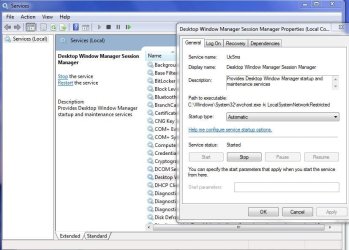
You can start the desktop windows management by going to Start>Run>services.msc
Locate the Window Manager Session Manager and start the service
Re-enable Aero
If it is disabled, set it to start automatically
 

Attachments

  • Capture.JPG
    Capture.JPG
    108.3 KB · Views: 2,836
  • d.JPG
    d.JPG
    72.8 KB · Views: 1,809

My Computer

Computer type
PC/Desktop
Computer Manufacturer/Model Number
Custom Build
OS
Windows 10 Pro x64, Arch Linux
CPU
Intel Core 2 Quad Q8200 OC'd 3.08GHz
Motherboard
Asus Rampage formula LGA775
Memory
8GB DDR2 900Mhz
Graphics Card(s)
MSI GT730 2GB GDDR5 (Kepler)
Sound Card
Supreme FX2
Monitor(s) Displays
Samsung LS22F350 LED
Screen Resolution
1080P
Hard Drives
Kingston SSDNow UV400 120GB, 500GB Hitachi, 2TB Samsung, 500GB Seagate FreeAgent, 640GB Samsung, 160GB Toshiba (Arch)
PSU
AeroCool 500W Bronze
Cooling
Cooler Master V6 + 3X fans
Keyboard
Prolink keyboard
Mouse
Logitech M705
Internet Speed
1MiB/s
Browser
Chrome Beta
I have already done that plenty of time
 

My Computer

OS
Windows 7 Ultimate x32
CPU
Intel core 2 duo E7400 2.8
Motherboard
Intel DG31PR
Memory
3GB
Graphics Card(s)
Sapphire Radeon HD 4670 1Gb ddr3
Sound Card
Creative 5.1
Monitor(s) Displays
ViewSonic 17 widescreen
Hard Drives
320gb Sata
PSU
600watt
Case
Antec 900
Try uninstalling the drivers you just installed. Then reboot, and let Windows automatically find and install drivers.
 

My Computer

Computer Manufacturer/Model Number
Custom
OS
Windows 7 Professional x64
CPU
Intel i7 2600K OC'd @ 4620 MHz
Motherboard
Asus P8Z68-V Pro
Memory
16GB GSkill Sniper 2133 Mhz (4x4GB)
Graphics Card(s)
EVGA GeForce GTX 480 SuperClocked+
Sound Card
Realtek High Definition Audio
Monitor(s) Displays
2x Acer S273HLbmii 27"
Screen Resolution
2 x 1920x1080
Hard Drives
64GB Crucial M4 SSD

Storage: Hitachi 1TB 5400RPM, Samsung 1.5TB 5400RPM
PSU
Corsair HW Series 750w (modular)
Case
Cooler Master HAF 932 Advanced Blue Edition
Cooling
CM Hyper 212+ CPU cooler, 3x 230mm + 1x 140mm case fans
Keyboard
Logitech MK320 (wireless)
Mouse
Logitech MK320 (wireless)
Internet Speed
30 Mb/s : 2 Mb/s
Windows Install Ati radeon hd 4600 series drivers itself. But the problem is. It doesn't work
 

My Computer

OS
Windows 7 Ultimate x32
CPU
Intel core 2 duo E7400 2.8
Motherboard
Intel DG31PR
Memory
3GB
Graphics Card(s)
Sapphire Radeon HD 4670 1Gb ddr3
Sound Card
Creative 5.1
Monitor(s) Displays
ViewSonic 17 widescreen
Hard Drives
320gb Sata
PSU
600watt
Case
Antec 900
You get the same results with both drivers?
 

My Computer

Computer Manufacturer/Model Number
Custom
OS
Windows 7 Professional x64
CPU
Intel i7 2600K OC'd @ 4620 MHz
Motherboard
Asus P8Z68-V Pro
Memory
16GB GSkill Sniper 2133 Mhz (4x4GB)
Graphics Card(s)
EVGA GeForce GTX 480 SuperClocked+
Sound Card
Realtek High Definition Audio
Monitor(s) Displays
2x Acer S273HLbmii 27"
Screen Resolution
2 x 1920x1080
Hard Drives
64GB Crucial M4 SSD

Storage: Hitachi 1TB 5400RPM, Samsung 1.5TB 5400RPM
PSU
Corsair HW Series 750w (modular)
Case
Cooler Master HAF 932 Advanced Blue Edition
Cooling
CM Hyper 212+ CPU cooler, 3x 230mm + 1x 140mm case fans
Keyboard
Logitech MK320 (wireless)
Mouse
Logitech MK320 (wireless)
Internet Speed
30 Mb/s : 2 Mb/s
yes
 

My Computer

OS
Windows 7 Ultimate x32
CPU
Intel core 2 duo E7400 2.8
Motherboard
Intel DG31PR
Memory
3GB
Graphics Card(s)
Sapphire Radeon HD 4670 1Gb ddr3
Sound Card
Creative 5.1
Monitor(s) Displays
ViewSonic 17 widescreen
Hard Drives
320gb Sata
PSU
600watt
Case
Antec 900
Try downloading drivers from here: SAPPHIRE- HOME

Select your card and OS, and download the drivers it brings up.
 

My Computer

Computer Manufacturer/Model Number
Custom
OS
Windows 7 Professional x64
CPU
Intel i7 2600K OC'd @ 4620 MHz
Motherboard
Asus P8Z68-V Pro
Memory
16GB GSkill Sniper 2133 Mhz (4x4GB)
Graphics Card(s)
EVGA GeForce GTX 480 SuperClocked+
Sound Card
Realtek High Definition Audio
Monitor(s) Displays
2x Acer S273HLbmii 27"
Screen Resolution
2 x 1920x1080
Hard Drives
64GB Crucial M4 SSD

Storage: Hitachi 1TB 5400RPM, Samsung 1.5TB 5400RPM
PSU
Corsair HW Series 750w (modular)
Case
Cooler Master HAF 932 Advanced Blue Edition
Cooling
CM Hyper 212+ CPU cooler, 3x 230mm + 1x 140mm case fans
Keyboard
Logitech MK320 (wireless)
Mouse
Logitech MK320 (wireless)
Internet Speed
30 Mb/s : 2 Mb/s
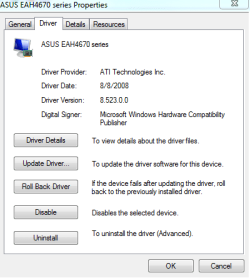
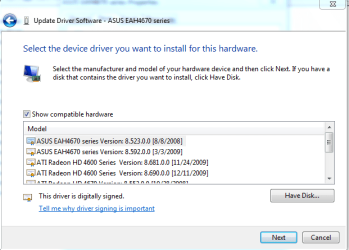
dude i have already installed the drivers from the official site. I just want to tell you that when i install other driver. Like manually install the driver from device manager and choose update my driver and have choose from the list and select the asus eah4670 driver version 8/8/2008 it's work but the problem is i cannot play to the latest game i mean game performance are really annoying infact we cannot choose other company driver for our device(The card manufacturer is Sapphire but why it accept other driver)
 

My Computer

OS
Windows 7 Ultimate x32
CPU
Intel core 2 duo E7400 2.8
Motherboard
Intel DG31PR
Memory
3GB
Graphics Card(s)
Sapphire Radeon HD 4670 1Gb ddr3
Sound Card
Creative 5.1
Monitor(s) Displays
ViewSonic 17 widescreen
Hard Drives
320gb Sata
PSU
600watt
Case
Antec 900
The card will accept ATI drivers, but Sapphire drivers will hopefully work better.

In case you don't know this already, the GPU was manufactured by ATI. The card was assembled by Sapphire.
 

My Computer

Computer Manufacturer/Model Number
Custom
OS
Windows 7 Professional x64
CPU
Intel i7 2600K OC'd @ 4620 MHz
Motherboard
Asus P8Z68-V Pro
Memory
16GB GSkill Sniper 2133 Mhz (4x4GB)
Graphics Card(s)
EVGA GeForce GTX 480 SuperClocked+
Sound Card
Realtek High Definition Audio
Monitor(s) Displays
2x Acer S273HLbmii 27"
Screen Resolution
2 x 1920x1080
Hard Drives
64GB Crucial M4 SSD

Storage: Hitachi 1TB 5400RPM, Samsung 1.5TB 5400RPM
PSU
Corsair HW Series 750w (modular)
Case
Cooler Master HAF 932 Advanced Blue Edition
Cooling
CM Hyper 212+ CPU cooler, 3x 230mm + 1x 140mm case fans
Keyboard
Logitech MK320 (wireless)
Mouse
Logitech MK320 (wireless)
Internet Speed
30 Mb/s : 2 Mb/s
here is the screenshot
 

Attachments

  • aero doesn't work.PNG
    aero doesn't work.PNG
    10 KB · Views: 28

My Computer

OS
Windows 7 Ultimate x32
CPU
Intel core 2 duo E7400 2.8
Motherboard
Intel DG31PR
Memory
3GB
Graphics Card(s)
Sapphire Radeon HD 4670 1Gb ddr3
Sound Card
Creative 5.1
Monitor(s) Displays
ViewSonic 17 widescreen
Hard Drives
320gb Sata
PSU
600watt
Case
Antec 900
here
 

Attachments

  • asd.PNG
    asd.PNG
    18.4 KB · Views: 55

My Computer

OS
Windows 7 Ultimate x32
CPU
Intel core 2 duo E7400 2.8
Motherboard
Intel DG31PR
Memory
3GB
Graphics Card(s)
Sapphire Radeon HD 4670 1Gb ddr3
Sound Card
Creative 5.1
Monitor(s) Displays
ViewSonic 17 widescreen
Hard Drives
320gb Sata
PSU
600watt
Case
Antec 900

My Computer

Computer Manufacturer/Model Number
Samsung NP550P5C-S02IN
OS
Windows 7 Ultimate - 64-bit | Windows 8 Pro - 64-bit
CPU
Intel® Core™ i7 Processor 3,610QM (2.30Hz, 6MB L3 Cach
Memory
8 GB
Graphics Card(s)
NVIDIA® GeForce® GT 650M 2GB Graphics, Optimus™ techno
Sound Card
SoundAlive™ JBL 3 Speakers (With sub-Woofer)
Monitor(s) Displays
39.62cm (15.6) SuperBright 300nit HD+ LED Display
Screen Resolution
1,600 x 900, Anti-Reflective
Hard Drives
1TB S-ATA II Hard Drive (5,400RPM)
I have tried all the troubleshooting to run aero . Even updating the driver but doesn't help
 

My Computer

OS
Windows 7 Ultimate x32
CPU
Intel core 2 duo E7400 2.8
Motherboard
Intel DG31PR
Memory
3GB
Graphics Card(s)
Sapphire Radeon HD 4670 1Gb ddr3
Sound Card
Creative 5.1
Monitor(s) Displays
ViewSonic 17 widescreen
Hard Drives
320gb Sata
PSU
600watt
Case
Antec 900
I have tried all the troubleshooting to run aero . Even updating the driver but doesn't help

What is the result it says after running the Troubleshooting wizard ??
 

My Computer

Computer Manufacturer/Model Number
Samsung NP550P5C-S02IN
OS
Windows 7 Ultimate - 64-bit | Windows 8 Pro - 64-bit
CPU
Intel® Core™ i7 Processor 3,610QM (2.30Hz, 6MB L3 Cach
Memory
8 GB
Graphics Card(s)
NVIDIA® GeForce® GT 650M 2GB Graphics, Optimus™ techno
Sound Card
SoundAlive™ JBL 3 Speakers (With sub-Woofer)
Monitor(s) Displays
39.62cm (15.6) SuperBright 300nit HD+ LED Display
Screen Resolution
1,600 x 900, Anti-Reflective
Hard Drives
1TB S-ATA II Hard Drive (5,400RPM)
Windows desktop manager is disabled and the windows theme doesn't change i mean grey appearence like basic. When i again go to device manager and install the drivers manually and then start troubleshooter the theme change with aero features on. But after restart it remain basic and if you want to troubleshoot the problem it doesn't work. Only if you update the driver, no matter which version it is. can only help. BUt the thing is that why i have to troubleshoot, why i have to always on restart update the driver to troubleshoot aero
 

My Computer

OS
Windows 7 Ultimate x32
CPU
Intel core 2 duo E7400 2.8
Motherboard
Intel DG31PR
Memory
3GB
Graphics Card(s)
Sapphire Radeon HD 4670 1Gb ddr3
Sound Card
Creative 5.1
Monitor(s) Displays
ViewSonic 17 widescreen
Hard Drives
320gb Sata
PSU
600watt
Case
Antec 900
Sounds like the Driver is broken or some issue with the System files itself.
I guess its best to try SFC/ SCANNOW if that didn't help then Repair Install

Hope this helps,
Captain
 

My Computer

Computer Manufacturer/Model Number
Samsung NP550P5C-S02IN
OS
Windows 7 Ultimate - 64-bit | Windows 8 Pro - 64-bit
CPU
Intel® Core™ i7 Processor 3,610QM (2.30Hz, 6MB L3 Cach
Memory
8 GB
Graphics Card(s)
NVIDIA® GeForce® GT 650M 2GB Graphics, Optimus™ techno
Sound Card
SoundAlive™ JBL 3 Speakers (With sub-Woofer)
Monitor(s) Displays
39.62cm (15.6) SuperBright 300nit HD+ LED Display
Screen Resolution
1,600 x 900, Anti-Reflective
Hard Drives
1TB S-ATA II Hard Drive (5,400RPM)
i have completed the scannow process here is the result attaching with this post but couldn't know what to do
 

Attachments

My Computer

OS
Windows 7 Ultimate x32
CPU
Intel core 2 duo E7400 2.8
Motherboard
Intel DG31PR
Memory
3GB
Graphics Card(s)
Sapphire Radeon HD 4670 1Gb ddr3
Sound Card
Creative 5.1
Monitor(s) Displays
ViewSonic 17 widescreen
Hard Drives
320gb Sata
PSU
600watt
Case
Antec 900
i have completed the scannow process here is the result attaching with this post but couldn't know what to do

Doesn't look like something is wrong. Anyway just reboot the System and try it out once if that fails then Repair install would be my suggestion
 

My Computer

Computer Manufacturer/Model Number
Samsung NP550P5C-S02IN
OS
Windows 7 Ultimate - 64-bit | Windows 8 Pro - 64-bit
CPU
Intel® Core™ i7 Processor 3,610QM (2.30Hz, 6MB L3 Cach
Memory
8 GB
Graphics Card(s)
NVIDIA® GeForce® GT 650M 2GB Graphics, Optimus™ techno
Sound Card
SoundAlive™ JBL 3 Speakers (With sub-Woofer)
Monitor(s) Displays
39.62cm (15.6) SuperBright 300nit HD+ LED Display
Screen Resolution
1,600 x 900, Anti-Reflective
Hard Drives
1TB S-ATA II Hard Drive (5,400RPM)
ok tell me one last thing is that if repair also doesn''t work, what will be the actual cause of this problem a video card or windows 7 please tell me
 

My Computer

OS
Windows 7 Ultimate x32
CPU
Intel core 2 duo E7400 2.8
Motherboard
Intel DG31PR
Memory
3GB
Graphics Card(s)
Sapphire Radeon HD 4670 1Gb ddr3
Sound Card
Creative 5.1
Monitor(s) Displays
ViewSonic 17 widescreen
Hard Drives
320gb Sata
PSU
600watt
Case
Antec 900
Back
Top