- Local time
- 9:33 PM
- Messages
- 93
I dont know if I have inadvertantly changed a setting somewhere (although I'm pretty sure I haven't), but windows aero has started working differently.
If I have several tabs open in IE8, when I used to hover the mouse over the IE icon in the taskbar it used to give preview windows for ALL open tabs. But now when I hover I just get one preview window for the current tab or last viewed tab.
Also it doesn't always take you to the correct tab. E.G. I hovered over the icon and the preview pane showed this forum. The info bar above the preview pane referred a different tab, and when I clicked on the preview pane it took me to the other tab and not to the one shown in the preview.
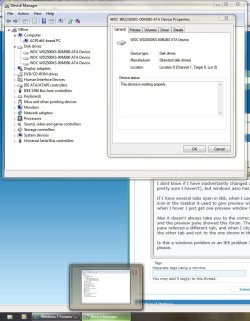
It seems to be not working on other applications also. Take a look at the following snip. I have device manager AND a properties box open, yet the preview pane only shows device manager and not the properties window.
Anyone have any ideas as to what the problem is please.
If I have several tabs open in IE8, when I used to hover the mouse over the IE icon in the taskbar it used to give preview windows for ALL open tabs. But now when I hover I just get one preview window for the current tab or last viewed tab.
Also it doesn't always take you to the correct tab. E.G. I hovered over the icon and the preview pane showed this forum. The info bar above the preview pane referred a different tab, and when I clicked on the preview pane it took me to the other tab and not to the one shown in the preview.
It seems to be not working on other applications also. Take a look at the following snip. I have device manager AND a properties box open, yet the preview pane only shows device manager and not the properties window.
Anyone have any ideas as to what the problem is please.
Attachments
My Computer
- Computer type
- PC/Desktop
- Computer Manufacturer/Model Number
- Self build
- OS
- Windows 7 professional X 64
- CPU
- Phenom 11 X 6 1090t 3.2 GHz
- Motherboard
- Asus Crosshair III Formula 790FX
- Memory
- 8 gb Corsair 1600MHz C9 DDR3
- Graphics Card(s)
- 2 X Saphire HD5770 Vapour X in crossfire
- Sound Card
- SupremeFX X-Fi
- Monitor(s) Displays
- Samsung 24" full HD
- Screen Resolution
- 1920 X 1080
- Hard Drives
- 1 X 1Tb Sata HHD
- PSU
- Corsair TX 650 watt
- Case
- Antec 902 ultimate gamer case
- Cooling
- Zalman CNPS 9900