- Local time
- 12:51 AM
- Messages
- 35
Hello everybody,
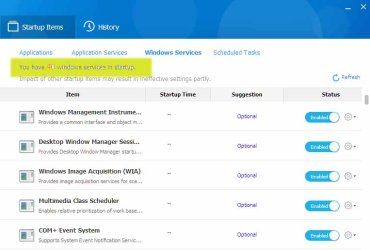
I have found a system utility called Baidu PC Faster that gives me a report about Windows and Application Services and Sheduled Tasks in startup. Since now I haven't found a better program for listing as many services and tasks in startup as Baidu does.
Let me be more specific. Baidu says I have 40 windows services in startup. It also says I have 22 scheduled tasks in startup. Wow, isn't that too much? Isn't that a reason for the slow start up of my computer? How can I decide what services / tasks to turn off?
What is the best way to manipulate all these services and tasks if I wish my computer to run fast and smooth? I don't think it a smart idea to search the Internet and learn about all these services and tasks. I don't want to become a Win 7 startup services/tasks expert! The only thing I want is my computer to run fast. Furthermore, I don't like the idea to constantly supervise tasks and services of my operating system.
Your comments are welcome,
LOR
I have found a system utility called Baidu PC Faster that gives me a report about Windows and Application Services and Sheduled Tasks in startup. Since now I haven't found a better program for listing as many services and tasks in startup as Baidu does.
Let me be more specific. Baidu says I have 40 windows services in startup. It also says I have 22 scheduled tasks in startup. Wow, isn't that too much? Isn't that a reason for the slow start up of my computer? How can I decide what services / tasks to turn off?
What is the best way to manipulate all these services and tasks if I wish my computer to run fast and smooth? I don't think it a smart idea to search the Internet and learn about all these services and tasks. I don't want to become a Win 7 startup services/tasks expert! The only thing I want is my computer to run fast. Furthermore, I don't like the idea to constantly supervise tasks and services of my operating system.
Your comments are welcome,
LOR
My Computer
At a glance
N/AN/AN/AN/A
- Computer Manufacturer/Model Number
- N/A
- OS
- N/A
- CPU
- N/A
- Motherboard
- N/A
- Memory
- N/A
- Graphics Card(s)
- N/A
- Sound Card
- N/A
- Monitor(s) Displays
- N/A
- Hard Drives
- N/A
- PSU
- N/A
- Case
- N/A
- Cooling
- N/A