Windows Anytime Upgrade couldn't create a restore point!

thatdoggonegirl

New member
Local time
8:55 AM
Messages
79
Location
Pathetic country called Philippines.
Hello everyone. I'm back! Y'all know that I always wanted to upgrade my Windows 7 from Starter to besides-Starter. Lol! So, I got a valid key but WAU couldn't create a restore point. Help me? :cry: :banghead::o
 

My Computer My Computer

Computer type
Laptop
Computer Manufacturer/Model Number
Toshiba L300
OS
Windows 7 Ultimate
Memory
2GB
Antivirus
Avast!
Browser
Google Chrome

My Computer My Computer

Computer type
Laptop
Computer Manufacturer/Model Number
Toshiba L300
OS
Windows 7 Ultimate
Memory
2GB
Antivirus
Avast!
Browser
Google Chrome
Uncheck everything in msconfig>Startup and Services tabs (after Hiding all MS Services) including AV. Reboot and try WAU again.

If it fails then uninstall the AV to try again.
 
Uncheck everything in msconfig>Startup and Services tabs (after Hiding all MS Services) including AV. Reboot and try WAU again.

If it fails then uninstall the AV to try again.

Still the same. :cry: :(
 

My Computer My Computer

Computer type
Laptop
Computer Manufacturer/Model Number
Toshiba L300
OS
Windows 7 Ultimate
Memory
2GB
Antivirus
Avast!
Browser
Google Chrome
If this is still the Toshiba factory install you can go from the worst install possible to the very best by doing a http://www.sevenforums.com/tutorials/219487-clean-reinstall-factory-oem-windows-7-a.html#post1839164.

Install and Activate the version on COA sticker, then run WAU to upgrade. Capture a backup image of your completed setup so you never have to do this again.

This tutorial compiles everything that works best in tens of thousands of installs we've directly helped with here since beta, and has over a million views by users without a single complaint.

You'll get and keep a perfect install to the exact extent you stick with the steps, tools and methods in it.
 
If this is still the Toshiba factory install you can go from the worst install possible to the very best by doing a http://www.sevenforums.com/tutorials/219487-clean-reinstall-factory-oem-windows-7-a.html#post1839164.

Install and Activate the version on COA sticker, then run WAU to upgrade. Capture a backup image of your completed setup so you never have to do this again.

This tutorial compiles everything that works best in tens of thousands of installs we've directly helped with here since beta, and has over a million views by users without a single complaint.

You'll get and keep a perfect install to the exact extent you stick with the steps, tools and methods in it.

Until now, I didn't able to upgrade my Windows 7 Starter. My problem is: The sticker is no longer visible at the bottom of my netbook. ;_; I'm talking about the COA sticker.
 

My Computer My Computer

Computer type
Laptop
Computer Manufacturer/Model Number
Toshiba L300
OS
Windows 7 Ultimate
Memory
2GB
Antivirus
Avast!
Browser
Google Chrome
Then I'd make your Toshiba Factory Recovery disks and run Recovery which self-activates. Then immediately run WAU.

Go to the Toshiba Support Downloads webpage for your model since it might be different and read the Manual, print out how to make Recov disks - an absolute must since running Recov from hard drive can fail - and how to Run Recovery for your model. You want two methods since its the only way you can reinstall without COA Key. Toshiba Factory Recovery
Creating system recovery media using the Toshiba Recovery Media Creator utility

Then run it from OS or boot key with disks standing by.
 
Last edited:
Just a thought.

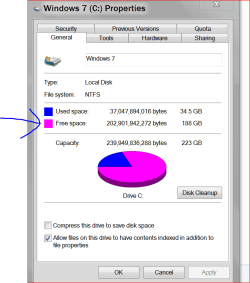
How much free space is on the disk with Windows?

You will not be able to Upgrade or Repair install unless Windows 7 has some elbow room on the drive.

Capture.PNG
 

My Computer My Computer

Computer type
PC/Desktop
Computer Manufacturer/Model Number
Home made Desktop
OS
Windows 10 Pro. 64/ version 1709 Windows 7 Pro/64
CPU
Intel i7-6800K @ 4.3
Motherboard
ASUS X-99 Deluxe II
Memory
Corsair Platinum 16 gig @2400
Graphics Card(s)
EVGA GTX 1070 OC
Monitor(s) Displays
Asus 27" LED LCD/VE278Q
Screen Resolution
1920-1080 or 1280-720 HDMI
Hard Drives
INTEL SSD 730-240 Gb Sata 3.0/
PSU
EVGA Platium 1200W
Case
Phanteks Luxe Tempered Glass 8 fans/ one radiator
Cooling
XSPC/ Water Cooled CPU
Keyboard
Das 4 Professional
Mouse
Logitech M705/MX Anywhere 2-S
Internet Speed
100 mbits
Antivirus
Microsoft Security Essentials/ Malwarebytes Premium 3.0/ SAS
Browser
I.E. 11 default/Firefox/ ISP Time Warner Cable/Spectrum
Other Info
LG BluRay Burner/
Sound system-KLipsch-THX/
Icy Dock ssd Hot Swap bays.
Back
Top