
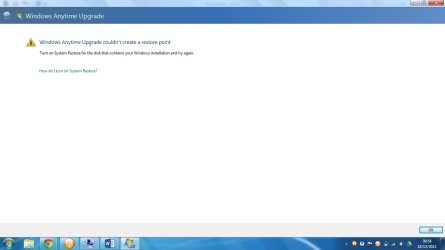
Windows Anytime Upgrade couldn't create a restore point??

avi312

New member
Member
Local time
12:17 PM
Messages
43
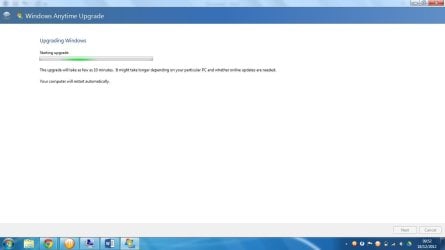
I have done thorough research and googled this issue many times but non of the resolutions actually apply to me and never solve my issue. I bought a windows 7 64 bit key but every time i run Windows Anytime Upgrade i get this message and at the bottom it says turn on system restore for the disk that contains your windows installation, it is on but i am unable to create a restore point because i then get this error 'An error was detected in the volume shadow copy service (vss). The problem occurred while trying to contact VSS writers. Verify that the event system and the VSS service are running (which they definitely are, they're both running and startup is automatic) and check for associated errors in the event logs. (0x80042318)
 

My Computer My Computer

Computer type
PC/Desktop
Computer Manufacturer/Model Number
Custom Build
OS
Microsoft Windows 7 Ultimate 64-bit 7601 Multiprocessor Free Service Pack 1
CPU
AMD FX(tm)-8350 Eight-Core Processor
Motherboard
ASUSTeK COMPUTER INC. M5A99X EVO R2.0
Memory
8.00 GB Corsair Vengeance
Graphics Card(s)
AMD Radeon HD 7870 DD (7000 SERIES)
Sound Card
(1) AMD High Definition Audio Device (2) Realtek High Defi
Monitor(s) Displays
LG IPS224
Screen Resolution
1920x1080
Hard Drives
(1) SanDisk SDSSDP128G SATA Disk Device (2) WDC WD50 00AAKX-00ERMA0 SATA Disk Device (3) SanDisk Cruzer Blade USB Device (4) Sony Hard Drive USB Device
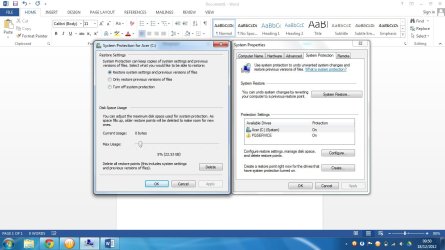
When you access System Protection to look at the drives, are any listed as "Recovered?"

If so turn off System Protection on that drive, then turn it back on for C which should now be protected.

 
Sanapshot.jpg

Snapshot.jpg

Snapshot001.jpg

None of the drives were listed as recovered...
 

My Computer My Computer

Computer type
PC/Desktop
Computer Manufacturer/Model Number
Custom Build
OS
Microsoft Windows 7 Ultimate 64-bit 7601 Multiprocessor Free Service Pack 1
CPU
AMD FX(tm)-8350 Eight-Core Processor
Motherboard
ASUSTeK COMPUTER INC. M5A99X EVO R2.0
Memory
8.00 GB Corsair Vengeance
Graphics Card(s)
AMD Radeon HD 7870 DD (7000 SERIES)
Sound Card
(1) AMD High Definition Audio Device (2) Realtek High Defi
Monitor(s) Displays
LG IPS224
Screen Resolution
1920x1080
Hard Drives
(1) SanDisk SDSSDP128G SATA Disk Device (2) WDC WD50 00AAKX-00ERMA0 SATA Disk Device (3) SanDisk Cruzer Blade USB Device (4) Sony Hard Drive USB Device
cmd.jpg
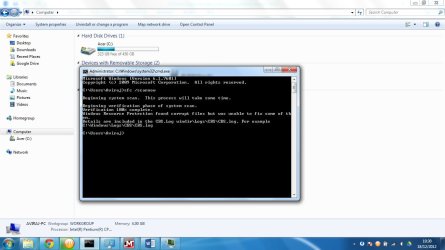
Ok im getting this message and have no idea what to do, btw did i tell you that i have recently had to do a full format of the c: drive and reinstall windows again through acer's reinstall utility, would this have something to do with the issue??
 

My Computer My Computer

Computer type
PC/Desktop
Computer Manufacturer/Model Number
Custom Build
OS
Microsoft Windows 7 Ultimate 64-bit 7601 Multiprocessor Free Service Pack 1
CPU
AMD FX(tm)-8350 Eight-Core Processor
Motherboard
ASUSTeK COMPUTER INC. M5A99X EVO R2.0
Memory
8.00 GB Corsair Vengeance
Graphics Card(s)
AMD Radeon HD 7870 DD (7000 SERIES)
Sound Card
(1) AMD High Definition Audio Device (2) Realtek High Defi
Monitor(s) Displays
LG IPS224
Screen Resolution
1920x1080
Hard Drives
(1) SanDisk SDSSDP128G SATA Disk Device (2) WDC WD50 00AAKX-00ERMA0 SATA Disk Device (3) SanDisk Cruzer Blade USB Device (4) Sony Hard Drive USB Device
btw heres the log...View attachment 246313 and im still getting the same error message for WAU as i posted in my second post (last image)....
 

My Computer My Computer

Computer type
PC/Desktop
Computer Manufacturer/Model Number
Custom Build
OS
Microsoft Windows 7 Ultimate 64-bit 7601 Multiprocessor Free Service Pack 1
CPU
AMD FX(tm)-8350 Eight-Core Processor
Motherboard
ASUSTeK COMPUTER INC. M5A99X EVO R2.0
Memory
8.00 GB Corsair Vengeance
Graphics Card(s)
AMD Radeon HD 7870 DD (7000 SERIES)
Sound Card
(1) AMD High Definition Audio Device (2) Realtek High Defi
Monitor(s) Displays
LG IPS224
Screen Resolution
1920x1080
Hard Drives
(1) SanDisk SDSSDP128G SATA Disk Device (2) WDC WD50 00AAKX-00ERMA0 SATA Disk Device (3) SanDisk Cruzer Blade USB Device (4) Sony Hard Drive USB Device
Next run a full scan with Malwarebytes, uninstall your AV and replace with Microsoft Security Essentials to run a full scan. If you're running a bloatware AV make sure you google for it's removal tool - these are themselves like infections.

Run SFC /scannow again several more times to see if it can repair the damaged system files.

If not run Repair Install.
 
ok will do man :)
 

My Computer My Computer

Computer type
PC/Desktop
Computer Manufacturer/Model Number
Custom Build
OS
Microsoft Windows 7 Ultimate 64-bit 7601 Multiprocessor Free Service Pack 1
CPU
AMD FX(tm)-8350 Eight-Core Processor
Motherboard
ASUSTeK COMPUTER INC. M5A99X EVO R2.0
Memory
8.00 GB Corsair Vengeance
Graphics Card(s)
AMD Radeon HD 7870 DD (7000 SERIES)
Sound Card
(1) AMD High Definition Audio Device (2) Realtek High Defi
Monitor(s) Displays
LG IPS224
Screen Resolution
1920x1080
Hard Drives
(1) SanDisk SDSSDP128G SATA Disk Device (2) WDC WD50 00AAKX-00ERMA0 SATA Disk Device (3) SanDisk Cruzer Blade USB Device (4) Sony Hard Drive USB Device
ok installed malwarebytes deleted 2 files... the more sfc /scannow operations i run - the better or the more chance of any repairs?? or should i completely install windows again? :/
 

My Computer My Computer

Computer type
PC/Desktop
Computer Manufacturer/Model Number
Custom Build
OS
Microsoft Windows 7 Ultimate 64-bit 7601 Multiprocessor Free Service Pack 1
CPU
AMD FX(tm)-8350 Eight-Core Processor
Motherboard
ASUSTeK COMPUTER INC. M5A99X EVO R2.0
Memory
8.00 GB Corsair Vengeance
Graphics Card(s)
AMD Radeon HD 7870 DD (7000 SERIES)
Sound Card
(1) AMD High Definition Audio Device (2) Realtek High Defi
Monitor(s) Displays
LG IPS224
Screen Resolution
1920x1080
Hard Drives
(1) SanDisk SDSSDP128G SATA Disk Device (2) WDC WD50 00AAKX-00ERMA0 SATA Disk Device (3) SanDisk Cruzer Blade USB Device (4) Sony Hard Drive USB Device
ok gregrocker in the end i just did a clean reinstall and will definately create a sytem restore point now... and have successfully upgraded to windows ultimate 64 bit through WAU :) thanks for the help
 

My Computer My Computer

Computer type
PC/Desktop
Computer Manufacturer/Model Number
Custom Build
OS
Microsoft Windows 7 Ultimate 64-bit 7601 Multiprocessor Free Service Pack 1
CPU
AMD FX(tm)-8350 Eight-Core Processor
Motherboard
ASUSTeK COMPUTER INC. M5A99X EVO R2.0
Memory
8.00 GB Corsair Vengeance
Graphics Card(s)
AMD Radeon HD 7870 DD (7000 SERIES)
Sound Card
(1) AMD High Definition Audio Device (2) Realtek High Defi
Monitor(s) Displays
LG IPS224
Screen Resolution
1920x1080
Hard Drives
(1) SanDisk SDSSDP128G SATA Disk Device (2) WDC WD50 00AAKX-00ERMA0 SATA Disk Device (3) SanDisk Cruzer Blade USB Device (4) Sony Hard Drive USB Device
ok i have figured out the problem but not sure how to fix it... after a clean reinstall of windows i could create a restore point after the latest windows updates (about 112 of them) i am getting the error again about the vss writers... not sure which update is doing this nad how do i found out which update is causing nthis problem (and i only installed the important updates).....
 

My Computer My Computer

Computer type
PC/Desktop
Computer Manufacturer/Model Number
Custom Build
OS
Microsoft Windows 7 Ultimate 64-bit 7601 Multiprocessor Free Service Pack 1
CPU
AMD FX(tm)-8350 Eight-Core Processor
Motherboard
ASUSTeK COMPUTER INC. M5A99X EVO R2.0
Memory
8.00 GB Corsair Vengeance
Graphics Card(s)
AMD Radeon HD 7870 DD (7000 SERIES)
Sound Card
(1) AMD High Definition Audio Device (2) Realtek High Defi
Monitor(s) Displays
LG IPS224
Screen Resolution
1920x1080
Hard Drives
(1) SanDisk SDSSDP128G SATA Disk Device (2) WDC WD50 00AAKX-00ERMA0 SATA Disk Device (3) SanDisk Cruzer Blade USB Device (4) Sony Hard Drive USB Device
Google the error text and identifying numbers to see how others resolved it.

Each group of Updates should set a Restore Point. So System Restore progressive backwards until you get before the problem. Then run Windows Updates and install in small groups, check for problem after each. When you find the group repsonsible, install those updates singly until you find the problem update, post it back here in our Updates forum and open a email Support Case on Windows Update's website.
 
ok :)
 

My Computer My Computer

Computer type
PC/Desktop
Computer Manufacturer/Model Number
Custom Build
OS
Microsoft Windows 7 Ultimate 64-bit 7601 Multiprocessor Free Service Pack 1
CPU
AMD FX(tm)-8350 Eight-Core Processor
Motherboard
ASUSTeK COMPUTER INC. M5A99X EVO R2.0
Memory
8.00 GB Corsair Vengeance
Graphics Card(s)
AMD Radeon HD 7870 DD (7000 SERIES)
Sound Card
(1) AMD High Definition Audio Device (2) Realtek High Defi
Monitor(s) Displays
LG IPS224
Screen Resolution
1920x1080
Hard Drives
(1) SanDisk SDSSDP128G SATA Disk Device (2) WDC WD50 00AAKX-00ERMA0 SATA Disk Device (3) SanDisk Cruzer Blade USB Device (4) Sony Hard Drive USB Device
Back
Top