
I'm using W7 home x64 and Malwarebytes latest.
I ran a full C: scan the other week and MB flagged a lot of files in the C:\Windows\Assembly\temp folder (which it didn't before)
(I have since scanned a handful of them via Virustotal and they came up clean.)
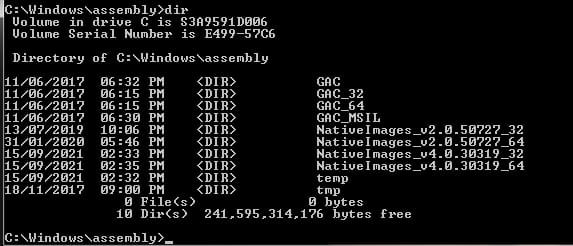
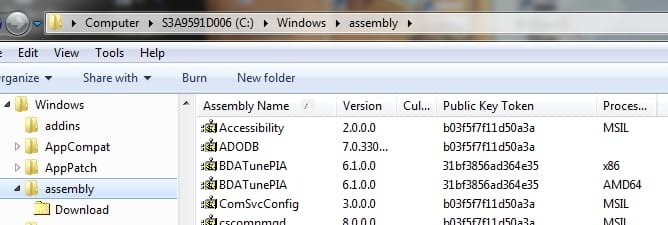
My query is though is with the mismatch between files in the Assembly folder as reported by Windows Explorer and that by a CMD shell.
the CMD shell shows folders but not the assembly files as shown in Explorer.
eg Explorer doesn't even show a temp folder (yes, it's set to show hidden/system files)
Pics attached will explain it.
Can anyone explain what's going on there?
I ran a full C: scan the other week and MB flagged a lot of files in the C:\Windows\Assembly\temp folder (which it didn't before)
(I have since scanned a handful of them via Virustotal and they came up clean.)
My query is though is with the mismatch between files in the Assembly folder as reported by Windows Explorer and that by a CMD shell.
the CMD shell shows folders but not the assembly files as shown in Explorer.
eg Explorer doesn't even show a temp folder (yes, it's set to show hidden/system files)
Pics attached will explain it.
Can anyone explain what's going on there?
Attachments
My Computer
At a glance
Windows 7 64 biti716GB
- Computer type
- Laptop
- Computer Manufacturer/Model Number
- Toshiba
- OS
- Windows 7 64 bit
- CPU
- i7
- Memory
- 16GB
- Antivirus
- Kaspersky IS 2013


