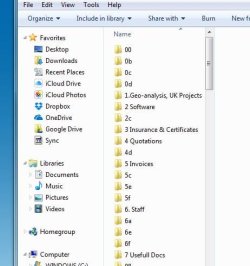
M mptasos New member Local time 3:48 AM Messages 4 Sep 2, 2017 #1 Hello, for some reason my windows keeps auto creating weird naming folders. Any idea? i am using anti-virus F secure Thanks in advance Attachments WIN7.JPG 35.8 KB · Views: 35 My Computer My Computer At a glance win 7 home premium X64Computer typeLaptopOSwin 7 home premium X64
Hello, for some reason my windows keeps auto creating weird naming folders. Any idea? i am using anti-virus F secure Thanks in advance
Mellon Head Electron Wrangler Guru Gold Member VIP Local time 11:48 PM Messages 3,255 Location Canada Sep 2, 2017 #2 I would suspect malware of some kind. Windows just doesn't produce spontaneous folders. Please download and run MalwareBytes (and have it scan your whole system, not just the usual scan), and report back the results. You can get MalwareBytes (the free version), from here: Malwarebytes | Free Cyber Security & Anti-Malware Software My Computer My Computer At a glance Win 7 Pro x64/Win 10 Pro x64 dual bootAMD FX 8350 Vishera @ 420016 GB Mushkin Blackline DDR3-2400 @ 1866 (9-1...XFX Radeon R9 280 Double D Black EditionComputer typePC/DesktopComputer Manufacturer/Model NumberMellon Labs (custom build)OSWin 7 Pro x64/Win 10 Pro x64 dual bootCPUAMD FX 8350 Vishera @ 4200MotherboardASUS M5A97 R2.0Memory16 GB Mushkin Blackline DDR3-2400 @ 1866 (9-10-10-10-31)Graphics Card(s)XFX Radeon R9 280 Double D Black EditionSound CardRealtek HD Audio on MB. Sounds great.Monitor(s) DisplaysAcer 24", Acer 22"Screen Resolution3840 x 1080Hard Drives1 x Mushkin Chronos 120 GB SSD (Win 10) 1 x Samsung 850 EVO 250 GB SSD (Win 7) 1 x WD 1TB SATA Blue 1 x WD 1TB SATA GreenPSUCorsair TX-750CaseCoolerMaster HAF 912+CoolingCoolermaster Seidon 240M Liquid AIO. 6 case fansKeyboardLogitech G710+MouseLogitech G500sInternet SpeedMuch better since I got fiber, but still way overpriced.AntivirusMSE, Malware Bytes for scanningBrowserFirefoxOther InfoCorsair VOID USB headphones. A Mellon Labs X-1 - LCD Smartie driven system status display. Brought to you by the letter E
I would suspect malware of some kind. Windows just doesn't produce spontaneous folders. Please download and run MalwareBytes (and have it scan your whole system, not just the usual scan), and report back the results. You can get MalwareBytes (the free version), from here: Malwarebytes | Free Cyber Security & Anti-Malware Software
M mptasos New member Thread Starter Local time 3:48 AM Messages 4 Sep 4, 2017 #3 many thanks but it didnt helped me much the Malwarebytes Any other suggestions? I noticed that every time i restart my laptop it creates folders and only in that specific folder Thanks anyway My Computer My Computer At a glance win 7 home premium X64Computer typeLaptopOSwin 7 home premium X64
many thanks but it didnt helped me much the Malwarebytes Any other suggestions? I noticed that every time i restart my laptop it creates folders and only in that specific folder Thanks anyway
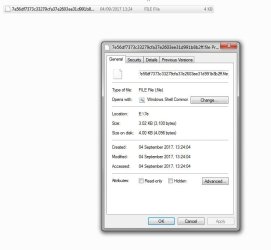
M mptasos New member Thread Starter Local time 3:48 AM Messages 4 Sep 4, 2017 #4 inside the ghost folders there is a strange file please see my image Attachments Capture.JPG 42.6 KB · Views: 18 My Computer My Computer At a glance win 7 home premium X64Computer typeLaptopOSwin 7 home premium X64
M mptasos New member Thread Starter Local time 3:48 AM Messages 4 Sep 4, 2017 #5 i think, might be win system files but should be hidden maybe? My Computer My Computer At a glance win 7 home premium X64Computer typeLaptopOSwin 7 home premium X64
samuria New member Guru Gold Member VIP Local time 9:48 PM Messages 3,999 Location crewe uk Sep 4, 2017 #6 Search for those strings often they refer to software that's been installed My Computer My Computer At a glance win 8 32 bitComputer typePC/DesktopOSwin 8 32 bit