Windows back page arrows greyed out

xectis

New member
Local time
11:53 AM
Messages
5
I have Windows 7 SP1. A strange thing has happened recently whereby when I open a window, say 'Downloads', a new window will open for that and if I open any file on the Download section then a separate window will open. Basically the back arrow is greyed out for anything I click on so I would have to close each window individually. The more windows I open the more I have to close individually. Could this be some kind of virus? Any help appreciated.
 

My Computer

Computer type
PC/Desktop
Computer Manufacturer/Model Number
MSI GE60 2PC Apache
OS
Windows Ultimate 7 x64
Welcome to the Forum.

Windows is a OS and under it you have many programs.
Please explain "whereby when I open a window, say 'Downloads' ". Are you referring under Windows Explorer? How do you open a "window"?
 

My Computers

System One System Two

  • Computer type
    PC/Desktop
    Computer Manufacturer/Model Number
    custom build
    OS
    Windows 7 HP 64
    CPU
    i5 6600K - 800MHz to 4200MHz
    Motherboard
    GA-Z170-HD3P
    Memory
    4+4G GSkill DDR4 3000
    Graphics Card(s)
    IG - Intel 530
    Monitor(s) Displays
    Samsung 226BW
    Screen Resolution
    1680x1050
    Hard Drives
    (1) -1 SM951 – 128GB M.2 AHCI PCIe SSD drive for Windows 7 and Lubuntu
    (2) -1 WD SATA 3 - 1T for Data
    (3) -1 WD SATA 3 - 1T for backup
    PSU
    Thermaltake 450W TR2 gold
    Keyboard
    Old and good Chicony mechanical keyboard
    Mouse
    Logitech mX performance - 9 buttons (had to disable some)
    Internet Speed
    500Mb/s
    Browser
    Firefox 64
    Other Info
    TinyWall firewall
  • Computer type
    Laptop
    System Manufacturer/Model Number
    Asus Q550LF
    OS
    Windows 7 Pro
    CPU
    i7-4500U 800MHz to 3.0GHz
    Motherboard
    Asus Q550LF
    Memory
    (4+4)G DDR3 1600
    Graphics Card(s)
    IG intel 4400 + NVIDIA GeForce GT 745M
    Sound Card
    Realtek
    Monitor(s) Displays
    LG Display LP156WF4-SPH1
    Screen Resolution
    1920 x 1080
    Hard Drives
    BX500 120G SSD for Windows and programs +
    1T HDD for data
    Internet Speed
    500 Mb/s
    Browser
    Firefox
    Other Info
    TinyWall firewall
Perhaps I didn't explain clearly. Please look at this very short video below. When I open a window within a window the back arrow key on the upper left corner is greyed out so I have to close the present window or minimize it to get back to the previous one. Basically I have to close multiple windows instead of getting back to the original window via the back arrow key.


Sample - YouTube
 
Last edited:

My Computer

Computer type
PC/Desktop
Computer Manufacturer/Model Number
MSI GE60 2PC Apache
OS
Windows Ultimate 7 x64
Welcome to the Forum.

Windows is a OS and under it you have many programs.
Please explain "whereby when I open a window, say 'Downloads' ". Are you referring under Windows Explorer? How do you open a "window"?


Sent a reply.
 

My Computer

Computer type
PC/Desktop
Computer Manufacturer/Model Number
MSI GE60 2PC Apache
OS
Windows Ultimate 7 x64
Folder Options

I have Windows 7 SP1. A strange thing has happened recently whereby when I open a window, say 'Downloads', a new window will open for that and if I open any file on the Download section then a separate window will open. Basically the back arrow is greyed out for anything I click on so I would have to close each window individually. The more windows I open the more I have to close individually. Could this be some kind of virus? Any help appreciated.
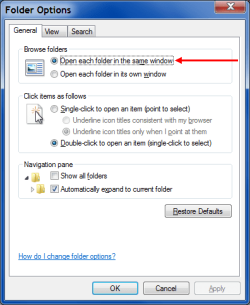
Have you checked your "Folder Options"?

Maybe the settings have mysteriously changed.
Folder Options General - Open Folder Window.png
 

My Computer

Computer type
PC/Desktop
Computer Manufacturer/Model Number
n/a
OS
W7 Ultimate SP1, LM19.2 MATE, W10 Home 1703, W10 Pro 1703 VM, #All 64 bit
CPU
AMD Phenom II x6 1100T, 3.3 GHz
Motherboard
ASUS M4A88T-M/USB3 (AM3)
Memory
12GB DDR3 1333 G-Skill (4GB x 2), G-Skill (2GB x 2)
Graphics Card(s)
NVIDIA GeForce GTX 660
Sound Card
Realtek?
Monitor(s) Displays
Samsung S23B350
Screen Resolution
1920x1080
Hard Drives
WD Green 2TB (SATA), WD Green 3TB (SATA), WD Blue 4TB (SATA), WD Blue 6TB (SATA)
PSU
Cooler Master
Case
Antec GX300 Tower
Cooling
3x Antec TRICOOL 120mm Fans
Mouse
Wired Optical
Internet Speed
DSL
Antivirus
Avast
Browser
Pale Moon (64 bit)
Other Info
2018-12-27 Upgraded HDDs
2015-12-10 Upgraded case, graphics card, storage
2015-08-15 Upgraded motherboard & RAM
2015-07-15 Upgraded LM17.1 to LM17.2
Check in program Files\internet explorer\ieproxy.dll

Make sure it is the same version you have installed.
 

My Computers

System One System Two

  • Computer type
    PC/Desktop
    OS
    7 X64
    CPU
    i5 8400
    Motherboard
    gigabyte b365m ds3h
    Memory
    2x8gb 3200mhz
    Hard Drives
    various
    PSU
    pure power 11 400w cm
    Case
    Coolermaster
    Cooling
    cryorig m9i
  • Computer type
    PC/Desktop
    OS
    7x64
    CPU
    g5400
    Motherboard
    ga b365m ds3h
    Memory
    8gb ddr4 2400
    PSU
    xfx pro 450w
Check in program Files\internet explorer\ieproxy.dll

Make sure it is the same version you have installed.


The folder options are ok, did a default restore just in case but still the same. The ieproxy.dll is the same version as IE.
 

My Computer

Computer type
PC/Desktop
Computer Manufacturer/Model Number
MSI GE60 2PC Apache
OS
Windows Ultimate 7 x64
Depending on which category you choose when you open Control Panel, the return arrows may or may not be there. It so happens the ones you chose in your video don't have the return arrow. Some of the others have dialogue boxes for making settings and those have never had a return arrow.
 

My Computer

Computer type
Laptop
Computer Manufacturer/Model Number
Dell M6500 Precision Work Station
OS
Windows 7 Pro SP1 64 bit
Memory
8 GB
Screen Resolution
1920x
Internet Speed
30 Mbps
Antivirus
Norton Security
Browser
IE 11
Am talking about the categories where there is an arrow back option. Unless someone knows exactly that causes this I take it it's some kind of virus in action.
 

My Computer

Computer type
PC/Desktop
Computer Manufacturer/Model Number
MSI GE60 2PC Apache
OS
Windows Ultimate 7 x64
On my system, the arrows aren't black when I open Administrative Tools. When I checked Display, the other day, I think the arrows weren't black either. They are today. (Actually, they're blue with a white arrow, I guess because of the Windows colors I'm using).

On the other hand, I noticed today that I don't have either "adjust brightness" or "connect to a projector" as options in Display. Different subject but not clear to me why I don't have those options.
 
Last edited:

My Computer

Computer type
Laptop
Computer Manufacturer/Model Number
Dell M6500 Precision Work Station
OS
Windows 7 Pro SP1 64 bit
Memory
8 GB
Screen Resolution
1920x
Internet Speed
30 Mbps
Antivirus
Norton Security
Browser
IE 11
Back
Top