Solved Windows Back-up and Restore can no longer do weekly backups on storage

3viljimmy

New member
Local time
5:47 AM
Messages
14
Hello members of the sevenforums,

Yesterday I had some weird issues with my computer. I had some programs crashing on me, including some standard Windows applications so I decided to run a backup and re-do everything I lost during that. After I was done Windows reminded me that I should make a new backup but then I found out I couldn't because for some reason Windows thought my storage drive ( D: ) was the drive Windows booted from but it isn't. It's on my SSD ( C: ).

After that I tried to reassign C: to be my boot drive through diskmgmt.msc which caused my computer to be unable to boot (Missing bootmgr on startup) so after tinkering with that for the rest of the day with my dad helping me out we managed to get back into Windows again but I'm still unable to make my weekly backups.

I've added an image of what the error looks like but it's in Dutch. Roughly translated it says: "Cannot save a system copy on a drive from which the computer boots or that has Windows installed on it".

(Also, I have this 100 MB System Reserved drive under Computer now, how do I hide this?)

I hope you'll be able to help me!

Kind regards, Jimmy
 

Attachments
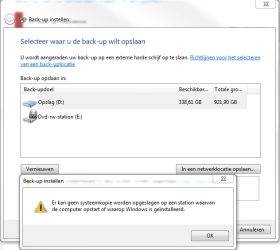
  • backuphelp.PNG
    backuphelp.PNG
    20.5 KB · Views: 14

My Computer My Computer

At a glance

Windows 7 Ultimate x64AMD Phenom II 1090TCorsair Vengeance 8GB (2x4)Sapphire HD 7950 Boost
Computer type
PC/Desktop
OS
Windows 7 Ultimate x64
CPU
AMD Phenom II 1090T
Motherboard
MSI 890FXA-GD70
Memory
Corsair Vengeance 8GB (2x4)
Graphics Card(s)
Sapphire HD 7950 Boost
Monitor(s) Displays
Samsung SyncMaster 2032MW, BenQ 2420T
Screen Resolution
1680x1050, 1920x1080
Hard Drives
Crucial M4 128GB (SSD)
Samsung Spinpoint F1 1TB (HDD)
PSU
Coolermaster 520W
Case
Thermaltake Soprano
Cooling
Gelid Tranquillo Rev.2 (CPU)
Keyboard
Max Keyboard Nighthawk x8 (Cherry MX Brown)
Mouse
Logitech G9x
Internet Speed
30/3
Antivirus
Bitdefender
Browser
Pale Moon
Post a screen shot of Windows Disk Management.

You may have Windows on the C drive, but your boot files may be on D. This can happen. In that case, Windows Backup regards both C and D as system drives and tries to back up both of them.

You may want to look at a separate application to do backups. Macrium Reflect Free Edition is probably the most commonly recommended program on this forum.

Depending on what the Windows Disk Management picture shows, you may want to make some changes in your configuration so that all Windows files are on C.

Backup programs generally won't let you save the backup on a partition contained in the backup. You need to save a backup of C on D or E or F.
 

My Computer My Computer

At a glance

Windows 7 Home Premium SP1, 64-bitIntel Skylake i5-6600K, not overclocked8 GB HyperX DDR4-2666 (2 x 4 GB)none; graphics are integrated on CPU
Computer type
PC/Desktop
Computer Manufacturer/Model Number
Ignatz Special; 4 speed manual gearbox; factory air conditioning; one of one
OS
Windows 7 Home Premium SP1, 64-bit
CPU
Intel Skylake i5-6600K, not overclocked
Motherboard
AsRock Z170M Extreme 4, micro ATX
Memory
8 GB HyperX DDR4-2666 (2 x 4 GB)
Graphics Card(s)
none; graphics are integrated on CPU
Sound Card
onboard: Realtek ALC1150; external: USB Behringer UF0-202
Monitor(s) Displays
Dell S2340M 23 inch IPS
Screen Resolution
1600 x 900
Hard Drives
System: Crucial MX100 series SSD, 128 GB;
Data: Samsung Spinpoint 103SJ, 1 TB;
Backup: WD Caviar Green WD30EZRX-00D8PB0, 3 TB
PSU
Rosewill SilentNight 500 watt fanless, semi-modular
Case
Antec Solo II
Cooling
Noctua NH-U12S; Noctua F12 intake, Noctua S12A exhaust
Keyboard
Microsoft 200 6JH-00001 USB
Mouse
Dell or Microsoft optical wired; USB
Antivirus
Microsoft Security Essentials and Malwarebytes Premium
Browser
Pale Moon
Other Info
All fans PWM; speeds at idle: CPU circa 500 rpm; intake circa 600 rpm; exhaust circa 600 rpm; CPU temps 27 idle and 47 C load in a warm room (27 C/81 F) when running Intel Extreme Tuning Utility stress test.
Post a screen shot of Windows Disk Management.

You may have Windows on the C drive, but your boot files may be on D. This can happen. In that case, Windows Backup regards both C and D as system drives and tries to back up both of them.

You may want to look at a separate application to do backups. Macrium Reflect Free Edition is probably the most commonly recommended program on this forum.

Depending on what the Windows Disk Management picture shows, you may want to make some changes in your configuration so that all Windows files are on C.

Backup programs generally won't let you save the backup on a partition contained in the backup. You need to save a backup of C on D or E or F.

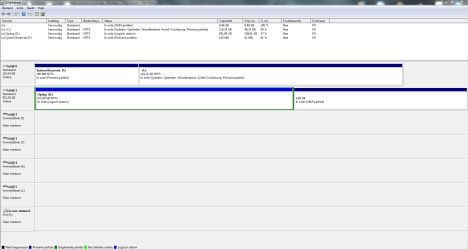
Here you go.

I realise I can't save the data of a drive on the same drive, that wouldn't make sense anyway.
I have no idea why or how my boot files got on there, nor do I know how to fix this so I hope the image is useful.

I'll probably take a look at some other backup programs later but I just want everything to work properly for now.
 

Attachments

  • backuphelp2.PNG
    backuphelp2.PNG
    34.6 KB · Views: 10

My Computer My Computer

At a glance

Windows 7 Ultimate x64AMD Phenom II 1090TCorsair Vengeance 8GB (2x4)Sapphire HD 7950 Boost
Computer type
PC/Desktop
OS
Windows 7 Ultimate x64
CPU
AMD Phenom II 1090T
Motherboard
MSI 890FXA-GD70
Memory
Corsair Vengeance 8GB (2x4)
Graphics Card(s)
Sapphire HD 7950 Boost
Monitor(s) Displays
Samsung SyncMaster 2032MW, BenQ 2420T
Screen Resolution
1680x1050, 1920x1080
Hard Drives
Crucial M4 128GB (SSD)
Samsung Spinpoint F1 1TB (HDD)
PSU
Coolermaster 520W
Case
Thermaltake Soprano
Cooling
Gelid Tranquillo Rev.2 (CPU)
Keyboard
Max Keyboard Nighthawk x8 (Cherry MX Brown)
Mouse
Logitech G9x
Internet Speed
30/3
Antivirus
Bitdefender
Browser
Pale Moon
On a typical Windows installation, I think this is what you would expect to see:

System Reserved partition: marked as system, active, and primary; no drive letter.

C partition: marked as boot, page file, crash dump, and primary; C drive letter

So, your PC is unusual in this way: System Reserved has a drive letter; it should not; it is not marked system, it is not marked active.

Your System Reserved partition is 100 MB, with about 61 of that unused, so something is on it, despite the lack of the "system" flag.

I may be making some errors as I don't read Dutch.

You can mark System Reserved as active in Windows Disk Management. You should be able to remove the drive letter in Windows Disk Management.

In Windows, a partition marked system should contain the boot loader. Apparently, you've managed to get the boot loader on C, when it should be on System Reserved. I assume this is so because C is marked "systeem" in the picture you just posted.

Wait for more comments from Gregrocker or WHS or maybe others. This is probably solvable, but I'm not sure what to tell you right now. You could obviously mark System Reserved as active and remove the F drive letter from it, but your boot loader would still be on C, rather than System Reserved.

You don't need a System Reserved if you can do without Bitlocker. I don't have a System Reserved.

Wait for more comments.

Could you do a clean install if you had to? I assume you have a valid Product Key?
 

My Computer My Computer

At a glance

Windows 7 Home Premium SP1, 64-bitIntel Skylake i5-6600K, not overclocked8 GB HyperX DDR4-2666 (2 x 4 GB)none; graphics are integrated on CPU
Computer type
PC/Desktop
Computer Manufacturer/Model Number
Ignatz Special; 4 speed manual gearbox; factory air conditioning; one of one
OS
Windows 7 Home Premium SP1, 64-bit
CPU
Intel Skylake i5-6600K, not overclocked
Motherboard
AsRock Z170M Extreme 4, micro ATX
Memory
8 GB HyperX DDR4-2666 (2 x 4 GB)
Graphics Card(s)
none; graphics are integrated on CPU
Sound Card
onboard: Realtek ALC1150; external: USB Behringer UF0-202
Monitor(s) Displays
Dell S2340M 23 inch IPS
Screen Resolution
1600 x 900
Hard Drives
System: Crucial MX100 series SSD, 128 GB;
Data: Samsung Spinpoint 103SJ, 1 TB;
Backup: WD Caviar Green WD30EZRX-00D8PB0, 3 TB
PSU
Rosewill SilentNight 500 watt fanless, semi-modular
Case
Antec Solo II
Cooling
Noctua NH-U12S; Noctua F12 intake, Noctua S12A exhaust
Keyboard
Microsoft 200 6JH-00001 USB
Mouse
Dell or Microsoft optical wired; USB
Antivirus
Microsoft Security Essentials and Malwarebytes Premium
Browser
Pale Moon
Other Info
All fans PWM; speeds at idle: CPU circa 500 rpm; intake circa 600 rpm; exhaust circa 600 rpm; CPU temps 27 idle and 47 C load in a warm room (27 C/81 F) when running Intel Extreme Tuning Utility stress test.
I think you understood everything in there correctly. But if you want anything translated to be sure just ask! :)

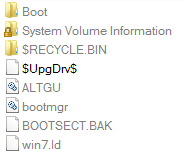
Yes I've got the boot loader on C now, we achieved this by using the command prompt when we booted from our Windows disk. The files that are on System Reserved are also boot files.
I suppose I could ask my dad if he still has the commands we used so I can provide them if they are needed for whatever reason.

I'll mark System Reserved inactive for now, if no one thinks its a bad idea to remove I'll do that too. I don't think I need Bitlocker.

I could do a clean install pretty easily, but I don't think it's worth it for a problem like this. I'd have to change a lot of settings and do some registry tweaks to get my Windows back the way I like. Not the mention all the stuff I would have to reinstall etc.

Oh and something I noticed which looked strange to me was that the System Volume Information folder in C doesn't have a little lock icon and is accessible while they aren't (and have the little icon) on my D and F drives.

Thank you for your help so far.

Here's what's currently on my F (System Reserved) drive.
 

Attachments

  • backuphelp3.PNG
    backuphelp3.PNG
    2.6 KB · Views: 13

My Computer My Computer

At a glance

Windows 7 Ultimate x64AMD Phenom II 1090TCorsair Vengeance 8GB (2x4)Sapphire HD 7950 Boost
Computer type
PC/Desktop
OS
Windows 7 Ultimate x64
CPU
AMD Phenom II 1090T
Motherboard
MSI 890FXA-GD70
Memory
Corsair Vengeance 8GB (2x4)
Graphics Card(s)
Sapphire HD 7950 Boost
Monitor(s) Displays
Samsung SyncMaster 2032MW, BenQ 2420T
Screen Resolution
1680x1050, 1920x1080
Hard Drives
Crucial M4 128GB (SSD)
Samsung Spinpoint F1 1TB (HDD)
PSU
Coolermaster 520W
Case
Thermaltake Soprano
Cooling
Gelid Tranquillo Rev.2 (CPU)
Keyboard
Max Keyboard Nighthawk x8 (Cherry MX Brown)
Mouse
Logitech G9x
Internet Speed
30/3
Antivirus
Bitdefender
Browser
Pale Moon
I'd take the drive letter off System Reserved, but I would not remove it yet. It contains about 39 MB of something, apparently not the boot loader.

I assume your main problem right now is that you can't backup with Windows. See if you can after marking System Reserved inactive without a drive letter.

Windows Backup "works" in its own peculiar way, but it's cranky enough that many have moved to Macrium, which is more straightforward, flexible, and understandable with no surprises.

What was the over-riding reason to move the boot loader to C? Just trying to find something that would allow you to backup?
 

My Computer My Computer

At a glance

Windows 7 Home Premium SP1, 64-bitIntel Skylake i5-6600K, not overclocked8 GB HyperX DDR4-2666 (2 x 4 GB)none; graphics are integrated on CPU
Computer type
PC/Desktop
Computer Manufacturer/Model Number
Ignatz Special; 4 speed manual gearbox; factory air conditioning; one of one
OS
Windows 7 Home Premium SP1, 64-bit
CPU
Intel Skylake i5-6600K, not overclocked
Motherboard
AsRock Z170M Extreme 4, micro ATX
Memory
8 GB HyperX DDR4-2666 (2 x 4 GB)
Graphics Card(s)
none; graphics are integrated on CPU
Sound Card
onboard: Realtek ALC1150; external: USB Behringer UF0-202
Monitor(s) Displays
Dell S2340M 23 inch IPS
Screen Resolution
1600 x 900
Hard Drives
System: Crucial MX100 series SSD, 128 GB;
Data: Samsung Spinpoint 103SJ, 1 TB;
Backup: WD Caviar Green WD30EZRX-00D8PB0, 3 TB
PSU
Rosewill SilentNight 500 watt fanless, semi-modular
Case
Antec Solo II
Cooling
Noctua NH-U12S; Noctua F12 intake, Noctua S12A exhaust
Keyboard
Microsoft 200 6JH-00001 USB
Mouse
Dell or Microsoft optical wired; USB
Antivirus
Microsoft Security Essentials and Malwarebytes Premium
Browser
Pale Moon
Other Info
All fans PWM; speeds at idle: CPU circa 500 rpm; intake circa 600 rpm; exhaust circa 600 rpm; CPU temps 27 idle and 47 C load in a warm room (27 C/81 F) when running Intel Extreme Tuning Utility stress test.
I removed the drive letter and it worked somehow.. I never expected it to work since I didn't have this drive to begin with. I'm going to keep this open until I'm a 100% it doesn't fail again (Sunday evening should be fine). Until then, and thanks for your help!

EDIT: It still mentions that it can't save the backup in that location, but it does.. We'll see.
 

My Computer My Computer

At a glance

Windows 7 Ultimate x64AMD Phenom II 1090TCorsair Vengeance 8GB (2x4)Sapphire HD 7950 Boost
Computer type
PC/Desktop
OS
Windows 7 Ultimate x64
CPU
AMD Phenom II 1090T
Motherboard
MSI 890FXA-GD70
Memory
Corsair Vengeance 8GB (2x4)
Graphics Card(s)
Sapphire HD 7950 Boost
Monitor(s) Displays
Samsung SyncMaster 2032MW, BenQ 2420T
Screen Resolution
1680x1050, 1920x1080
Hard Drives
Crucial M4 128GB (SSD)
Samsung Spinpoint F1 1TB (HDD)
PSU
Coolermaster 520W
Case
Thermaltake Soprano
Cooling
Gelid Tranquillo Rev.2 (CPU)
Keyboard
Max Keyboard Nighthawk x8 (Cherry MX Brown)
Mouse
Logitech G9x
Internet Speed
30/3
Antivirus
Bitdefender
Browser
Pale Moon
So, I didn't notice a single thing yesterday when my automated backups were going on (I didn't even notice it happened :D) so no error messages. I believe this is fixed for now, I wouldn't be surprised if I had to re-open this later but lets hope I wont have to!

Thank you for your help ignatzatsonic!
 

My Computer My Computer

At a glance

Windows 7 Ultimate x64AMD Phenom II 1090TCorsair Vengeance 8GB (2x4)Sapphire HD 7950 Boost
Computer type
PC/Desktop
OS
Windows 7 Ultimate x64
CPU
AMD Phenom II 1090T
Motherboard
MSI 890FXA-GD70
Memory
Corsair Vengeance 8GB (2x4)
Graphics Card(s)
Sapphire HD 7950 Boost
Monitor(s) Displays
Samsung SyncMaster 2032MW, BenQ 2420T
Screen Resolution
1680x1050, 1920x1080
Hard Drives
Crucial M4 128GB (SSD)
Samsung Spinpoint F1 1TB (HDD)
PSU
Coolermaster 520W
Case
Thermaltake Soprano
Cooling
Gelid Tranquillo Rev.2 (CPU)
Keyboard
Max Keyboard Nighthawk x8 (Cherry MX Brown)
Mouse
Logitech G9x
Internet Speed
30/3
Antivirus
Bitdefender
Browser
Pale Moon
Back
Top