Windows Backup Disc Image

Wasila

New member
Local time
3:21 AM
Messages
55
Hi,

Just a few quick questions about the disc image tool in Windows Backup. Does it restore programs? By this I mean if I restore the disc, will all the programs be fully functioning? I was under the impression that this is so, but I have also been told that it is not.

Also does the Backup restore to a different model/make of computer? Wouldn't this cause conflicts with drivers and OEM-bundled software?

Thanks,
Wasila
 

My Computer

Computer Manufacturer/Model Number
HP Pavilion DV6
OS
Windows 7 Home Premium x64
CPU
Intel i5
Memory
6GB RAM
Graphics Card(s)
512MB ATI Radeon
Hard Drives
500 GB HDD
External 500 GB HDD
Hello Wasila,

Yes, when you create a system image backup of your C: drive and any other selected drives, it will include everything on them when you do a system image recovery. It's best to save the system image to a separate HDD for better reliability.

You will not be able to do a system image recovery to a different computer than what the system image was created on. It would indeed cause confilcts, and may not even start.

Hope this helps,
Shawn
 

My Computer

Computer type
PC/Desktop
Computer Manufacturer/Model Number
Self built custom
OS
64-bit Windows 11 Pro for Workstations
CPU
Intel i7-8700K OC'd to 5 GHz
Motherboard
ASUS ROG Maximus XI Formula Z390
Memory
64 GB (4x16GB) G.SKILL TridentZ RGB DDR4 3600 MHz
Graphics Card(s)
ASUS ROG-STRIX-GTX1080TI-O11G-GAMING
Sound Card
Integrated
Monitor(s) Displays
2 x Samsung Odyssey G7 27"
Screen Resolution
2560x1440
Hard Drives
1TB Samsung 990 PRO M.2,
4TB Samsung 990 PRO PRO M.2,
TerraMaster F8 SSD Plus NAS
PSU
Seasonic Prime Titanium 850W
Case
Thermaltake Core P3
Cooling
Corsair Hydro H115i
Keyboard
Logitech wireless K800
Mouse
Logitech MX Master 4
Internet Speed
2 Gb/s Download and 100 Mb/s Upload
Antivirus
Malwarebyte Anti-Malware Premium
Browser
Google Chrome
Other Info
Logitech Z625 speaker system,
Logitech BRIO 4K Pro webcam,
HP Color LaserJet Pro MFP M477fdn,
APC SMART-UPS RT 1000 XL - SURT1000XLI,
Galaxy S23 Plus phone
I was told (by a member of PCWorld's TechGuys - a major UK computer chain, no less) that it did not copy over the .exe files due to legal issues. He was speaking rubbish then?
 

My Computer

Computer Manufacturer/Model Number
HP Pavilion DV6
OS
Windows 7 Home Premium x64
CPU
Intel i5
Memory
6GB RAM
Graphics Card(s)
512MB ATI Radeon
Hard Drives
500 GB HDD
External 500 GB HDD
If he was referring to system images, then yes he was speaking rubbish. I use system images all the time, and they are a complete clone of the selected HDD's when the image was created.

Now, a normal backup will not include your programs though unless you check the option to have it include a system image. You or he may be thinking about this backup instead.
 

My Computer

Computer type
PC/Desktop
Computer Manufacturer/Model Number
Self built custom
OS
64-bit Windows 11 Pro for Workstations
CPU
Intel i7-8700K OC'd to 5 GHz
Motherboard
ASUS ROG Maximus XI Formula Z390
Memory
64 GB (4x16GB) G.SKILL TridentZ RGB DDR4 3600 MHz
Graphics Card(s)
ASUS ROG-STRIX-GTX1080TI-O11G-GAMING
Sound Card
Integrated
Monitor(s) Displays
2 x Samsung Odyssey G7 27"
Screen Resolution
2560x1440
Hard Drives
1TB Samsung 990 PRO M.2,
4TB Samsung 990 PRO PRO M.2,
TerraMaster F8 SSD Plus NAS
PSU
Seasonic Prime Titanium 850W
Case
Thermaltake Core P3
Cooling
Corsair Hydro H115i
Keyboard
Logitech wireless K800
Mouse
Logitech MX Master 4
Internet Speed
2 Gb/s Download and 100 Mb/s Upload
Antivirus
Malwarebyte Anti-Malware Premium
Browser
Google Chrome
Other Info
Logitech Z625 speaker system,
Logitech BRIO 4K Pro webcam,
HP Color LaserJet Pro MFP M477fdn,
APC SMART-UPS RT 1000 XL - SURT1000XLI,
Galaxy S23 Plus phone
Thanks for the advice, however I have just discovered that, on Home Premium at least, backup to network drives is not supported. Could you suggest any trustworthy alternatives for disc imaging with this capability?

Wasila
 

My Computer

Computer Manufacturer/Model Number
HP Pavilion DV6
OS
Windows 7 Home Premium x64
CPU
Intel i5
Memory
6GB RAM
Graphics Card(s)
512MB ATI Radeon
Hard Drives
500 GB HDD
External 500 GB HDD
The standard alternatives mentioned in these parts are Acronis True Image, Macrium Reflect, and Paragon.

The first two are available in free versions for most people. Not sure about Paragon.

You'd have to go to their forums or websites to get clearcut info on whether network backup is supported--or another member here may have first hand knowledge.
 

My Computer

Computer type
PC/Desktop
Computer Manufacturer/Model Number
Ignatz Special; 4 speed manual gearbox; factory air conditioning; one of one
OS
Windows 7 Home Premium SP1, 64-bit
CPU
Intel Skylake i5-6600K, not overclocked
Motherboard
AsRock Z170M Extreme 4, micro ATX
Memory
8 GB HyperX DDR4-2666 (2 x 4 GB)
Graphics Card(s)
none; graphics are integrated on CPU
Sound Card
onboard: Realtek ALC1150; external: USB Behringer UF0-202
Monitor(s) Displays
Dell S2340M 23 inch IPS
Screen Resolution
1600 x 900
Hard Drives
System: Crucial MX100 series SSD, 128 GB;
Data: Samsung Spinpoint 103SJ, 1 TB;
Backup: WD Caviar Green WD30EZRX-00D8PB0, 3 TB
PSU
Rosewill SilentNight 500 watt fanless, semi-modular
Case
Antec Solo II
Cooling
Noctua NH-U12S; Noctua F12 intake, Noctua S12A exhaust
Keyboard
Microsoft 200 6JH-00001 USB
Mouse
Dell or Microsoft optical wired; USB
Antivirus
Microsoft Security Essentials and Malwarebytes Premium
Browser
Pale Moon
Other Info
All fans PWM; speeds at idle: CPU circa 500 rpm; intake circa 600 rpm; exhaust circa 600 rpm; CPU temps 27 idle and 47 C load in a warm room (27 C/81 F) when running Intel Extreme Tuning Utility stress test.
Wasila,

Macrium Reflect is a good free choice.

Features:
  • Create a disk image whilst running Windows using Microsoft Volume Shadow copy Service (VSS).
  • Image to Network, USB, FireWire drives and DVD.
  • Built in scheduler.
  • 32 bit and native 64 bit versions.
  • Industry leading compression levels and speed.
  • Linux based Rescue CD with Network access and full GUI. Only 6.5MB in size!
  • Built in CD/DVD packet writing engine. Supports packet writing to DVD DL media with Windows Vista.
  • HTML log files.
 

My Computer

Computer type
PC/Desktop
Computer Manufacturer/Model Number
Self built custom
OS
64-bit Windows 11 Pro for Workstations
CPU
Intel i7-8700K OC'd to 5 GHz
Motherboard
ASUS ROG Maximus XI Formula Z390
Memory
64 GB (4x16GB) G.SKILL TridentZ RGB DDR4 3600 MHz
Graphics Card(s)
ASUS ROG-STRIX-GTX1080TI-O11G-GAMING
Sound Card
Integrated
Monitor(s) Displays
2 x Samsung Odyssey G7 27"
Screen Resolution
2560x1440
Hard Drives
1TB Samsung 990 PRO M.2,
4TB Samsung 990 PRO PRO M.2,
TerraMaster F8 SSD Plus NAS
PSU
Seasonic Prime Titanium 850W
Case
Thermaltake Core P3
Cooling
Corsair Hydro H115i
Keyboard
Logitech wireless K800
Mouse
Logitech MX Master 4
Internet Speed
2 Gb/s Download and 100 Mb/s Upload
Antivirus
Malwarebyte Anti-Malware Premium
Browser
Google Chrome
Other Info
Logitech Z625 speaker system,
Logitech BRIO 4K Pro webcam,
HP Color LaserJet Pro MFP M477fdn,
APC SMART-UPS RT 1000 XL - SURT1000XLI,
Galaxy S23 Plus phone
Curius problem with Macrium Reflect. It appears to show all three system partitions in one (as seen by the reported disc size). I have one system/program partition, one (currently empty) partition for Data which I created with Windows Partitioning Tool, and one recovery partition.

This combined disc is also greyed out and labelled 'Invalid'. It fails to appear in the wizard and when I selected it and clicked 'create image' it completed instantly, with an unuseable 1KB back up file.

How come the program does not recognise my partitions?

Thanks,
Wasila
 

My Computer

Computer Manufacturer/Model Number
HP Pavilion DV6
OS
Windows 7 Home Premium x64
CPU
Intel i5
Memory
6GB RAM
Graphics Card(s)
512MB ATI Radeon
Hard Drives
500 GB HDD
External 500 GB HDD
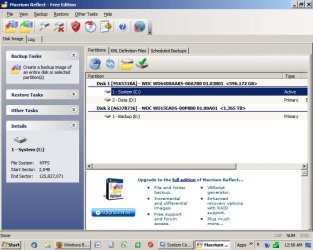
Here is my Macrium window.

Can you post yours so we can take a look?

If your Window looks similar to mine at that stage, post the Window where you are having the issue.
 

Attachments

  • Untitled-1.jpg
    Untitled-1.jpg
    89.9 KB · Views: 66

My Computer

Computer type
PC/Desktop
Computer Manufacturer/Model Number
Ignatz Special; 4 speed manual gearbox; factory air conditioning; one of one
OS
Windows 7 Home Premium SP1, 64-bit
CPU
Intel Skylake i5-6600K, not overclocked
Motherboard
AsRock Z170M Extreme 4, micro ATX
Memory
8 GB HyperX DDR4-2666 (2 x 4 GB)
Graphics Card(s)
none; graphics are integrated on CPU
Sound Card
onboard: Realtek ALC1150; external: USB Behringer UF0-202
Monitor(s) Displays
Dell S2340M 23 inch IPS
Screen Resolution
1600 x 900
Hard Drives
System: Crucial MX100 series SSD, 128 GB;
Data: Samsung Spinpoint 103SJ, 1 TB;
Backup: WD Caviar Green WD30EZRX-00D8PB0, 3 TB
PSU
Rosewill SilentNight 500 watt fanless, semi-modular
Case
Antec Solo II
Cooling
Noctua NH-U12S; Noctua F12 intake, Noctua S12A exhaust
Keyboard
Microsoft 200 6JH-00001 USB
Mouse
Dell or Microsoft optical wired; USB
Antivirus
Microsoft Security Essentials and Malwarebytes Premium
Browser
Pale Moon
Other Info
All fans PWM; speeds at idle: CPU circa 500 rpm; intake circa 600 rpm; exhaust circa 600 rpm; CPU temps 27 idle and 47 C load in a warm room (27 C/81 F) when running Intel Extreme Tuning Utility stress test.
a4q6tl.png


Notice the Inactive single parition.

Thanks,
Wasila
 

My Computer

Computer Manufacturer/Model Number
HP Pavilion DV6
OS
Windows 7 Home Premium x64
CPU
Intel i5
Memory
6GB RAM
Graphics Card(s)
512MB ATI Radeon
Hard Drives
500 GB HDD
External 500 GB HDD
Can you post a Windows diskmanagement screen shot using the snipping tool.
 

My Computer

Computer type
PC/Desktop
Computer Manufacturer/Model Number
Own build
OS
Windows 7x64 Home Premium SP1
CPU
Intel i7 2600k
Motherboard
ASUS P8Z68 Deluxe
Memory
G.Skill Ripjaws (DDR3-1600) 2x4GB
Graphics Card(s)
Nvidia GeForce GTS 450; Intel HD Graphics 3000(GT2+)
Monitor(s) Displays
Dell Ultrasharp IPS panel U2311H, Samsung SyncMaster P2350
Screen Resolution
1920x1080
Hard Drives
Samsung 850 Pro SSD 256GB, Samsung SSD 840 120GB, Seagates 1TB Barracuda ST31000528AS x2
PSU
Seasonic M12II 520W
Case
Lian Li Lancool PC-K60
Cooling
Case: 1x120mm, 3x140mm CPU: Hyper 212+
Keyboard
Logitech MK520 (wireless)
Mouse
Logitech MK520
Internet Speed
6-7 Mbps
Antivirus
Norton Security Premium, Malwarebytes on 2 (MSE on 3rd PC)
Browser
FireFox
Other Info
Audio: Logitech Z523 2.1
2rg04zo.png


Here you go.
 

My Computer

Computer Manufacturer/Model Number
HP Pavilion DV6
OS
Windows 7 Home Premium x64
CPU
Intel i5
Memory
6GB RAM
Graphics Card(s)
512MB ATI Radeon
Hard Drives
500 GB HDD
External 500 GB HDD
Do you know what to do with your dynamic HDD to get it back to basic?

I'm guessing you made the data partition and accepted the disk going dynamic? You can recover from this.
 
Last edited by a moderator:

My Computer

Computer type
PC/Desktop
Computer Manufacturer/Model Number
Own build
OS
Windows 7x64 Home Premium SP1
CPU
Intel i7 2600k
Motherboard
ASUS P8Z68 Deluxe
Memory
G.Skill Ripjaws (DDR3-1600) 2x4GB
Graphics Card(s)
Nvidia GeForce GTS 450; Intel HD Graphics 3000(GT2+)
Monitor(s) Displays
Dell Ultrasharp IPS panel U2311H, Samsung SyncMaster P2350
Screen Resolution
1920x1080
Hard Drives
Samsung 850 Pro SSD 256GB, Samsung SSD 840 120GB, Seagates 1TB Barracuda ST31000528AS x2
PSU
Seasonic M12II 520W
Case
Lian Li Lancool PC-K60
Cooling
Case: 1x120mm, 3x140mm CPU: Hyper 212+
Keyboard
Logitech MK520 (wireless)
Mouse
Logitech MK520
Internet Speed
6-7 Mbps
Antivirus
Norton Security Premium, Malwarebytes on 2 (MSE on 3rd PC)
Browser
FireFox
Other Info
Audio: Logitech Z523 2.1

My Computer

Computer type
PC/Desktop
Computer Manufacturer/Model Number
Custom Build
OS
Windows 7 Professional SP1 - x64 [Non-UEFI Boot]
CPU
Ivy Bridge Core i5 3570K (Delidded)
Motherboard
Asus P8Z77-V LE PLUS
Memory
G.Skill "Ares" DDR3 PC3-12800 - 1600MHz (16Gb)
Graphics Card(s)
Asus Dual-RX480-O4G
Sound Card
Creative Sound Blaster Z w/5.1 sound system
Monitor(s) Displays
Asus IPS 23"
Screen Resolution
16/9
Hard Drives
Internal:
500Go Sata 6Gb/s (x2)
500Go Sata 3Gb/s (x2)
SSD 60Go Sata 6Gb/s
PSU
In Win C 900W Series 80+ Platinum
Case
Thermaltake Chaser A71
Cooling
Custom Water Cooling Loop
Keyboard
Cooler Master QuickFire XTi
Mouse
Razer Imperator 2012 (4G)
Antivirus
MSE
Browser
IE 11.0.xxx Rtm
Other Info
"Raid0" with Intel Smart Response Technology (HDD/SSD)
I understand that to convert the disks I will have to delete *all my data*. I do have an external HDD, but I want to avoid this if I can. For example, what does this do to my registry? Will the programs just work if I move them back in?

How come I have to have basic discs? Is it just Reflect which doesn't support them? If so - I'd rather switch to a different program.

Sorry about all the questions!
Wasila

(EDIT: Just found this software:http://www.paragon-software.com/home/db-express/index.html

Does it do dynamic discs? Has anyone used it before?)
Bacup & Recovery 2011 (Advanced) Fre
 
Last edited by a moderator:

My Computer

Computer Manufacturer/Model Number
HP Pavilion DV6
OS
Windows 7 Home Premium x64
CPU
Intel i5
Memory
6GB RAM
Graphics Card(s)
512MB ATI Radeon
Hard Drives
500 GB HDD
External 500 GB HDD
Your registry will be OK if the conversion back to basic works. If you are forced to reinstall Windows, you will get a fresh registry.

If the conversion goes well, your programs will continue to work and your data will not be affected.

If you use the right tool, you can convert those dynamic partitions back to basic. Dynamics are a pain as you are finding.

I think Partition Wizard can convert without forcing you to reformat and reinstall.

Free Download Magic Partition Manager Software - Partition Wizard Online

I'm not sure about the Paragon tools, at least the free ones.

BUT BUT BUT, because anything can and might go wrong during the conversion back to basic discs, you definitely should copy (not move) all of your personal data to a completely different drive---not just to another partition on the same drive. In your case that appears to be an external.

Draw a distinction in your mind between Windows and your personal data (email, bookmarks, pictures, mp3s, videos, Word files, Excel files, whatever you use the PC for). It's the personal stuff that you need to copy.

Installed programs aren't going to survive well being dragged around from one disc to another.

When I say copy, I don't mean use an image. I mean using the mouse, folder by folder.

If the conversion goes well, you won't have to reinstall anything and your data won't be damaged. But you can't count on it not being damaged---that's why you need to copy personal files to an external.

You should also make "recovery discs" since I assume your HP did not come with any type of Windows or installation discs. That may no longer be possible since you now have dynamic discs.

Plan for the worst, hope for the best. I'm not a dynamic to basic conversion guru, but I know it has been done successfully. Wait for more input in this thread.
 

My Computer

Computer type
PC/Desktop
Computer Manufacturer/Model Number
Ignatz Special; 4 speed manual gearbox; factory air conditioning; one of one
OS
Windows 7 Home Premium SP1, 64-bit
CPU
Intel Skylake i5-6600K, not overclocked
Motherboard
AsRock Z170M Extreme 4, micro ATX
Memory
8 GB HyperX DDR4-2666 (2 x 4 GB)
Graphics Card(s)
none; graphics are integrated on CPU
Sound Card
onboard: Realtek ALC1150; external: USB Behringer UF0-202
Monitor(s) Displays
Dell S2340M 23 inch IPS
Screen Resolution
1600 x 900
Hard Drives
System: Crucial MX100 series SSD, 128 GB;
Data: Samsung Spinpoint 103SJ, 1 TB;
Backup: WD Caviar Green WD30EZRX-00D8PB0, 3 TB
PSU
Rosewill SilentNight 500 watt fanless, semi-modular
Case
Antec Solo II
Cooling
Noctua NH-U12S; Noctua F12 intake, Noctua S12A exhaust
Keyboard
Microsoft 200 6JH-00001 USB
Mouse
Dell or Microsoft optical wired; USB
Antivirus
Microsoft Security Essentials and Malwarebytes Premium
Browser
Pale Moon
Other Info
All fans PWM; speeds at idle: CPU circa 500 rpm; intake circa 600 rpm; exhaust circa 600 rpm; CPU temps 27 idle and 47 C load in a warm room (27 C/81 F) when running Intel Extreme Tuning Utility stress test.
There is a good chance you can recover by only backing up the data partition and retaining everything else. I'll provide the procedure if you want to go this way.

You need to use Partition Wizard 4.2 from here
partition wizard 4.2 free.zip - Windows Live

The current free PW (5.2) has removed the dynamic to basic conversion v4.2 has it.
You need to delete the data partition and resize your OS partition back to it's original size then do a dynamic to basic disk conversion. PW 4.2 can perform all these functions.
 
Last edited by a moderator:

My Computer

Computer type
PC/Desktop
Computer Manufacturer/Model Number
Own build
OS
Windows 7x64 Home Premium SP1
CPU
Intel i7 2600k
Motherboard
ASUS P8Z68 Deluxe
Memory
G.Skill Ripjaws (DDR3-1600) 2x4GB
Graphics Card(s)
Nvidia GeForce GTS 450; Intel HD Graphics 3000(GT2+)
Monitor(s) Displays
Dell Ultrasharp IPS panel U2311H, Samsung SyncMaster P2350
Screen Resolution
1920x1080
Hard Drives
Samsung 850 Pro SSD 256GB, Samsung SSD 840 120GB, Seagates 1TB Barracuda ST31000528AS x2
PSU
Seasonic M12II 520W
Case
Lian Li Lancool PC-K60
Cooling
Case: 1x120mm, 3x140mm CPU: Hyper 212+
Keyboard
Logitech MK520 (wireless)
Mouse
Logitech MK520
Internet Speed
6-7 Mbps
Antivirus
Norton Security Premium, Malwarebytes on 2 (MSE on 3rd PC)
Browser
FireFox
Other Info
Audio: Logitech Z523 2.1
Thanks for all the advice; I did successfully run a disk image backup and it appears to have worked. I have also set up a daily schedule using the same XML file.

However, as a test I restarted the backup soon after it completed - it scanned the drive and then gave me a two hour completion estimate? Is there no incremental backup - will it take two or three hours every single day?
 

My Computer

Computer Manufacturer/Model Number
HP Pavilion DV6
OS
Windows 7 Home Premium x64
CPU
Intel i5
Memory
6GB RAM
Graphics Card(s)
512MB ATI Radeon
Hard Drives
500 GB HDD
External 500 GB HDD
A 2 hour backup a day is out of the question for a single system.

We need more information.
It would be useful if you provided an update on what you did. Did you convert the disk to basic? It looks like you are using Macrium with it's XMLs.
Again a screen shot and a description of what you're backing up is needed.
 

My Computer

Computer type
PC/Desktop
Computer Manufacturer/Model Number
Own build
OS
Windows 7x64 Home Premium SP1
CPU
Intel i7 2600k
Motherboard
ASUS P8Z68 Deluxe
Memory
G.Skill Ripjaws (DDR3-1600) 2x4GB
Graphics Card(s)
Nvidia GeForce GTS 450; Intel HD Graphics 3000(GT2+)
Monitor(s) Displays
Dell Ultrasharp IPS panel U2311H, Samsung SyncMaster P2350
Screen Resolution
1920x1080
Hard Drives
Samsung 850 Pro SSD 256GB, Samsung SSD 840 120GB, Seagates 1TB Barracuda ST31000528AS x2
PSU
Seasonic M12II 520W
Case
Lian Li Lancool PC-K60
Cooling
Case: 1x120mm, 3x140mm CPU: Hyper 212+
Keyboard
Logitech MK520 (wireless)
Mouse
Logitech MK520
Internet Speed
6-7 Mbps
Antivirus
Norton Security Premium, Malwarebytes on 2 (MSE on 3rd PC)
Browser
FireFox
Other Info
Audio: Logitech Z523 2.1
I believe these long back up times are a problem with my router - slow transfer speeds have been a constant issue. This is why I'm asking whether Reflect is capable of incremental back-up?

The disc is converted to basic and I just imaged the whole thing. I am indeed using Macrium with its XMLs, however if this problem persists I might switch to the fancy-looking Paragon program I found (anybody used it?)

2lm87es.png


The rest is just the other discs mentioned in disc management (minus the HP TOOLS partition - I appear to have lost that...).
 

My Computer

Computer Manufacturer/Model Number
HP Pavilion DV6
OS
Windows 7 Home Premium x64
CPU
Intel i5
Memory
6GB RAM
Graphics Card(s)
512MB ATI Radeon
Hard Drives
500 GB HDD
External 500 GB HDD
Back
Top