Windows Backup is double the size

bru

New member
Pro User
Local time
5:11 AM
Messages
417
Location
A suburb of Chicago
Windows Backup worked fine for me for 1.5 years. Now something strange is happening.

I have it set to do a weekly backup of data files. I noticed a week or so ago that the backup file size was 180Gb instead of 90GB. Looking at the backup it said something like 7/22/2012 to 8/12/2012. Prior to that last backup it had been working fine and the size was about 90GB.

So I erased that backup and did a new one on 8/17. Its size was 93GB. Yesterday after it's weekly backup which should have only added new files the size is now 186GB. It is labelled 8/17/2012 to 8/24/2012.

Looking at the backup I don't see duplicates of folders/files so I don't know where the extra complete backup even is.

Why is this happening? How do I get it to work properly?
 

My Computer

Computer Manufacturer/Model Number
HP p6608f
OS
Win 7 Home Premium x64
CPU
Intel Core i3-540 3.07 GHz
Motherboard
MS-7613 (Iona-GL8E)
Memory
4 GB (2 X 2) Dual-Channel PC-10600 DDR3 @ 665MHz (9-9-9-24)
Graphics Card(s)
Integrated Intel H57
Sound Card
Integrated Realtek ALC888S Audio
Monitor(s) Displays
17" SDM-HS73 (a vestige from my old computer)
Screen Resolution
1280 X 1024
Hard Drives
750GB SATA 7200 RPM
PSU
250W
Keyboard
HP USB keyboard
Mouse
HP USB optical mouse
Internet Speed
15Mbps/1Mbps
You don't really say what type of backup you are doing, but I suppose two things to look for, are you backing up the backup or doing full backups instead of changed file backups?

Something may have changed your settings or preferences.
 

My Computer

Computer Manufacturer/Model Number
Homebuilt
OS
Windows 7 x64
CPU
i7-2600K
Motherboard
Asus P8Z77-v Pro
Memory
8 G
Graphics Card(s)
GTX 480
Sound Card
Onboard
Monitor(s) Displays
LG W2753V
Screen Resolution
1920x1080
Hard Drives
Crucial M4 128 G SSD
Let me guess - you are using Windows7 imaging. In that case it seems to be imaging more than just the C partition. That happens when some system file(s) is on another partition (other than C).

Suggest you post a picture of your disk management. Maybe that can shed some light on it.
 

My Computer

Computer Manufacturer/Model Number
HP, Dell, Gateway, Toshiba - 4 laptops and 2 desktops
OS
Vista, Windows7, Mint Mate, Zorin, Windows 8
CPU
from 1.6GHz Duo to i7
Monitor(s) Displays
2x HP w2207
Hard Drives
5x HDD, 7x SSD, 12x Externals
Keyboard
with trackball - no mices
Mouse
Trackball mice
Internet Speed
DSL 6000
Hi there,

I would suggest reviewing the backup logs to see what's happening.

Head to : C:\Windows\System32\winevt\Logs\Microsoft-Windows-Backup.evtx

Double-click the recent backup file to view the detailed log through the Event Viewer

(Event viewer>Application & service logs>Windowslogs>Microsoft>Windows>....
Backup or Windows backup)

What WHS suggested in another possibility.

On a side note, I would recommend using a better, third-party backup or imaging program on your PC.
 

My Computer

Computer Manufacturer/Model Number
Dell / Custom
OS
Windows 7 HP / Ultimate x64
CPU
Core i5 / X4 955 BE
Motherboard
OEM / Gigabyte 880GM-USB3
Memory
4GB DDR3 1333Mhz / 8GB DDR3 1600Mhz
Graphics Card(s)
HD5470 / HD5670
Sound Card
Onboard
Monitor(s) Displays
FullHD 15" / Dell 22" WS
Screen Resolution
1920x1080 / 1680x1050
Hard Drives
320GB / 1.5TB
PSU
CM
Case
CM
Cooling
CM, Antec
Keyboard
Logitech
Mouse
Logitech
This is file backups through Windows Backup and Restore. Not a System Image.

As I said it worked fine for over a year. It's set to backup every Friday. After the initial backup, each week it would just add new files.

The backups would look something like:

8/28/2012 to X/XX/2012. The first week it would be 90GB in size, the next week it would be 90.5GB. It would increase slightly with each new weeks date.

The last few times it would show the date format but instead of 90.5GB it showed 181GB.

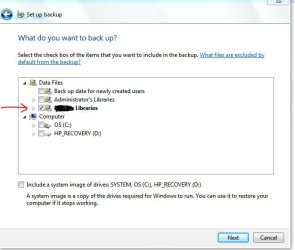
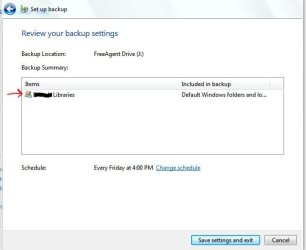
Someone said maybe I am doing a backup of the backup. I don't see how. Here are my settings. After this problem I changed it to backup My Libraries only instead of Administrators also (which I am) but it still doubled the backup.
 

Attachments

  • wu.JPG
    wu.JPG
    48.6 KB · Views: 15
  • wu2.JPG
    wu2.JPG
    34.9 KB · Views: 11

My Computer

Computer Manufacturer/Model Number
HP p6608f
OS
Win 7 Home Premium x64
CPU
Intel Core i3-540 3.07 GHz
Motherboard
MS-7613 (Iona-GL8E)
Memory
4 GB (2 X 2) Dual-Channel PC-10600 DDR3 @ 665MHz (9-9-9-24)
Graphics Card(s)
Integrated Intel H57
Sound Card
Integrated Realtek ALC888S Audio
Monitor(s) Displays
17" SDM-HS73 (a vestige from my old computer)
Screen Resolution
1280 X 1024
Hard Drives
750GB SATA 7200 RPM
PSU
250W
Keyboard
HP USB keyboard
Mouse
HP USB optical mouse
Internet Speed
15Mbps/1Mbps
On a side note, I would recommend using a better, third-party backup or imaging program on your PC.

OK I give in. Not sure why things changed but Windows Backup & Restore is not working properly. Perhaps it's related to the new Network I created and the fact that Windows Media Player sharing service is enabled, I did read some posts about this.

Regardless it's time to move on. My goal is to back up files. System Images are not a priority.

My Seagate external drive has it's own backup utility and I used my old Maxtor's built in software with success. Does the Seagate backup seem like a good option?

Macrium seems geared toward images and frankly the whole creating of disks has me confused.

As I said all I want to do is backup my files, documents, music and pictures. And of course be able to restore them easily to either my current or a new computer if necessary.
 

My Computer

Computer Manufacturer/Model Number
HP p6608f
OS
Win 7 Home Premium x64
CPU
Intel Core i3-540 3.07 GHz
Motherboard
MS-7613 (Iona-GL8E)
Memory
4 GB (2 X 2) Dual-Channel PC-10600 DDR3 @ 665MHz (9-9-9-24)
Graphics Card(s)
Integrated Intel H57
Sound Card
Integrated Realtek ALC888S Audio
Monitor(s) Displays
17" SDM-HS73 (a vestige from my old computer)
Screen Resolution
1280 X 1024
Hard Drives
750GB SATA 7200 RPM
PSU
250W
Keyboard
HP USB keyboard
Mouse
HP USB optical mouse
Internet Speed
15Mbps/1Mbps
Back
Top