Windows Backup Issues...

elmo2006

New member
Local time
7:43 PM
Messages
18
Hello...

I have a question that I'm unable to find a resolution to hence my presence in this forum and thread.

I have Win7x64 Ultimate and have been using the Windows backup functionality. I have it set up to perform a backup on a weekly basis to an external drive. The backup consists of data files only, no backup images are performed.
So I started with a clean complete backup of my data drive = 575GB, and every week it performs what seems to be an incremental or differential backup - either case is fine with me as long as my data get's backed up.
Herein lies the problem, for some strange reason the backup would generate a complete backup after the 3rd or 10th incremental/differential backup.
I now end up with 2 complete backups and my drive space has now been exceeded and I'm forced to delete a backup.

I guess my question is:

1. Why would Windows Backup perform an initial backup followed by scheduled differential/incremental backups then arbitrarily perform a complete backup once again.

BTW, these complete backups take almost 14 hours to complete - each.

Any responses would be greatly appreciated.

Thanks
 

My Computer

Computer Manufacturer/Model Number
Home Built
OS
Windows 7 x64 Ultimate
CPU
Intel Quad Core Q6600
Motherboard
Asus P5Q
Memory
OCZ Platinum 2x4GB 1066
Graphics Card(s)
Asus EAH 3450
Sound Card
On board
Monitor(s) Displays
Dell 17'
Hard Drives
1xsata 320GB OS
1xsata 500GB VM
1xsata 640GB Dynamic mirrored with 1.0TB
1xsata 1.0TB Dynamic mirrored with 640GB
1xsata 1.5TB External via E-sata Docking Station
PSU
OCZ 700MXSP
Case
Thermaltake full-tower
Cooling
Air
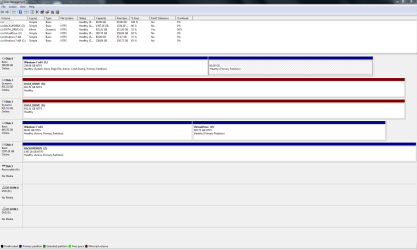
post a snippet/snapshot of the output of disk management.

WIN key |type DISKMGMT.MSC | Enter key
Maximize the display

WIN key | type snipping | Enter

After all that post the snippet:
How to Post a Screenshot
 

My Computer

Computer Manufacturer/Model Number
Toshiba Satellite S875D-S7239 laptop
OS
MS Windows 7 Ultimate SP1 64-bit
CPU
AMD A10-4600M
Motherboard
AMD Pumori (Socket FT1)
Memory
6.00 GB Dual-Channel DDR3 @ 798MHz (11-11-12-28)
Graphics Card(s)
AMD Radeon HD 7660G
Sound Card
High Definition Audio Device
Monitor(s) Displays
Generic PnP Monitor (1600x900@60Hz)
Screen Resolution
1600x900@60Hz
Hard Drives
SSD 119GB Corsair CSSD-V128GB2 ATA Device
Keyboard
Standard PS/2 Keyboard
Mouse
HP Wireless Optical Mobile Mouse Model FHA-3410
Internet Speed
What the local pub, local coffee shop offers.
Other Info
Optical Drive:MATSHITA BD-CMB UJ160B ATA Device


Also have an Asus ha1002xp netbook with Win 7 Ultimate installed.
I make full images each time, so I can't confirm it should make only incremental backups after the first time. I did find this in windows help:


"After you create your first backup, Windows Backup will add new or changed information to your subsequent backups. If you're saving your backups on a hard drive or network location, Windows Backup will create a new, full backup for you automatically when needed. If you're saving your backups on CDs or DVDs and can't find an existing backup disc, or if you want to create a new backup of all of the files on your computer, you can create a full backup."

"Windows Backup keeps track of the files that have been added or modified since your last backup and then updates the existing backup, which saves disk space."

"Backups are created in sets known as backup periods. To help maximize your disk space, Windows Backup backs up all selected folders the first time it's run and then it only backs up files that are new or have been modified since the last backup was made. Periodically, Windows creates a new, full backup. Each full backup is known as a backup period. When you view your file backups, you see all of the backup periods labeled with date ranges. If you decide to delete file backups, you should always keep the most recent file backup."

A Guy
 

My Computer

Computer type
PC/Desktop
OS
Windows 10 Home x64
CPU
INTEL Core i5-750 Quad-Core 3.37GHz
Motherboard
ASUS P7P55D
Memory
HyperX Fury Black Series 8GB (2 x 4GB) 1866Mhz
Graphics Card(s)
EVGA GeForce GTX 750 Superclocked 1GB 128-Bit GDDR5
Monitor(s) Displays
LG 32MA68HY 32" IPS
Screen Resolution
1920 x 1080
Hard Drives
Samsung 840 Evo 120GB, SEAGATE 500GB Barracuda® 7200.12, SATA 3 Gb/s, 7200 RPM, 16MB cache
PSU
ANTEC TruePower New TP-550, 80 PLUS, 550W
Case
ANTEC Three Hundred Illusion
Cooling
COOLER MASTER Hyper 212 Plus, 4 x 120mm 1 x 140mm Noctua's
Internet Speed
85 + Mbps
Antivirus
Avast
Browser
Vivaldi
Buy a good backup program like Acronis True Image Home 2010 which will do incremental backups and if you set it up that way, will continue to do so indefinitely, by merging the oldest into the full backup then creating a new incremental.

Macrium Reflect Free version is good but does not do incremental backups. For that you need to purchase the Pro version.
 

My Computer

Computer type
PC/Desktop
Computer Manufacturer/Model Number
Lenovo IdeaCenter 450
OS
Windows 10 Pro X64
CPU
Intel Quad Core i7-4770 @ 3.4Ghz
Memory
16.0GB PC3-12800 DDR3 SDRAM 1600 MHz
Graphics Card(s)
Intel Integrated HD Graphics
Sound Card
Realtek HD Audio
Monitor(s) Displays
HP 22" LCD
Screen Resolution
1680 x 1050
Hard Drives
250GB Samsung EVO SATA-3 SSD
2TB Seagate ST2000DM001 SATA-2
1.5TB Seagate ST3150041AS SATA
Keyboard
Dell USB
Mouse
Lenovo USB
Internet Speed
Cable via Road Runner 3MB Upload, 30MB Download
Antivirus
Windows Defender, MBAM Pro, MBAE
Browser
Seamonkey
Other Info
UEFI/GPT
PLDS DVD-RW DH16AERSH
BTW, these complete backups take almost 14 hours to complete - each.

How much and what sort of data are you backing up? If it takes 14 hours there must be something wrong?
You're backing up to an external USB(2) connected HDD correct?
I use MS imaging and backup (+ Macrium as secondary safeguard imaging utility).
Full image of my 456 GB partition takes around 20 minutes and about the same time when I've restored.
I have multiple user accounts on my computer and a full MS backup takes about the same time (maybe a little less).
 
Last edited:

My Computer

Computer type
PC/Desktop
Computer Manufacturer/Model Number
Own build
OS
Windows 7x64 Home Premium SP1
CPU
Intel i7 2600k
Motherboard
ASUS P8Z68 Deluxe
Memory
G.Skill Ripjaws (DDR3-1600) 2x4GB
Graphics Card(s)
Nvidia GeForce GTS 450; Intel HD Graphics 3000(GT2+)
Monitor(s) Displays
Dell Ultrasharp IPS panel U2311H, Samsung SyncMaster P2350
Screen Resolution
1920x1080
Hard Drives
Samsung 850 Pro SSD 256GB, Samsung SSD 840 120GB, Seagates 1TB Barracuda ST31000528AS x2
PSU
Seasonic M12II 520W
Case
Lian Li Lancool PC-K60
Cooling
Case: 1x120mm, 3x140mm CPU: Hyper 212+
Keyboard
Logitech MK520 (wireless)
Mouse
Logitech MK520
Internet Speed
6-7 Mbps
Antivirus
Norton Security Premium, Malwarebytes on 2 (MSE on 3rd PC)
Browser
FireFox
Other Info
Audio: Logitech Z523 2.1
have been using the Windows backup functionality
This is a safe way to get yourself into trouble. I have yet to see the various windows backup facilities to work as expected. I am with Zturker - take an OEM product. I use free Macrium - after using a half dozen other products, I find Macrium to do the best job. But I do not like incrementals (you loose one you loose all). I always make full images. Takes just a few minutes (best time was 3.5 minutes for a full Win7 system). And disk space is so cheap these days, that this is my least worry.
 

My Computer

Computer Manufacturer/Model Number
HP, Dell, Gateway, Toshiba - 4 laptops and 2 desktops
OS
Vista, Windows7, Mint Mate, Zorin, Windows 8
CPU
from 1.6GHz Duo to i7
Monitor(s) Displays
2x HP w2207
Hard Drives
5x HDD, 7x SSD, 12x Externals
Keyboard
with trackball - no mices
Mouse
Trackball mice
Internet Speed
DSL 6000
Window Backup and Restore is a very safe, sound, reliable program.

Please use a product before you start to make judgments.

I've requested a disk management output snapshot.

There are many possible causes for an extremely slow full backup.

Any backup software will be slow if there is insufficient disk space.

Let us wait for the snapshot of his disk management output before jumping to conclusions.
 

My Computer

Computer Manufacturer/Model Number
Toshiba Satellite S875D-S7239 laptop
OS
MS Windows 7 Ultimate SP1 64-bit
CPU
AMD A10-4600M
Motherboard
AMD Pumori (Socket FT1)
Memory
6.00 GB Dual-Channel DDR3 @ 798MHz (11-11-12-28)
Graphics Card(s)
AMD Radeon HD 7660G
Sound Card
High Definition Audio Device
Monitor(s) Displays
Generic PnP Monitor (1600x900@60Hz)
Screen Resolution
1600x900@60Hz
Hard Drives
SSD 119GB Corsair CSSD-V128GB2 ATA Device
Keyboard
Standard PS/2 Keyboard
Mouse
HP Wireless Optical Mobile Mouse Model FHA-3410
Internet Speed
What the local pub, local coffee shop offers.
Other Info
Optical Drive:MATSHITA BD-CMB UJ160B ATA Device


Also have an Asus ha1002xp netbook with Win 7 Ultimate installed.
Karl, I hear you. I have used all Windows flavors in Vista and Win7 backup/restore and imaging and had problems all the time. Plus, I also saw a lot of members reporting their own troubles. That does not really inspire me. The least I can say - besides the "relative" reliability of the functions, they are unnecessarily complicated.
 

My Computer

Computer Manufacturer/Model Number
HP, Dell, Gateway, Toshiba - 4 laptops and 2 desktops
OS
Vista, Windows7, Mint Mate, Zorin, Windows 8
CPU
from 1.6GHz Duo to i7
Monitor(s) Displays
2x HP w2207
Hard Drives
5x HDD, 7x SSD, 12x Externals
Keyboard
with trackball - no mices
Mouse
Trackball mice
Internet Speed
DSL 6000
post a snippet/snapshot of the output of disk management.

WIN key |type DISKMGMT.MSC | Enter key
Maximize the display

WIN key | type snipping | Enter

After all that post the snippet:
How to Post a Screenshot

Hi karlsnooks...

Here is the capture as requested...
 

Attachments

  • Capture.PNG
    Capture.PNG
    36.6 KB · Views: 18

My Computer

Computer Manufacturer/Model Number
Home Built
OS
Windows 7 x64 Ultimate
CPU
Intel Quad Core Q6600
Motherboard
Asus P5Q
Memory
OCZ Platinum 2x4GB 1066
Graphics Card(s)
Asus EAH 3450
Sound Card
On board
Monitor(s) Displays
Dell 17'
Hard Drives
1xsata 320GB OS
1xsata 500GB VM
1xsata 640GB Dynamic mirrored with 1.0TB
1xsata 1.0TB Dynamic mirrored with 640GB
1xsata 1.5TB External via E-sata Docking Station
PSU
OCZ 700MXSP
Case
Thermaltake full-tower
Cooling
Air
I make full images each time, so I can't confirm it should make only incremental backups after the first time. I did find this in windows help:


"After you create your first backup, Windows Backup will add new or changed information to your subsequent backups. If you're saving your backups on a hard drive or network location, Windows Backup will create a new, full backup for you automatically when needed. If you're saving your backups on CDs or DVDs and can't find an existing backup disc, or if you want to create a new backup of all of the files on your computer, you can create a full backup."

"Windows Backup keeps track of the files that have been added or modified since your last backup and then updates the existing backup, which saves disk space."

"Backups are created in sets known as backup periods. To help maximize your disk space, Windows Backup backs up all selected folders the first time it's run and then it only backs up files that are new or have been modified since the last backup was made. Periodically, Windows creates a new, full backup. Each full backup is known as a backup period. When you view your file backups, you see all of the backup periods labeled with date ranges. If you decide to delete file backups, you should always keep the most recent file backup."

A Guy

Awesome, this explains everything inregards to the backups.
 

My Computer

Computer Manufacturer/Model Number
Home Built
OS
Windows 7 x64 Ultimate
CPU
Intel Quad Core Q6600
Motherboard
Asus P5Q
Memory
OCZ Platinum 2x4GB 1066
Graphics Card(s)
Asus EAH 3450
Sound Card
On board
Monitor(s) Displays
Dell 17'
Hard Drives
1xsata 320GB OS
1xsata 500GB VM
1xsata 640GB Dynamic mirrored with 1.0TB
1xsata 1.0TB Dynamic mirrored with 640GB
1xsata 1.5TB External via E-sata Docking Station
PSU
OCZ 700MXSP
Case
Thermaltake full-tower
Cooling
Air
Karl, I hear you. I have used all Windows flavors in Vista and Win7 backup/restore and imaging and had problems all the time. Plus, I also saw a lot of members reporting their own troubles. That does not really inspire me. The least I can say - besides the "relative" reliability of the functions, they are unnecessarily complicated.

Anyone can make a piece of software malfunction. I congratulate you.
 

My Computer

Computer Manufacturer/Model Number
Toshiba Satellite S875D-S7239 laptop
OS
MS Windows 7 Ultimate SP1 64-bit
CPU
AMD A10-4600M
Motherboard
AMD Pumori (Socket FT1)
Memory
6.00 GB Dual-Channel DDR3 @ 798MHz (11-11-12-28)
Graphics Card(s)
AMD Radeon HD 7660G
Sound Card
High Definition Audio Device
Monitor(s) Displays
Generic PnP Monitor (1600x900@60Hz)
Screen Resolution
1600x900@60Hz
Hard Drives
SSD 119GB Corsair CSSD-V128GB2 ATA Device
Keyboard
Standard PS/2 Keyboard
Mouse
HP Wireless Optical Mobile Mouse Model FHA-3410
Internet Speed
What the local pub, local coffee shop offers.
Other Info
Optical Drive:MATSHITA BD-CMB UJ160B ATA Device


Also have an Asus ha1002xp netbook with Win 7 Ultimate installed.
Karl, I hear you. I have used all Windows flavors in Vista and Win7 backup/restore and imaging and had problems all the time. Plus, I also saw a lot of members reporting their own troubles. That does not really inspire me. The least I can say - besides the "relative" reliability of the functions, they are unnecessarily complicated.

Anyone can make a piece of software malfunction. I congratulate you.
I assume that you do not expect me to answer to this statement. :p
 

My Computer

Computer Manufacturer/Model Number
HP, Dell, Gateway, Toshiba - 4 laptops and 2 desktops
OS
Vista, Windows7, Mint Mate, Zorin, Windows 8
CPU
from 1.6GHz Duo to i7
Monitor(s) Displays
2x HP w2207
Hard Drives
5x HDD, 7x SSD, 12x Externals
Keyboard
with trackball - no mices
Mouse
Trackball mice
Internet Speed
DSL 6000
Thank you all for the responses, very much appreciated.

I decided to use the native Windows Backup for simplicity, if at all possible I try to keep things as *native* as possible. Hence my display driver for example is the native driver as I do not use my desktop for video games or the like. I figured using Windows Backup would avoid me from installing another program that I really could avoid unless required.

I'll perform some more research on Macrium as a friend of mine mentioned this program as well. As for the long backup times, I missed some information in my original post, other than images, videos and documents, there are also ISO files as well as other *.img files that are backed up, so this may explain the long backup times. Windows Backup saves the backups to an external sata drive - a WD 1.5TB Green Drive.

I'm a backup freak as a number of months ago, I had a drive fail and thought I had lost everything, now I have my Data drive mirrored followed by Windows Backup of said drive.

Once again I'm thankful for all the responses, I obviously came to the right place.
 

My Computer

Computer Manufacturer/Model Number
Home Built
OS
Windows 7 x64 Ultimate
CPU
Intel Quad Core Q6600
Motherboard
Asus P5Q
Memory
OCZ Platinum 2x4GB 1066
Graphics Card(s)
Asus EAH 3450
Sound Card
On board
Monitor(s) Displays
Dell 17'
Hard Drives
1xsata 320GB OS
1xsata 500GB VM
1xsata 640GB Dynamic mirrored with 1.0TB
1xsata 1.0TB Dynamic mirrored with 640GB
1xsata 1.5TB External via E-sata Docking Station
PSU
OCZ 700MXSP
Case
Thermaltake full-tower
Cooling
Air
Glad that we could be of assistance.

I had to start handling the backup of iso and other image files separately for the very reason you mentioned.
 

My Computer

Computer Manufacturer/Model Number
Toshiba Satellite S875D-S7239 laptop
OS
MS Windows 7 Ultimate SP1 64-bit
CPU
AMD A10-4600M
Motherboard
AMD Pumori (Socket FT1)
Memory
6.00 GB Dual-Channel DDR3 @ 798MHz (11-11-12-28)
Graphics Card(s)
AMD Radeon HD 7660G
Sound Card
High Definition Audio Device
Monitor(s) Displays
Generic PnP Monitor (1600x900@60Hz)
Screen Resolution
1600x900@60Hz
Hard Drives
SSD 119GB Corsair CSSD-V128GB2 ATA Device
Keyboard
Standard PS/2 Keyboard
Mouse
HP Wireless Optical Mobile Mouse Model FHA-3410
Internet Speed
What the local pub, local coffee shop offers.
Other Info
Optical Drive:MATSHITA BD-CMB UJ160B ATA Device


Also have an Asus ha1002xp netbook with Win 7 Ultimate installed.
Thank you all for the responses, very much appreciated.

I decided to use the native Windows Backup for simplicity, if at all possible I try to keep things as *native* as possible. Hence my display driver for example is the native driver as I do not use my desktop for video games or the like. I figured using Windows Backup would avoid me from installing another program that I really could avoid unless required.

I'll perform some more research on Macrium as a friend of mine mentioned this program as well. As for the long backup times, I missed some information in my original post, other than images, videos and documents, there are also ISO files as well as other *.img files that are backed up, so this may explain the long backup times. Windows Backup saves the backups to an external sata drive - a WD 1.5TB Green Drive.

I'm a backup freak as a number of months ago, I had a drive fail and thought I had lost everything, now I have my Data drive mirrored followed by Windows Backup of said drive.

Once again I'm thankful for all the responses, I obviously came to the right place.

Glad we could help :D

A Guy
 

My Computer

Computer type
PC/Desktop
OS
Windows 10 Home x64
CPU
INTEL Core i5-750 Quad-Core 3.37GHz
Motherboard
ASUS P7P55D
Memory
HyperX Fury Black Series 8GB (2 x 4GB) 1866Mhz
Graphics Card(s)
EVGA GeForce GTX 750 Superclocked 1GB 128-Bit GDDR5
Monitor(s) Displays
LG 32MA68HY 32" IPS
Screen Resolution
1920 x 1080
Hard Drives
Samsung 840 Evo 120GB, SEAGATE 500GB Barracuda® 7200.12, SATA 3 Gb/s, 7200 RPM, 16MB cache
PSU
ANTEC TruePower New TP-550, 80 PLUS, 550W
Case
ANTEC Three Hundred Illusion
Cooling
COOLER MASTER Hyper 212 Plus, 4 x 120mm 1 x 140mm Noctua's
Internet Speed
85 + Mbps
Antivirus
Avast
Browser
Vivaldi
Back
Top