bobtheflower
New member
- Local time
- 12:58 AM
- Messages
- 13
So this is a bit of a weird one and I wracked my brain to think of the right place to put it.
I'm going to try and make it as simple as possible, but I really don't understand how it turned out in the first place so it might be tough.
I was trying to back up my windows drive, i've been intending to upgrade from windows 7 Premium to Pro (or ultimate) so i can use more RAM, but i wanted to make sure i had a backup first, just in case.
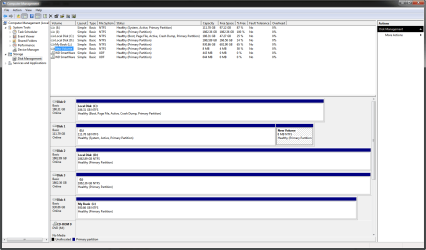
Well, any time i try to make a disk image with windows, it INSIST on also using drive E (I have drives C, D and E as well as externals). I don't want this at all, because it makes the image huge. On a little inspection (showing protected operating system files) i've found that E is littered with things like boot directoriesm autoexec, boot, bootmgr, bootsect, and so on.
They are all OLD (last modified 2009) but i don't think i can deleted them, and it won't let me reformat the drive either.
I worry, that aside, that windows NEEDs these files even though Windows is installed on C. Is there any way to find out if they are actually needed, and being used, and/or move them if they are being used, so i can delete them (also.. how do i delete them?) so i can do the backup without taking that entire drive as well.
Also.. if they are being used on that drive as opposed to C.. it can't be good for it either and fixing that is probably good.
Any help at all would be appreciated.
I'm going to try and make it as simple as possible, but I really don't understand how it turned out in the first place so it might be tough.
I was trying to back up my windows drive, i've been intending to upgrade from windows 7 Premium to Pro (or ultimate) so i can use more RAM, but i wanted to make sure i had a backup first, just in case.
Well, any time i try to make a disk image with windows, it INSIST on also using drive E (I have drives C, D and E as well as externals). I don't want this at all, because it makes the image huge. On a little inspection (showing protected operating system files) i've found that E is littered with things like boot directoriesm autoexec, boot, bootmgr, bootsect, and so on.
They are all OLD (last modified 2009) but i don't think i can deleted them, and it won't let me reformat the drive either.
I worry, that aside, that windows NEEDs these files even though Windows is installed on C. Is there any way to find out if they are actually needed, and being used, and/or move them if they are being used, so i can delete them (also.. how do i delete them?) so i can do the backup without taking that entire drive as well.
Also.. if they are being used on that drive as opposed to C.. it can't be good for it either and fixing that is probably good.
Any help at all would be appreciated.
My Computer
At a glance
Windows 7Intel Core i7 4770K16GM DDR3NVidia GeForce GTX 780
- Computer type
- PC/Desktop
- Computer Manufacturer/Model Number
- Custom
- OS
- Windows 7
- CPU
- Intel Core i7 4770K
- Motherboard
- Gigabyte H87-D3H-CF
- Memory
- 16GM DDR3
- Graphics Card(s)
- NVidia GeForce GTX 780
- Monitor(s) Displays
- Samsung SyncMaster P2770HD / Acer P244W
- Screen Resolution
- 1920x1080