
Windows Boot Manager issue - accidentally installed 2 OS's

Toddsta

New member
Member
Local time
7:10 PM
Messages
46
First - I'm no computer whiz, which is why I am posting here - hoping you gurus can guide me through a fix via 'baby-steps.'

Ok... I put a new hard drive in a Dell Precision Workstation 390. It apparently had some sort of Raid ADHD (probably have those initials messed up... but it kind of describes the way I'm feeling ;) )

It has two hard drives.


The new hard drive is the OS/Boot drive. It was a 1tb drive, so I thought I might experiment and partition it down into two smaller drives - thinking that the bootable portion might boot faster if the drive was smaller, plus - thinking the other drive could act as an additional storage drive that wouldn't bog down the Boot Drive Partition. Is that thinking flawed?

Anyway... I tried putting XP back on and I kept getting this error saying that 'Cannot find a drive'..... something to that effect.

So, I got into the Bios... and changed the type of Raid to a different one... and eventually it seemed that it might work... XP installed, but everything was jack-screwed in that the video drivers weren't there, etc, etc.

So, I thought, I'm going to stick in my Windows 7 upgrade (which I was saving for another computer) and see if I can just boot off that disk, wipe off the other OS and maybe the newer Windows 7 would work.

Well.... it DID work!

Only problem is, I discovered that now I get the Windows Boot Manager everytime I boot the computer and it wants me to decide between "Windows 7 or a Previous Installation." I select 'Windows 7' and it boots just fine... but this doesn't seem right to me and I want to get rid of the Boot Manager and just have Windows 7 boot up.

I dug around a bit and discovered I SOMEHOW (slap to the forehead) installed Windows XP onto the 2nd partitioned portion of my new drive.

I went to that drive letter and 'deleted' the 'windows' folder.

But I still get the Windows Boot Manager popping up upon startup.

Can you tell me, in very detailed steps an ignorant person like me can understand, how to get this fixed?

I also see in my Bios Settup 'BOOT SEQUENCE' that both my hard drives are listed under the CD Rom drive as 'Add-in Hard Drive' ........and then to the right of each of those it says, [Not present].

What does that mean????

The computer seems to boot and run fine, but shouldn't the drives be listed by the Drive Manufacturer's name and capacity???

Thanks for your help.
 

My Computer

Computer Manufacturer/Model Number
Custom
OS
Windows 7 Professional 64 bit
CPU
Intel i7 920
Motherboard
Asus P6T Deluxe
Memory
OCZ PC3 12800 P/N OCZ3G1600LV6GK - 12 GB TOTAL (2x6 STICKS)
Graphics Card(s)
Evga e-GeForce 8800 GTS
Sound Card
SoundMax Integrated Digital HD Audio - On board
Monitor(s) Displays
Dell 2209 WA (Dual Monitors)
Hard Drives
Boot Drive: Fujitsu MBA3147RC scsi SAS drive - 15K rpm
Storage Drive 1: Samsung HD103UJATA (1 tb sata)
Storage Drive 2: WDC WD1001FALS-00J7B0 (1 tb sata)
External Storage: 2 external usb drives - Same as Storage Dr 1.
PSU
Corsair TX 850w
Case
CoolerMaster CM Storm
Cooling
CPU fan (std intel fan), Evercool heatsink fan, 4 large case
Toddsta
You mentioned that you did a change for your bios. Did you restore those changes?
 

My Computer

Computer Manufacturer/Model Number
HP pavilion DV6-Laptop
OS
win7 home premium-64bit-SP1-IE9RTM
CPU
Intel core2 duo - T6600 2.2GHZ
Memory
4.00Gb
Graphics Card(s)
ATI Mobility Radeon HD 4530
Sound Card
IDT audio Monitor
Screen Resolution
32Bpp,1366x768
Hard Drives
Western Digital 500Gb
Internet Speed
Fast DSL
Hi John -

Yes, I restored the 'SATA Operation' from Raid Autodetect ATA, back to it's original configuration of Raid Autodetect AHCI (original manufacturer/Dell setting.)
 

My Computer

Computer Manufacturer/Model Number
Custom
OS
Windows 7 Professional 64 bit
CPU
Intel i7 920
Motherboard
Asus P6T Deluxe
Memory
OCZ PC3 12800 P/N OCZ3G1600LV6GK - 12 GB TOTAL (2x6 STICKS)
Graphics Card(s)
Evga e-GeForce 8800 GTS
Sound Card
SoundMax Integrated Digital HD Audio - On board
Monitor(s) Displays
Dell 2209 WA (Dual Monitors)
Hard Drives
Boot Drive: Fujitsu MBA3147RC scsi SAS drive - 15K rpm
Storage Drive 1: Samsung HD103UJATA (1 tb sata)
Storage Drive 2: WDC WD1001FALS-00J7B0 (1 tb sata)
External Storage: 2 external usb drives - Same as Storage Dr 1.
PSU
Corsair TX 850w
Case
CoolerMaster CM Storm
Cooling
CPU fan (std intel fan), Evercool heatsink fan, 4 large case

My Computer

Computer Manufacturer/Model Number
HP Pavilion Elite 495UK
OS
Windows 7 Ultimate SP1 64-Bit
CPU
Intel Core i7 870 @ 2.93GHz
Motherboard
MSI 2A9C (CPU1)
Memory
8Gb Dual-Channel DDR3 @ 664MHz
Graphics Card(s)
nVidia GeForce GTX 460 1024MB dedicated RAM
Sound Card
Realtek HD Audio
Monitor(s) Displays
HP2310i
Screen Resolution
1920 x 1080
Hard Drives
1x1954GB Hitachi HDS22020ALA 330 (RAID), 1x1954GB Hitachi External for backup and storage
PSU
460W
Case
HP Elite
Cooling
Air cooled
Keyboard
Logitech K750 solar-powered keyboard
Mouse
Logitech Wireless M180 mouse
Internet Speed
2Mb
Other Info
Pure Avanti Flow Internet Radio with iPod Dock, 64Gb iPod, HP USB Speakers, Sony MDR-V500 Headphones, Sony Vaio F-Series Laptop
You shouldn't delete the WIndows folder to delete an OS, instead format or delete the partition and create it again.

If you have XP on the HD, chances are the WIn7 boot files have been written to the XP partition and will have to be recovered into Win7 before it will boot on its own.

Post back a screenshot of your full Disk Mgmt drive map with listings, using SNipping TOol in Start menu, and we will advise you the steps to remove XP and it's boot listing.
 
Make sure you reset BIOS back to DEFAULT.
 

My Computer

OS
ME/XP/Vista/Win7
Seavixen32 - I just went through the link you provided for repairing the 'Boot Manager'.... however, the link's instructions didn't provide information for the last line that appeared in the command prompt after I typed in all the instructions:

The command prompt message asked me this: Add installation to boot disk? Yes (Y), No (N), or All (A).

How do I answer this question???? Thanks.
 

My Computer

Computer Manufacturer/Model Number
Custom
OS
Windows 7 Professional 64 bit
CPU
Intel i7 920
Motherboard
Asus P6T Deluxe
Memory
OCZ PC3 12800 P/N OCZ3G1600LV6GK - 12 GB TOTAL (2x6 STICKS)
Graphics Card(s)
Evga e-GeForce 8800 GTS
Sound Card
SoundMax Integrated Digital HD Audio - On board
Monitor(s) Displays
Dell 2209 WA (Dual Monitors)
Hard Drives
Boot Drive: Fujitsu MBA3147RC scsi SAS drive - 15K rpm
Storage Drive 1: Samsung HD103UJATA (1 tb sata)
Storage Drive 2: WDC WD1001FALS-00J7B0 (1 tb sata)
External Storage: 2 external usb drives - Same as Storage Dr 1.
PSU
Corsair TX 850w
Case
CoolerMaster CM Storm
Cooling
CPU fan (std intel fan), Evercool heatsink fan, 4 large case
Seavixen32 - I just went through the link you provided for repairing the 'Boot Manager'.... however, the link's instructions didn't provide information for the last line that appeared in the command prompt after I typed in all the instructions:

The command prompt message asked me this: Add installation to boot disk? Yes (Y), No (N), or All (A).

How do I answer this question???? Thanks.

Answer Yes to update the master boot record and you should be good to go.

Have you also reset the BIOS as advised?
 

My Computer

Computer Manufacturer/Model Number
HP Pavilion Elite 495UK
OS
Windows 7 Ultimate SP1 64-Bit
CPU
Intel Core i7 870 @ 2.93GHz
Motherboard
MSI 2A9C (CPU1)
Memory
8Gb Dual-Channel DDR3 @ 664MHz
Graphics Card(s)
nVidia GeForce GTX 460 1024MB dedicated RAM
Sound Card
Realtek HD Audio
Monitor(s) Displays
HP2310i
Screen Resolution
1920 x 1080
Hard Drives
1x1954GB Hitachi HDS22020ALA 330 (RAID), 1x1954GB Hitachi External for backup and storage
PSU
460W
Case
HP Elite
Cooling
Air cooled
Keyboard
Logitech K750 solar-powered keyboard
Mouse
Logitech Wireless M180 mouse
Internet Speed
2Mb
Other Info
Pure Avanti Flow Internet Radio with iPod Dock, 64Gb iPod, HP USB Speakers, Sony MDR-V500 Headphones, Sony Vaio F-Series Laptop
I had set the Bios back to it's default prior after I initially loaded the Windows 7.... with the 'Raid' set back to it's default.... if that is what you mean.

I just answered 'YES' to the command prompt per your instructions and it now boots PERFECTLY - with no more Windows Boot Manager screen popping up! Yes !!!!!!!!

Thanks a ton Sea ! The link worked and solved my issue.

Have an excellent day!! :)
 

My Computer

Computer Manufacturer/Model Number
Custom
OS
Windows 7 Professional 64 bit
CPU
Intel i7 920
Motherboard
Asus P6T Deluxe
Memory
OCZ PC3 12800 P/N OCZ3G1600LV6GK - 12 GB TOTAL (2x6 STICKS)
Graphics Card(s)
Evga e-GeForce 8800 GTS
Sound Card
SoundMax Integrated Digital HD Audio - On board
Monitor(s) Displays
Dell 2209 WA (Dual Monitors)
Hard Drives
Boot Drive: Fujitsu MBA3147RC scsi SAS drive - 15K rpm
Storage Drive 1: Samsung HD103UJATA (1 tb sata)
Storage Drive 2: WDC WD1001FALS-00J7B0 (1 tb sata)
External Storage: 2 external usb drives - Same as Storage Dr 1.
PSU
Corsair TX 850w
Case
CoolerMaster CM Storm
Cooling
CPU fan (std intel fan), Evercool heatsink fan, 4 large case
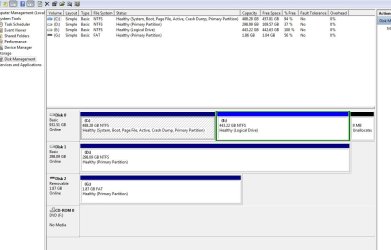
here is a screenshot of my Disk Management.... you can see that my partition is labeled C and E.... I suspect this is because I had my current D drive plugged in when I installed Windows 7. Any way to re-assign drive letters so that the current E becomes the D, and the D becomes the E?

Also - note the message to the right of my C drive.... any concerns there??? Thanks.
 

Attachments

  • Disk Management.JPG
    Disk Management.JPG
    85.2 KB · Views: 15

My Computer

Computer Manufacturer/Model Number
Custom
OS
Windows 7 Professional 64 bit
CPU
Intel i7 920
Motherboard
Asus P6T Deluxe
Memory
OCZ PC3 12800 P/N OCZ3G1600LV6GK - 12 GB TOTAL (2x6 STICKS)
Graphics Card(s)
Evga e-GeForce 8800 GTS
Sound Card
SoundMax Integrated Digital HD Audio - On board
Monitor(s) Displays
Dell 2209 WA (Dual Monitors)
Hard Drives
Boot Drive: Fujitsu MBA3147RC scsi SAS drive - 15K rpm
Storage Drive 1: Samsung HD103UJATA (1 tb sata)
Storage Drive 2: WDC WD1001FALS-00J7B0 (1 tb sata)
External Storage: 2 external usb drives - Same as Storage Dr 1.
PSU
Corsair TX 850w
Case
CoolerMaster CM Storm
Cooling
CPU fan (std intel fan), Evercool heatsink fan, 4 large case
No. What you see is a logical drive.

The hard drive can have no more than three primary partitions so the fourth will become a logical partition.

I see you have some allocated space towards the right of the logical drive so you can go into disk management and extend the partition to take up the slack.

Anyway, pleased we got your problem sorted. Satisfied customers is what WSF is all about. :)
 

My Computer

Computer Manufacturer/Model Number
HP Pavilion Elite 495UK
OS
Windows 7 Ultimate SP1 64-Bit
CPU
Intel Core i7 870 @ 2.93GHz
Motherboard
MSI 2A9C (CPU1)
Memory
8Gb Dual-Channel DDR3 @ 664MHz
Graphics Card(s)
nVidia GeForce GTX 460 1024MB dedicated RAM
Sound Card
Realtek HD Audio
Monitor(s) Displays
HP2310i
Screen Resolution
1920 x 1080
Hard Drives
1x1954GB Hitachi HDS22020ALA 330 (RAID), 1x1954GB Hitachi External for backup and storage
PSU
460W
Case
HP Elite
Cooling
Air cooled
Keyboard
Logitech K750 solar-powered keyboard
Mouse
Logitech Wireless M180 mouse
Internet Speed
2Mb
Other Info
Pure Avanti Flow Internet Radio with iPod Dock, 64Gb iPod, HP USB Speakers, Sony MDR-V500 Headphones, Sony Vaio F-Series Laptop
You should be able to delete D in Disk Management to recreate it as a Primary Partition. I am not sure why it became Logical since you only have one other partition on the HD - unless you chose that using a partition manager.

After deleting it but before creating the new one, rightclick on D and change it's drive letter to E. Then you can create a new D partition on DISK0 next to C.

Partition or Volume - Delete - Windows 7 Forums
Partition or Volume - Create New - Windows 7 Forums
 
You guys are the best!! Thanks!!

Questions: The "D" drive was an existing secondary hard drive, and contains a LOT of important data. I do not want to lose that by messing with the drive letters... so, should I back up it's entire contents prior to doing what you're suggesting? Any danger there? Thanks.

I guess I'm confused on this point.... the D drive is just a secondary hard drive for data storage... isn't that how all hard drives are listed.... as a Basic, Primary Partition like it shows in my screen shot?
 

My Computer

Computer Manufacturer/Model Number
Custom
OS
Windows 7 Professional 64 bit
CPU
Intel i7 920
Motherboard
Asus P6T Deluxe
Memory
OCZ PC3 12800 P/N OCZ3G1600LV6GK - 12 GB TOTAL (2x6 STICKS)
Graphics Card(s)
Evga e-GeForce 8800 GTS
Sound Card
SoundMax Integrated Digital HD Audio - On board
Monitor(s) Displays
Dell 2209 WA (Dual Monitors)
Hard Drives
Boot Drive: Fujitsu MBA3147RC scsi SAS drive - 15K rpm
Storage Drive 1: Samsung HD103UJATA (1 tb sata)
Storage Drive 2: WDC WD1001FALS-00J7B0 (1 tb sata)
External Storage: 2 external usb drives - Same as Storage Dr 1.
PSU
Corsair TX 850w
Case
CoolerMaster CM Storm
Cooling
CPU fan (std intel fan), Evercool heatsink fan, 4 large case
Yes, back up your data before changing drive letter - it should be backed up anyway.

Basic refers to type of Disk vs. Dynamic which allows spanning partitions across disks.

Primary partition allows installation of an OS' boot files, although since you're allowed three Primaries before it creates a Logical Extended (to add as many sub-partitions as you want) it is fine for just data storage.

You can leave the partitioning alone if you want, but since you asked to change D to Disk0, and possibly still need to delete the rest of XP off of E, I gave you the steps to do all of this at once.
 
You guys are the best!! Thanks!!

Questions: The "D" drive was an existing secondary hard drive, and contains a LOT of important data. I do not want to lose that by messing with the drive letters... so, should I back up it's entire contents prior to doing what you're suggesting? Any danger there? Thanks.

I guess I'm confused on this point.... the D drive is just a secondary hard drive for data storage... isn't that how all hard drives are listed.... as a Basic, Primary Partition like it shows in my screen shot?

Data loss is never very pleasant and if I were you I'd seriously consider getting an external drive to backup your data drive.

I've just shelled out £80 ($120) for one that has password protection, 1TB of storage space, automatic incremental backups, USB3 transfer speed and goes to sleep when my computer does......peace of mind, you can't put a price on it.

If you choose to change the drive letter you can do without risking your data.
 
Last edited:

My Computer

Computer Manufacturer/Model Number
HP Pavilion Elite 495UK
OS
Windows 7 Ultimate SP1 64-Bit
CPU
Intel Core i7 870 @ 2.93GHz
Motherboard
MSI 2A9C (CPU1)
Memory
8Gb Dual-Channel DDR3 @ 664MHz
Graphics Card(s)
nVidia GeForce GTX 460 1024MB dedicated RAM
Sound Card
Realtek HD Audio
Monitor(s) Displays
HP2310i
Screen Resolution
1920 x 1080
Hard Drives
1x1954GB Hitachi HDS22020ALA 330 (RAID), 1x1954GB Hitachi External for backup and storage
PSU
460W
Case
HP Elite
Cooling
Air cooled
Keyboard
Logitech K750 solar-powered keyboard
Mouse
Logitech Wireless M180 mouse
Internet Speed
2Mb
Other Info
Pure Avanti Flow Internet Radio with iPod Dock, 64Gb iPod, HP USB Speakers, Sony MDR-V500 Headphones, Sony Vaio F-Series Laptop
Thanks guys....

I do have an external backup - I know what you mean about losing data! :-)

How do I merge the 9mb of unallocated space with the E partition shown in my Disk Manager screen shot?

Also... I looked on the E drive and don't see any files whatsoever after I right/click and deleted the 'Windows' folder I had on it. Are they somehow 'hidden' on the drive? I don't want to remove that partition if I don't have to. Thanks.
 

My Computer

Computer Manufacturer/Model Number
Custom
OS
Windows 7 Professional 64 bit
CPU
Intel i7 920
Motherboard
Asus P6T Deluxe
Memory
OCZ PC3 12800 P/N OCZ3G1600LV6GK - 12 GB TOTAL (2x6 STICKS)
Graphics Card(s)
Evga e-GeForce 8800 GTS
Sound Card
SoundMax Integrated Digital HD Audio - On board
Monitor(s) Displays
Dell 2209 WA (Dual Monitors)
Hard Drives
Boot Drive: Fujitsu MBA3147RC scsi SAS drive - 15K rpm
Storage Drive 1: Samsung HD103UJATA (1 tb sata)
Storage Drive 2: WDC WD1001FALS-00J7B0 (1 tb sata)
External Storage: 2 external usb drives - Same as Storage Dr 1.
PSU
Corsair TX 850w
Case
CoolerMaster CM Storm
Cooling
CPU fan (std intel fan), Evercool heatsink fan, 4 large case
Just extend E into the space: Partition or Volume - Extend

Why do you not want to delete E to make sure everything from XP is gone? As I stated before, deleting the Windows folder is NOT how uninstalling an OS is done except in rare circumstances which require more surgery.

Simply delete the partition and create a new one in Disk Mgmt. Swap the driver letters if still desired.
 
Ok... I'll do that.... just was concerned that if I deleted that partition it might affect the Windows 7 installed on the C drive... but that's probably not the case?

Thanks a ton again, for your willingness to help.... :-)
 

My Computer

Computer Manufacturer/Model Number
Custom
OS
Windows 7 Professional 64 bit
CPU
Intel i7 920
Motherboard
Asus P6T Deluxe
Memory
OCZ PC3 12800 P/N OCZ3G1600LV6GK - 12 GB TOTAL (2x6 STICKS)
Graphics Card(s)
Evga e-GeForce 8800 GTS
Sound Card
SoundMax Integrated Digital HD Audio - On board
Monitor(s) Displays
Dell 2209 WA (Dual Monitors)
Hard Drives
Boot Drive: Fujitsu MBA3147RC scsi SAS drive - 15K rpm
Storage Drive 1: Samsung HD103UJATA (1 tb sata)
Storage Drive 2: WDC WD1001FALS-00J7B0 (1 tb sata)
External Storage: 2 external usb drives - Same as Storage Dr 1.
PSU
Corsair TX 850w
Case
CoolerMaster CM Storm
Cooling
CPU fan (std intel fan), Evercool heatsink fan, 4 large case
Deleting the old XP partition in no way can affect Win7 unless it holds the System Active boot files - which is why I asked you to post the screenshot. It is good to GO>

Glad to help. Stop by anytime.
 
Thanks Gregrocker.... I will do it - appreciate your patience. Rock on! :cool:
 

My Computer

Computer Manufacturer/Model Number
Custom
OS
Windows 7 Professional 64 bit
CPU
Intel i7 920
Motherboard
Asus P6T Deluxe
Memory
OCZ PC3 12800 P/N OCZ3G1600LV6GK - 12 GB TOTAL (2x6 STICKS)
Graphics Card(s)
Evga e-GeForce 8800 GTS
Sound Card
SoundMax Integrated Digital HD Audio - On board
Monitor(s) Displays
Dell 2209 WA (Dual Monitors)
Hard Drives
Boot Drive: Fujitsu MBA3147RC scsi SAS drive - 15K rpm
Storage Drive 1: Samsung HD103UJATA (1 tb sata)
Storage Drive 2: WDC WD1001FALS-00J7B0 (1 tb sata)
External Storage: 2 external usb drives - Same as Storage Dr 1.
PSU
Corsair TX 850w
Case
CoolerMaster CM Storm
Cooling
CPU fan (std intel fan), Evercool heatsink fan, 4 large case
Back
Top