Windows Boot Manager not being displayed

win7fan

New member
Local time
6:37 AM
Messages
8
Hi, I'm new to the seven forums ;). I've got Windows 7 dual booted with vista, but the boot manager is not being displayed, for me to select which version of Windows I want to boot up. I have got both Windows 7 & Vista on seperate Hard drives. Does anyone have any idea, how I can enable the boot manager selection screen (when my computer boots up), so I can either boot Vista or Windows 7. Currently, I can only boot Windows 7.

If this helps, I've had vista installed first and I've only just installed Windows 7 today. Any help will be appreicated. ;)
 

My Computer

OS
Windows 7 & Vista
Memory
3072MB
Graphics Card(s)
Nvida GeForce 8600 GT
Monitor(s) Displays
2
Hello Win7fab, and welcome to Seven Forums.

Strange, if you install Windows 7 with the Vista drive still connected, then it should have had this for you by default.

Double check to make sure that you have the Time to Display the List of Operating Systems at Boot box checked with how long you want to wait to have to select a OS at boot. Be sure to check that both Vista and Windows 7 is listed as being available to select from as well.

http://www.sevenforums.com/tutorials/2282-default-operating-system-change-default-boot-os.html


If you do not have both of them listed there or at boot, then you can run a Startup Repair to add it.

Hope this helps,
Shawn
 

My Computer

Computer type
PC/Desktop
Computer Manufacturer/Model Number
Self built custom
OS
64-bit Windows 11 Pro for Workstations
CPU
Intel i7-8700K OC'd to 5 GHz
Motherboard
ASUS ROG Maximus XI Formula Z390
Memory
64 GB (4x16GB) G.SKILL TridentZ RGB DDR4 3600 MHz
Graphics Card(s)
ASUS ROG-STRIX-GTX1080TI-O11G-GAMING
Sound Card
Integrated
Monitor(s) Displays
2 x Samsung Odyssey G7 27"
Screen Resolution
2560x1440
Hard Drives
1TB Samsung 990 PRO M.2,
4TB Samsung 990 PRO PRO M.2,
TerraMaster F8 SSD Plus NAS
PSU
Seasonic Prime Titanium 850W
Case
Thermaltake Core P3
Cooling
Corsair Hydro H115i
Keyboard
Logitech wireless K800
Mouse
Logitech MX Master 4
Internet Speed
2 Gb/s Download and 100 Mb/s Upload
Antivirus
Malwarebyte Anti-Malware Premium
Browser
Google Chrome
Other Info
Logitech Z625 speaker system,
Logitech BRIO 4K Pro webcam,
HP Color LaserJet Pro MFP M477fdn,
APC SMART-UPS RT 1000 XL - SURT1000XLI,
Galaxy S23 Plus phone
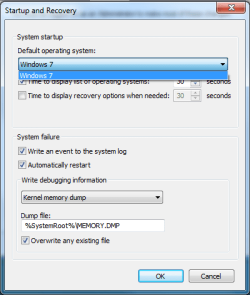
Thanks for the help Brink ;). I've just checked 'System Configuration' and 'Windows 7' is the only one listed under the 'Boot' tab. This is the same in Startup and Recovery as well, Windows 7 is only avaliable in the drop down box, under the 'Default operating system' section, instead of both Vista and Windows 7. I have attached some screenshots to show this.

It looks like I am going to have to use the Startup Repair tool, like you suggested ;). Which DVD shall I use to perform a Startup Repair, Vista or Windows 7?
 

Attachments

  • ms-config window.PNG
    ms-config window.PNG
    14.2 KB · Views: 31
  • Startup-recovery window.PNG
    Startup-recovery window.PNG
    13.5 KB · Views: 53

My Computer

OS
Windows 7 & Vista
Memory
3072MB
Graphics Card(s)
Nvida GeForce 8600 GT
Monitor(s) Displays
2
You could try VistaBootPro. It's $10 now but if you hunt around you may be able to get a version when it was still freeware.
 

My Computer

Computer Manufacturer/Model Number
HP Media Center
OS
Windows 7 32 bit
CPU
AMD 5200+ dual core
Memory
2 GB
Graphics Card(s)
NVidia GeForce 6150SE 128 MB
Monitor(s) Displays
CRT
Screen Resolution
1280x1024
Hard Drives
500 GB Sata internal :

SIIG USB 3.0 docking stations w/WD Caviar Black 6 Gb/s drives
Keyboard
PS/2
Mouse
PS/2 Wheel Mouse
Other Info
SIIG USB 3.0 PCIexpress card.
Win7fan,

You might also see if doing a Startup Repair with the Vista installation DVD can fix and add Vista to the Windows Boot Manager to have both of them.
 

My Computer

Computer type
PC/Desktop
Computer Manufacturer/Model Number
Self built custom
OS
64-bit Windows 11 Pro for Workstations
CPU
Intel i7-8700K OC'd to 5 GHz
Motherboard
ASUS ROG Maximus XI Formula Z390
Memory
64 GB (4x16GB) G.SKILL TridentZ RGB DDR4 3600 MHz
Graphics Card(s)
ASUS ROG-STRIX-GTX1080TI-O11G-GAMING
Sound Card
Integrated
Monitor(s) Displays
2 x Samsung Odyssey G7 27"
Screen Resolution
2560x1440
Hard Drives
1TB Samsung 990 PRO M.2,
4TB Samsung 990 PRO PRO M.2,
TerraMaster F8 SSD Plus NAS
PSU
Seasonic Prime Titanium 850W
Case
Thermaltake Core P3
Cooling
Corsair Hydro H115i
Keyboard
Logitech wireless K800
Mouse
Logitech MX Master 4
Internet Speed
2 Gb/s Download and 100 Mb/s Upload
Antivirus
Malwarebyte Anti-Malware Premium
Browser
Google Chrome
Other Info
Logitech Z625 speaker system,
Logitech BRIO 4K Pro webcam,
HP Color LaserJet Pro MFP M477fdn,
APC SMART-UPS RT 1000 XL - SURT1000XLI,
Galaxy S23 Plus phone
Thanks again, I've tried to do a Start-up Repair from the Vista DVD, but when I click 'Repair your Computer', to open the recovery tools window, Vista is not listed at all in 'System Recovery Options'. I clicked 'Next' anyway and then selected 'Start-up Repair'. It checked for any problems and attempted a repair and then displayed a report.

The following message was displayed under 'Root Cause Found' in the report:

'The partition table does not have a valid system partition.

Repair action: Partition table repair
Result: Completed successfully. Error Code 0x0
Time taken: 3406 ms.'

Does anyone know how to correct this error and repair Vista, without formating and reinstalling?
 

My Computer

OS
Windows 7 & Vista
Memory
3072MB
Graphics Card(s)
Nvida GeForce 8600 GT
Monitor(s) Displays
2
Last edited by a moderator:

My Computer

Computer Manufacturer/Model Number
Custom Build
OS
W7 RTM Ultimate x64
CPU
Intel Q8400 @ 2.66GHZ
Motherboard
Gigabyte GA-EG45M-UD2H
Memory
4GB DDR2-800
Graphics Card(s)
Gainward GTS 450 GLH 1GB Edition
Sound Card
Integrated 8 Channel
Monitor(s) Displays
AOC 23.6 Inch Widescreen LCD
Screen Resolution
1920x1080
Hard Drives
Seagate 500GB Internal
Western Digital 1TB Internal

Hitachi 1TB External
PSU
Apevia Java Power 500W
Case
Cooler Master HAF 922 Black
Cooling
Stock Intel CPU Fan
Keyboard
HP SK-2960 Multimedia Keyboard
Mouse
Logitech M350 Wireless Gaming Mouse
Internet Speed
1.5MB
Thanks Uber Phlif ;), I will try EasyBCD. Just one question though, will it add Vista, even if it can't boot up or be displayed from the Vista DVD?
 

My Computer

OS
Windows 7 & Vista
Memory
3072MB
Graphics Card(s)
Nvida GeForce 8600 GT
Monitor(s) Displays
2
yes, what you need to do, is set W7 as default, and set Vista as second boot, as last post of mine in the link i gave you earlier will describe.

If you need any help, don't hesitate to ask me here, and ill be ore then happy to help you through.
 
Last edited by a moderator:

My Computer

Computer Manufacturer/Model Number
Custom Build
OS
W7 RTM Ultimate x64
CPU
Intel Q8400 @ 2.66GHZ
Motherboard
Gigabyte GA-EG45M-UD2H
Memory
4GB DDR2-800
Graphics Card(s)
Gainward GTS 450 GLH 1GB Edition
Sound Card
Integrated 8 Channel
Monitor(s) Displays
AOC 23.6 Inch Widescreen LCD
Screen Resolution
1920x1080
Hard Drives
Seagate 500GB Internal
Western Digital 1TB Internal

Hitachi 1TB External
PSU
Apevia Java Power 500W
Case
Cooler Master HAF 922 Black
Cooling
Stock Intel CPU Fan
Keyboard
HP SK-2960 Multimedia Keyboard
Mouse
Logitech M350 Wireless Gaming Mouse
Internet Speed
1.5MB
I've tried to use EasyBCD to repair and add vista, so I can dual boot it with Windows 7, but that was unfortunately unsuccessful. Earlier, I removed the Windows 7 HDD and left the Vista HDD in. I then tried booting vista but it would not boot and came up with the following message: 'Insert a Disk or Bootable Media and Press any key to continue'

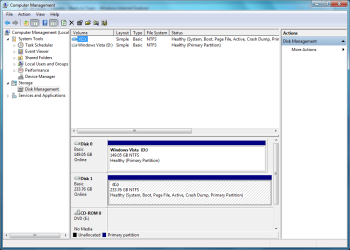
Is there anyway to recover or repair Vista without formating? If this helps, vista is displayed as a healthy partition in 'Disk Management' via Windows 7. I have attached a screenshot of this below.

Thanks for your help everyone ;)
 

Attachments

  • disk-manage.PNG
    disk-manage.PNG
    31.9 KB · Views: 51

My Computer

OS
Windows 7 & Vista
Memory
3072MB
Graphics Card(s)
Nvida GeForce 8600 GT
Monitor(s) Displays
2
haha, i dunno if this will work, but in EasyBCD, try just doing the "Re-install Vista Bootloader" option. maybe it will boot you into Vista? Just a thought.
 

My Computer

Computer Manufacturer/Model Number
Custom Build
OS
W7 RTM Ultimate x64
CPU
Intel Q8400 @ 2.66GHZ
Motherboard
Gigabyte GA-EG45M-UD2H
Memory
4GB DDR2-800
Graphics Card(s)
Gainward GTS 450 GLH 1GB Edition
Sound Card
Integrated 8 Channel
Monitor(s) Displays
AOC 23.6 Inch Widescreen LCD
Screen Resolution
1920x1080
Hard Drives
Seagate 500GB Internal
Western Digital 1TB Internal

Hitachi 1TB External
PSU
Apevia Java Power 500W
Case
Cooler Master HAF 922 Black
Cooling
Stock Intel CPU Fan
Keyboard
HP SK-2960 Multimedia Keyboard
Mouse
Logitech M350 Wireless Gaming Mouse
Internet Speed
1.5MB
haha, i dunno if this will work, but in EasyBCD, try just doing the "Re-install Vista Bootloader" option. maybe it will boot you into Vista? Just a thought.
Thanks Uber Philif, I will try that ;). Hopefully, Vista will boot again.

Edit: No, it did not work, windows 7 boots up again. I restarted, then I Pressed F8 before windows 7 booted up and went to Windows Boot Manager. It looks like Vista's partition table is corrupt somehow, as Windows 7 is only displayed. There's got to be a way around this, as Vista is listed as healthy. :confused:
 

My Computer

OS
Windows 7 & Vista
Memory
3072MB
Graphics Card(s)
Nvida GeForce 8600 GT
Monitor(s) Displays
2
Unfortunately, when you boot a Vista install DVD and do the repair to fix the MBR, they deliberately do not overwrite the partition table info in the mbr. So if that's what's hosed, it won't fix it. That's why it's a good idea to save a copy of the mbr with some utility or use an image backup that does it. I unhosed my partition table by backing up and restoring with Macrium Reflect. But you might try some partition table fixer programs.

Also see this site:

Boot Land

They may be able to show you how to set up a USB key drive with a boot manager to boot off the HD similar to how Linux does it. Once you get it set up on USB it should be easier to get the HD setup fixed up.
 

My Computer

Computer Manufacturer/Model Number
HP Media Center
OS
Windows 7 32 bit
CPU
AMD 5200+ dual core
Memory
2 GB
Graphics Card(s)
NVidia GeForce 6150SE 128 MB
Monitor(s) Displays
CRT
Screen Resolution
1280x1024
Hard Drives
500 GB Sata internal :

SIIG USB 3.0 docking stations w/WD Caviar Black 6 Gb/s drives
Keyboard
PS/2
Mouse
PS/2 Wheel Mouse
Other Info
SIIG USB 3.0 PCIexpress card.
Run startup repair from the 7 dvd - if it doesn't do it automatically, select Vista from the o/s's listed and click Next, then startup repair.

Or do it by hand :

Boot into 7, open an elevated cmd prompt, type: (Replace the ? with the Vista drive letter as seen when booted into 7. Press enter after each command)

bcdedit /copy {current} /d "Vista"

A {GUID} will be returned, use that , including brackets , in the commands below:

bcdedit /set { the-guid-you-got} device partition=?:

bcdedit /set { the-guid-you-got} osdevice partition=?:

close cmd prompt.

The description between " " can be anything you like.
 

My Computers

System One System Two

  • Computer type
    PC/Desktop
    OS
    7 X64
    CPU
    i5 8400
    Motherboard
    gigabyte b365m ds3h
    Memory
    2x8gb 3200mhz
    Hard Drives
    various
    PSU
    pure power 11 400w cm
    Case
    Coolermaster
    Cooling
    cryorig m9i
  • Computer type
    PC/Desktop
    OS
    7x64
    CPU
    g5400
    Motherboard
    ga b365m ds3h
    Memory
    8gb ddr4 2400
    PSU
    xfx pro 450w
Thanks SIW2 ;). Vista is now bootable and is now displayed in the Windows Boot Manager! :D Also, Thanks for the everyone who helped me out with this problem ;). I really appreicaite it :)

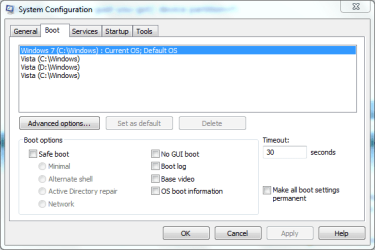
Edit: Accidently, I typed the commands (above post) several times and now I have got 3 Vista Entries in the Windows Boot Manager! :rolleyes: Is it safe to delete the one's marked as 'C:'?, as 'D' is the drive windows vista is on. I've attached a screenshot of this below.
 

Attachments

  • sys-config.PNG
    sys-config.PNG
    14.6 KB · Views: 12

My Computer

OS
Windows 7 & Vista
Memory
3072MB
Graphics Card(s)
Nvida GeForce 8600 GT
Monitor(s) Displays
2
Win7fan,

I would recommend that you verify the good Vista C: or D: entry by booting into it first though, but it will be safe to delete the extra Vista C: and D: entries from msconfig afterwards.
 

My Computer

Computer type
PC/Desktop
Computer Manufacturer/Model Number
Self built custom
OS
64-bit Windows 11 Pro for Workstations
CPU
Intel i7-8700K OC'd to 5 GHz
Motherboard
ASUS ROG Maximus XI Formula Z390
Memory
64 GB (4x16GB) G.SKILL TridentZ RGB DDR4 3600 MHz
Graphics Card(s)
ASUS ROG-STRIX-GTX1080TI-O11G-GAMING
Sound Card
Integrated
Monitor(s) Displays
2 x Samsung Odyssey G7 27"
Screen Resolution
2560x1440
Hard Drives
1TB Samsung 990 PRO M.2,
4TB Samsung 990 PRO PRO M.2,
TerraMaster F8 SSD Plus NAS
PSU
Seasonic Prime Titanium 850W
Case
Thermaltake Core P3
Cooling
Corsair Hydro H115i
Keyboard
Logitech wireless K800
Mouse
Logitech MX Master 4
Internet Speed
2 Gb/s Download and 100 Mb/s Upload
Antivirus
Malwarebyte Anti-Malware Premium
Browser
Google Chrome
Other Info
Logitech Z625 speaker system,
Logitech BRIO 4K Pro webcam,
HP Color LaserJet Pro MFP M477fdn,
APC SMART-UPS RT 1000 XL - SURT1000XLI,
Galaxy S23 Plus phone
Thanks for your help everyone ;) Windows 7 & Vista are now dual booted successfully and are listed in the Windows Boot Manager :D The problem is now solved :).
 

My Computer

OS
Windows 7 & Vista
Memory
3072MB
Graphics Card(s)
Nvida GeForce 8600 GT
Monitor(s) Displays
2
I'm happy to hear that you got it sorted win7fan. :)
 

My Computer

Computer type
PC/Desktop
Computer Manufacturer/Model Number
Self built custom
OS
64-bit Windows 11 Pro for Workstations
CPU
Intel i7-8700K OC'd to 5 GHz
Motherboard
ASUS ROG Maximus XI Formula Z390
Memory
64 GB (4x16GB) G.SKILL TridentZ RGB DDR4 3600 MHz
Graphics Card(s)
ASUS ROG-STRIX-GTX1080TI-O11G-GAMING
Sound Card
Integrated
Monitor(s) Displays
2 x Samsung Odyssey G7 27"
Screen Resolution
2560x1440
Hard Drives
1TB Samsung 990 PRO M.2,
4TB Samsung 990 PRO PRO M.2,
TerraMaster F8 SSD Plus NAS
PSU
Seasonic Prime Titanium 850W
Case
Thermaltake Core P3
Cooling
Corsair Hydro H115i
Keyboard
Logitech wireless K800
Mouse
Logitech MX Master 4
Internet Speed
2 Gb/s Download and 100 Mb/s Upload
Antivirus
Malwarebyte Anti-Malware Premium
Browser
Google Chrome
Other Info
Logitech Z625 speaker system,
Logitech BRIO 4K Pro webcam,
HP Color LaserJet Pro MFP M477fdn,
APC SMART-UPS RT 1000 XL - SURT1000XLI,
Galaxy S23 Plus phone
You're welcome - glad it's working for you:D
 

My Computers

System One System Two

  • Computer type
    PC/Desktop
    OS
    7 X64
    CPU
    i5 8400
    Motherboard
    gigabyte b365m ds3h
    Memory
    2x8gb 3200mhz
    Hard Drives
    various
    PSU
    pure power 11 400w cm
    Case
    Coolermaster
    Cooling
    cryorig m9i
  • Computer type
    PC/Desktop
    OS
    7x64
    CPU
    g5400
    Motherboard
    ga b365m ds3h
    Memory
    8gb ddr4 2400
    PSU
    xfx pro 450w
Back
Top