Windows Boot Manager

Register3D

Banned
Local time
12:58 AM
Messages
29
Location
Helsinki
When i boot up i get a screen that says that i can choose between OS systems Windows 7 and then XP but i want to take away that this screen!! How do i do that?
 

My Computer

OS
Windows 7 Ultimate 64bit and Windows 7 Home Premium on laptop
CPU
3.2 Ghz
Motherboard
ASUSTeK M4A87TD/USB3
Memory
4096MB of RAM
Graphics Card(s)
Radeon HD 6850
Sound Card
AMD HD Audio Device & VIA HD Audio
Monitor(s) Displays
BenQ G2220 HD
Screen Resolution
1900 x 1080
Hard Drives
C: 931 GB, D: 99.9 MB + 1 TB External
Keyboard
Logitech G110
Mouse
Microsoft
Internet Speed
100.0 Mbps
If you want to keep Windows XP:
Contol Panel->System,from the left side go to Advanced System Settings. In StartUp and Recovery click Settings. There unselect Time to display list of Operating Systems,and as default OS put Windows 7.
 

My Computer

Computer type
PC/Desktop
Computer Manufacturer/Model Number
Custom Build
OS
Windows 10 Pro x64
CPU
Intel Core i5 4440 @Stock
Motherboard
Gigabyte Z97 D3H
Memory
4 x 4GB HyperX Fury DDR3
Graphics Card(s)
Gigabyte GTX 1050Ti O4G
Sound Card
Integrated
Monitor(s) Displays
Dell P2417H
Screen Resolution
1920 x 1080
Hard Drives
Samsung EVO 850 120GB / Toshiba DT01ACA050 1TB 7200prm 32MB
PSU
Riotoro Onyx 750W
Case
NZXT H500 Black-Red
Cooling
Stock CPU + NZXT 120mm + 2x120mm red fans
Keyboard
Modecom Volcano Lanparty
Mouse
Asus ROG Gladius / DeepCool E-Pad Plus
Internet Speed
DOCSIS 50/3 Mbit
Browser
Google Chrome
Other Info
Asus K55VJ(i5 3210M, GT635M / 2GB, 8GB DDR3, 500GB HDD)
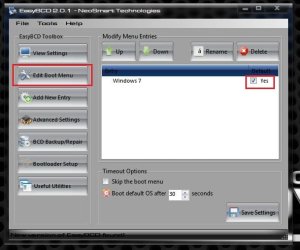
Download and install EasyBCD 2.1 , then run it, click on edit boot menu, and uncheck the boot entry you dont want to use. You may delete it, too .
Capture.JPG

But if both the OSs are in the same HDD, you will be in trouble to use the deleted one .
 
Last edited:

My Computer

Computer type
PC/Desktop
Computer Manufacturer/Model Number
Self Assembled
OS
Microsoft Windows 10 Pro Insider Preview 64-bit
CPU
Intel(R) Core(TM) i3-4130 CPU @ 3.40GHz
Motherboard
Gigabyte Technology Co., Ltd. B85M-D3H
Memory
Corsair Vengence 4GB x2 (8.00GB Dual-Channel DDR3 @ 798MHz)
Graphics Card(s)
2047MB GeForce GTS 450 (ZOTAC International)
Sound Card
Onboard (Realtek High Definition Audio)
Monitor(s) Displays
LG Flatron E2040T
Screen Resolution
1600x900
Hard Drives
Western Digital 1 TB
Seagate 500 GB
PSU
Corsair VS550
Case
Cooler Master K380
Cooling
Cooler Master Seidon 120V Plus
Keyboard
Logitech MK260r
Mouse
Logitech MK260r
Internet Speed
PMPL Broadband
Antivirus
Windows Defender + MBAM
Browser
Firefox
Other Info
Dell Studio 15" Laptop
There u have it!!!
 

Attachments

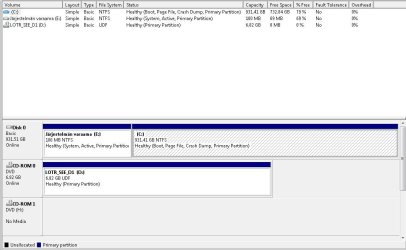
  • PC 2011.JPG
    PC 2011.JPG
    68.4 KB · Views: 23

My Computer

OS
Windows 7 Ultimate 64bit and Windows 7 Home Premium on laptop
CPU
3.2 Ghz
Motherboard
ASUSTeK M4A87TD/USB3
Memory
4096MB of RAM
Graphics Card(s)
Radeon HD 6850
Sound Card
AMD HD Audio Device & VIA HD Audio
Monitor(s) Displays
BenQ G2220 HD
Screen Resolution
1900 x 1080
Hard Drives
C: 931 GB, D: 99.9 MB + 1 TB External
Keyboard
Logitech G110
Mouse
Microsoft
Internet Speed
100.0 Mbps
If you want to keep Windows XP:
Contol Panel->System,from the left side go to Advanced System Settings. In StartUp and Recovery click Settings. There unselect Time to display list of Operating Systems,and as default OS put Windows 7.

Download and install EasyBCD 2.1 , then run it, click on edit boot menu, and uncheck the boot entry you dont want to use. You may delete it, too .
View attachment 169061

But if both the OSs are in the same HDD, you be be in trouble to use the deleted one .

As you only have one OS install, use one of two ways above.
 

My Computer

OS
ME/XP/Vista/Win7
[qouote] from PM.
Okay it didnt work do u have some other solution?
What did not work?
Where did you install Win XP & Windows 7?
 

My Computer

OS
ME/XP/Vista/Win7
Well i went through the tutorial that Brink had posted and now when i used Easybcd to delete the XP, it still comes up a screen that says:
Windows Boot Manager, Use arrows to choose between Os systems, press tab for for choosing a tool, enter to choose and F8 for advanced settings...!
 

My Computer

OS
Windows 7 Ultimate 64bit and Windows 7 Home Premium on laptop
CPU
3.2 Ghz
Motherboard
ASUSTeK M4A87TD/USB3
Memory
4096MB of RAM
Graphics Card(s)
Radeon HD 6850
Sound Card
AMD HD Audio Device & VIA HD Audio
Monitor(s) Displays
BenQ G2220 HD
Screen Resolution
1900 x 1080
Hard Drives
C: 931 GB, D: 99.9 MB + 1 TB External
Keyboard
Logitech G110
Mouse
Microsoft
Internet Speed
100.0 Mbps
Well i went through the tutorial that Brink had posted and now when i used Easybcd to delete the XP, it still comes up a screen that says:
Windows Boot Manager, Use arrows to choose between Os systems, press tab for for choosing a tool, enter to choose and F8 for advanced settings...!

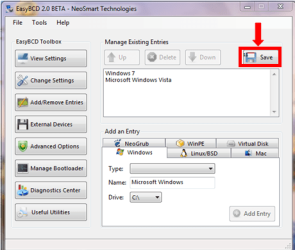
Did you save.

EasyBCD 002.PNG
 

My Computer

OS
ME/XP/Vista/Win7
Back
Top