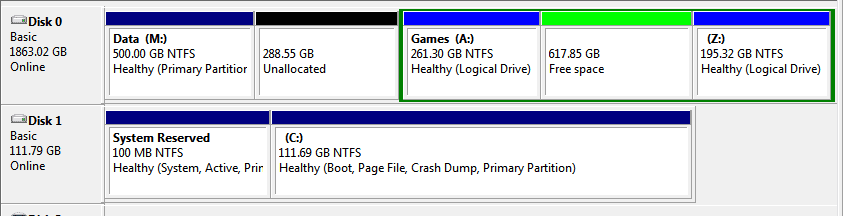
I have two drives.
1. A 120 GB SSD containing the windows system.
2. A 2TB HDD partitioned into three.
Following a failed system restore I was unable to boot into windows and had to use the windows recovery disc.
To cut a long story short, I ended up with two Windows 7 Operating Systems, the original in the SSD and a "recovery" one in a partition in the HDD.
I eventually ended up with a PC that would boot into the original O/S but only after selecting an OS via the Windows Boot Manager page which appeared during the boot sequence.
I deleted the "recovery" OS from the HDD partition but the Windows Boot Manager page still halted the boot sequence and required a OS choice.
Using msconfig :System Configuration:Boot Tab, and even though I had deleted the OS from the Z partition, I had the following:
Windows 7 (Z:\Windows): Default OS
Windows 7 (C:\Windows): Current OS
I made the Windows 7 (C:\Windows) the default OS but the Windows Boot Manager page still appears for a couple of seconds. However, the boot sequence now carries on to load windows normally.
If I delete Windows 7 (Z:\Windows) from the System Configuration:Boot Tab menu, will the Windows Boot Manager disappear.
Having got a nearly working system back I do not want any more boot problems.
1. A 120 GB SSD containing the windows system.
2. A 2TB HDD partitioned into three.
Following a failed system restore I was unable to boot into windows and had to use the windows recovery disc.
To cut a long story short, I ended up with two Windows 7 Operating Systems, the original in the SSD and a "recovery" one in a partition in the HDD.
I eventually ended up with a PC that would boot into the original O/S but only after selecting an OS via the Windows Boot Manager page which appeared during the boot sequence.
I deleted the "recovery" OS from the HDD partition but the Windows Boot Manager page still halted the boot sequence and required a OS choice.
Using msconfig :System Configuration:Boot Tab, and even though I had deleted the OS from the Z partition, I had the following:
Windows 7 (Z:\Windows): Default OS
Windows 7 (C:\Windows): Current OS
I made the Windows 7 (C:\Windows) the default OS but the Windows Boot Manager page still appears for a couple of seconds. However, the boot sequence now carries on to load windows normally.
If I delete Windows 7 (Z:\Windows) from the System Configuration:Boot Tab menu, will the Windows Boot Manager disappear.
Having got a nearly working system back I do not want any more boot problems.
My Computer
- Computer type
- PC/Desktop
- OS
- window 7 64 bit