windows boot problem

Funnyfarm

New member
Local time
6:39 PM
Messages
4
I just up graded my computer from windows xp pro to windows 7 Ultimate. When it boots up now I had three chooses of booting :1. Previous Earlier version 2. Windows 7
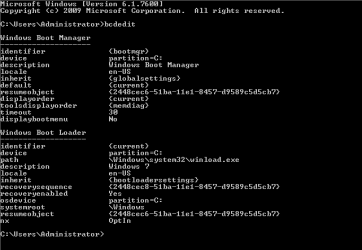
3. Microsoft windows xp professional setup: I was able to get the previous earlier version off of boot screen, but cannot get the Microsoft windows xp professional setup off the boot screen and even though I set windows 7 as primary boot, when I go and boot but do not chose windows 7 it will boot using the microsoft windows xp pro setup but just crashes: I Used easy bcd 2.0 to get rid of Previous Earlier version, it doesn't even show Microsoft windows xp pro setup . below is a snipe of my boot manager from bcdedit Any suggestions : windows 7 works okay but I just want to get rid of this annoyance.
 
Last edited by a moderator:

My Computer

Computer Manufacturer/Model Number
e- machines T3256
OS
windows 7 32 it
CPU
amd athlon 3200
Memory
2 GB
Graphics Card(s)
128 internal
Sound Card
built in
Hard Drives
160 gb + 14 gb
PSU
450 Watt
Case
mid
Cooling
cpu and main
Did you delete XP when installing Win7? Are you sure?

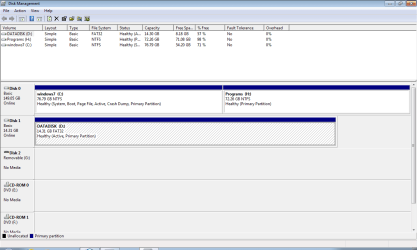
Post up a screenshot of your maximized Disk management drive map with listings, using Snipping Tool in Start Menu. Tell us what's on each partition. Chances are one has an unfinished install of XP, maybe even the old XP Pro install.
 
Boot file

Here is my bcd file:

Windows boot manager
 

Attachments

  • Capture.PNG
    Capture.PNG
    4.3 KB · Views: 13
Last edited:

My Computer

Computer Manufacturer/Model Number
e- machines T3256
OS
windows 7 32 it
CPU
amd athlon 3200
Memory
2 GB
Graphics Card(s)
128 internal
Sound Card
built in
Hard Drives
160 gb + 14 gb
PSU
450 Watt
Case
mid
Cooling
cpu and main
I asked for DIsk Management drive map with listings.

Type Disk Management in Start Search box.

Open and maximize the window.

Open Snipping Tool in Start Menu, draw a rectangular box around drive map and all listings.

Post back file using Paper Clip in Reply box.

Tell us what is on each partition.

Please follow instructions completely if you want help.
 
my disk management file:

C: Drive -- windows 7 - bcdedit program -firefox
D: Drive mainly old files no system files
H: Drive MS office 7
 

Attachments

  • disk management.PNG
    disk management.PNG
    20.4 KB · Views: 15

My Computer

Computer Manufacturer/Model Number
e- machines T3256
OS
windows 7 32 it
CPU
amd athlon 3200
Memory
2 GB
Graphics Card(s)
128 internal
Sound Card
built in
Hard Drives
160 gb + 14 gb
PSU
450 Watt
Case
mid
Cooling
cpu and main
Was D formerly XP partition? Only OS partitions should be marked Active. Check if there is a Windows file on there.

How was Win7 installed, from boot or run from XP?

You can try booting the DVD Repair console to run Startup Repair a few times to see if it will sort it out.
 
on drive D there are only files that a wanted to keep like outlook express e-mails files
small downloaded programs : pictures documents .
As my windows 7 was an upgrade copy I installed it with windows xp on but when asked for upgrade or clean install I said clean install and i t warned me windows xp would be lost, I still used clean install.
 

My Computer

Computer Manufacturer/Model Number
e- machines T3256
OS
windows 7 32 it
CPU
amd athlon 3200
Memory
2 GB
Graphics Card(s)
128 internal
Sound Card
built in
Hard Drives
160 gb + 14 gb
PSU
450 Watt
Case
mid
Cooling
cpu and main
In the future you should boot the installer to install Win7.

I have no idea why XP Pro setup would be on your boot menu unless it was left over from when XP was installed and only showed up now. You can check in msconfig>Boot to see if it has a listing to Delete.

I would not recommend rebuilding the BCD as the commands are complicated and could bork your system if you make an error. The automated methods here as they are more user-friendly. So try running Startup Repair a few times to see if it will sort it out.

When you get ready to reinstall wipe the boot sector first with Clean command: SSD - HDD Optimize for Windows Reinstallation
 
Back
Top