Solved \$windows.~bt\windows\system32\winload.exe corrupted or missing

LilBro

New member
Local time
4:25 PM
Messages
19
I have begun getting an error message on boot that that the file \$windows.~bt\windows\system32\winload.exe corrupted or missing. I've done the following:

1) Booted from Win7/64 Install (upgrade) disc and ran Repair System. No system errors found.

2) Booted from Win7/64 Install (upgrade) disc, opened command prompt and ran bootrec.exe /fixmbr, bootrec.exe /fixboot, and bootrec.exe /RebuildBcd.

3) Booted from Win7/64 Install (upgrade) disc, opened command prompt and ran chkdsk /f /r

4) Booted from Win7/64 Install (upgrade) disc, opened command prompt and ran sfc /scannow. For this program I keep getting a message there is a system repair pending which requires a reboot to complete. Reboot Windows and try again.

If the Win7 disc is not in the CD/DVD drive there error returns.

This started appearing BEFORE I installed Ubuntu 12.10 on the H: drive (SATA0) while Win7/64 resides on the C: drive (SATA1). I had been running EasyBCD so I could dual boot Win7/32 but have since uninstalled it.

I've tried:

Windows Repair Console; chkdsk /f /r; sfc /scannow; bootrec.exe /fixmbr, /fixboot, /rebuildbcd

The system will NOT boot unless the Win7 Home Premium Upgrade disc is in the CD/DVD drive.

Suggestions?
 

My Computer

Computer Manufacturer/Model Number
Home built
OS
Windows 7 Home Premium 64
CPU
AMD 64 X2 5400+ Black Edition
Motherboard
Gigabyte MA770-UD3
Memory
8 Gb
Graphics Card(s)
ATi Radeon HD 4600
Sound Card
Integrated
Please post back a screenshot of your maximized Disk Management drive map and listings:

1. Type Disk Management in Start Search box.
2. Open Disk Mgmt. window and maximize it.
3. Type Snipping Tool in Start Search box.
4. Open Snipping Tool, choose Rectangular Snip, click New, draw a box around full drive map and all listings.
5, Save Snip, attach using paper clip in Reply Box.

Tell us what is on each partition.

Normally you would assure SysReserved or C is marked Active then run Startup Repair - Run 3 Separate Times to fully repair or rewrite boot files. Try that first. But they have be corrupted beyond repair.
 
Drive Maps

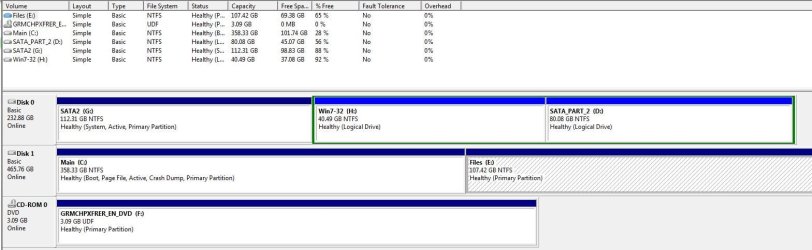
Attached is my drive map.
C: is OS / Boot disk
H: has Ubuntu
All other drives are files
Got the error message BEFORE Ubuntu was installed.
There is no \$windows.~bt... directory on this computer, or on my laptop or on my wife's laptop.
 

Attachments

  • Drives.JPG
    Drives.JPG
    90.8 KB · Views: 111

My Computer

Computer Manufacturer/Model Number
Home built
OS
Windows 7 Home Premium 64
CPU
AMD 64 X2 5400+ Black Edition
Motherboard
Gigabyte MA770-UD3
Memory
8 Gb
Graphics Card(s)
ATi Radeon HD 4600
Sound Card
Integrated
The System boot files are clearly on the large data partition G instead of on C where they belong, as signified by the System flag which doesn't lie or hide.

Unplug all other HD's except C, swap Disk0 data cable to it or make sure it's set first HD to boot in BIOS setup (after DVD drive).

Boot into WIn7 DVD or System Repair Disk to run Startup Repair - Run 3 Separate Times until C holds the System Active flags and boots on its own.

Then plug back in the other HD's, Mark G Inactive boot Ubuntu when needed using the one-time BIOS Boot Menu key at boot. This keeps the HD's independent to come and go as you please, and keeps GRUB off of Win7.
 
Last edited:
\$windows etc.

The error message started popping up in the last couple weeks. The two drives have been set up as shown for the past couple years. Both C & G drives have Boot directories with what appear to be similar subdirectories and files.
 

My Computer

Computer Manufacturer/Model Number
Home built
OS
Windows 7 Home Premium 64
CPU
AMD 64 X2 5400+ Black Edition
Motherboard
Gigabyte MA770-UD3
Memory
8 Gb
Graphics Card(s)
ATi Radeon HD 4600
Sound Card
Integrated
G clearly holds the only System Boot files currently being used on the system. I told you how to write them to C where they belong and should have been in the first place had you correctly unplugged all other HD's when installing Win7. If you want to continue booting Win7 off of another HD then that's up to you, but it's not correct.
 
\$Windows et cetera

Cable swap worked. Now to load Ubuntu so I can whack the unneeded files on G:.
Thanks.
 

My Computer

Computer Manufacturer/Model Number
Home built
OS
Windows 7 Home Premium 64
CPU
AMD 64 X2 5400+ Black Edition
Motherboard
Gigabyte MA770-UD3
Memory
8 Gb
Graphics Card(s)
ATi Radeon HD 4600
Sound Card
Integrated
Correction, cable swap did not work. From Windows 7 Home Edition install disc, I started Windows RE, I ran:
bcdedit /export C:\BCD_Backup
C:
cd boot
attrib bcd -s -h -r
ren c:\boot\bcd bcd.old
bootrec /Rebuild Bcd
Rebooted.

Received boot error:
File: \Boot\BCD
Status: 0xc000000f
Info: Error occurred while attempting to read boot configuration data

Rebooted into Windows RE and ran:

bootrec /FixMBR
Rebooted - same error

Rebooted into Windows RE and ran:
bootrec /FixBoot
Rebooted - same error

Now what? If the Windows Cd is in the drive, all is well even if I do NOT select Boot from CD/DVD.
 

My Computer

Computer Manufacturer/Model Number
Home built
OS
Windows 7 Home Premium 64
CPU
AMD 64 X2 5400+ Black Edition
Motherboard
Gigabyte MA770-UD3
Memory
8 Gb
Graphics Card(s)
ATi Radeon HD 4600
Sound Card
Integrated
Excuse me, but where were you advised to do any of that?

I gave you very specfic steps to follow to write the System boot files to C, steps which have worked countless thousands of times here. Why did you ignore them and make up your own?
 
Got it working following your steps. Now you can go back on your meds and chill. Thanks.
 

My Computer

Computer Manufacturer/Model Number
Home built
OS
Windows 7 Home Premium 64
CPU
AMD 64 X2 5400+ Black Edition
Motherboard
Gigabyte MA770-UD3
Memory
8 Gb
Graphics Card(s)
ATi Radeon HD 4600
Sound Card
Integrated
And it only took two weeks since you apparently couldn't find your ADHD meds to be able to follow steps or ask back questions how to?

I'm surfing the North Shore of Oahu right now at one of my half dozen homes because I can follow instructions as well as I give them.

You're welcome. ;)
 
Back
Top