Solved Windows cannot access the specified device, path or file

72010

New member
Member
Local time
7:34 AM
Messages
26
When I try to play a CD, I get this error. I can only play it with auto play.

Here is a link to a video which shows the problem in detail: cd error - YouTube

Does anyone know how to fix this?
 

My Computer

Computer type
PC/Desktop
Computer Manufacturer/Model Number
Custom Built
OS
Windows 7 Professional x64
CPU
Intel i7 6700K 4GHz
Motherboard
Asus Z170-AR
Memory
32GB Corsair Vengance LPX Red 2133Mhz
Graphics Card(s)
NVIDIA GTX 960 (MSI 2GB)
Sound Card
Onboard Realtek HD Audio
Monitor(s) Displays
BENQ GW2455
Screen Resolution
1920x1080
Hard Drives
1TB Toshiba HDD (DATA)
250GB Samsung EVO 850 SSD (OS)
PSU
Thermaltake 500W
Case
Corsair 500R Black
Cooling
Noctua NH U9S
Keyboard
Logitech MK120
Mouse
Logitech MK120
Internet Speed
30 Mbits Down, 1 Mbit Up
Antivirus
Kaspersky
Browser
Chrome
As you have win 7 pro it can be a restriction on Group Policy (GPedit).

- Do a check disk. On a CMD window, type chkdsk c: /f. It will ask if you want to schedule a disk check on next boot = yes. Reboot. Pay attention on the results, specially bad blocks or bad clusters.
- Do a system file check. On a CMD window, type sfc /scannow.
 

My Computers

System One System Two

  • Computer type
    PC/Desktop
    Computer Manufacturer/Model Number
    custom build
    OS
    Windows 7 HP 64
    CPU
    i5 6600K - 800MHz to 4200MHz
    Motherboard
    GA-Z170-HD3P
    Memory
    4+4G GSkill DDR4 3000
    Graphics Card(s)
    IG - Intel 530
    Monitor(s) Displays
    Samsung 226BW
    Screen Resolution
    1680x1050
    Hard Drives
    (1) -1 SM951 – 128GB M.2 AHCI PCIe SSD drive for Windows 7 and Lubuntu
    (2) -1 WD SATA 3 - 1T for Data
    (3) -1 WD SATA 3 - 1T for backup
    PSU
    Thermaltake 450W TR2 gold
    Keyboard
    Old and good Chicony mechanical keyboard
    Mouse
    Logitech mX performance - 9 buttons (had to disable some)
    Internet Speed
    500Mb/s
    Browser
    Firefox 64
    Other Info
    TinyWall firewall
  • Computer type
    Laptop
    System Manufacturer/Model Number
    Asus Q550LF
    OS
    Windows 7 Pro
    CPU
    i7-4500U 800MHz to 3.0GHz
    Motherboard
    Asus Q550LF
    Memory
    (4+4)G DDR3 1600
    Graphics Card(s)
    IG intel 4400 + NVIDIA GeForce GT 745M
    Sound Card
    Realtek
    Monitor(s) Displays
    LG Display LP156WF4-SPH1
    Screen Resolution
    1920 x 1080
    Hard Drives
    BX500 120G SSD for Windows and programs +
    1T HDD for data
    Internet Speed
    500 Mb/s
    Browser
    Firefox
    Other Info
    TinyWall firewall
I did the steps you said but i'm still having the same issue.
If anyone has any other suggestions please let me know, I don't really want to have to re-install windows.
 

My Computer

Computer type
PC/Desktop
Computer Manufacturer/Model Number
Custom Built
OS
Windows 7 Professional x64
CPU
Intel i7 6700K 4GHz
Motherboard
Asus Z170-AR
Memory
32GB Corsair Vengance LPX Red 2133Mhz
Graphics Card(s)
NVIDIA GTX 960 (MSI 2GB)
Sound Card
Onboard Realtek HD Audio
Monitor(s) Displays
BENQ GW2455
Screen Resolution
1920x1080
Hard Drives
1TB Toshiba HDD (DATA)
250GB Samsung EVO 850 SSD (OS)
PSU
Thermaltake 500W
Case
Corsair 500R Black
Cooling
Noctua NH U9S
Keyboard
Logitech MK120
Mouse
Logitech MK120
Internet Speed
30 Mbits Down, 1 Mbit Up
Antivirus
Kaspersky
Browser
Chrome
Did you check the Group Policy (GPedit.msc)?
 

My Computers

System One System Two

  • Computer type
    PC/Desktop
    Computer Manufacturer/Model Number
    custom build
    OS
    Windows 7 HP 64
    CPU
    i5 6600K - 800MHz to 4200MHz
    Motherboard
    GA-Z170-HD3P
    Memory
    4+4G GSkill DDR4 3000
    Graphics Card(s)
    IG - Intel 530
    Monitor(s) Displays
    Samsung 226BW
    Screen Resolution
    1680x1050
    Hard Drives
    (1) -1 SM951 – 128GB M.2 AHCI PCIe SSD drive for Windows 7 and Lubuntu
    (2) -1 WD SATA 3 - 1T for Data
    (3) -1 WD SATA 3 - 1T for backup
    PSU
    Thermaltake 450W TR2 gold
    Keyboard
    Old and good Chicony mechanical keyboard
    Mouse
    Logitech mX performance - 9 buttons (had to disable some)
    Internet Speed
    500Mb/s
    Browser
    Firefox 64
    Other Info
    TinyWall firewall
  • Computer type
    Laptop
    System Manufacturer/Model Number
    Asus Q550LF
    OS
    Windows 7 Pro
    CPU
    i7-4500U 800MHz to 3.0GHz
    Motherboard
    Asus Q550LF
    Memory
    (4+4)G DDR3 1600
    Graphics Card(s)
    IG intel 4400 + NVIDIA GeForce GT 745M
    Sound Card
    Realtek
    Monitor(s) Displays
    LG Display LP156WF4-SPH1
    Screen Resolution
    1920 x 1080
    Hard Drives
    BX500 120G SSD for Windows and programs +
    1T HDD for data
    Internet Speed
    500 Mb/s
    Browser
    Firefox
    Other Info
    TinyWall firewall
no only the chkdsk and the scan. I'm not sure what I need to change in the group policy, would you be able to tell me what I need to check in there?
 

My Computer

Computer type
PC/Desktop
Computer Manufacturer/Model Number
Custom Built
OS
Windows 7 Professional x64
CPU
Intel i7 6700K 4GHz
Motherboard
Asus Z170-AR
Memory
32GB Corsair Vengance LPX Red 2133Mhz
Graphics Card(s)
NVIDIA GTX 960 (MSI 2GB)
Sound Card
Onboard Realtek HD Audio
Monitor(s) Displays
BENQ GW2455
Screen Resolution
1920x1080
Hard Drives
1TB Toshiba HDD (DATA)
250GB Samsung EVO 850 SSD (OS)
PSU
Thermaltake 500W
Case
Corsair 500R Black
Cooling
Noctua NH U9S
Keyboard
Logitech MK120
Mouse
Logitech MK120
Internet Speed
30 Mbits Down, 1 Mbit Up
Antivirus
Kaspersky
Browser
Chrome
Sorry, my Win 7 is HP and it doesn't have Group Policy (GPedit.msc).
You have to open it and look for hardware restrictions.
 

My Computers

System One System Two

  • Computer type
    PC/Desktop
    Computer Manufacturer/Model Number
    custom build
    OS
    Windows 7 HP 64
    CPU
    i5 6600K - 800MHz to 4200MHz
    Motherboard
    GA-Z170-HD3P
    Memory
    4+4G GSkill DDR4 3000
    Graphics Card(s)
    IG - Intel 530
    Monitor(s) Displays
    Samsung 226BW
    Screen Resolution
    1680x1050
    Hard Drives
    (1) -1 SM951 – 128GB M.2 AHCI PCIe SSD drive for Windows 7 and Lubuntu
    (2) -1 WD SATA 3 - 1T for Data
    (3) -1 WD SATA 3 - 1T for backup
    PSU
    Thermaltake 450W TR2 gold
    Keyboard
    Old and good Chicony mechanical keyboard
    Mouse
    Logitech mX performance - 9 buttons (had to disable some)
    Internet Speed
    500Mb/s
    Browser
    Firefox 64
    Other Info
    TinyWall firewall
  • Computer type
    Laptop
    System Manufacturer/Model Number
    Asus Q550LF
    OS
    Windows 7 Pro
    CPU
    i7-4500U 800MHz to 3.0GHz
    Motherboard
    Asus Q550LF
    Memory
    (4+4)G DDR3 1600
    Graphics Card(s)
    IG intel 4400 + NVIDIA GeForce GT 745M
    Sound Card
    Realtek
    Monitor(s) Displays
    LG Display LP156WF4-SPH1
    Screen Resolution
    1920 x 1080
    Hard Drives
    BX500 120G SSD for Windows and programs +
    1T HDD for data
    Internet Speed
    500 Mb/s
    Browser
    Firefox
    Other Info
    TinyWall firewall
You may try system restore if you can restore Windows to a point before you encountered this issue.

Alternatively, reset group policy to the default Local Group Policy - Reset to Default .

Or use Regedit and lookup the registry entry at

Code:
HKEY_CLASSES_ROOT\DVD\shell\play\command
Default Regkey Data should read:

Code:
"%ProgramFiles(x86)%\Windows Media Player\wmplayer.exe" /prefetch:4 /device:DVD "%L"
wmplayer DVD.PNG

- Does issue occur only on DVD drive, or is problem on CD drive too?
 

My Computer

Computer type
PC/Desktop
OS
Windows 7 x64, Vista x64, 8.1 smartphone
CPU
Intel E8400 65W 64-bit
Motherboard
Gigabyte EP45-UD3LR
Memory
DDR2 2 x 2GB, 1GB x 2
Graphics Card(s)
XFX Radeon HD5750
Sound Card
AMD High Definition Audio; Realtek High Definition Audio
Monitor(s) Displays
iiyama prolite X2377HDS
Screen Resolution
1920 x 1080
Hard Drives
500GB 7200 rpm Seagate ST3500413AS 16MB, 500GB 5400 rpm Toshiba MQ02ABF050H 32MB, 200GB 7200 rpm Seagate ST3200820AS 8MB, 2TB 7200 rpm Western Digital WD20EZRX 64MB
PSU
Enermax Liberty Modular
Case
Antec P193 Midi Tower
Keyboard
Mionix ZIBAL 60
Mouse
Razer USB 2.0 Diamondback Mouse or Huion Graphics Tablet
Browser
Internet Explorer, Lunascape, Firefox, Opera, Avast Safezone
I checked the registry and all looked good in there. The problem happens when i try to play an audio CD, I haven't tried a DVD but I would imagine the same thing would happen
 

My Computer

Computer type
PC/Desktop
Computer Manufacturer/Model Number
Custom Built
OS
Windows 7 Professional x64
CPU
Intel i7 6700K 4GHz
Motherboard
Asus Z170-AR
Memory
32GB Corsair Vengance LPX Red 2133Mhz
Graphics Card(s)
NVIDIA GTX 960 (MSI 2GB)
Sound Card
Onboard Realtek HD Audio
Monitor(s) Displays
BENQ GW2455
Screen Resolution
1920x1080
Hard Drives
1TB Toshiba HDD (DATA)
250GB Samsung EVO 850 SSD (OS)
PSU
Thermaltake 500W
Case
Corsair 500R Black
Cooling
Noctua NH U9S
Keyboard
Logitech MK120
Mouse
Logitech MK120
Internet Speed
30 Mbits Down, 1 Mbit Up
Antivirus
Kaspersky
Browser
Chrome
You could look up the File and Folder Path Permissions.

We are interested in Permissions for SYSTEM (since the object does not work in AutoPlay).

What are the Permissions set:

For folder path C:\Program Files (x86)\Windows Media Player\
For Application C:\Program Files (x86)\Windows Media Player\wmplayer.exe ?
 

My Computer

Computer type
PC/Desktop
OS
Windows 7 x64, Vista x64, 8.1 smartphone
CPU
Intel E8400 65W 64-bit
Motherboard
Gigabyte EP45-UD3LR
Memory
DDR2 2 x 2GB, 1GB x 2
Graphics Card(s)
XFX Radeon HD5750
Sound Card
AMD High Definition Audio; Realtek High Definition Audio
Monitor(s) Displays
iiyama prolite X2377HDS
Screen Resolution
1920 x 1080
Hard Drives
500GB 7200 rpm Seagate ST3500413AS 16MB, 500GB 5400 rpm Toshiba MQ02ABF050H 32MB, 200GB 7200 rpm Seagate ST3200820AS 8MB, 2TB 7200 rpm Western Digital WD20EZRX 64MB
PSU
Enermax Liberty Modular
Case
Antec P193 Midi Tower
Keyboard
Mionix ZIBAL 60
Mouse
Razer USB 2.0 Diamondback Mouse or Huion Graphics Tablet
Browser
Internet Explorer, Lunascape, Firefox, Opera, Avast Safezone
Last edited:

My Computer

Computer type
PC/Desktop
Computer Manufacturer/Model Number
Custom Built
OS
Windows 7 Professional x64
CPU
Intel i7 6700K 4GHz
Motherboard
Asus Z170-AR
Memory
32GB Corsair Vengance LPX Red 2133Mhz
Graphics Card(s)
NVIDIA GTX 960 (MSI 2GB)
Sound Card
Onboard Realtek HD Audio
Monitor(s) Displays
BENQ GW2455
Screen Resolution
1920x1080
Hard Drives
1TB Toshiba HDD (DATA)
250GB Samsung EVO 850 SSD (OS)
PSU
Thermaltake 500W
Case
Corsair 500R Black
Cooling
Noctua NH U9S
Keyboard
Logitech MK120
Mouse
Logitech MK120
Internet Speed
30 Mbits Down, 1 Mbit Up
Antivirus
Kaspersky
Browser
Chrome

My Computer

Computer type
PC/Desktop
OS
Windows 7 x64, Vista x64, 8.1 smartphone
CPU
Intel E8400 65W 64-bit
Motherboard
Gigabyte EP45-UD3LR
Memory
DDR2 2 x 2GB, 1GB x 2
Graphics Card(s)
XFX Radeon HD5750
Sound Card
AMD High Definition Audio; Realtek High Definition Audio
Monitor(s) Displays
iiyama prolite X2377HDS
Screen Resolution
1920 x 1080
Hard Drives
500GB 7200 rpm Seagate ST3500413AS 16MB, 500GB 5400 rpm Toshiba MQ02ABF050H 32MB, 200GB 7200 rpm Seagate ST3200820AS 8MB, 2TB 7200 rpm Western Digital WD20EZRX 64MB
PSU
Enermax Liberty Modular
Case
Antec P193 Midi Tower
Keyboard
Mionix ZIBAL 60
Mouse
Razer USB 2.0 Diamondback Mouse or Huion Graphics Tablet
Browser
Internet Explorer, Lunascape, Firefox, Opera, Avast Safezone
ok so what else could be the cause of the problem?
 

My Computer

Computer type
PC/Desktop
Computer Manufacturer/Model Number
Custom Built
OS
Windows 7 Professional x64
CPU
Intel i7 6700K 4GHz
Motherboard
Asus Z170-AR
Memory
32GB Corsair Vengance LPX Red 2133Mhz
Graphics Card(s)
NVIDIA GTX 960 (MSI 2GB)
Sound Card
Onboard Realtek HD Audio
Monitor(s) Displays
BENQ GW2455
Screen Resolution
1920x1080
Hard Drives
1TB Toshiba HDD (DATA)
250GB Samsung EVO 850 SSD (OS)
PSU
Thermaltake 500W
Case
Corsair 500R Black
Cooling
Noctua NH U9S
Keyboard
Logitech MK120
Mouse
Logitech MK120
Internet Speed
30 Mbits Down, 1 Mbit Up
Antivirus
Kaspersky
Browser
Chrome
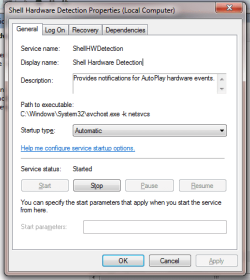
It seems likely that the path is okay, however you may like to check to see if the Shell Hardware Detection service has been disabled:

In Start Menu type services.msc then press ENTER,
In services.msc, Scroll down until you see Shell Hardware Detection, and make sur that it is Running, and the Startup Type is set to Automatic. If not, change the service status by double-clicking it, select start and then change the Startup Type to automatic.
 

My Computer

Computer type
PC/Desktop
OS
Windows 7 x64, Vista x64, 8.1 smartphone
CPU
Intel E8400 65W 64-bit
Motherboard
Gigabyte EP45-UD3LR
Memory
DDR2 2 x 2GB, 1GB x 2
Graphics Card(s)
XFX Radeon HD5750
Sound Card
AMD High Definition Audio; Realtek High Definition Audio
Monitor(s) Displays
iiyama prolite X2377HDS
Screen Resolution
1920 x 1080
Hard Drives
500GB 7200 rpm Seagate ST3500413AS 16MB, 500GB 5400 rpm Toshiba MQ02ABF050H 32MB, 200GB 7200 rpm Seagate ST3200820AS 8MB, 2TB 7200 rpm Western Digital WD20EZRX 64MB
PSU
Enermax Liberty Modular
Case
Antec P193 Midi Tower
Keyboard
Mionix ZIBAL 60
Mouse
Razer USB 2.0 Diamondback Mouse or Huion Graphics Tablet
Browser
Internet Explorer, Lunascape, Firefox, Opera, Avast Safezone
I checked and it is running and set to automatic
 

Attachments

  • shell.PNG
    shell.PNG
    42.8 KB · Views: 24

My Computer

Computer type
PC/Desktop
Computer Manufacturer/Model Number
Custom Built
OS
Windows 7 Professional x64
CPU
Intel i7 6700K 4GHz
Motherboard
Asus Z170-AR
Memory
32GB Corsair Vengance LPX Red 2133Mhz
Graphics Card(s)
NVIDIA GTX 960 (MSI 2GB)
Sound Card
Onboard Realtek HD Audio
Monitor(s) Displays
BENQ GW2455
Screen Resolution
1920x1080
Hard Drives
1TB Toshiba HDD (DATA)
250GB Samsung EVO 850 SSD (OS)
PSU
Thermaltake 500W
Case
Corsair 500R Black
Cooling
Noctua NH U9S
Keyboard
Logitech MK120
Mouse
Logitech MK120
Internet Speed
30 Mbits Down, 1 Mbit Up
Antivirus
Kaspersky
Browser
Chrome
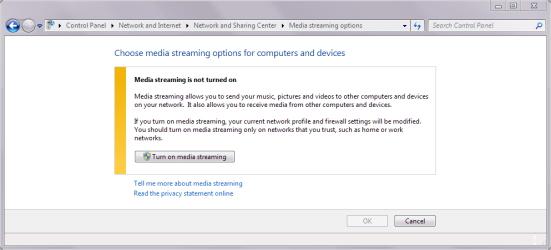
Hello 72010, I am running out of ideas. There could be a problem with Network Sharing or Media Sharing over a Network, as I see from your vid you have a Network device. So I am curious as if this has caused the issue?

Could you check if media streaming is enabled?

media streaming options.PNG


The Media Streaming options can be found at Control Panel > Network and Internet > Network and Sharing Center > Media Streaming options. By default it is switched off.
 

My Computer

Computer type
PC/Desktop
OS
Windows 7 x64, Vista x64, 8.1 smartphone
CPU
Intel E8400 65W 64-bit
Motherboard
Gigabyte EP45-UD3LR
Memory
DDR2 2 x 2GB, 1GB x 2
Graphics Card(s)
XFX Radeon HD5750
Sound Card
AMD High Definition Audio; Realtek High Definition Audio
Monitor(s) Displays
iiyama prolite X2377HDS
Screen Resolution
1920 x 1080
Hard Drives
500GB 7200 rpm Seagate ST3500413AS 16MB, 500GB 5400 rpm Toshiba MQ02ABF050H 32MB, 200GB 7200 rpm Seagate ST3200820AS 8MB, 2TB 7200 rpm Western Digital WD20EZRX 64MB
PSU
Enermax Liberty Modular
Case
Antec P193 Midi Tower
Keyboard
Mionix ZIBAL 60
Mouse
Razer USB 2.0 Diamondback Mouse or Huion Graphics Tablet
Browser
Internet Explorer, Lunascape, Firefox, Opera, Avast Safezone
i turned media streaming on but same problem :/
 

My Computer

Computer type
PC/Desktop
Computer Manufacturer/Model Number
Custom Built
OS
Windows 7 Professional x64
CPU
Intel i7 6700K 4GHz
Motherboard
Asus Z170-AR
Memory
32GB Corsair Vengance LPX Red 2133Mhz
Graphics Card(s)
NVIDIA GTX 960 (MSI 2GB)
Sound Card
Onboard Realtek HD Audio
Monitor(s) Displays
BENQ GW2455
Screen Resolution
1920x1080
Hard Drives
1TB Toshiba HDD (DATA)
250GB Samsung EVO 850 SSD (OS)
PSU
Thermaltake 500W
Case
Corsair 500R Black
Cooling
Noctua NH U9S
Keyboard
Logitech MK120
Mouse
Logitech MK120
Internet Speed
30 Mbits Down, 1 Mbit Up
Antivirus
Kaspersky
Browser
Chrome
does anyone have any other suggestions?
 

My Computer

Computer type
PC/Desktop
Computer Manufacturer/Model Number
Custom Built
OS
Windows 7 Professional x64
CPU
Intel i7 6700K 4GHz
Motherboard
Asus Z170-AR
Memory
32GB Corsair Vengance LPX Red 2133Mhz
Graphics Card(s)
NVIDIA GTX 960 (MSI 2GB)
Sound Card
Onboard Realtek HD Audio
Monitor(s) Displays
BENQ GW2455
Screen Resolution
1920x1080
Hard Drives
1TB Toshiba HDD (DATA)
250GB Samsung EVO 850 SSD (OS)
PSU
Thermaltake 500W
Case
Corsair 500R Black
Cooling
Noctua NH U9S
Keyboard
Logitech MK120
Mouse
Logitech MK120
Internet Speed
30 Mbits Down, 1 Mbit Up
Antivirus
Kaspersky
Browser
Chrome
PROBLEM HAS BEEN SOLVED
Using a new user account has solved the problem and it works normally
 

My Computer

Computer type
PC/Desktop
Computer Manufacturer/Model Number
Custom Built
OS
Windows 7 Professional x64
CPU
Intel i7 6700K 4GHz
Motherboard
Asus Z170-AR
Memory
32GB Corsair Vengance LPX Red 2133Mhz
Graphics Card(s)
NVIDIA GTX 960 (MSI 2GB)
Sound Card
Onboard Realtek HD Audio
Monitor(s) Displays
BENQ GW2455
Screen Resolution
1920x1080
Hard Drives
1TB Toshiba HDD (DATA)
250GB Samsung EVO 850 SSD (OS)
PSU
Thermaltake 500W
Case
Corsair 500R Black
Cooling
Noctua NH U9S
Keyboard
Logitech MK120
Mouse
Logitech MK120
Internet Speed
30 Mbits Down, 1 Mbit Up
Antivirus
Kaspersky
Browser
Chrome
Back
Top