

So here I am. Almost finished with re-installing AI Suite II. What a nightmare that was. Took me hours to figure out what was going on when the setup did not start properly. Still after a long time I managed to figure it out on my own without asking help. But for this I think I do need help.
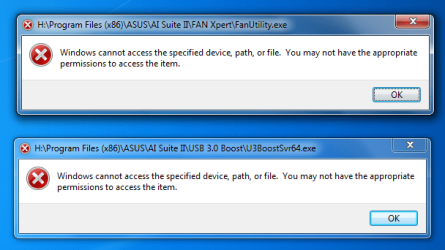
Anyways when I log on with ANY user account I get what you see below.
Edit: I get it faster or maybe just only now with the admin account. It didn't occur yet on my other account and I'm logged in on it for 25 min.
I've installed AI Suite on an other drive but on the C drive it has also present in two locations I know off but maybe this has nothing to do with the problem as its not AI Suite but ASUS right?
C:\Program Files (x86)\ASUS\AAHM\1.00.14\
aaHMLib.dll
aaHMSvc.exe
aaHMSvc.ini
AsAcpi.dll
asacpiex.dll
C:\Program Files (x86)\ASUS\AsSysCtrlService\1.00.11\
AsAcpi.dll
asacpiex.dll
AsSysCtrlService.exe
AsSysCtrlSrvcHelp.dll
AsSysCtrlSrvcIns.exe
AsSysCtrlSrvcIns.exe.manifest
config.ini
C:\Program Files (x86)\ASUS\AXSP\1.00.13\
ATKEX.dll
atkexComSvc.exe
PEbiosinterface32.dll
C:\Program Files (x86)\ASUS\AXSP\1.00.14\
ATKEX.dll
atkexComSvc.exe
PEbiosinterface32.dll
Location 2
C:\Program Files\ASUS\ASUS USB 3.0 Boost Storage Driver\
ASUSstor.inf
ASUSumsc.cat
ASUSumsc.inf
ASUSUninstall.exe
C:\Program Files\ASUS\ASUS USB 3.0 Boost Storage Driver\amd64\
ASUScrnt.sys
ASUSstpt.sys
ASUSumsc.sys
ASUSwhnt.sys
ASUSxpsp.sys
How to fix this error message WITHOUT re-installing to C drive?
Anyways when I log on with ANY user account I get what you see below.
Edit: I get it faster or maybe just only now with the admin account. It didn't occur yet on my other account and I'm logged in on it for 25 min.
I've installed AI Suite on an other drive but on the C drive it has also present in two locations I know off but maybe this has nothing to do with the problem as its not AI Suite but ASUS right?
C:\Program Files (x86)\ASUS\AAHM\1.00.14\
aaHMLib.dll
aaHMSvc.exe
aaHMSvc.ini
AsAcpi.dll
asacpiex.dll
C:\Program Files (x86)\ASUS\AsSysCtrlService\1.00.11\
AsAcpi.dll
asacpiex.dll
AsSysCtrlService.exe
AsSysCtrlSrvcHelp.dll
AsSysCtrlSrvcIns.exe
AsSysCtrlSrvcIns.exe.manifest
config.ini
C:\Program Files (x86)\ASUS\AXSP\1.00.13\
ATKEX.dll
atkexComSvc.exe
PEbiosinterface32.dll
C:\Program Files (x86)\ASUS\AXSP\1.00.14\
ATKEX.dll
atkexComSvc.exe
PEbiosinterface32.dll
Location 2
C:\Program Files\ASUS\ASUS USB 3.0 Boost Storage Driver\
ASUSstor.inf
ASUSumsc.cat
ASUSumsc.inf
ASUSUninstall.exe
C:\Program Files\ASUS\ASUS USB 3.0 Boost Storage Driver\amd64\
ASUScrnt.sys
ASUSstpt.sys
ASUSumsc.sys
ASUSwhnt.sys
ASUSxpsp.sys
How to fix this error message WITHOUT re-installing to C drive?
Attachments
Last edited:
My Computer
At a glance
Windows 7 Ultimate 64-bit
- Computer type
- PC/Desktop
- Computer Manufacturer/Model Number
- Asus
- OS
- Windows 7 Ultimate 64-bit
- Browser
- Chrome

