Windows Cannot Acess \\IPaddress\sharedfolder

tys

New member
Hi all,
I need some desperate help!

I'm running one computer, which is logged on locally with a share folder that is linked onto 3 other Windows 7 computers that are logged onto the domain.

the problem is that - after a while off sharing this folder, we cannot connect to the Network Share. We receive this message: "Check the spelling of the name. Other there might be a problem with your network. Error code: 0x80004005". This has happened before when adding the network share via the computername. So I thought it might be a DNS problem so I added the share via the IP address (static by the way) and this solved it for a few days. But it has happened again, with no one accessing this share.
I gone onto the PC that is sharing the folder and it states it is a network share and is being shared. But from any computer, we cannot access it.

I've ping the IP from the computers - successful.

I've checked to see if "Client for Microsoft Network" is applied and it is on the PCS trying to access the share.

Permissions have been set correctly.

I'm thinking it might be because it is logged in locally. I've joined the PC to the domain, but it's logged in locally.


Thanks :) !!
 
Last edited:

My Computer

OS
Windows 7 Professional x64
Have you tried clearing the cached credentials (I assume that it has asked you for a username and password?), and readding when it prompts again on first connect after you do that? I've done this before to fix a similar issue. You can clear cached credentials from Control Panel if I recall correctly.

Also be sure that in Network/Sharing Center, under Advanced Sharing Options, that file and print sharing is enabled on all PC's.
 

My Computer

Computer Manufacturer/Model Number
Custom Build
OS
Windows 7 Ultimate x64, BackTrack Linux 5 R2, Windows XP
CPU
Intel Core i7 920 OC to 3.6GHz
Motherboard
ASUS P6T Deluxe V2
Memory
Corsair 6GB DDR3
Graphics Card(s)
ATI Radeon 4890
Monitor(s) Displays
ASUS 23"
Screen Resolution
1920x1080
Hard Drives
150GB Velociraptor
640GB
PSU
Corsair 850w
Case
CoolerMaster HAF932
Cooling
CoolerMaster V8
Internet Speed
30Mbps
It doesn't ask for credentials. double click on the share and it tries to load it up but then I receive that error message.
 

My Computer

OS
Windows 7 Professional x64
It now isn't working through the name, but is working through the IP address. Does this mean it's a DNS issue? Although in the past the name tends to stop working and then a day later the IP address stops.
 

My Computer

OS
Windows 7 Professional x64
Hello,

In addition......What happens if instead you logging in locally, log on to your domain and see if your issue persist?
I'm thinking it might be because it is logged in locally. I've joined the PC to the domain, but it's logged in locally.
 

My Computer

Computer Manufacturer/Model Number
Lenovo Desktop/Samsung Laptop
OS
Win7 & Win8 64bit
CPU
Intel i5
Internet Speed
Charter-20 Mbps
Antivirus
Avast
Browser
FF, IE9 and Chrome
Sorry, yes. I forgot to mention this. I did do this, and seemed to be working, but yesterday I weren't able to view the Network Share via the Domain Name, still working VIA IP address though.
 

My Computer

OS
Windows 7 Professional x64
Will you be able to provide us ipconfig /all output coming from your Server and 1 computer for us to review?
 

My Computer

Computer Manufacturer/Model Number
Lenovo Desktop/Samsung Laptop
OS
Win7 & Win8 64bit
CPU
Intel i5
Internet Speed
Charter-20 Mbps
Antivirus
Avast
Browser
FF, IE9 and Chrome
It has now done it again.... Very strange. This time it lasted around 2/3 weeks before the "connection" dropped out.
 

My Computer

OS
Windows 7 Professional x64
Please see Post# 7, if you don't mind giving us output.
 

My Computer

Computer Manufacturer/Model Number
Lenovo Desktop/Samsung Laptop
OS
Win7 & Win8 64bit
CPU
Intel i5
Internet Speed
Charter-20 Mbps
Antivirus
Avast
Browser
FF, IE9 and Chrome
hi, see both attachments. "Untitled" being ipconfig /all from a laptop that cannot access the share. "Untitled1" being ipconfig /all from the Domain Controller.
 

Attachments

  • Untitled.png
    Untitled.png
    85.3 KB · Views: 3
  • Untitled1.png
    Untitled1.png
    39 KB · Views: 3

My Computer

OS
Windows 7 Professional x64
Hello,

Sorry for the late reply....
The output on the Client PC and your Server looks great and there's no issue there.
I would investigate on the hardware side if you have not done this route yet. Try changing the network cable, using Cat5e or higher category is better.
This time it lasted around 2/3 weeks before the "connection" dropped out.
I don't know if you done driver update, it might do wonders.

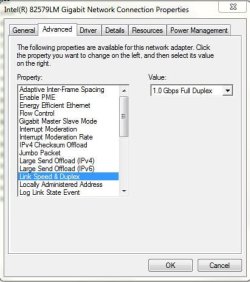
Also, changing the Speed & Duplex might be another option - you may try 1Gbps(if your NIC supports this) or 100Mbps, see attached image.
 

Attachments

  • Speed and Duplex setting.JPG
    Speed and Duplex setting.JPG
    46.4 KB · Views: 0

My Computer

Computer Manufacturer/Model Number
Lenovo Desktop/Samsung Laptop
OS
Win7 & Win8 64bit
CPU
Intel i5
Internet Speed
Charter-20 Mbps
Antivirus
Avast
Browser
FF, IE9 and Chrome
I have tested this the past couple of weeks and it seems to be working fine now... I didn't do any of those changes? Any idea why it would just start working?
 

My Computer

OS
Windows 7 Professional x64
Network hiccups, maybe you've rebooted some devices that helped.
 

My Computer

Computer Manufacturer/Model Number
Lenovo Desktop/Samsung Laptop
OS
Win7 & Win8 64bit
CPU
Intel i5
Internet Speed
Charter-20 Mbps
Antivirus
Avast
Browser
FF, IE9 and Chrome
Back
Top