Windows cannot be installed to this disk

BrightonBob

New member
Local time
4:10 PM
Messages
11
I purchased a new Seagate 240 GB SSD to install Windows 7 64 bit on. I am unable to do so, getting the message "Windows cannot be installed to this disk. The computer's hardware may not support booting top this disk. Ensure that the disk's controller is enabled in the computer's BIOS menu." I have the BIOS set to AHCI and the SSD is the only drive in the machine. I tried partitioning and formatting and making the partition active in my Windows 7 32 bit installation, but still no success.

I cleaned the disk with diskpart, then attempted again. As soon as I get to the page with the drive listed, windows shows the exclamation point and says "Windows cannot be installed on this drive." I loaded Intel(R) ICH10R SATA AHCI Controller from Intel the download refreshed, but still the same. I also tried the drivers from the ASUS site (slightly different filename), same result.

As a point that I don't understand but may be relevant, Windows 7 loses the drive, then reacquires it over and over. I have watched it in BIOS and it seems to be stable there. I also have a Windows 8 installation and the drive is stable there,also.
 

My Computer

Computer type
PC/Desktop
Computer Manufacturer/Model Number
Custom Build
OS
Windows 7 Pro 32 bit
CPU
Intel Q6600
Motherboard
Asus P5Q Deluxe
Memory
Kingston Hyper 4 GB
Graphics Card(s)
ATI Radeon HD4800
Hard Drives
Seagate ST240HM000 (240 GB SSD)
(2) Samsung HD103UJ (1 TB Internal)
Seagate ST1500DL003 (1.5 TB Internal)
Western Digital WD1002FAEX (1 TB Internal)
Western Digital WD20 EZRX (2 TB USB External)
Seagate 9Y7865 (300GB External)
Antivirus
AVG Free
Browser
Chrome/Firefox
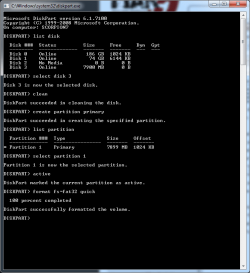
Create the partition with diskpart and mark it as active like this
 

Attachments

  • diskpart.png
    diskpart.png
    18 KB · Views: 10

My Computer

Computer type
PC/Desktop
Computer Manufacturer/Model Number
Custom build
OS
Windows 7 64bit
CPU
AMD Athlon(tm) X4 750K Quad Core Processor
Motherboard
MSI
Memory
8GB
Graphics Card(s)
AMD Radeon HD 7750 XFX Core Edition
Hard Drives
ST1000DM003-1CH162 ATA Device 1TB
Antivirus
AVG
Browser
FireFox
As a point that I don't understand but may be relevant, Windows 7 loses the drive, then reacquires it over and over. I have watched it in BIOS and it seems to be stable there. I also have a Windows 8 installation and the drive is stable there,also.

Is Windows 8 installed?
If YES.
Can you post a screen shot of Disk management?
http://www.sevenforums.com/tutorials/9733-screenshots-files-upload-post-seven-forums.html
http://www.sevenforums.com/tutorials/274797-disk-management-post-screen-capture-image.html

What is the make & model of the motherboard?
 

My Computer

OS
ME/XP/Vista/Win7
Suggestion by trowieuk was not successful. Same error message.

I presently have a dual boot system with Windows 7 32 bit and Windows 8 64 bit. My motherboard is Asus P5Q Deluxe. I am trying to install Windows 7 64 bit on a new SSD. I have one essential program that will not run on W8, but I want to go to 64 bit for Adobe Photoshop CC. I will attempt the screenshots requested, but I need to boot into W8 first. Will make new post.
 

My Computer

Computer type
PC/Desktop
Computer Manufacturer/Model Number
Custom Build
OS
Windows 7 Pro 32 bit
CPU
Intel Q6600
Motherboard
Asus P5Q Deluxe
Memory
Kingston Hyper 4 GB
Graphics Card(s)
ATI Radeon HD4800
Hard Drives
Seagate ST240HM000 (240 GB SSD)
(2) Samsung HD103UJ (1 TB Internal)
Seagate ST1500DL003 (1.5 TB Internal)
Western Digital WD1002FAEX (1 TB Internal)
Western Digital WD20 EZRX (2 TB USB External)
Seagate 9Y7865 (300GB External)
Antivirus
AVG Free
Browser
Chrome/Firefox
Suggestion by trowieuk was not successful. Same error message.

I presently have a dual boot system with Windows 7 32 bit and Windows 8 64 bit. My motherboard is Asus P5Q Deluxe. I am trying to install Windows 7 64 bit on a new SSD. I have one essential program that will not run on W8, but I want to go to 64 bit for Adobe Photoshop CC. I will attempt the screenshots requested, but I need to boot into W8 first. Will make new post.


Vista, Windows 7 & Windows 8/8.1, will not install to a FAT32 formatted HDD.
 

My Computer

OS
ME/XP/Vista/Win7
Yeah, I caught that. I formatted NTFS. Still the same error message though.

Do you still think the screen shots will help?
 

My Computer

Computer type
PC/Desktop
Computer Manufacturer/Model Number
Custom Build
OS
Windows 7 Pro 32 bit
CPU
Intel Q6600
Motherboard
Asus P5Q Deluxe
Memory
Kingston Hyper 4 GB
Graphics Card(s)
ATI Radeon HD4800
Hard Drives
Seagate ST240HM000 (240 GB SSD)
(2) Samsung HD103UJ (1 TB Internal)
Seagate ST1500DL003 (1.5 TB Internal)
Western Digital WD1002FAEX (1 TB Internal)
Western Digital WD20 EZRX (2 TB USB External)
Seagate 9Y7865 (300GB External)
Antivirus
AVG Free
Browser
Chrome/Firefox

My Computer

Computer Manufacturer/Model Number
HP, Dell, Gateway, Toshiba - 4 laptops and 2 desktops
OS
Vista, Windows7, Mint Mate, Zorin, Windows 8
CPU
from 1.6GHz Duo to i7
Monitor(s) Displays
2x HP w2207
Hard Drives
5x HDD, 7x SSD, 12x Externals
Keyboard
with trackball - no mices
Mouse
Trackball mice
Internet Speed
DSL 6000
If it is a SSD you can simply copy your contents over via firewire cable (if it contains one). Also, it has to be formatted NTFS for it to work with 64 bit.
 

My Computer

Computer type
Laptop
Computer Manufacturer/Model Number
HP DV5 1132 Entertainment Notebook
OS
Windows 7 Ultimate x64
CPU
Intel Mobile Core 2 Duo T5800 @ 2.00GHz
Motherboard
Quanta 3602
Memory
4.00GB Dual-Channel DDR2 @ 398MHz (6-6-6-18)
Graphics Card(s)
Intel Mobile Intel 4 Series Express Chipset Family (Merom)
Sound Card
IDT High Def
Monitor(s) Displays
Built-in OEM Display, 26" Toshiba External Flatscreen
Screen Resolution
1280x768
Hard Drives
Fujitsu 220GB (SATA-II 3.0Gb/s OEM), Crucial SSD M4 128GB (SATA-III 6.0Gb/s)
PSU
OEM Laptop PSU
Case
OEM
Cooling
OEM
Keyboard
Built-in OEM
Mouse
USB Optical Mouse
Internet Speed
Turtle
Antivirus
Microsoft Secirty Essentials
Browser
Firefox
Other Info
Broadcom 802.11g Network Adapter
Is your SSD SATA2 or SATA3, as your motherboard has SATA2 ports, no SATA3.
 

My Computer

OS
ME/XP/Vista/Win7

My Computer

Computer type
PC/Desktop
Computer Manufacturer/Model Number
Custom Build
OS
Windows 7 Pro 32 bit
CPU
Intel Q6600
Motherboard
Asus P5Q Deluxe
Memory
Kingston Hyper 4 GB
Graphics Card(s)
ATI Radeon HD4800
Hard Drives
Seagate ST240HM000 (240 GB SSD)
(2) Samsung HD103UJ (1 TB Internal)
Seagate ST1500DL003 (1.5 TB Internal)
Western Digital WD1002FAEX (1 TB Internal)
Western Digital WD20 EZRX (2 TB USB External)
Seagate 9Y7865 (300GB External)
Antivirus
AVG Free
Browser
Chrome/Firefox
Is your SSD SATA2 or SATA3, as your motherboard has SATA2 ports, no SATA3.

Still should work even though MB is SATA2.
 

My Computer

Computer type
PC/Desktop
Computer Manufacturer/Model Number
Custom Build
OS
Windows 7 Pro 32 bit
CPU
Intel Q6600
Motherboard
Asus P5Q Deluxe
Memory
Kingston Hyper 4 GB
Graphics Card(s)
ATI Radeon HD4800
Hard Drives
Seagate ST240HM000 (240 GB SSD)
(2) Samsung HD103UJ (1 TB Internal)
Seagate ST1500DL003 (1.5 TB Internal)
Western Digital WD1002FAEX (1 TB Internal)
Western Digital WD20 EZRX (2 TB USB External)
Seagate 9Y7865 (300GB External)
Antivirus
AVG Free
Browser
Chrome/Firefox
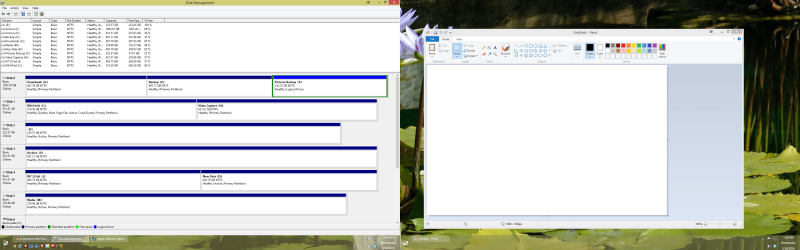
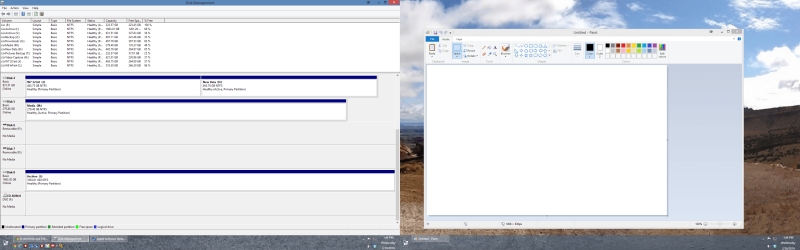
Here are the screenshots.DskMgmt1.png

DskMgmt2.png
 

My Computer

Computer type
PC/Desktop
Computer Manufacturer/Model Number
Custom Build
OS
Windows 7 Pro 32 bit
CPU
Intel Q6600
Motherboard
Asus P5Q Deluxe
Memory
Kingston Hyper 4 GB
Graphics Card(s)
ATI Radeon HD4800
Hard Drives
Seagate ST240HM000 (240 GB SSD)
(2) Samsung HD103UJ (1 TB Internal)
Seagate ST1500DL003 (1.5 TB Internal)
Western Digital WD1002FAEX (1 TB Internal)
Western Digital WD20 EZRX (2 TB USB External)
Seagate 9Y7865 (300GB External)
Antivirus
AVG Free
Browser
Chrome/Firefox
You only need one ACTIVE Partition on disk 0, you have four all over the place.
 

My Computer

OS
ME/XP/Vista/Win7
You only need one ACTIVE Partition on disk 0, you have four all over the place.

Actually, there are no active partitions on disk 0.

I don't think that that speaks to my problem as I only have the 240 GB SSD connected when I try to install Windows on it.
 

My Computer

Computer type
PC/Desktop
Computer Manufacturer/Model Number
Custom Build
OS
Windows 7 Pro 32 bit
CPU
Intel Q6600
Motherboard
Asus P5Q Deluxe
Memory
Kingston Hyper 4 GB
Graphics Card(s)
ATI Radeon HD4800
Hard Drives
Seagate ST240HM000 (240 GB SSD)
(2) Samsung HD103UJ (1 TB Internal)
Seagate ST1500DL003 (1.5 TB Internal)
Western Digital WD1002FAEX (1 TB Internal)
Western Digital WD20 EZRX (2 TB USB External)
Seagate 9Y7865 (300GB External)
Antivirus
AVG Free
Browser
Chrome/Firefox
I think your problem might be one of the other disks onto which the installer is trying to put the new bootmgr. Disconnect ALL disks except the SSD and try to install then.

Note: the installer always tries to install the bootmgr to the first active disk it finds. But you do not want that.
 

My Computer

Computer Manufacturer/Model Number
HP, Dell, Gateway, Toshiba - 4 laptops and 2 desktops
OS
Vista, Windows7, Mint Mate, Zorin, Windows 8
CPU
from 1.6GHz Duo to i7
Monitor(s) Displays
2x HP w2207
Hard Drives
5x HDD, 7x SSD, 12x Externals
Keyboard
with trackball - no mices
Mouse
Trackball mice
Internet Speed
DSL 6000
I think your problem might be one of the other disks onto which the installer is trying to put the new bootmgr. Disconnect ALL disks except the SSD and try to install then.

Note: the installer always tries to install the bootmgr to the first active disk it finds. But you do not want that.

I have NO other disks connected when trying to install Windows on the SSD.
 

My Computer

Computer type
PC/Desktop
Computer Manufacturer/Model Number
Custom Build
OS
Windows 7 Pro 32 bit
CPU
Intel Q6600
Motherboard
Asus P5Q Deluxe
Memory
Kingston Hyper 4 GB
Graphics Card(s)
ATI Radeon HD4800
Hard Drives
Seagate ST240HM000 (240 GB SSD)
(2) Samsung HD103UJ (1 TB Internal)
Seagate ST1500DL003 (1.5 TB Internal)
Western Digital WD1002FAEX (1 TB Internal)
Western Digital WD20 EZRX (2 TB USB External)
Seagate 9Y7865 (300GB External)
Antivirus
AVG Free
Browser
Chrome/Firefox
Hmm, you are doing the right thing. But then I have no clue why you get this trouble. I have installed 7 on a dozen different SSDs and never seen that.
 

My Computer

Computer Manufacturer/Model Number
HP, Dell, Gateway, Toshiba - 4 laptops and 2 desktops
OS
Vista, Windows7, Mint Mate, Zorin, Windows 8
CPU
from 1.6GHz Duo to i7
Monitor(s) Displays
2x HP w2207
Hard Drives
5x HDD, 7x SSD, 12x Externals
Keyboard
with trackball - no mices
Mouse
Trackball mice
Internet Speed
DSL 6000
Well, the problem is definitely in the BIOS. When I set to ATI or RAID, the error message goes away. I was able to load Windows with the MB configured as RAID, but Windows wouldn't run. Said installation could not be completed on this computer. I'm tired of messing with it now. I'll try again tomorrow with MB config as ATI and see if it will install.
 

My Computer

Computer type
PC/Desktop
Computer Manufacturer/Model Number
Custom Build
OS
Windows 7 Pro 32 bit
CPU
Intel Q6600
Motherboard
Asus P5Q Deluxe
Memory
Kingston Hyper 4 GB
Graphics Card(s)
ATI Radeon HD4800
Hard Drives
Seagate ST240HM000 (240 GB SSD)
(2) Samsung HD103UJ (1 TB Internal)
Seagate ST1500DL003 (1.5 TB Internal)
Western Digital WD1002FAEX (1 TB Internal)
Western Digital WD20 EZRX (2 TB USB External)
Seagate 9Y7865 (300GB External)
Antivirus
AVG Free
Browser
Chrome/Firefox
Does anyone know whether or not I will immediately lose my 32 bit installation? I'm installing both on the same serial number. I on,y want one installation, but I'd like a little time to get programs loaded and configured before I lose the 32 bit installation.
 

My Computer

Computer type
PC/Desktop
Computer Manufacturer/Model Number
Custom Build
OS
Windows 7 Pro 32 bit
CPU
Intel Q6600
Motherboard
Asus P5Q Deluxe
Memory
Kingston Hyper 4 GB
Graphics Card(s)
ATI Radeon HD4800
Hard Drives
Seagate ST240HM000 (240 GB SSD)
(2) Samsung HD103UJ (1 TB Internal)
Seagate ST1500DL003 (1.5 TB Internal)
Western Digital WD1002FAEX (1 TB Internal)
Western Digital WD20 EZRX (2 TB USB External)
Seagate 9Y7865 (300GB External)
Antivirus
AVG Free
Browser
Chrome/Firefox
You will loose your 32 bit install if you format it. Unplug all other drives ( as already suggested )

What are you talking about, " I`m installing both on the same serial number " ???
 

My Computer

Computer type
PC/Desktop
Computer Manufacturer/Model Number
Skylake Special #666
OS
Windows 10 Pro x64
CPU
Intel Core i7 6700K
Motherboard
Asus Sabertooth Z170 Mark 1
Memory
GSkill TridentZ RGB 16GB 3600 16-16-16-36
Graphics Card(s)
EVGA GTX 980 Ti SC x2
Sound Card
Realtek High Definition
Monitor(s) Displays
AOC G2460PG
Screen Resolution
1920 x 1080 144Hz
Hard Drives
Samsung 860 Pro 256GB, Seagate Barracuda 4TB x2
PSU
EVGA 1000 P2, EVGA White Custom Braided Cables
Case
Corsair Vengeance C70 Gunmetal Black
Cooling
Corsair H100i v2, Corsair ML120 x2, Thermal Grizzly Kryonaut
Keyboard
Logitech G910 Orion Spectrum
Mouse
Logitech G700s
Internet Speed
Verizon Fios Quantum Gateway 75/75
Antivirus
Windows Defender, Malwarebytes Free 3.8.3
Browser
Chrome
Other Info
Corsair SP120 x4, LG Blu-ray Drive, Durabrand HT-395 100 Watt Dolby Digital Amp, Corsair H2100 Wireless 7.1 Headset
Back
Top