Windows Cannot Install Required Files

Anpippin

New member
Local time
6:51 PM
Messages
128
Whenever I try to install windows I get an error saying, Windows cannot install required files. Make sure all files required for installation are available, and restart the installation. Error code 0x080070001. I know there is nothing wrong with the iso I burned because I have used it to install Windows 7 on my laptop. Oh and if it helps I had Windows 7 on this computer before but my explorer.exe messed up and now it won't let me reinstall Windows. Anyone know what I can do to fix my Windows not installing?
 

My Computer

Computer Manufacturer/Model Number
Custom Build
OS
Windows 7 Ultimate 64-Bit
CPU
Pentium D 2.80GHz LGA Socket 775
Motherboard
EVGA nForce 730i
Memory
4GB DDR2 800MHz Corsair Gaming Memory
Graphics Card(s)
Nvidia 9600GT
Sound Card
Nvidia 9600GT SPDIF/Built in Monitor Speakers
Monitor(s) Displays
Samsung Syncmaster 22"
Screen Resolution
1680x1050
Hard Drives
250GB Western Digital, 300GB Western Digital, and a 500GB Caviar Green Western Digital
PSU
BFG 450 Watt
Case
Thermaltake Black Widow Soprano RS 101 PC Gaming Case
Cooling
Asus V60
Keyboard
Logitech G19, Logitech G15, and Steelseries/Ideazon Zboard
Mouse
Logitech G9x, Logitech G500, and Microsoft Wireless 5000
Internet Speed
DSL
are you trying to do a repair install or a clean install??
 

My Computer

Computer type
PC/Desktop
Computer Manufacturer/Model Number
LENOVO K450 @3.0GHZ
OS
64-bit Windows 8.1 Pro
CPU
Core(TM) i5 CPU 4330 Haswell @ 3.20GHz
Motherboard
LENOVO
Memory
12.00 GB
Graphics Card(s)
Intel(R) HD Graphics
Sound Card
Intel HD integtrated
Monitor(s) Displays
HP 25' ISP Monitor
Screen Resolution
1900/1020
Hard Drives
(1) ST1000DM003-1CH162 (2) Generic STORAGE DEVICE USB Device (3) Generic STORAGE DEVICE USB Device
Internet Speed
100mb down/10mb up

My Computer

Computer Manufacturer/Model Number
Custom Build
OS
Windows 7 Ultimate 64-Bit
CPU
Pentium D 2.80GHz LGA Socket 775
Motherboard
EVGA nForce 730i
Memory
4GB DDR2 800MHz Corsair Gaming Memory
Graphics Card(s)
Nvidia 9600GT
Sound Card
Nvidia 9600GT SPDIF/Built in Monitor Speakers
Monitor(s) Displays
Samsung Syncmaster 22"
Screen Resolution
1680x1050
Hard Drives
250GB Western Digital, 300GB Western Digital, and a 500GB Caviar Green Western Digital
PSU
BFG 450 Watt
Case
Thermaltake Black Widow Soprano RS 101 PC Gaming Case
Cooling
Asus V60
Keyboard
Logitech G19, Logitech G15, and Steelseries/Ideazon Zboard
Mouse
Logitech G9x, Logitech G500, and Microsoft Wireless 5000
Internet Speed
DSL
Try booting from the DVD, not OS. Set your BIOS to boot from CD?DVD, not the Hard drive.
 

My Computer

Computer type
PC/Desktop
Computer Manufacturer/Model Number
Dell XPS 420
OS
Windows 10, Home Clean Install
CPU
Intel Core2 processsor Q8200(2.33Ghz 1333FSB) Quad Core Tech
Motherboard
Dell
Memory
6 gb
Graphics Card(s)
ATI Radeon 256MB HD3650
Sound Card
Intergrated 7.1 Channel Audio
Monitor(s) Displays
Dell SP2009W 20"
Hard Drives
640 GB Serial ATA Hard drive
Cooling
Fan
Keyboard
Dell USB Keyboard
Mouse
Dell Premium Optical USB
Internet Speed
DSL 2.85
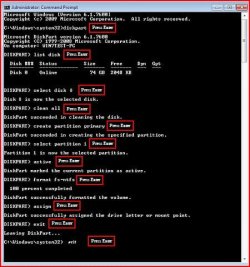
Try a full clean & full format.

1) Boot DVD.

2) Press Shift+F10 (for command prompt)

Type in command line

DISKPART
LIST DISK
SELECT DISK # (win 7 HD)
CLEAN ALL
CREATE PARTITION PRIMARY
SELECT PARTITION 1
ACTIVE
FORMAT=NTFS
ASSIGN
EXIT
EXIT
 

Attachments

  • Capture5.JPG
    Capture5.JPG
    45.3 KB · Views: 3,366

My Computer

OS
ME/XP/Vista/Win7
Sometimes this error can result from a faulty CD/DVD or even HDD drive ... also check that the CD/DVD isn't damaged or of poor quality.
 

My Computer

Computer type
PC/Desktop
Computer Manufacturer/Model Number
Self Built
OS
Windows 7 Ultimate 64bit
CPU
AMD Phenom Quad core 9950 black edition
Motherboard
Gigabyte
Memory
16Gb
Graphics Card(s)
2x XFX Radeon 5850
Sound Card
PCI Express X-Fi Titanium / Logitech G35
Monitor(s) Displays
2x HP 2410i
Screen Resolution
1920x1080
Hard Drives
2x 500Gb Seagate
1x 300Gb Seagate
1x 1Tb Seagate
2x 1Tb Hitatchi
PSU
Jean Tech Storm 700W
Case
Cooler Master COSMOS S
Cooling
Akasa Evo Blue Pro
Keyboard
Logitech G15
Mouse
Mad Catz M.M.O. 7
Internet Speed
12mb
Try booting from the DVD, not OS. Set your BIOS to boot from CD?DVD, not the Hard drive.
I can only boot from my cd/dvd right now, because I have no os on my system, because I formatted my hard drive.
 

My Computer

Computer Manufacturer/Model Number
Custom Build
OS
Windows 7 Ultimate 64-Bit
CPU
Pentium D 2.80GHz LGA Socket 775
Motherboard
EVGA nForce 730i
Memory
4GB DDR2 800MHz Corsair Gaming Memory
Graphics Card(s)
Nvidia 9600GT
Sound Card
Nvidia 9600GT SPDIF/Built in Monitor Speakers
Monitor(s) Displays
Samsung Syncmaster 22"
Screen Resolution
1680x1050
Hard Drives
250GB Western Digital, 300GB Western Digital, and a 500GB Caviar Green Western Digital
PSU
BFG 450 Watt
Case
Thermaltake Black Widow Soprano RS 101 PC Gaming Case
Cooling
Asus V60
Keyboard
Logitech G19, Logitech G15, and Steelseries/Ideazon Zboard
Mouse
Logitech G9x, Logitech G500, and Microsoft Wireless 5000
Internet Speed
DSL
Someone in another thread said changing around their memory helped.
 

My Computer

Computer Manufacturer/Model Number
Homebuilt
OS
Windows 7 x64
CPU
i7-2600K
Motherboard
Asus P8Z77-v Pro
Memory
8 G
Graphics Card(s)
GTX 480
Sound Card
Onboard
Monitor(s) Displays
LG W2753V
Screen Resolution
1920x1080
Hard Drives
Crucial M4 128 G SSD

My Computer

Computer Manufacturer/Model Number
Custom Build
OS
Windows 7 Ultimate 64-Bit
CPU
Pentium D 2.80GHz LGA Socket 775
Motherboard
EVGA nForce 730i
Memory
4GB DDR2 800MHz Corsair Gaming Memory
Graphics Card(s)
Nvidia 9600GT
Sound Card
Nvidia 9600GT SPDIF/Built in Monitor Speakers
Monitor(s) Displays
Samsung Syncmaster 22"
Screen Resolution
1680x1050
Hard Drives
250GB Western Digital, 300GB Western Digital, and a 500GB Caviar Green Western Digital
PSU
BFG 450 Watt
Case
Thermaltake Black Widow Soprano RS 101 PC Gaming Case
Cooling
Asus V60
Keyboard
Logitech G19, Logitech G15, and Steelseries/Ideazon Zboard
Mouse
Logitech G9x, Logitech G500, and Microsoft Wireless 5000
Internet Speed
DSL

My Computer

Computer type
PC/Desktop
Computer Manufacturer/Model Number
Dell XPS 420
OS
Windows 10, Home Clean Install
CPU
Intel Core2 processsor Q8200(2.33Ghz 1333FSB) Quad Core Tech
Motherboard
Dell
Memory
6 gb
Graphics Card(s)
ATI Radeon 256MB HD3650
Sound Card
Intergrated 7.1 Channel Audio
Monitor(s) Displays
Dell SP2009W 20"
Hard Drives
640 GB Serial ATA Hard drive
Cooling
Fan
Keyboard
Dell USB Keyboard
Mouse
Dell Premium Optical USB
Internet Speed
DSL 2.85

My Computer

Computer Manufacturer/Model Number
Custom Build
OS
Windows 7 Ultimate 64-Bit
CPU
Pentium D 2.80GHz LGA Socket 775
Motherboard
EVGA nForce 730i
Memory
4GB DDR2 800MHz Corsair Gaming Memory
Graphics Card(s)
Nvidia 9600GT
Sound Card
Nvidia 9600GT SPDIF/Built in Monitor Speakers
Monitor(s) Displays
Samsung Syncmaster 22"
Screen Resolution
1680x1050
Hard Drives
250GB Western Digital, 300GB Western Digital, and a 500GB Caviar Green Western Digital
PSU
BFG 450 Watt
Case
Thermaltake Black Widow Soprano RS 101 PC Gaming Case
Cooling
Asus V60
Keyboard
Logitech G19, Logitech G15, and Steelseries/Ideazon Zboard
Mouse
Logitech G9x, Logitech G500, and Microsoft Wireless 5000
Internet Speed
DSL
I got my software from the Microsoft Store, and when I try to start up my computer I get Windows could not start because the following file is missing or corrupt: <Windows Root>\system32\hal.dll
Please re-install a copy of the above file. Even though I have formatted my hard drive already.
 

My Computer

Computer Manufacturer/Model Number
Custom Build
OS
Windows 7 Ultimate 64-Bit
CPU
Pentium D 2.80GHz LGA Socket 775
Motherboard
EVGA nForce 730i
Memory
4GB DDR2 800MHz Corsair Gaming Memory
Graphics Card(s)
Nvidia 9600GT
Sound Card
Nvidia 9600GT SPDIF/Built in Monitor Speakers
Monitor(s) Displays
Samsung Syncmaster 22"
Screen Resolution
1680x1050
Hard Drives
250GB Western Digital, 300GB Western Digital, and a 500GB Caviar Green Western Digital
PSU
BFG 450 Watt
Case
Thermaltake Black Widow Soprano RS 101 PC Gaming Case
Cooling
Asus V60
Keyboard
Logitech G19, Logitech G15, and Steelseries/Ideazon Zboard
Mouse
Logitech G9x, Logitech G500, and Microsoft Wireless 5000
Internet Speed
DSL
I got my software from the Microsoft Store, and when I try to start up my computer I get Windows could not start because the following file is missing or corrupt: <Windows Root>\system32\hal.dll
Please re-install a copy of the above file. Even though I have formatted my hard drive already.
Try to reset the bios settings. Or be sure CD is first in Boot order
 

My Computer

Computer Manufacturer/Model Number
HP
OS
Windows 8 Pro
Memory
8gb
Monitor(s) Displays
23 inch Acer
I am having this problem, too. This is what is happening. A friend gave me his DELL Inspririon 531 2007 Desktop. It has a pirated copy of 7 ultimate x64 (which I am not sure if this supports 64 bit). Prior to looking into how old the machine was, I was able to install 8.1 64 bit. But it wouldn't allow me to install any drivers from the DELL site. Said that the machine wasn't compatible. So, I tried with Windows 7 32 bit and I am getting this error. I have deleted all partitions, but now, I do not have that option when I choose Custom-advanced. There is no Delete option.

A few times I got the error at 5% other times at over 60%. What can I do to get this to install? It is a legit DVD of windows. Why would it have allowed 8.1 to successfully install now it is doing this? What files are missing? I have tried both deleting the partitions and not deleting. Same result.
 

My Computer

Computer Manufacturer/Model Number
HP
OS
Windows 8 Pro
Memory
8gb
Monitor(s) Displays
23 inch Acer
Back
Top