Whenever I try to install Windows 7 Ultimate 64 bit I get this error: Windows cannot install required files. The file may be corrupt or missing. Make sure all files required for installation are available, and restart the installation. Error code: 0x80070570 I know my memory isn't bad because I've run memtest for a few hours already. So how do I fix this problem? I have installed WIndows 7 on my computer before with this same exact installation cd.
My Computer
Computer Manufacturer/Model Number
Custom Build
OS
Windows 7 Ultimate 64-Bit
CPU
Pentium D 2.80GHz LGA Socket 775
Motherboard
EVGA nForce 730i
Memory
4GB DDR2 800MHz Corsair Gaming Memory
Graphics Card(s)
Nvidia 9600GT
Sound Card
Nvidia 9600GT SPDIF/Built in Monitor Speakers
Monitor(s) Displays
Samsung Syncmaster 22"
Screen Resolution
1680x1050
Hard Drives
250GB Western Digital, 300GB Western Digital, and a 500GB Caviar Green Western Digital
PSU
BFG 450 Watt
Case
Thermaltake Black Widow Soprano RS 101 PC Gaming Case
Cooling
Asus V60
Keyboard
Logitech G19, Logitech G15, and Steelseries/Ideazon Zboard
Mouse
Logitech G9x, Logitech G500, and Microsoft Wireless 5000
hi i am having the same problem i have 64 bit installed on my laptop (they didn't have 32bit in stores) so i downloaded the 32 bit version burnt it to a disk go to install and i has the same error message. we are having the same problem.
hi i am having the same problem i have 64 bit installed on my laptop (they didn't have 32bit in stores) so i downloaded the 32 bit version burnt it to a disk go to install and i has the same error message. we are having the same problem.
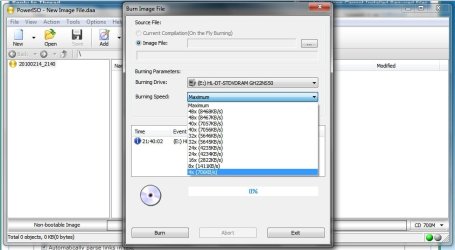
What program did you use to burn the ISO file? At what speed? I would suggest burning it with ImgBurn or PowerISO. Recommended speed 4x. Do not burn at a faster speed as it will corrupt the installation files needed for installing. That's why the following errors occurred.
Last edited:
My Computer
Computer Manufacturer/Model Number
D3f's Customs
OS
Win 7 Ultimate SP1 x64
CPU
Intel Pentium Dual Core E5300 OC'd @ 3GHz
Motherboard
Asus P5G41-M LE
Memory
Kingston 2x2GB DDR2-800 Dual Channel SDRAM
Graphics Card(s)
Integrated Intel GMA X4500
Sound Card
Realtek 5.1 HD Audio (ALC887)
Monitor(s) Displays
LG Flatron W1943S @ 60Hz
Screen Resolution
1360 x 768
Hard Drives
Internal - WD Caviar Blue 500GB, External - WD My Passport Essential 500GB
PSU
Headway 450w PSU
Case
Pixxo Slim Black mATX Case
Cooling
Stock Cpu Fan, 1 x Top Case Fan
Keyboard
Logitech K120
Mouse
Logitech LS1 Laser Mouse
Internet Speed
17.66Mb/s Down, 0.82Mb/s Up
Other Info
Creative SBS A300 2.1 Speaker System, LG GH22NS50 22x Internal Super-Multi DVD-RW, 2Wire 5012NV Wireless Modem Router
i used poweriso and i did not see times four? i also tried useing the built in windows iso buring software is there a tutorial on useing iso burning software?
i used poweriso and i did not see times four? i also tried useing the built in windows iso buring software is there a tutorial on useing iso burning software?
Since you have burnt the ISO at 4x speed and installation still fails. I have a feeling that the ISO file is somehow corrupted. :huh: Did you try to mount the ISO on a virtual drive using PowerISO before burning it?
My Computer
Computer Manufacturer/Model Number
D3f's Customs
OS
Win 7 Ultimate SP1 x64
CPU
Intel Pentium Dual Core E5300 OC'd @ 3GHz
Motherboard
Asus P5G41-M LE
Memory
Kingston 2x2GB DDR2-800 Dual Channel SDRAM
Graphics Card(s)
Integrated Intel GMA X4500
Sound Card
Realtek 5.1 HD Audio (ALC887)
Monitor(s) Displays
LG Flatron W1943S @ 60Hz
Screen Resolution
1360 x 768
Hard Drives
Internal - WD Caviar Blue 500GB, External - WD My Passport Essential 500GB
PSU
Headway 450w PSU
Case
Pixxo Slim Black mATX Case
Cooling
Stock Cpu Fan, 1 x Top Case Fan
Keyboard
Logitech K120
Mouse
Logitech LS1 Laser Mouse
Internet Speed
17.66Mb/s Down, 0.82Mb/s Up
Other Info
Creative SBS A300 2.1 Speaker System, LG GH22NS50 22x Internal Super-Multi DVD-RW, 2Wire 5012NV Wireless Modem Router
I have ran into this a couple times some older chipsets don't like 7 what I did was put in a Vista disc and let it boot from that and get to the partitioning screen then swap out the Vista disc for the 7 disc and continue the install it's a very odd problem but this was the only thing that worked
My Computer
Computer Manufacturer/Model Number
Custom Built
OS
Windows 7 Ultimate 32 bit
CPU
AMD Athlon 64 X2 4200+ Overclocked to 3.0Ghz
Motherboard
Biostar TF560 A2+
Memory
2 Gigs of G.Skill DDR2 800
Graphics Card(s)
HIS ATI Radeon HD 2600 Pro With IceQ cooler
Sound Card
6.1 Channel Sound Blaster Live 24 Bit
Monitor(s) Displays
Dual 20.5 " LG Flatrons W2052TO
Screen Resolution
1152x864
Hard Drives
Dual 36 Gig 10,000 RPM Raptors
PSU
430 watt Seasonic 80%+ Dual 12v Rails 2x80mm fans
Case
CHIEFMAX YA-5X
Cooling
4-80mm case fans 1-140mm case fan freezer 64 Pro CPU cooler
Keyboard
Saitek Eclipse II
Mouse
A4Tech wireless battery free optical scroll mouse
Internet Speed
1.5 meg down 384 up
Other Info
Logisys LED fan/light controller and dual 16" LED sticks mounted inside top of case all fans are LED all lighting is blue
DVD RW and CD RW both and Memory card reader
i see this funny as it will install the 64 bit version of windows and run with out a problem and i dont have a vista disk i only have to recovery disks. is there another way around it?
4-80mm case fans 1-140mm case fan freezer 64 Pro CPU cooler
Keyboard
Saitek Eclipse II
Mouse
A4Tech wireless battery free optical scroll mouse
Internet Speed
1.5 meg down 384 up
Other Info
Logisys LED fan/light controller and dual 16" LED sticks mounted inside top of case all fans are LED all lighting is blue
DVD RW and CD RW both and Memory card reader
there will be a cover on the bottom side remove the screws and the ram has a clip on each side pull outward on the clips and release the ram and lift up at an angle and out easy as pie
My Computer
Computer Manufacturer/Model Number
Custom Built
OS
Windows 7 Ultimate 32 bit
CPU
AMD Athlon 64 X2 4200+ Overclocked to 3.0Ghz
Motherboard
Biostar TF560 A2+
Memory
2 Gigs of G.Skill DDR2 800
Graphics Card(s)
HIS ATI Radeon HD 2600 Pro With IceQ cooler
Sound Card
6.1 Channel Sound Blaster Live 24 Bit
Monitor(s) Displays
Dual 20.5 " LG Flatrons W2052TO
Screen Resolution
1152x864
Hard Drives
Dual 36 Gig 10,000 RPM Raptors
PSU
430 watt Seasonic 80%+ Dual 12v Rails 2x80mm fans
Case
CHIEFMAX YA-5X
Cooling
4-80mm case fans 1-140mm case fan freezer 64 Pro CPU cooler
Keyboard
Saitek Eclipse II
Mouse
A4Tech wireless battery free optical scroll mouse
Internet Speed
1.5 meg down 384 up
Other Info
Logisys LED fan/light controller and dual 16" LED sticks mounted inside top of case all fans are LED all lighting is blue
DVD RW and CD RW both and Memory card reader



 Do not burn at a faster speed as it will corrupt the installation files needed for installing. That's why the following errors occurred.