
You are using an out of date browser. It may not display this or other websites correctly.
You should upgrade or use an alternative browser.
You should upgrade or use an alternative browser.
Solved Windows can't read FLAC tags
- Thread starter speedgamer01
- Start date

Indeed, this needs to be stickied.
Out of curiosity, anyone know if the file explorer in Windows 8 handles flac tags ?
Out of curiosity, anyone know if the file explorer in Windows 8 handles flac tags ?
My Computer
At a glance
7 64bit UltimateG6208G GSkillGigabyte 7850 OC 2G
- OS
- 7 64bit Ultimate
- CPU
- G620
- Motherboard
- Gigabyte P8H77-M PRO
- Memory
- 8G GSkill
- Graphics Card(s)
- Gigabyte 7850 OC 2G
- Monitor(s) Displays
- Dell U2711, Samsung 204B
- Screen Resolution
- 2650x1440
- Hard Drives
- Samsung 830 128G, Seagate 1T
- PSU
- Seasonic S12D
- Case
- fractal ARC midi
- Keyboard
- Filco Majestouch2 (blue keys)
- Mouse
- Logitech 950
- Internet Speed
- ADSL2+
- Local time
- 2:15 PM
- Messages
- 56
Out of curiosity, anyone know if the file explorer in Windows 8 handles flac tags ?
Do you mean native support? No, just like in Windows 7, a third-party property handler is still required.
My Computer
At a glance
Windows 10
- Computer type
- PC/Desktop
- OS
- Windows 10
KarlBlomquist
New member
- Local time
- 8:15 AM
- Messages
- 1
Yeah! Thank you Tim and Seth! Thanks for the link! I will upload that thing to mediafire, cause it has to last looong.
FLACPH15.rar
Anyone know where this can be found now? A search results in just dead links. Thanks.
My Computer
At a glance
ON - Ontario
- OS
- ON - Ontario
- Local time
- 2:15 PM
- Messages
- 56
Yes it's fine. It will not change the files. It just allows you to see the properties (Title, Artist, etc.) in Windows Explorer.
My Computer
At a glance
Windows 7/ UbuntuAMD Turion X2 1.6ghz1.5GbNvidia Geforce Go 6150
- Computer Manufacturer/Model Number
- HP Pavillion DV2000 Notebook
- OS
- Windows 7/ Ubuntu
- CPU
- AMD Turion X2 1.6ghz
- Motherboard
- Wistron 30B5
- Memory
- 1.5Gb
- Graphics Card(s)
- Nvidia Geforce Go 6150
- Sound Card
- Conexant HD/ Creative Xmod USB
- Monitor(s) Displays
- Laptop Built in
- Hard Drives
- Fujitsu 120Gb
- Cooling
- GPU Runs Hot! Using NHC to cycle down cpu and keep cool.
Thank you all so much! 
I've been looking for a program like this EVERYWHERE, but this is the only place where this glorios little program had a working download link. I know this post is old, but i needed to display my gratitude
I've been looking for a program like this EVERYWHERE, but this is the only place where this glorios little program had a working download link. I know this post is old, but i needed to display my gratitude
My Computer
At a glance
Windows 8 64 bitIntel i5 Sandy bridge
- Computer type
- Laptop
- Computer Manufacturer/Model Number
- HP
- OS
- Windows 8 64 bit
- CPU
- Intel i5 Sandy bridge
- Motherboard
- ¯\_(ツ)_/¯
- Antivirus
- MSE
- Browser
- Aurora
Works for Windows 8 x64, no hassles.
My Computer
At a glance
Windows 8 Pro x64i7 3820 @ 4.68GHzF3-12800CL9D-8GBXL (32GB)GTX 480 SLI
- Computer type
- PC/Desktop
- OS
- Windows 8 Pro x64
- CPU
- i7 3820 @ 4.68GHz
- Motherboard
- ASUS Rampage IV Extreme RoG BF3
- Memory
- F3-12800CL9D-8GBXL (32GB)
- Graphics Card(s)
- GTX 480 SLI
- Sound Card
- Auzentech X-Fi HomeTheater HD
- Monitor(s) Displays
- Sony 32V5500
- Screen Resolution
- 1920 x 1080
- Hard Drives
- LSI MR9260-4i (RAID10):
Toshiba DT01ACA300 x 4
iaStorA:
OCZ Vertex Enterprise 120GB
ST3500320AS 500GB
Intel 520 Series 120GB
- PSU
- OCZ ZX 1250W
- Case
- HAF X
- Cooling
- H80
- Keyboard
- Cyborg V.7
- Mouse
- Razer Lachesis 3.5G 5600dpi
- Internet Speed
- 23296kbps ds / 812kbps us ADSL2+
- Browser
- Mozilla/5.0 (Windows NT 6.3; Win64; x64; rv:32.0) Gecko/2010
- Other Info
- AverMedia C127 Game Broadcaster HD
the FLAC Property handler actually worked in Windows 8, but not it doesn't work in Windows 10 again.
neither i was able to find a similar fix for ALAC/M4A files for Win8 or Win10.
we only have to pray until someone updates FLAC property handler to work in Win10, and produces similar ALAC/M4A property handler to work in Win8/Win10
neither i was able to find a similar fix for ALAC/M4A files for Win8 or Win10.
we only have to pray until someone updates FLAC property handler to work in Win10, and produces similar ALAC/M4A property handler to work in Win8/Win10
My Computer
At a glance
Win 10
- Computer type
- PC/Desktop
- OS
- Win 10
- Local time
- 2:15 PM
- Messages
- 56
Microsoft has added native FLAC support in Windows 10 so you don't need a third-party property handler anymore there.
For M4A tags (including ALAC) there has already been native support since Windows 7. To play ALAC you still need the DC-Bass Source Filter though.
For M4A tags (including ALAC) there has already been native support since Windows 7. To play ALAC you still need the DC-Bass Source Filter though.
My Computer
At a glance
Windows 10
- Computer type
- PC/Desktop
- OS
- Windows 10
both are not true.
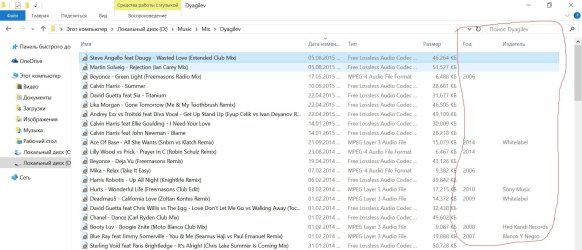
win10 does not support FLAC tags, neither did Win7 (or Win8, or Win10) support ALAC/M4A tags (to be precise, only certain tags were supported, but not all for ALAC/MP4 and absolutely no tags were supported for FLAC). please see attached screenshot. sorry it's in Russian language, but the language doesn't matter, for English version of OS it's absolutely same. The column names are "year" and "publisher". Both publisher and year tag are filled in for FLAC/M4A files in the folder in question, but neither is displayed for FLAC and only year is displayed for M4A, but publisher tag is not displayed. while they are both shown (as always) for MP3 files.
btw if you google a bit, you'll find out that now everyone has same problem - ppl who used FLAG tag property handler for Win7/Win8 confirm that it doesn't work anymore in Win10/the system doesn't support FLAG tags either
win10 does not support FLAC tags, neither did Win7 (or Win8, or Win10) support ALAC/M4A tags (to be precise, only certain tags were supported, but not all for ALAC/MP4 and absolutely no tags were supported for FLAC). please see attached screenshot. sorry it's in Russian language, but the language doesn't matter, for English version of OS it's absolutely same. The column names are "year" and "publisher". Both publisher and year tag are filled in for FLAC/M4A files in the folder in question, but neither is displayed for FLAC and only year is displayed for M4A, but publisher tag is not displayed. while they are both shown (as always) for MP3 files.
btw if you google a bit, you'll find out that now everyone has same problem - ppl who used FLAG tag property handler for Win7/Win8 confirm that it doesn't work anymore in Win10/the system doesn't support FLAG tags either
Attachments
Last edited:
My Computer
At a glance
Win 10
- Computer type
- PC/Desktop
- OS
- Win 10
- Local time
- 2:15 PM
- Messages
- 56
So you're basing the presence of FLAC support on just the Year and Publisher tag? I suggest that you check other tags like Length, Artist and Title. Native FLAC support has been added in Windows 10; that's a fact. If *you* would Google around a bit, you'd quickly find that out yourself.
And yes, certain FLAC tags aren't recognized, but that's because Microsoft's support isn't complete yet. I suggest that you use the feedback tool in Windows 10 to report that.
I'm not going to further comment on M4A as that's off-topic here.
And yes, certain FLAC tags aren't recognized, but that's because Microsoft's support isn't complete yet. I suggest that you use the feedback tool in Windows 10 to report that.
I'm not going to further comment on M4A as that's off-topic here.
My Computer
At a glance
Windows 10
- Computer type
- PC/Desktop
- OS
- Windows 10
So you're basing the presence of FLAC support on just the Year and Publisher tag? I suggest that you check other tags like Length, Artist and Title. Native FLAC support has been added in Windows 10; that's a fact. If *you* would Google around a bit, you'd quickly find that out yourself.
And yes, certain FLAC tags aren't recognized, but that's because Microsoft's support isn't complete yet. I suggest that you use the feedback tool in Windows 10 to report that.
I'm not going to further comment on M4A as that's off-topic here.
well what's the use to me that microsoft declares win10 now supports FLAC, where it actually does not? little help. and again, it's not me, but other people complaining too. and, for MP3 these tags work. so if FLAC support is declared, then same fields should work for FLAC too, otherwise there's no logic. And what's the point to display artist and title in the columns on the right, if they are usually a part of filename anyway? there's much more sense to display publisher (label) and release year on the right. if you had a large music library, you'd understand me.
i actually did mention this in the feedback tool. hope Microsoft responds. though not soon probably, as these guys are usually a bit slow, unfortunately :-(
My Computer
At a glance
Win 10
- Computer type
- PC/Desktop
- OS
- Win 10
luckily I just found a solution how to fix this.
first you need to disable the native FLAC support in Windows 10:
FAQ (WMP Tag Plus) - BM-productions
and then you can install the above mentioned FLAC property handler tool, and now it will work!!! VOILA!!!
first you need to disable the native FLAC support in Windows 10:
FAQ (WMP Tag Plus) - BM-productions
and then you can install the above mentioned FLAC property handler tool, and now it will work!!! VOILA!!!
Last edited by a moderator:
My Computer
At a glance
Win 10
- Computer type
- PC/Desktop
- OS
- Win 10
This is great. Flac property handler works on my W7 x64.
One question though:
How would one go about getting custom tags support?
Specifically, I mean tags like "ACCURATERIPCOUNTALLOFFSETS" and "ACCURATERIPTOTAL" (can be added by CUETools to store whether the file is ripped accurately).
I would *think* that once you have the means to display the tag content for regular tags like "album" or whatever, it should be a relatively small step to get the same for <insert your tag name here>, no?
One question though:
How would one go about getting custom tags support?
Specifically, I mean tags like "ACCURATERIPCOUNTALLOFFSETS" and "ACCURATERIPTOTAL" (can be added by CUETools to store whether the file is ripped accurately).
I would *think* that once you have the means to display the tag content for regular tags like "album" or whatever, it should be a relatively small step to get the same for <insert your tag name here>, no?
My Computer
At a glance
W7 Pro x64
- Computer type
- PC/Desktop
- OS
- W7 Pro x64
- Local time
- 2:15 PM
- Messages
- 56
Apologies for the late reply, I was meaning to reply sooner but lost sight of your post.
There's actually a predefined list of properties that Windows supports, it's documented here. While it's possible to define custom properties (explained here), doing so requires work from the developer of the particular Property Handler providing the custom properties. It's unfortunately not possible for individual users to define their own custom properties.
There's actually a predefined list of properties that Windows supports, it's documented here. While it's possible to define custom properties (explained here), doing so requires work from the developer of the particular Property Handler providing the custom properties. It's unfortunately not possible for individual users to define their own custom properties.
My Computer
At a glance
Windows 10
- Computer type
- PC/Desktop
- OS
- Windows 10
Apologies for the late reply, I was meaning to reply sooner but lost sight of your post.
There's actually a predefined list of properties that Windows supports, it's documented here. While it's possible to define custom properties (explained here), doing so requires work from the developer of the particular Property Handler providing the custom properties. It's unfortunately not possible for individual users to define their own custom properties.
Oh, that's going to be beyond me then, too bad. Thank you for the informative response!
My Computer
At a glance
W7 Pro x64
- Computer type
- PC/Desktop
- OS
- W7 Pro x64
Similar threads

- Replies
- 15
- Views
- 4K

- Replies
- 6
- Views
- 10K
